
BVTVRemote-01
Universal TV Remote Control User Manual
Model: BVTVRemote-01
1. Уводзіны
This manual provides comprehensive instructions for the setup, operation, maintenance, and troubleshooting of your new Universal TV Remote Control. Designed for ease of use, this remote is compatible with a wide range of major TV brands, offering a convenient replacement for your original remote.
Калі ласка, уважліва прачытайце гэтую інструкцыю перад выкарыстаннем пульта дыстанцыйнага кіравання, каб забяспечыць аптымальную прадукцыйнасць і даўгавечнасць.

Figure 1: Universal TV Remote Control

Figure 2: Compatible with Major TV Brands
2. Інструкцыі па ўсталёўцы
Before first use, insert two AAA batteries into the remote control. Ensure correct polarity (+/-) as indicated inside the battery compartment.
2.1. Brand Setting (Recommended Method)
This method is recommended for major TV brands that have a dedicated button on the remote control (e.g., Samsung, LG, Sony, TCL, Vizio, Hisense, Sanyo, Insignia, Philips, Panasonic, Sharp, Toshiba, Hitachi, JVC, Vestel, Seiki, RCA, Magnavox, Westinghouse, Haier).
- Identify the button on the remote control corresponding to your TV brand.
- Press and hold the corresponding brand button for approximately 3 seconds.
- The LED indicator on the remote will flash three times, indicating that the setting is complete.

Figure 3: Brand Setting Method
Карысная парада: Under the Initial Setting Mode, this remote can directly control many TV brands, including LG, SAMSUNG, PHILIPS, SONY, PANASONIC, SHARP and other TV brands listed on the remote control.
2.2. Code Setting Method
Use this method for TV brands that do not have a dedicated brand button on the remote, or if the Brand Setting method does not work.
- Націсніце і ўтрымлівайце Адключыць гук кнопка і Магутнасць кнопку адначасова на некалькі секунд.
- Release both buttons when the LED indicator light illuminates.
- Refer to the provided code list in the physical manual (not included here) and enter the 3 or 4-digit code for your TV brand using the number buttons.
- If the code is correct, the LED will turn off, indicating successful setup. If the code is incorrect, the LED will remain lit, and you will need to re-enter the code.

Figure 4: Code Setting Method
Заўвага: The new chip provides stronger power-off memory. Once set up, the TV brand memory will be maintained permanently, even after power off.
3. Інструкцыя па эксплуатацыі
Once set up, your universal remote control functions similarly to your original TV remote. Below are some common button functions:

Figure 5: Other Button Functions
- Кнопка харчавання: Уключае або выключае тэлевізар.
- Кнопка ўводу: Cycles through video input sources (HDMI, AV, etc.).
- Кнопка субтытраў (CC): Уключае або выключае схаваныя субтытры.
- Разумная кнопка: Accesses the Smart TV hub or home screen.
- Кнопка NETFLIX: Прамы доступ да праграмы Netflix.
- Кнопка 3D: Уключае або выключае рэжым 3D (калі падтрымліваецца тэлевізарам).
- Навігацыйная панэль (Уверх, Уніз, Улева, Управа, ОК): Выкарыстоўваецца для навігацыі па меню і выбару.
- Кнопка меню: Адкрывае галоўнае меню тэлевізара.
- Кнопка праграм: Accesses the TV's application list.
- Vol +/- Buttons: Рэгулюе ўзровень гучнасці.
- Ch +/- Buttons: Мяняе канал.
- Кнопка адключэння: Адключэнне або ўключэнне гуку тэлевізара.
- Лічбавыя кнопкі (0-9): Direct channel input.
- Кнопка выхаду: Выхад з бягучага меню або праграмы.
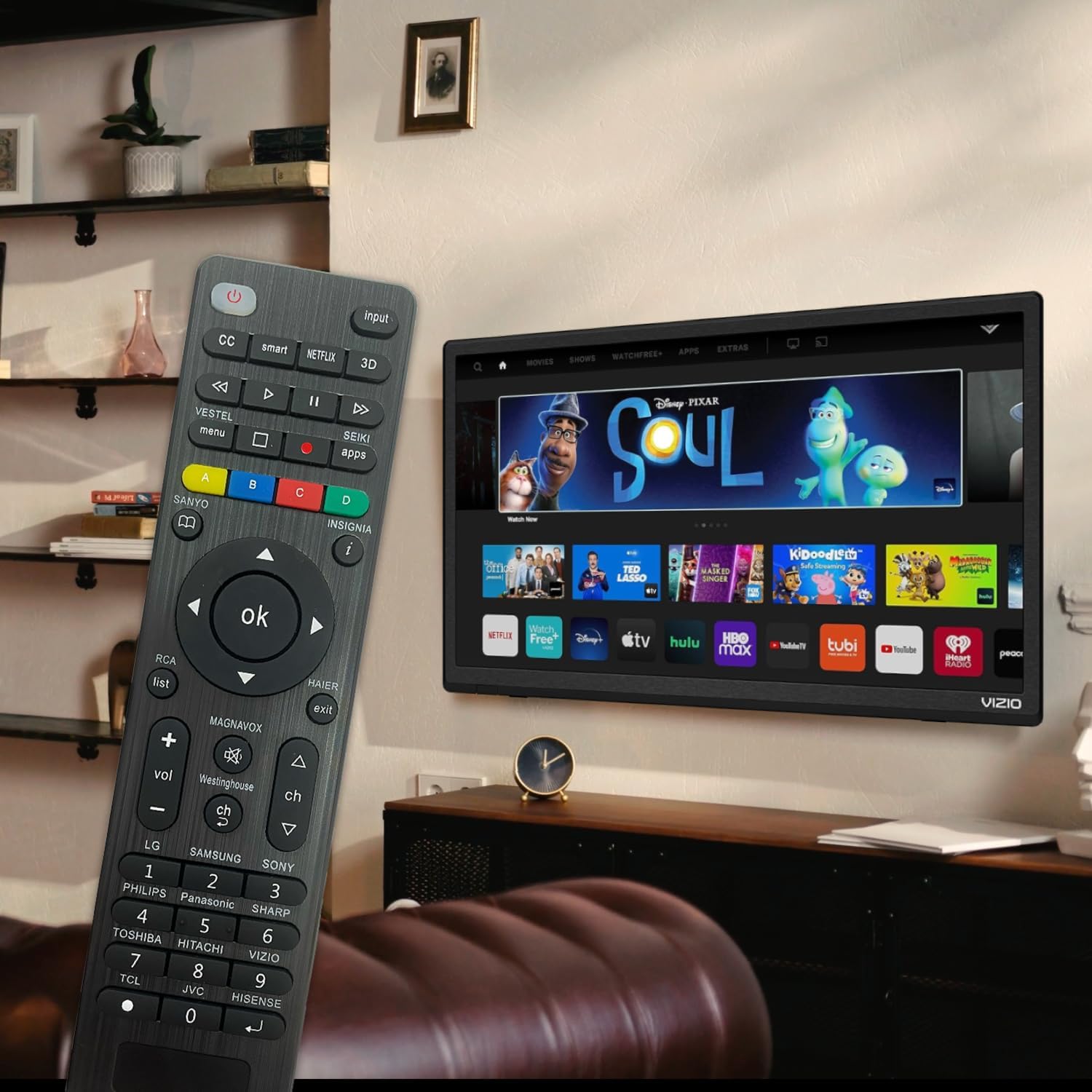
Figure 6: Remote in use with a Smart TV
4. Тэхнічнае абслугоўванне
- Уборка: Для чысткі пульта дыстанцыйнага кіравання выкарыстоўвайце мяккую сухую тканіну. Не выкарыстоўвайце вадкія ачышчальнікі або абразіўныя матэрыялы, бо яны могуць пашкодзіць паверхню або ўнутраныя кампаненты.
- Замена батарэі: Replace batteries when the remote's response becomes sluggish or the LED indicator does not light up. Always replace both batteries at the same time with new AAA batteries. Do not mix old and new batteries or different types of batteries.
- захоўванне: Калі пульт не будзе выкарыстоўвацца працяглы час, выміце батарэйкі, каб прадухіліць уцечку і магчымае пашкоджанне. Захоўвайце пульт у прахалодным, сухім месцы, удалечыні ад прамых сонечных прамянёў і экстрэмальных тэмператур.
- Трываласць: The remote features upgraded material with a metal dome added to the control buttons for enhanced flexibility and extended life. Avoid dropping the remote or exposing it to excessive force.
5. Выпраўленне непаладак
| праблема | Магчымая прычына | Рашэнне |
|---|---|---|
| Пульт не працуе. | Batteries are dead or inserted incorrectly. Remote is not paired with the TV. Obstruction between remote and TV. | Check and replace batteries, ensuring correct polarity. Re-attempt Brand Setting or Code Setting. Ensure clear line of sight to TV's IR receiver. |
| Некаторыя кнопкі не працуюць. | Incorrect code or partial pairing. TV does not support certain functions. | Try a different code from the manual's code list. Verify if your TV model supports the specific function. |
| Remote is slow to respond. | Нізкі зарад батарэі. Перашкоды. | Replace batteries. Ensure no strong light sources or other IR devices are interfering. |
| LED indicator keeps lighting up during code setting. | Уведзены няправільны код. | Re-enter the correct 3 or 4-digit code from the manual's code list. |
| Cannot find my TV brand button. | Brand not listed on dedicated buttons. | Use the Code Setting Method (Section 2.2) with the provided code list. |
If issues persist, please refer to the original product packaging for customer support contact information or visit the manufacturer's webсайт.
6. Тэхнічныя характарыстыкі
- Нумар мадэлі: BVTVRemote-01
- Памеры прадукту: 1.38 х 0.6 х 6.5 цалі
- Вага прадмета: 2.39 унцыі
- Неабходныя батарэі: 2 x AAA (не ўключаны)
- колер: Чорны
- асаблівасць: Programmable, Power-off Memory
- Максімальная колькасць падтрымоўваных прылад: 3 (typically for TV, DVD/Blu-ray Player, though primarily designed for TV)
- Сумяшчальныя прылады: Television, DVD/Blu-ray Player (Universal compatibility with major TV brands)
- вытворца: BoostVision
- Краіна паходжання: Кітай
7. Гарантыя і падтрымка
For warranty information, please refer to the documentation included with your purchase or contact the seller directly. This product is typically covered by a standard manufacturer's warranty against defects in materials and workmanship.
For technical support or further assistance, please contact BoostVision customer service through their official website or the contact details provided on the product packaging.
Прадавец: BoostVision TV Remote
Старонка прадукту Amazon: https://www.amazon.com/dp/B0DHCZB2DT
Ask a question about this manual
Ask about setup, troubleshooting, compatibility, parts, safety, or missing instructions. Manuals+ will review the question and use this page’s manual context to help answer it.