
1. Уводзіны
Thank you for choosing the TREBLEET 13-in-1 Professional Docking Station. This manual provides detailed instructions for setting up, operating, and maintaining your docking station to ensure optimal performance. This versatile docking station is designed to expand the connectivity of your Thunderbolt 3/4 or USB4 enabled Mac or Windows computer, offering a wide array of ports and features for enhanced productivity.
2. Змесціва ўпакоўкі
Калі ласка, пераканайцеся, што ўсе прадметы прысутнічаюць у вашай упакоўцы:
- 1x TREBLEET 13-in-1 Professional Docking Station
- 1x Thunderbolt 3/USB4 40Gbps Cable
- 1x 120W Power Supply (24V/5A)
- 1x Кароткае кіраўніцтва
- 1x трымальнік кабеля
3. Прадукт скончыўсяview
The TREBLEET 13-in-1 Docking Station features a robust aluminum chassis designed for efficient heat dissipation and durability. It offers a comprehensive set of ports for various peripherals and display configurations.

Малюнак 1: Пярэдняя частка view of the TREBLEET 13-in-1 Professional Docking Station, showcasing its sleek design and various ports.
Парты на пярэдняй панэлі:
- 3.5mm Audio Headset/Mic Jack: For connecting headphones or a microphone.
- Слот для карты SD 4.0: Supports UHS-II theoretical bus speed up to 312MB/s, compatible with SDXC, SDHC, and standard SD cards.
- Порт USB 3.1 Gen2 тыпу A (10 Гбіт/с): Для хуткаснай перадачы дадзеных.
- Thunderbolt 4 Upstream Port (Max 98W PD): Connects to your host laptop and provides up to 98W power delivery.
- Кнопка харчавання: Каб уключыць/выключыць док-станцыю.
Парты на задняй панэлі:
- Уваход пастаяннага току 20 В: Power input for the 120W power adapter.
- 3x Thunderbolt 4 Downstream Ports (15W PD each): For connecting additional Thunderbolt devices or displays.
- 2x USB 2.0 Type-A Ports (5Gbps): Для падлучэння стандартных перыферыйных прылад USB.
- Порт 2.5 Gigabit Ethernet: Забяспечвае высакахуткаснае падключэнне да правадной сеткі.
- DisplayPort 1.4: Для падлучэння знешніх дысплеяў.
- HDMI: Для падлучэння знешніх дысплеяў.
Унутраныя функцыі:
- 4x Modular Expansion Interface Slots: Allows for customization with various expansion cards (sold separately), such as CFexpress Type-A/B, XQD, CFast2.0, SD&TF card readers.
- M.2 Socket for NVMe SSD (PCIe Gen.3 x2): Supports high-speed storage expansion up to 2800 MB/s.
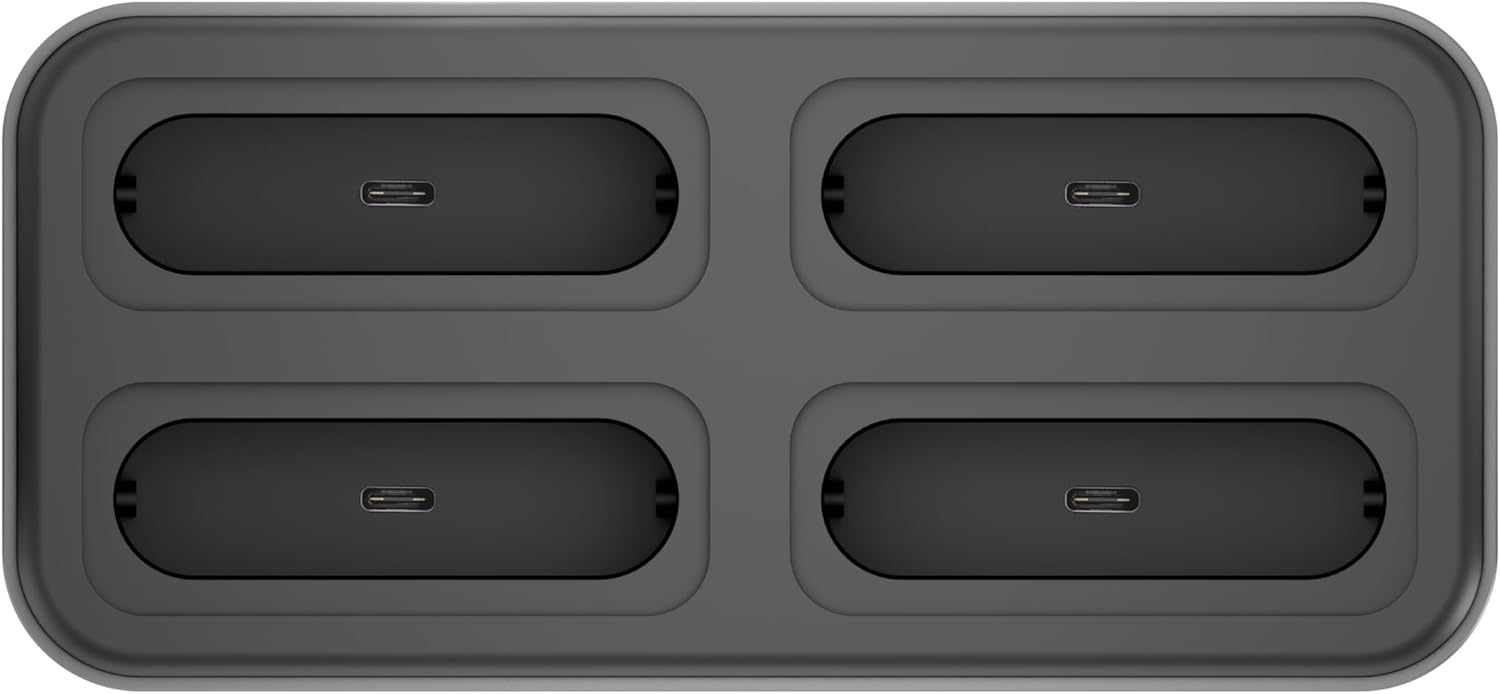
Малюнак 2: Верх view of the docking station, highlighting the four modular expansion slots for customizable connectivity.

Figure 3: The docking station shown with different expansion modules, such as card readers and USB drives, inserted into its modular slots.

Малюнак 4: Разарваны view illustrating the process of installing an NVMe SSD into the dedicated M.2 socket within the docking station.
4. Кіраўніцтва па наладцы
Follow these steps to set up your TREBLEET Docking Station:
- Падключыце харчаванне: Plug the included 120W power adapter into the 'DC IN 20V' port on the rear of the docking station, then connect the adapter to a power outlet.
- Падключэнне да галоўнага кампутара: Use the provided Thunderbolt 3/USB4 40Gbps cable to connect the docking station's 'Thunderbolt 4 Upstream' port (Max 98W PD) on the front panel to a Thunderbolt 3/4 or USB4 port on your laptop.
- Уключэнне: Press the power button on the front of the docking station.
- Ўстаноўка драйвераў (пры неабходнасці): For full functionality, especially for DisplayLink features or specific operating systems, you may need to install drivers. Refer to the 'Driver Download Links' pamphlet included in your package or visit the TREBLEET support webсайт.
- Падключэнне перыферыйных прылад: Connect your external monitors, USB devices, Ethernet cable, and audio devices to the respective ports on the docking station.

Figure 5: A typical setup showing the docking station connected to a laptop, powering and extending its display to multiple external monitors, and connecting various peripherals.
5. Інструкцыя па эксплуатацыі
Канфігурацыя дысплея:
Док-станцыя падтрымлівае розныя канфігурацыі дысплея:
- Адзінкавы дысплей: Up to 8K @ 60Hz (7680x4320) via DisplayPort 1.4.
- Падвойныя дысплеі: Up to 4K @ 60Hz for each display.
- Quad Displays: Achievable through a combination of Thunderbolt 4, DisplayPort, and HDMI ports, potentially requiring DisplayLink drivers for certain setups.
Ensure your computer's graphics card and operating system support the desired display configuration.
Энергазабеспячэнне:
The upstream Thunderbolt 4 port provides up to 98W of power delivery to charge your connected laptop. Downstream Thunderbolt 4 ports provide 15W each for connected devices.
Перадача дадзеных:
Utilize the various USB and Thunderbolt ports for high-speed data transfer:
- Парты Thunderbolt 4: Up to 40Gbps.
- USB 3.1 Gen2 Type-C Ports: Up to 10Gbps.
- Парты USB 2.0 тыпу A: Up to 5Gbps (Note: Due to bandwidth limitations, the 2x USB-A ports only provide the transfer rate of USB 2.0).
- NVMe Slot: Supports PCI-e Gen.3 x2 for speeds up to 2,800 MB/s.
Модульнае пашырэнне:
The four modular expansion slots allow you to customize your docking station with specific card readers or other modules (sold separately) to suit your workflow. Simply insert the desired module into an available slot.
Шліфавая ланцужок:
The Thunderbolt 4 downstream ports support daisy-chaining, allowing you to connect up to 6 additional Thunderbolt 3 compatible devices, including other Thunderbolt docks and displays.
6. Тэхнічнае абслугоўванне
- Уборка: Для чысткі вонкавай паверхні док-станцыі выкарыстоўвайце мяккую сухую тканіну. Пазбягайце выкарыстання вадкіх ачышчальнікаў або абразіўных матэрыялаў.
- Вентыляцыя: Ensure the ventilation slots on the sides and bottom of the device are not obstructed to prevent overheating.
- захоўванне: Захоўвайце док-станцыю ў прахалодным, сухім месцы, калі яна не выкарыстоўваецца.
- Кабельнае кіраванне: Use the included cable holder to keep your workspace tidy and prevent cable damage.
7. Выпраўленне непаладак
- Няма вываду на дысплей:
- Ensure the docking station is powered on and correctly connected to your laptop's Thunderbolt/USB4 port.
- Verify that your external monitors are powered on and set to the correct input source.
- Check all display cables (DisplayPort, HDMI) for secure connections.
- Install or update the latest DisplayLink drivers from the TREBLEET support website, especially for multi-display setups on certain operating systems.
- Ensure your laptop's Thunderbolt/USB4 port supports video output.
- Ноўтбук не зараджаецца:
- Confirm the 120W power adapter is securely connected to both the docking station and a working power outlet.
- Ensure your laptop is connected to the 'Thunderbolt 4 Upstream' port on the docking station.
- Verify your laptop supports charging via its Thunderbolt/USB4 port and that the port is functioning correctly.
- USB-прылады не распазнаюцца:
- Try connecting the USB device to a different port on the docking station or directly to your computer to isolate the issue.
- Ensure the docking station has power.
- Абнавіце драйверы USB вашага кампутара.
- Праблемы з падключэннем да Ethernet:
- Праверце падключэнне кабеля Ethernet паміж док-станцыяй і маршрутызатарам/мадэмам.
- Verify your network settings on your computer.
- Ensure the Ethernet port on the docking station is active (check indicator lights if present).
- Modular Expansion Slots Not Working:
- Ensure the expansion module is correctly and fully inserted into the slot.
- Verify the expansion module itself is functional.
- Check for any specific drivers required for the expansion module.
8. Тэхнічныя характарыстыкі
| Асаблівасць | Дэталь |
|---|---|
| Марка | ТРЭБЛІТ |
| мадэль | B0DHH41P8L |
| Інтэрфейс | Thunderbolt 3/USB4 (x2), DisplayPort 1.4 (x1), USB 2.0 USB-A (x2), USB 3.1 Gen2 USB-C (x2), M.2 socket for NVMe SSD (x1), 2.5Gb Ethernet (x1), 3.5mm audio headset/mic jack (x1), Modular expansion interface (x4) |
| Вывад дысплея | Single 8K@60Hz (7680x4320), Dual 4K@60Hz |
| Power Delivery (Upstream) | Max 98W to host |
| Power Delivery (Downstream) | 15W per Thunderbolt 4 port |
| Выхад USB-A 2.0 | 5В пры 3А |
| USB 3.1 Gen2 USB-C Speed | 10Gbps (5V@3A) |
| Гняздо M.2 | PCI-e Gen.3 x2 (Up to 2,800 MB/s) |
| Ethernet | 2.5 Гбіт/с |
| Сумяшчальнасць | Mac OS 10.X or above, Windows 10 or later, Computer with Thunderbolt 3/USB4 port |
| Памеры | 5.67"x3.11"x0.76" (144.2x79.2x19.4mm) |
| Вага прадмета | 1.5 фунта |
9. Інфармацыя аб гарантыі
This TREBLEET product comes with a 1 год гарантыі from the date of purchase. Please retain your proof of purchase for warranty claims. The warranty covers manufacturing defects and malfunctions under normal use. It does not cover damage caused by misuse, accidents, unauthorized modifications, or natural disasters.
10. Падтрымка кліентаў
For technical support, driver downloads, or further assistance, please visit the official TREBLEET support webсайт або звязацца з іх камандай абслугоўвання кліентаў.
- Official News & Press: Wavelink Official
- Тэхнічная падтрымка: Wavelink Tech Support