
Gsou D2-BK-3 Wire
Gsou Track Lighting Speaker User Manual
Model: D2-BK-3 Wire
Марка: Gsou
Уводзіны
The Gsou Track Lighting Speaker (Model D2-BK-3 Wire) combines an RGB LED track light with a Bluetooth speaker, designed to enhance your environment with both dynamic lighting and sound. This manual provides essential information for proper installation, operation, and maintenance of your device.
Што ў скрынцы
- 1 x Track Lighting Head
- 1 х Кіраўніцтва карыстальніка
- 1 х пульт дыстанцыйнага кіравання
Настройка і ўстаноўка
Ensure your track system is compatible with H-Type tracks and has a 3-wire interface. This device is not compatible with J or L type tracks.

выява: Diagram illustrating compatibility with H-Type track systems and how to identify a 3-wire interface. Incompatible track types (J and L) are also shown.
- Падрыхтоўка да ўстаноўкі: Turn the toggle switches on both sides of the track lighting head to the OFF position. This ensures the copper sheet is parallel to the guide rail, allowing for easy insertion.
- Insert into Track: Carefully clip the track lighting head into the H-Type track.
- Забяспечце прыладу: After inserting, turn the toggle switches on both sides to the ON position to lock the device securely into the track.
- Першапачатковае ўключэнне: Once powered on, push the button on the track light to set it as a "Host" for multi-machine series connection, if desired.
Multi-Machine Series Connection ("1+N")
The "1+N" Multi Machine Series Connection allows multiple Gsou Track Lighting Speakers to synchronize audio playback. This feature works within a 25-meter open range (approximately 82 feet).
- Designate Host: Select one device and set it as the "Host" using its button or remote control.
- Set Subordinates: Set other devices as "Subordinate" units.
- Аўтаматычнае падключэнне: All Subordinate machines will actively search for and connect to the Host machine.
- Synchronized Audio: Once connected, the content played by the Host will be synchronized across all connected devices, effectively doubling the volume and expanding the sound field.

выява: Illustration of the "1+N" Multi Machine Series Connection, showing a Host unit and multiple Subordinate units connecting wirelessly for synchronized audio.
Відэа: This video demonstrates the rotatable H-Type track head and plug-in installation of the Gsou Track Lighting Speakers, along with RGB color-changing lights.
Інструкцыя па эксплуатацыі
Падключэнне Bluetooth (Bluetooth 5.3)
The Gsou Track Lighting Speaker features Bluetooth 5.3 for stable and efficient wireless connection to your devices.
- Уключыць Bluetooth: Ensure Bluetooth is enabled on your smartphone, laptop, tablet, or Smart TV.
- Спалучэнне: Пошук "D2-B" (or similar identifier) in your device's Bluetooth settings and select it to pair.
- Прайграванне аўдыя: Once paired, audio from your device will play through the track lighting speaker(s).

выява: A smartphone displaying a music app, connected via Bluetooth 5.3 to the track lighting speakers, indicating stable wireless audio streaming.
Відэа: This video provides instructions on how to connect the Gsou Track Lighting Speaker to a Smart TV via Bluetooth for enhanced audio experience.
RGB Color Changing Lights
The integrated RGB LED lights offer various dynamic and static color options to create different atmospheres.
- Дынамічныя светлавыя эфекты: Choose from Gradient, Horse Race Lamp, and Rhythmic Rhythm modes for animated color changes.
- Single Light Color Adjustment: Select individual colors such as Red, Green, Blue, White, Yellow, Cyan, and Purple.
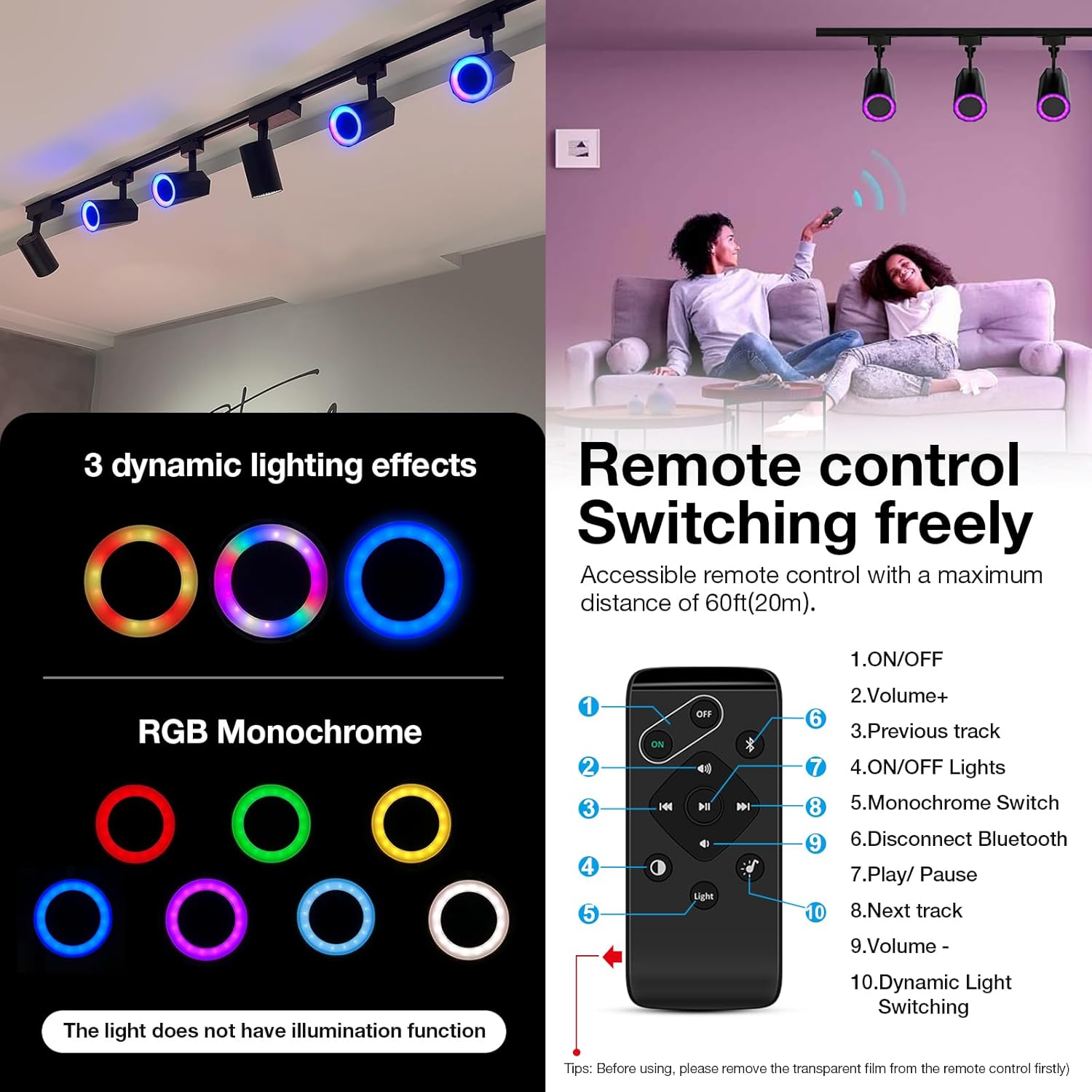
выява: Падрабязны view of the remote control and examples of dynamic lighting effects (Gradient, Color Marquee, Rhythm) and various monochrome color options for the RGB LED lights.
Відэа: This video showcases the RGB color-changing capabilities of the Gsou Track Light Bluetooth Speaker, demonstrating various lighting modes and colors.
Праца дыстанцыйнага кіравання
The included remote control provides convenient access to all functions of the track lighting speaker. Ensure the transparent film is removed from the remote before first use.
| Кнопка | Функцыя |
|---|---|
| ВКЛ/ВЫКЛ | Уключэнне/выключэнне прылады. |
| Аб'ём + | Павялічыць гучнасць гуку. |
| Папярэдні трэк | Go to the previous audio track. |
| ON/OFF Lights | Turn the RGB lights on/off. |
| Monochrome Switch | Cycle through single color modes. |
| Адключыце Bluetooth | Disconnect current Bluetooth connection. |
| Прайграванне/Паўза | Прайграць або прыпыніць прайграванне аўдыё. |
| Наступны трэк | Go to the next audio track. |
| гучнасць - | Паменшыць гучнасць гуку. |
| Dynamic Light Switching | Cycle through dynamic lighting effects. |
Тэхнічнае абслугоўванне
To ensure the longevity and optimal performance of your Gsou Track Lighting Speaker, follow these maintenance guidelines:
- Уборка: Gently wipe the surface of the speaker and light head with a soft, dry cloth. Avoid using abrasive cleaners or solvents, as they may damage the finish.
- Выдаленне пылу: Periodically remove dust from the speaker grille and light components using a soft brush or compressed air.
- Умовы навакольнага асяроддзя: Avoid exposing the device to extreme temperatures, high humidity, or direct water contact.
- Выключаць, калі не выкарыстоўваецца: If the device will not be used for an extended period, it is recommended to power it off.
Ліквідацыю непаладак
If you encounter any issues with your Gsou Track Lighting Speaker, please refer to the following common troubleshooting steps:
- Няма харчавання:
- Ensure the track lighting head is securely installed in the track and the toggle switches are in the ON position.
- Verify that the track system itself is receiving power.
- No Sound/Bluetooth Connection Issues:
- Праверце, ці ўключаны дынамік.
- Ensure Bluetooth is enabled on your source device and the speaker is selected.
- Move your source device closer to the speaker to ensure it's within the 25-meter operating range.
- Disconnect and re-pair the Bluetooth connection.
- If using "1+N" connection, ensure the Host and Subordinate units are correctly configured.
- Lights Not Changing Color/Responding:
- Ensure the remote control's transparent film has been removed and its battery is functional.
- Point the remote directly at the track lighting head.
- Check if the lights are turned on via the remote.
For further assistance, please contact Gsou customer support.
Тэхнічныя характарыстыкі
| Асаблівасць | Дэталь |
|---|---|
| Нумар мадэлі | D2-BK-3 Wire |
| Колер | Чорны |
| Форма | Цыліндрычны |
| Матэрыял | Пластыкавыя |
| Тып аздаблення | Пафарбаваны |
| Тып крыніцы святла | святлодыёд |
| Крыніца харчавання | Track Powered (AC) |
| тtage | 110 вольт (пераменны ток) |
| Крыніца святла Ватtage | 12 ват |
| Тып мацавання | Ceiling Mount (H Type Track) |
| Асаблівасці лямпачкі | Dimming, Color Changing, RGB |
| Версія Bluetooth | 5.3 |
| Асаблівасці | Bluetooth Speaker, H Track Light Head, RGB Track Lighting Kit, TWS (True Wireless Stereo for "1+N") |
| Памеры прадукту | 3.8 см Д х 3.9 см Ш х 9.6 см В |
| Вага прадмета | 1.21 фунта |
Гарантыя і падтрымка
Gsou products are designed and manufactured to the highest quality standards. For information regarding warranty coverage, technical support, or service inquiries, please visit the official Gsou store or contact their customer service department.
Official Gsou Store: Gsou Store on Amazon
Ask a question about this manual
Ask about setup, troubleshooting, compatibility, parts, safety, or missing instructions. Manuals+ will review the question and use this page’s manual context to help answer it.