
1. Уводзіны
Welcome to the user manual for your new ECHO Rainbow Pro S Smartwatch. This elegant and functional smartwatch is designed to enhance your daily life with integrated AI assistance, Bluetooth calling, comprehensive health sensors, and various sports modes. It comes with two interchangeable straps for maximum flexibility and is IP68 waterproof for worry-free use. This manual will guide you through the setup, operation, maintenance, and troubleshooting of your device.
2. Што ў скрынцы
Калі ласка, праверце змесціва пакета, каб пераканацца ў наяўнасці ўсіх прадметаў:
- ECHO Rainbow Pro S Smartwatch (Rose Gold)
- Silicone Strap (Rose Gold)
- Nylon Strap (Bordeaux)
- Магнітны зарадны кабель
- Кіраўніцтва карыстальніка (гэты дакумент)
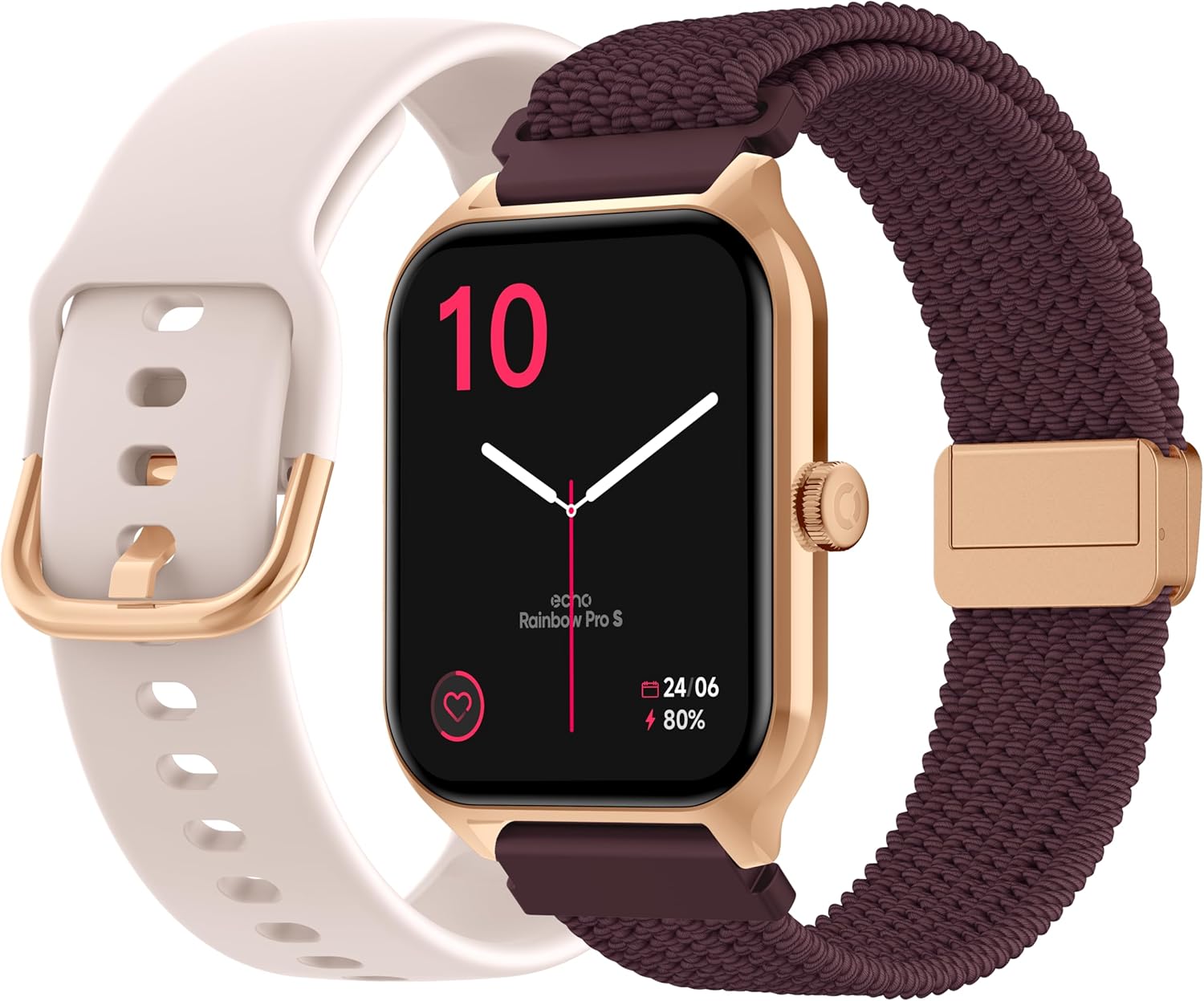
Image: The ECHO Rainbow Pro S Smartwatch, showcasing its rose gold finish, accompanied by both the rose gold silicone strap and the bordeaux nylon strap, along with the magnetic charging cable.
3. Настройка
3.1 Зарадка прылады
Before first use, fully charge your smartwatch. Connect the magnetic charging cable to the charging points on the back of the watch and plug the USB end into a standard USB power adapter (not included) or a computer's USB port. A full charge takes approximately 2.5 hours.
3.2 Усталёўка праграмы Da Fit
The ECHO Rainbow Pro S Smartwatch works with the Da Fit application. Download the Da Fit app from the Apple App Store (for iOS devices) or Google Play Store (for Android devices).
- Scan the QR code in the watch's manual or on the watch screen (if available) or search for "Da Fit" in your app store.
- Усталюйце праграму на свой смартфон.
3.3 Спалучэнне са смартфонам
To unlock the full potential of your smartwatch, pair it with the Da Fit app:
- Пераканайцеся, што Bluetooth уключаны на вашым смартфоне.
- Адкрыйце праграму Da Fit.
- Follow the on-screen instructions to add a new device. The app will search for your ECHO Rainbow Pro S.
- Select your watch from the list of found devices. Confirm the pairing request on both your phone and the watch.
- Once paired, your watch will synchronize data with the app.

Image: The ECHO Rainbow Pro S Smartwatch, showing the watch body, both the silicone and nylon straps, and the magnetic charging cable, illustrating the components for setup.
4. Кіраванне разумным гадзіннікам
4.1 Навігацыя па інтэрфейсе
The ECHO Rainbow Pro S features an intuitive 1.96-inch touchscreen. Swipe left, right, up, or down to access different functions and menus. The side button typically serves as a power button or a return-to-home screen button.
4.2 Маніторынг здароўя
Your smartwatch is equipped with advanced sensors to track your well-being:
- Частата сардэчных скарачэнняў: Бесперапынна кантралюе частату сардэчных скарачэнняў на працягу дня.
- Кісларод крыві (SpO2): Measures the oxygen saturation in your blood.
- Артэрыяльны ціск: Забяспечвае ацэнкі вашага артэрыяльнага ціску.
- Адсочванне сну: Аналізуе вашы рэжымы сну, у тым ліку глыбокі і лёгкі сонtagэс.
Усе дадзеныя пра здароўе могуць быць viewed in detail within the Da Fit app, allowing you to track trends and progress over time.

Выява: Задняя частка view of the ECHO Rainbow Pro S Smartwatch, highlighting the optical sensors used for heart rate, SpO2, and blood pressure monitoring.

Image: The ECHO Rainbow Pro S Smartwatch screen showing various health metrics, including heart rate (BPM), SpO2 percentage, and activity data, demonstrating its health tracking capabilities.
4.3 Функцыі сувязі
Заставайцеся на сувязі непасрэдна з вашага запясця:
- Выклікі Bluetooth: Здзяйсняйце і прымайце званкі непасрэдна з гадзінніка, падлучанага да смартфона.
- Апавяшчэнні: Атрымлівайце апавяшчэнні аб званках, паведамленнях і апавяшчэннях праграм са спалучанага смартфона.

Image: The ECHO Rainbow Pro S Smartwatch displaying incoming call and message notifications, illustrating its communication features when paired with a smartphone.
4.4 Памочнік штучнага інтэлекту
The ECHO Rainbow Pro S integrates an AI assistant for convenient voice commands and information retrieval. Simply activate the AI feature on your watch and speak your query or command.

Image: The ECHO Rainbow Pro S Smartwatch screen showing the AI assistant interface, ready to receive voice commands or queries.
4.5 Sports Modes & Coaching
With over 100 sports modes and integrated training programs, your smartwatch is an ideal companion for your fitness journey. Select your activity from the watch's menu to track performance metrics such as calories burned, distance, and duration. The Da Fit app provides personalized tracking and allows you to follow your course using your smartphone's GPS.

Image: The ECHO Rainbow Pro S Smartwatch displaying various sports modes and training exercises, with accompanying smartphone app screenshots showing detailed workout plans and GPS tracking.
4.6 Налада
Персаналізуйце свой разумны гадзіннік:
- Гадзіннік: Choose from over 100 downloadable watch faces via the Da Fit app to match your style.
- Зменныя рамяні: Easily swap between the included silicone and nylon straps to suit your activity or outfit.
Image: The ECHO Rainbow Pro S Smartwatch, showcasing its rose gold finish, accompanied by both the rose gold silicone strap and the bordeaux nylon strap, highlighting the interchangeable design.
5. Тэхнічнае абслугоўванне
5.1 Ачыстка
To keep your smartwatch in optimal condition, clean it regularly. Wipe the screen and body with a soft, lint-free cloth. For stubborn smudges, slightly dampпрамыйце тканіну вадой. Пазбягайце выкарыстання агрэсіўных хімічных рэчываў або абразіўных матэрыялаў.
5.2 Воданепранікальнасць (IP68)
The ECHO Rainbow Pro S is IP68 rated, meaning it is resistant to water up to 1 meter deep for 30 minutes. This makes it suitable for daily activities like hand washing, rain, or accidental splashes. However, it is not recommended for swimming, diving, or high-pressure water activities. Avoid exposing the watch to hot water, steam, or corrosive liquids.
5.3 Тэрмін службы батарэі
The smartwatch offers up to 5 days of battery life with typical usage. To optimize battery performance:
- Паменшыць яркасць экрана.
- Адключыце бесперапынны маніторынг пульса, калі ён не патрэбны.
- Абмежаваць колькасць апавяшчэнняў праграм.
6. Выпраўленне непаладак
If you encounter any issues with your ECHO Rainbow Pro S Smartwatch, please refer to the following common problems and solutions:
| праблема | Рашэнне |
|---|---|
| Гадзіннік не ўключаецца | Пераканайцеся, што гадзіннік цалкам зараджаны. Падключыце яго да магнітнага зараднага кабеля і крыніцы харчавання як мінімум на 30 хвілін. |
| Немагчыма спалучыць прыладу са смартфонам | 1. Пераканайцеся, што на вашым тэлефоне ўключаны Bluetooth. 2. Пераканайцеся, што гадзіннік знаходзіцца ў зоне дзеяння вашага тэлефона. 3. Перазагрузіце гадзіннік і тэлефон. 4. Ачысціце кэш Bluetooth на тэлефоне (Android) або забудзьце прыладу і зноў падключыце яе (iOS/Android). 5. Ensure the Da Fit app has necessary permissions. |
| Няправільныя паказчыкі здароўя | 1. Пераканайцеся, што гадзіннік шчыльна прылягае да запясця, не занадта туга і не занадта свабодна. 2. Ачысціце датчыкі на задняй панэлі гадзінніка. 3. Пазбягайце празмерных рухаў падчас вымярэнняў. 4. Звярніце ўвагу, што гэтыя паказанні прызначаны для даведкі і не прызначаны для медыцынскай дыягностыкі. |
| Апавяшчэнні не атрыманы | 1. Ensure the watch is paired and connected to your phone. 2. Check notification settings in the Da Fit app and on your phone (e.g., app permissions, DND mode). 3. Make sure the Da Fit app is running in the background. |
| Кароткі тэрмін службы батарэі | 1. Зменшце яркасць экрана. 2. Адключыце бесперапынны маніторынг пульса, калі ён не патрэбны. 3. Limit background app refresh for the Da Fit app. 4. Ensure no apps are constantly running on the watch. |
7. Тэхнічныя характарыстыкі
| Асаблівасць | Дэталь |
|---|---|
| Марка | РЭХА |
| мадэль | Rainbow Pro S |
| Нумар мадэлі | bd279646-58a1-4a95-ab0c-0847dc2ca4e6 |
| Колер | Ружовае золата |
| Памер экрана | 1.96 цалі |
| Тып дысплея | OLED or LED |
| Сувязь | Bluetooth |
| Сумяшчальныя прылады | Смартфон, планшэт |
| Склад батарэі | Літый-палімерны |
| Тэрмін службы батарэі (тыповы) | 5 дзён |
| Час зарадкі | 2.5 гадзін |
| Воданепранікальнасць | IP68 (да 1 метра на 30 хвілін) |
| GPS | Няма GPS |
| Форма | Круглая |
| Сумяшчальнасць прыкладанняў | Da Fit |
| Краіна паходжання | Кітай |
8. Гарантыя і падтрымка
8.1 Гарантыя на выраб
Your ECHO Rainbow Pro S Smartwatch is covered by a standard manufacturer's warranty against defects in materials and workmanship. The specific duration and terms of the warranty may vary based on your region and point of purchase. Please refer to your purchase documentation or contact your retailer for detailed warranty information.
8.2 Падтрымка кліентаў
For technical assistance, troubleshooting beyond this manual, or warranty claims, please contact the retailer or manufacturer directly. Have your product model number (bd279646-58a1-4a95-ab0c-0847dc2ca4e6) and proof of purchase ready when contacting support.