
Уводзіны
Thank you for choosing the Ninestars 13 Gallon Automatic Motion Sensor Trash Can. This touchless trash bin is designed for convenience and hygiene in various indoor environments such as kitchens, bedrooms, living rooms, offices, and hotels. Featuring a motion sensor for hands-free operation and a durable stainless steel body, this D-shaped trash can offers a large 13-gallon (50-liter) capacity.
This manual provides detailed instructions for setup, operation, maintenance, and troubleshooting to ensure optimal performance and longevity of your product. Please read it carefully before use and retain it for future reference.
Што ў скрынцы
Акуратна распакуйце ўсе кампаненты і пераканайцеся, што вы атрымалі наступныя прадметы:
- Корпус смеццевага вядра
- Trash Can Lid (with motion sensor)
- Кальцо ўкладыша
Настройка
1. Устаноўка батарэі
The trash can operates on 2 D-sized batteries (not included). For optimal performance, use new, high-quality alkaline batteries.
- Знайдзіце батарэйны адсек на ніжняй частцы вечка.
- Адкрыйце крышку батарэйнага адсека.
- Insert 2 D-sized batteries, ensuring the correct polarity (+/-) as indicated inside the compartment.
- Надзейна зачыніце крышку батарэйнага адсека.

Image: Battery compartment for 2 D-sized batteries, located on the lid.
2. Усталёўка смеццевых пакетаў
Follow these steps to properly install a trash bag using the liner ring:
- Remove the lid from the trash can body.
- Place the trash bag into the trash can body.
- Fit the top edge of the trash bag over the liner ring, ensuring it is securely held in place.
- Insert the liner ring with the trash bag into the trash can body, tucking any excess bag material neatly.
- Place the lid back onto the trash can body, aligning it properly.

Image: Step-by-step guide for trash bag installation.
Інструкцыя па эксплуатацыі
Праца датчыка руху
The Ninestars trash can features an infrared motion sensor for hands-free operation.
- When an object or hand is within 10 inches (25 cm) of the sensor window, the lid will automatically open.
- The lid will remain open as long as the object is within the sensor range.
- Once the object moves away from the sensor range, the lid will close automatically after approximately 3-5 seconds.
- The lid features a soft-closing mechanism for quiet operation.
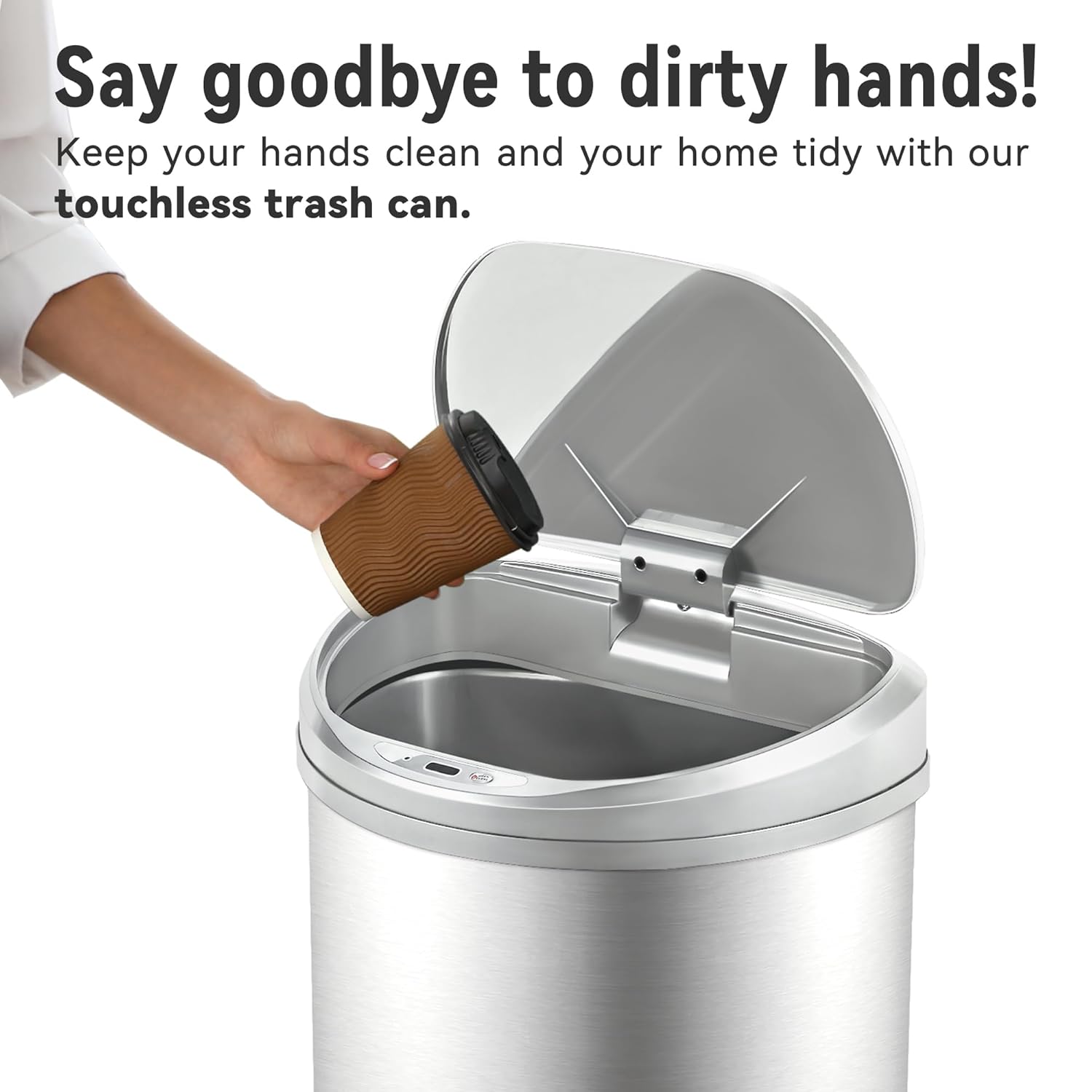
Image: Demonstrating touchless operation with the motion sensor.
Manual Open/Close Button
For extended opening or manual control, use the 'OPEN/CLOSE' buttons located on the lid.
- Press the 'OPEN' button to keep the lid open indefinitely.
- Press the 'CLOSE' button to close the lid. The motion sensor will reactivate after the lid is closed manually.
Тэхнічнае абслугоўванне
Уборка
To maintain the appearance and functionality of your trash can:
- Wipe the exterior of the stainless steel body with a soft, damp тканіна. Пазбягайце абразіўных ачышчальнікаў або агрэсіўных хімікатаў, якія могуць пашкодзіць пакрыццё.
- The stainless steel is designed to be fingerprint, scratch, and oil resistant.
- Clean the sensor window on the lid with a soft, dry cloth to ensure proper function.
- Do not immerse the lid in water or place it under running water, as this can damage the electronic components.
- The interior of the trash can body can be cleaned with mild soap and water. Ensure it is completely dry before reinserting the liner ring and lid.

Image: Stainless steel construction features for easy maintenance.
Замена батарэі
When the lid's operation becomes slow or inconsistent, it is time to replace the batteries. Refer to the 'Battery Installation' section for detailed steps.
Ліквідацыю непаладак
If you encounter issues with your Ninestars Automatic Motion Sensor Trash Can, please refer to the following common problems and solutions:
| праблема | Магчымая прычына | Рашэнне |
|---|---|---|
| Lid does not open when sensor is activated. | Батарэі разрадзіліся або разрадзіліся. Sensor window is dirty or obstructed. Вечка няправільна выраўнавана. | Replace batteries with new D-sized batteries. Clean the sensor window with a soft, dry cloth. Ensure the lid is correctly seated on the trash can body. |
| Lid opens or closes slowly. | Нізкі зарад батарэі. | Replace batteries with new D-sized batteries. |
| Lid remains open or opens randomly. | Sensor is continuously detecting an object. Sensor is exposed to direct sunlight or strong artificial light. | Ensure no objects are within the sensor's range. Relocate the trash can to an area with less direct light interference. |
| Lid makes unusual noises. | Абструкцыя механізму. | Check for any debris or foreign objects obstructing the lid's opening/closing mechanism. |
Тэхнічныя характарыстыкі
- Марка: Дзевяць зорак
- мадэль: 13 Gallon D-Shaped
- Ёмістасць: 13 галонаў (50 літраў)
- Механізм адчынення: Датчык руху
- матэрыял: Пластык, нержавеючая сталь
- Форма: D-вобразная форма
- Тып аздаблення: Пэндзаль
- Магутнасць: 2 x D-sized batteries (not included)
- Памеры прадукту: 15.12" Д х 12.13" Ш х 26.61" В (38.4 см Д х 30.8 см Ш х 67.6 см В)
- Рэкамендуемае выкарыстанне: Kitchen, Indoor Room, Home Office, Laundry Room, Garage, Lobby, Classroom
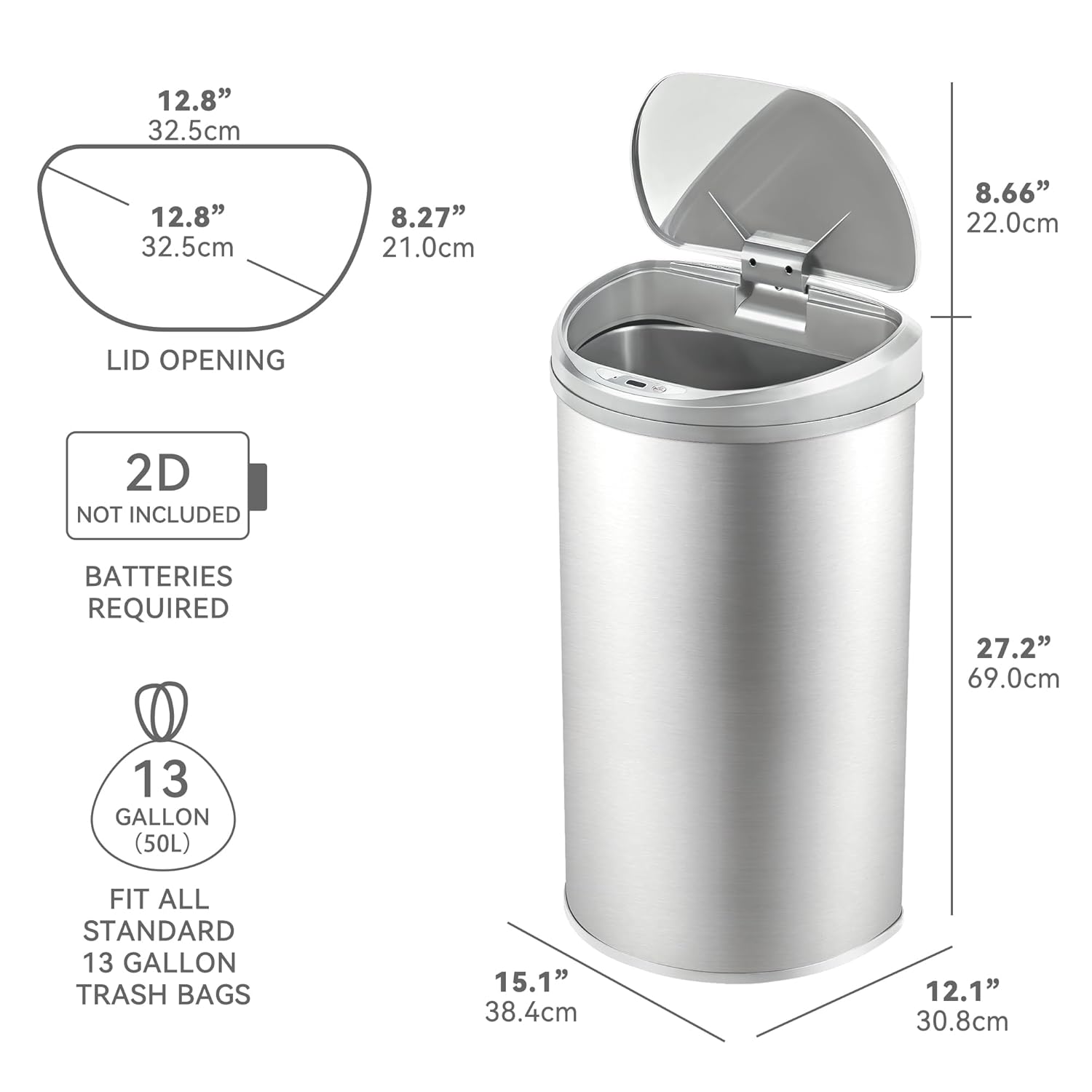
Image: Product dimensions and battery requirement.
Гарантыя і падтрымка
Інфармацыя аб гарантыі
This Ninestars product typically comes with a 2-year warranty. Please refer to your purchase documentation or the manufacturer's official webсайт для атрымання канкрэтных гарантыйных умоў.
Падтрымка кліентаў
For further assistance, troubleshooting not covered in this manual, or warranty claims, please contact Ninestars customer support through their official webсайт або кантактную інфармацыю, прадастаўленую пры пакупцы.