
1. Уводзіны
Thank you for choosing the Mesqool CR1025 Clock Radio. This device combines an alarm clock, Bluetooth speaker, FM radio, night light, and phone charger into one compact unit. This manual provides detailed instructions for setup, operation, and maintenance to ensure optimal performance and user experience.

Figure 1: Mesqool CR1025 Clock Radio
2. Прадукт скончыўсяview
2.1 Асноўныя магчымасці
- Шматфункцыянальны дызайн: Alarm Clock, Bluetooth Speaker, FM Radio, Night Light, and Phone Charger.
- Bluetooth 5.0: For stable and quick wireless audio streaming.
- FM-радыё: 87.5MHz-108.0MHz frequency range with 20 preset stations.
- Рэгуляваная яркасць: 5 levels for the LED display.
- Рэгуляваная гучнасць: 16 levels (45dB to 116dB).
- Таймер сну: Allows automatic shutdown of audio playback.
- Функцыя затрымкі: 9-minute delay for alarms.
- Рэзервовае капіраванне батарэі: Retains time and alarm settings during power outagэс.
- Два порта USB для зарадкі: Type-C and USB-A for device charging.
- Фармат часу: 12-hour and 24-hour display options.
- Пераход на летні час (DST): Quick adjustment feature.

Малюнак 2: Функцыянальнасць 5-у-1
2.2 Змест пакета
- Mesqool CR1025 Clock Radio
- Адаптар сілкавання
- Кабель USB
- CR2032 Lithium Battery (pre-installed or separate for backup)
- Кіраўніцтва карыстальніка (гэты дакумент)

Малюнак 3: Змест пакета
3. Элементы кіравання і дысплей
Familiarize yourself with the buttons and ports on your Mesqool CR1025 Clock Radio.
3.1 Элементы кіравання на верхняй панэлі
- Ручка таймера сну: Rotate to set sleep timer duration. Press to confirm.
- Кнопка сігналізацыі: Press to set or activate/deactivate alarms.
- Time/12/24 Button: Press to set time. Hold to switch between 12/24-hour format.
- Кнопка рэгулявання святла/летняга часу: Press to adjust display brightness. Hold to activate/deactivate Daylight Saving Time.
- Кнопка SNOOZE/LED: Press to snooze alarm or turn night light on/off.
- Кнопка папярэдняй налады/спалучэння: Press to cycle through FM presets. Hold to enter Bluetooth pairing mode.
- Play/Mode Button: Press to play/pause in Bluetooth mode. Hold to switch between FM/Bluetooth modes.
- Power/Scan Knob: Rotate to adjust volume. Press to power on/off. Hold to auto-scan FM stations.
3.2 Парты на задняй панэлі
- DC IN: Порт ўводу харчавання.
- Выхад USB-A: Для зарадкі знешніх прылад.
- Выхад Type-C: Для зарадкі знешніх прылад.
4. Настройка
4.1 Падключэнне харчавання
- Connect the power adapter to the DC IN port on the back of the clock radio.
- Падключыце адаптар сілкавання да звычайнай разеткі. Дысплей загарыцца.

Малюнак 4: Падключэнне харчавання
4.2 Рэзервовае капіраванне ад батарэі
The CR2032 battery provides backup for time and alarm settings during a power outage. The display will not show time, and alarms will not sound until power is restored.
- Ensure the battery insulator tab is removed if the battery was pre-installed.
- If replacing, open the battery compartment on the bottom and insert a new CR2032 battery with the correct polarity.
4.3 Настройка часу
- Націсніце і ўтрымлівайце Time/12/24 кнопку, пакуль не пачнуць міргаць лічбы гадзін.
- Павярнуць Харчаванне/сканаванне ручку, каб наладзіць гадзіну.
- Націсніце Time/12/24 button again to confirm the hour, and the minute digits will flash.
- Павярнуць Харчаванне/сканаванне ручку, каб наладзіць хвіліны.
- Націсніце Time/12/24 button to save the time setting.
4.4 12/24-гадзінны фармат
Каб пераключыцца паміж 12-гадзінным і 24-гадзінным фарматамі часу, націсніце кнопку Time/12/24 button briefly while the time is displayed.

Figure 5: 12H/24H and DST Display
4.5 Пераход на летні час (DST)
To activate or deactivate DST, press and hold the Рэгулятар яркасці/летні час button. The 'DST' indicator will appear or disappear on the display.
5. Інструкцыя па эксплуатацыі
5.1 Налада будзільніка
- Націсніце і ўтрымлівайце Сігналізацыя кнопку, пакуль не замігаюць лічбы гадзін будзільніка.
- Павярнуць Харчаванне/сканаванне knob to adjust the alarm hour.
- Націсніце Сігналізацыя button again to confirm the hour, and the minute digits will flash.
- Павярнуць Харчаванне/сканаванне knob to adjust the alarm minutes.
- Націсніце Сігналізацыя кнопку, каб захаваць час будзільніка.
- Каб уключыць/выключыць будзільнік, націсніце кнопку Сігналізацыя коратка націсніце кнопку. На дысплеі з'явіцца/знікне значок сігналізацыі.
5.2 Функцыя паўтору
Калі прагучыць сігнал трывогі, націсніце SNOOZE / LIGHT button to activate the 9-minute snooze function. The alarm will sound again after 9 minutes. This can be repeated up to 9 times. To stop the alarm completely, press the Сігналізацыя кнопка.

Малюнак 6: Функцыя паўтору будзільніка
Праца з радыё 5.3 FM
- Націсніце Play/Mode кнопку, каб пераключыцца ў рэжым FM-радыё.
- Аўтаматычнае сканаванне: Націсніце і ўтрымлівайце Харчаванне/сканаванне knob to automatically scan and save available FM stations (up to 20 presets).
- Ручная настройка: Briefly rotate the Харчаванне/сканаванне ручку для дакладнай налады частаты.
- Выберыце налады: Націсніце Папярэдняя ўстаноўка/Спалучэнне кнопка для пераключэння паміж захаванымі станцыямі.
- Рэгуляванне гучнасці: Павярнуць Харчаванне/сканаванне knob to adjust the volume (16 levels).

Figure 7: FM Radio Features
5.4 Праца з Bluetooth-дынамікам
- Націсніце Play/Mode button to switch to Bluetooth mode. The 'BT' icon will flash on the display.
- On your mobile device, enable Bluetooth and search for 'CR1025'.
- Select 'CR1025' to pair. Once connected, the 'BT' icon will stop flashing.
- Прайгравайце аўдыё з вашай прылады. Выкарыстоўвайце Play/Mode кнопка прайгравання/паўзы.
- Рэгуляванне гучнасці: Павярнуць Харчаванне/сканаванне ручка для рэгулявання гучнасці.

Малюнак 8: Падключэнне Bluetooth 5.0
5.5 Праца начнога святла
Націсніце SNOOZE / LIGHT button to turn the night light on or off. The night light provides a soft, warm glow.

Figure 9: Warm Night Light
5.6 Рэгуляванне яркасці дысплея
Націсніце Рэгулятар яркасці/летні час button repeatedly to cycle through 5 levels of display brightness, from off to brightest.
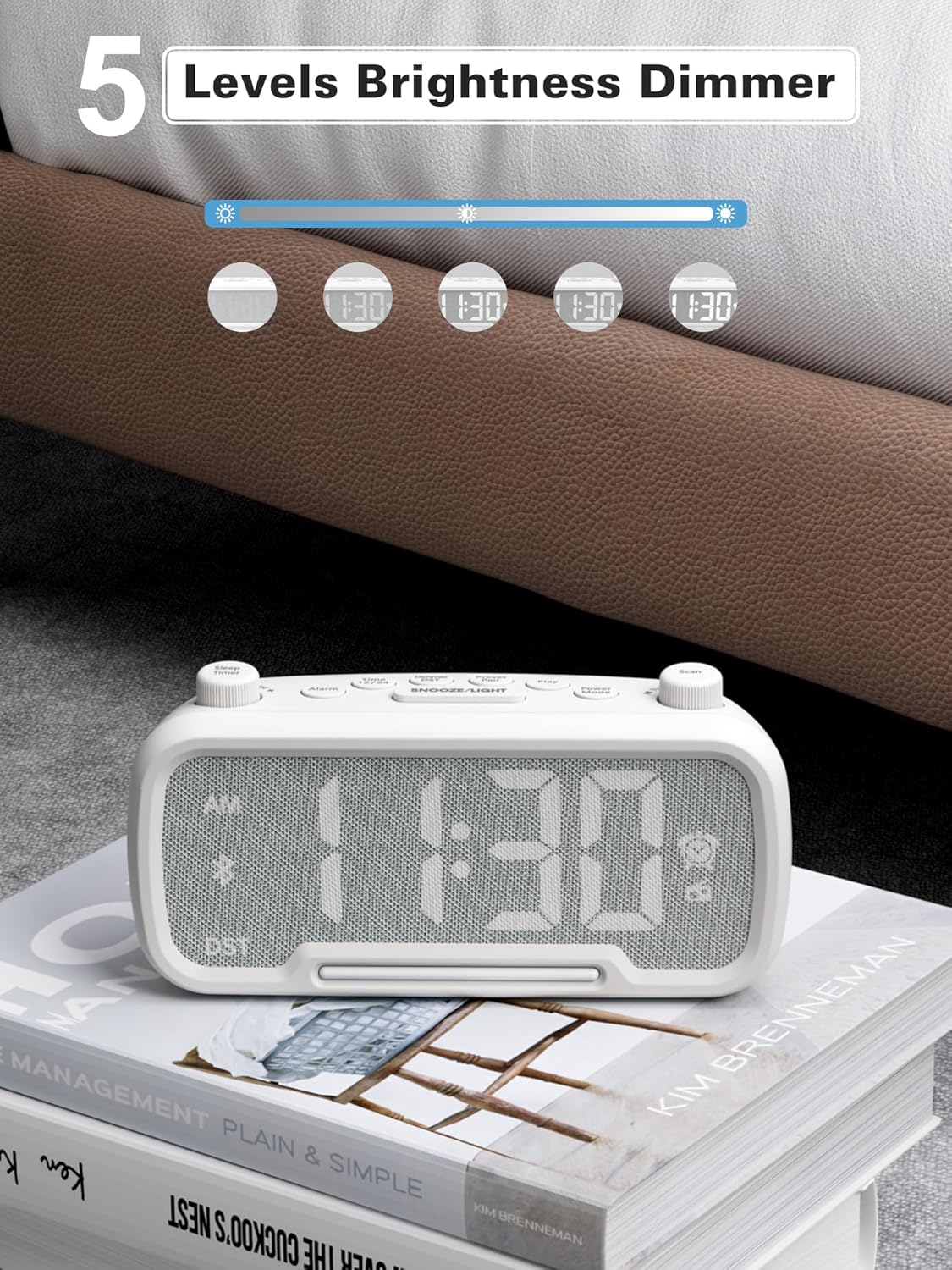
Figure 10: 5 Levels Brightness Dimmer
5.7 Таймер сну
The sleep timer allows you to set a duration after which the radio or Bluetooth audio will automatically turn off.
- While playing FM radio or Bluetooth audio, rotate the Таймер сну knob to select the desired sleep duration (e.g., 15, 30, 60, 90 minutes).
- The display will show the remaining sleep time. The audio will turn off automatically when the timer expires.
5.8 Зарадка тэлефона
The clock radio features two USB charging ports (Type-C and USB-A) for convenient charging of your mobile devices.
- Connect your device's charging cable to either the USB-A or Type-C port on the back of the clock radio.
- Падключыце другі канец кабеля да мабільнай прылады. Зарадка пачнецца аўтаматычна.

Figure 11: Dual USB Charging Ports
6. Тэхнічнае абслугоўванне
- Працірайце прыладу мяккай сухой тканінай. Не выкарыстоўвайце абразіўныя ачышчальнікі або растваральнікі.
- Трымайце прыладу далей ад прамых сонечных прамянёў, крыніц цяпла і вільгаці.
- Забяспечце належную вентыляцыю вакол прылады.
- If the unit will not be used for an extended period, unplug it from the power outlet.
7. Выпраўленне непаладак
| праблема | Магчымая прычына | Рашэнне |
|---|---|---|
| Няма харчавання/дысплей выключаны | Адаптар харчавання не падключаны або няспраўны. | Ensure power adapter is securely plugged into the unit and wall outlet. Check outlet functionality. |
| Будзільнік не гучыць | Сігналізацыя не ўключана або настроена няправільна. | Verify alarm time is set and the alarm icon is visible on the display. Check alarm volume. |
| Дрэнны прыём FM-радыё | Слабы сігнал або перашкоды. | Adjust the unit's position. Try auto-scanning again. |
| Bluetooth не спалучаецца | Device not in pairing mode or too far. | Ensure the clock radio is in Bluetooth mode (BT icon flashing). Move device closer. Forget device on phone and re-pair. |
| USB-зарадка не працуе | Cable faulty or device incompatible. | Try a different USB cable. Ensure the clock radio is powered on. |
8. Тэхнічныя характарыстыкі
- мадэль: CR1025
- Спажываная магутнасць: Пераменны ток 100-240 В, 50/60 Гц
- Рэзервовае капіраванне батарэі: 1 х CR2032 (у камплекце)
- Частата FM: 87.5 - 108.0 МГц
- Версія Bluetooth: 5.0
- Выхад USB: USB-A, Type-C (Charging only)
- Яркасць дысплея: 5 узроўняў
- Узроўні гучнасці: 16 узроўняў (45 дБ - 116 дБ)
- Памеры: 5.9 х 3.81 х 8.4 см (2.32 х 1.5 х 3.31 цалі)
- Вага: 216 г (0.48 фунта)
Малюнак 12: Памеры вырабу
9. Гарантыя і падтрымка
Mesqool products are designed and manufactured to the highest quality standards. For warranty information, technical support, or customer service inquiries, please refer to the contact information provided on the product packaging or visit the official Mesqool webсайт.
Webсайт: Mesqool Official Store