
Thomson 50UA5S13W
Thomson 50-inch 4K Ultra HD Smart Android TV User Manual
Model: 50UA5S13W
1. Уводзіны
This user manual provides detailed instructions for the setup, operation, and maintenance of your Thomson 50-inch 4K Ultra HD Smart Android TV (Model: 50UA5S13W). Please read this manual thoroughly before using the television to ensure proper and safe operation. Keep this manual for future reference.

Выява: спераду view of the Thomson 50-inch 4K Ultra HD Smart Android TV, showcasing its slim bezels and white finish.
2. Важная інфармацыя па бяспецы
Always adhere to the following safety precautions to prevent electric shock, fire, damage to the device, or personal injury.
- Не падвяргайце тэлевізар уздзеянню дажджу або вільгаці.
- Не адчыняйце тэлевізарasinг; звяртайцеся да кваліфікаванага персаналу па ўсё абслугоўванне.
- Забяспечце належную вентыляцыю; не блакуйце вентыляцыйныя адтуліны.
- Абараніце сеткавы шнур ад наступання або заціскання.
- Адключайце тэлевізар ад сеткі падчас навальніцы або калі ён не выкарыстоўваецца працяглы час.
- Трымайце тэлевізар далей ад крыніц цяпла і прамых сонечных прамянёў.
- Выкарыстоўвайце толькі насадкі/аксэсуары, указаныя вытворцам.
3. Змесціва ўпакоўкі
Перад тым, як працягнуць наладу, пераканайцеся, што ўсе пералічаныя ніжэй элементы ўваходзяць у камплект:
- Thomson 50-inch 4K Ultra HD Smart Android TV
- Remote Control (with backlit buttons)
- Батарэі для пульта дыстанцыйнага кіравання
- Тумбы пад тэлевізар (2 штукі)
- Шрубы для падстаўкі пад тэлевізар
- Шнур харчавання
- Кароткае кіраўніцтва
- Кіраўніцтва карыстальніка (гэты дакумент)
4. Настройка
4.1 Фізічная ўстаноўка
You can either place the TV on a flat surface using the provided stands or mount it on a wall (wall mount not included).
Мацаванне стоек:
- Асцярожна пакладзеце тэлевізар экранам уніз на мяккую чыстую паверхню, каб пазбегнуць пашкоджання экрана.
- Сумясціце кожную падстаўку з адпаведнымі адтулінамі для шруб у ніжняй частцы тэлевізара.
- Замацуйце стойкі з дапамогай прадугледжаных шруб.
Насценны мантаж:
This TV supports VESA 200x200 wall mounts. Please refer to the wall mount's instructions for proper installation. Ensure the wall can support the weight of the TV (approximately 12.22 kg).

Выява: спераду view of the Thomson TV, illustrating its dimensions: 112 cm width, 69 cm height, and 8 cm depth.

Выява: Збоку view of the Thomson TV, showing its slim profile.
4.2 Падключэнне перыферыйных прылад
Connect your external devices to the appropriate ports on the TV's rear panel.
- HDMI (4x HDMI 2.0): Для падключэння Blu-ray прайгравальнікаў, гульнявых прыставак, тэлевізійных прыставак і г.д.
- USB (2x USB 2.0): Для падключэння USB-назапашвальнікаў для прайгравання мультымедыя або абнаўлення праграмнага забеспячэння.
- LAN: Для праваднога падключэння да Інтэрнэту.
- Audio Out (Digital Optical): Для падлучэння да саўндбараў або сістэм хатняга кінатэатра.
- Спадарожнікавае тэлебачанне (DVB-S2): For satellite antenna connection.
- Antenna (DVB-T2/C): For terrestrial or cable antenna connection.
- AV-уваход: Для падлучэння старых прылад з кампазітнымі відэа/аўдыёвыхадамі.
- Агульны інтэрфейс (CI+): For inserting a CAM module and smart card for encrypted channels.

Выява: Задняя частка view of the Thomson TV, detailing the various input and output ports including HDMI, USB, LAN, Audio Out, Satellite, Antenna, AV In, and Common Interface.
4.3 Пачатковая налада і падключэнне да сеткі
After connecting the power cord and turning on the TV, you will be guided through the initial setup process.
- Уключэнне: Plug in the power cord and press the power button on the remote control or TV.
- Выбар мовы: Выберыце пераважную мову.
- Падключэнне да сеткі: Connect to your Wi-Fi network or use a wired LAN connection. This is essential for Smart TV features.
- Настройка акаўнта Google: Увайдзіце ў свой уліковы запіс Google, каб атрымаць доступ да крамы Google Play, Google Assistant і іншых функцый Android TV.
- Сканаванне каналаў: The TV will guide you through scanning for available channels via the Triple-Tuner (DVB-S2, DVB-T2, or DVB-C).
5. Operating Your Thomson Smart Android TV
5.1 Android TV Interface and Streaming
Your Thomson TV runs on Android TV, providing access to a vast library of content and applications. The home screen offers personalized recommendations and quick access to your favorite streaming services like Netflix, Prime Video, YouTube, and Disney+.

Image: The Android TV home screen, displaying popular streaming applications and content recommendations.
5.2 Памочнік Google
The integrated Google Assistant allows you to control your TV and smart home devices using voice commands. Simply press the Google Assistant button on your remote and speak your command.
- "Play [Movie Title] on Netflix."
- "Адкрый YouTube."
- "Якое надвор'е?"
- "Dim the lights." (Requires compatible smart home devices)

Image: A user interacting with the TV using Google Assistant voice commands via the remote control.
5.3 Убудаваны Chromecast
With Chromecast built-in, you can easily cast movies, shows, photos, and more from your compatible smartphone, tablet, or laptop directly to your TV screen.

Image: Illustration of Google Cast functionality, demonstrating how content can be streamed wirelessly from various smart devices to the Thomson TV.
5.4 Audio and Visual Enhancements (Dolby Atmos & Dolby Vision)
Experience immersive sound and stunning visuals with Dolby Atmos and Dolby Vision technologies.
- Dolby Atmos: Creates a multi-dimensional sound experience, making audio flow around you. (Compatible sound device needed)
- Dolby Vision: Delivers incredible brightness, contrast, and color, bringing entertainment to life.

Image: An illustration depicting the immersive, multi-dimensional sound experience provided by Dolby Atmos, with sound waves emanating from the TV and surrounding viewERS.

Image: A side-by-side comparison illustrating the enhanced visual quality of Dolby Vision 4K UHD compared to standard SDR, highlighting improved brightness, contrast, and color.
5.5 Функцыі дыстанцыйнага кіравання
The included remote control is designed for ease of use, featuring backlit buttons for visibility in low light and a dedicated favorites button.

Image: The Thomson TV remote control, showcasing its ergonomic design, a dedicated button for favorite apps, backlit buttons for use in the dark, and integrated voice control functionality.
6. Тэхнічнае абслугоўванне
Правільнае абслугоўванне забяспечвае даўгавечнасць вашага тэлевізара.
- Ачыстка экрана: Акуратна працярыце экран мяккай тканінай без ворса. Для выдалення ўстойлівых плям выкарыстоўвайце спецыяльны сродак для чысткі экранаў, нанесены на тканіну, а не непасрэдна на экран.
- Ачыстка Casing: Выкарыстоўвайце мяккую сухую тканіну, каб праціраць тэлевізарasinг. Не выкарыстоўвайце абразіўныя ачышчальнікі або растваральнікі.
- Вентыляцыя: Ensure the ventilation openings are not blocked by dust or objects.
- Выключэнне: Заўсёды адключайце тэлевізар ад электрычнай разеткі перад чысткай або калі ён не выкарыстоўваецца працяглы час.
7. Выпраўленне непаладак
Вось рашэнні распаўсюджаных праблем, з якімі вы можаце сутыкнуцца:
| праблема | Магчымая прычына | Рашэнне |
|---|---|---|
| Няма сілы | Шнур сілкавання не падключаны; няма харчавання ў разетцы. | Праверце падключэнне шнура харчавання; пратэстуйце разетку з іншай прыладай. |
| Няма выявы/гуку | Няправільная крыніца ўваходнага сігналу; няшчыльнае падключэнне кабеля. | Select correct input source; check all cable connections. |
| Пульт дыстанцыйнага кіравання не працуе | Разраджаныя батарэйкі; перашкода паміж пультам і тэлевізарам. | Замяніце батарэйкі; выдаліце ўсе перашкоды. |
| Немагчыма падключыцца да Wi-Fi | Няправільны пароль; праблема з маршрутызатарам; тэлевізар занадта далёка ад маршрутызатара. | Праверце пароль; перазапусціце маршрутызатар; перасуньце тэлевізар бліжэй або скарыстайцеся правадным падключэннем. |
| Apps Crashing/Slow Performance | Too many apps running; low storage; software glitch. | Close unused apps; clear cache; restart TV; check for software updates. |
8. Тэхнічныя характарыстыкі
| Асаблівасць | Спецыфікацыя |
|---|---|
| Нумар мадэлі | 50UA5S13W |
| Памер экрана | 50 цаляў (126 см) |
| Тэхналогія адлюстравання | UHD (A+ Panel Quality) |
| дазвол | 3840 x 2160 (4K Ultra HD) |
| Частата абнаўлення | 60 Гц |
| Аперацыйная сістэма | Android TV |
| Сувязь | Wi-Fi, Bluetooth, 4x HDMI 2.0, 2x USB 2.0, LAN, Digital Optical Audio Out, AV In, CI+ |
| Цюнеры | Triple-Tuner (DVB-S2, DVB-T2, DVB-C) |
| Аўдыётэхналогія | Dolby Digital, Dolby Atmos (compatible sound device needed) |
| Відэатэхналогіі | Dolby Vision, 4K UHD |
| Памеры (Ш х У х Г) | 112 х 69 х 8 см (без падстаўкі) |
| Вага | 12.22 кг |
| Клас энергаэфектыўнасці (SDR) | E (53 кВт·г/1000 г) |
| Клас энергаэфектыўнасці (HDR) | E (54 кВт·г/1000 г) |
| Насценнае мацаванне VESA | 200x200 (not included) |

Image: Official product data sheet for the Thomson 50UA5S13W television, detailing technical specifications and energy consumption.
Для атрымання дадатковай інфармацыі звярніцеся да EPREL Product Database.
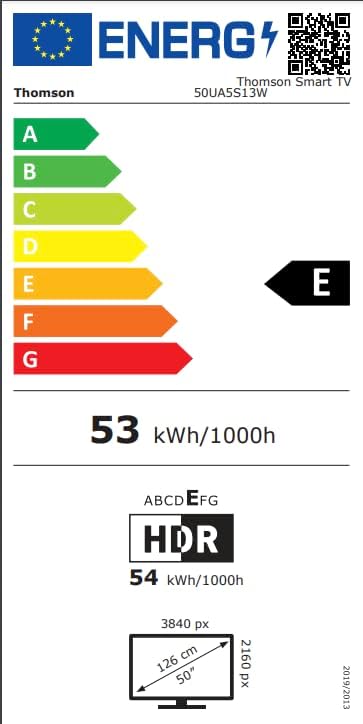
Image: Energy efficiency label for the Thomson 50UA5S13W TV, showing its 'E' rating for both SDR and HDR content.
9. Гарантыя і падтрымка
Thomson offers a Гарантыя 3 год on your television, ensuring peace of mind and reliable performance. For technical support, service, or warranty claims, please contact the manufacturer's authorized service center or refer to the contact information provided in your product documentation.
вытворца: THOMSON (StreamView GmbH)
Webсайт: www.streamview.com
электронная пошта: кантакт@стрымview.com
тэлефон: +4318900066
Адрас: Franz-Josefs-Kai 1, 1010 Vienna, Austria
Ask a question about this manual
Ask about setup, troubleshooting, compatibility, parts, safety, or missing instructions. Manuals+ will review the question and use this page’s manual context to help answer it.