
1. Уводзіны
This instruction manual provides essential information for the safe and effective use of your GT POWER AC Adapter, model 602. This power supply is designed to be compatible with the Verizon WNC-CR200A Gateway Router. Please read this manual thoroughly before use and retain it for future reference.
2. Інфармацыя па бяспецы
WARNING: To reduce the risk of electric shock, fire, or injury, observe the following safety precautions:
- Ensure the power adapter is used with devices that match its voltagе і бягучыя спецыфікацыі.
- Не падвяргайце адаптар уздзеянню вады, дажджу або празмернай вільгаці.
- Не разбірайце і не мадыфікуйце адаптар. Звяртайцеся па ўсё абслугоўванне да кваліфікаванага персаналу.
- Avoid placing the adapter in areas with poor ventilation or near heat sources.
- Inspect the adapter and cable for damage before each use. Do not use if damaged.
- Захоўваць у месцах, недаступных дзецям.
- Адключайце адаптар ад разеткі, калі ён не выкарыстоўваецца працяглы час.
Гэты адаптар мае функцыю Over VoltagАбарона ад электроннай напругі (OVP), абарона ад перагрузкі па току (OCP) і абарона ад кароткага замыкання (SCP) для забеспячэння бяспечнай працы.
3. Змесціва ўпакоўкі
- 1 x GT POWER AC Adapter (Model 602)
4. Прадукт скончыўсяview
The GT POWER AC Adapter is a compact and reliable power supply designed for specific networking equipment. It converts standard AC wall power to the DC power required by your device.

Малюнак 4.1: Фронт view of the GT POWER AC Adapter, showing the power prongs and the output cable.

Малюнак 4.2: Збоку view of the GT POWER AC Adapter, highlighting the barrel connector at the end of the output cable.
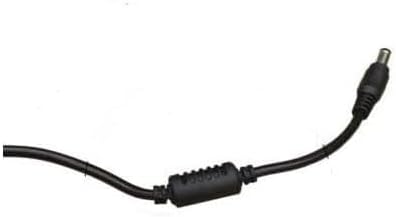
Малюнак 4.3: Буйны план view of the barrel connector, which plugs into the compatible device.
5. Настройка
Follow these steps to properly connect your GT POWER AC Adapter to your Verizon WNC-CR200A Gateway Router.
- Праверце сумяшчальнасць прылады: Before connecting, ensure your device is a Verizon WNC-CR200A Gateway Router. The adapter is specifically designed for this model. You can often find the model number on a label at the bottom or back of your router.

Малюнак 5.1: Example of a Verizon WNC-CR200A Gateway Router's bottom label, indicating the model number for compatibility verification.
- Падключэнне да прылады: Insert the barrel connector of the GT POWER AC Adapter firmly into the power input port of your Verizon WNC-CR200A Gateway Router.
- Падключыце да разеткі: Plug the AC prongs of the adapter into a standard 100-240V AC wall outlet.
- Уключэнне: Once connected, your Verizon WNC-CR200A Gateway Router should power on automatically or can be turned on using its power button, if available.
6. Аперацыйная
The GT POWER AC Adapter operates automatically once connected. It provides a stable power supply to your compatible device. No user interaction is required for its operation beyond initial connection.
- Ensure the adapter is always connected to a functioning power outlet.
- Avoid disconnecting the adapter during critical operations of your router to prevent data loss or system instability.
7. Тэхнічнае абслугоўванне
Правільнае абслугоўванне забяспечвае даўгавечнасць і бяспечную працу вашага адаптара пераменнага току.
- Уборка: Адключыце адаптар ад разеткі і прылады перад чысткай. Выкарыстоўвайце мяккую сухую тканіну для працірання вонкавых паверхняў. Не выкарыстоўвайце вадкія ачышчальнікі або растваральнікі.
- захоўванне: Калі адаптар не выкарыстоўваецца, захоўвайце яго ў прахалодным, сухім месцы, удалечыні ад прамых сонечных прамянёў і экстрэмальных тэмператур. Пазбягайце тугога згортвання кабеля, каб пазбегнуць пашкоджанняў.
- Сыход за кабелем: Не згінайце, не перакручвайце і не цягніце кабель празмерна. Не кладзіце на кабель цяжкія прадметы.
8. Выпраўленне непаладак
If you encounter issues with your GT POWER AC Adapter, refer to the following common problems and solutions:
| праблема | Магчымая прычына | Рашэнне |
|---|---|---|
| Прылада не ўключаецца. |
|
|
| Адаптар незвычайна награваецца. |
|
|
9. Тэхнічныя характарыстыкі
| Асаблівасць | Дэталь |
|---|---|
| Нумар мадэлі | 602 |
| Марка | GT POWER |
| Уваходны кнtage | Пераменны ток 100-240 В (50/60 Гц) |
| Выхад Voltage | 12 В пастаяннага току |
| Выхадны ток | 3A |
| Ватtage | 36 ват |
| Тып раздыма | Бочка |
| Даўжыня кабеля | 59 цаляў (прыблізна 1.5 метра) |
| Функцыі абароны | OVP (над тымtagабарона ад электрычнай напругі), OCP (абарона ад перагрузкі па току), SCP (абарона ад кароткага замыкання) |
| Сумяшчальныя прылады | Verizon WNC-CR200A Gateway Router CR200A WiFi6 NKR-LV65C-T3 |
10. Гарантыя і падтрымка
This GT POWER AC Adapter comes with a Адзін год гарантыі з даты пакупкі. Акрамя таго, 30-дзённая гарантыя вяртання грошай прапануецца.
For technical support, warranty claims, or further assistance, please contact your retailer or the manufacturer directly. Please have your purchase information and product model number (602) available when contacting support.
For more information, you may refer to the seller's contact details provided at the point of purchase.