
Уводзіны
This manual provides detailed instructions for the proper setup, operation, and maintenance of your SYNCO XTALK XPRO2 Wireless Intercom Headset System. Please read this manual thoroughly before using the product to ensure optimal performance and longevity.

Image: SYNCO XPRO Wireless Intercom Headset System highlighting its 1640ft wireless range.
Што ў скрынцы
Праверце наяўнасць усіх кампанентаў у вашай упакоўцы:
- XTALK PRO Headset x2
- Сумка для пераноскі x2
- Ветравое шкло мікрафона x2
- Cable x1 (USB-C charging cable)
- One-Ear Foam Cushions x2
- Акумулятарная батарэя x2
- Зарадная станцыя x1
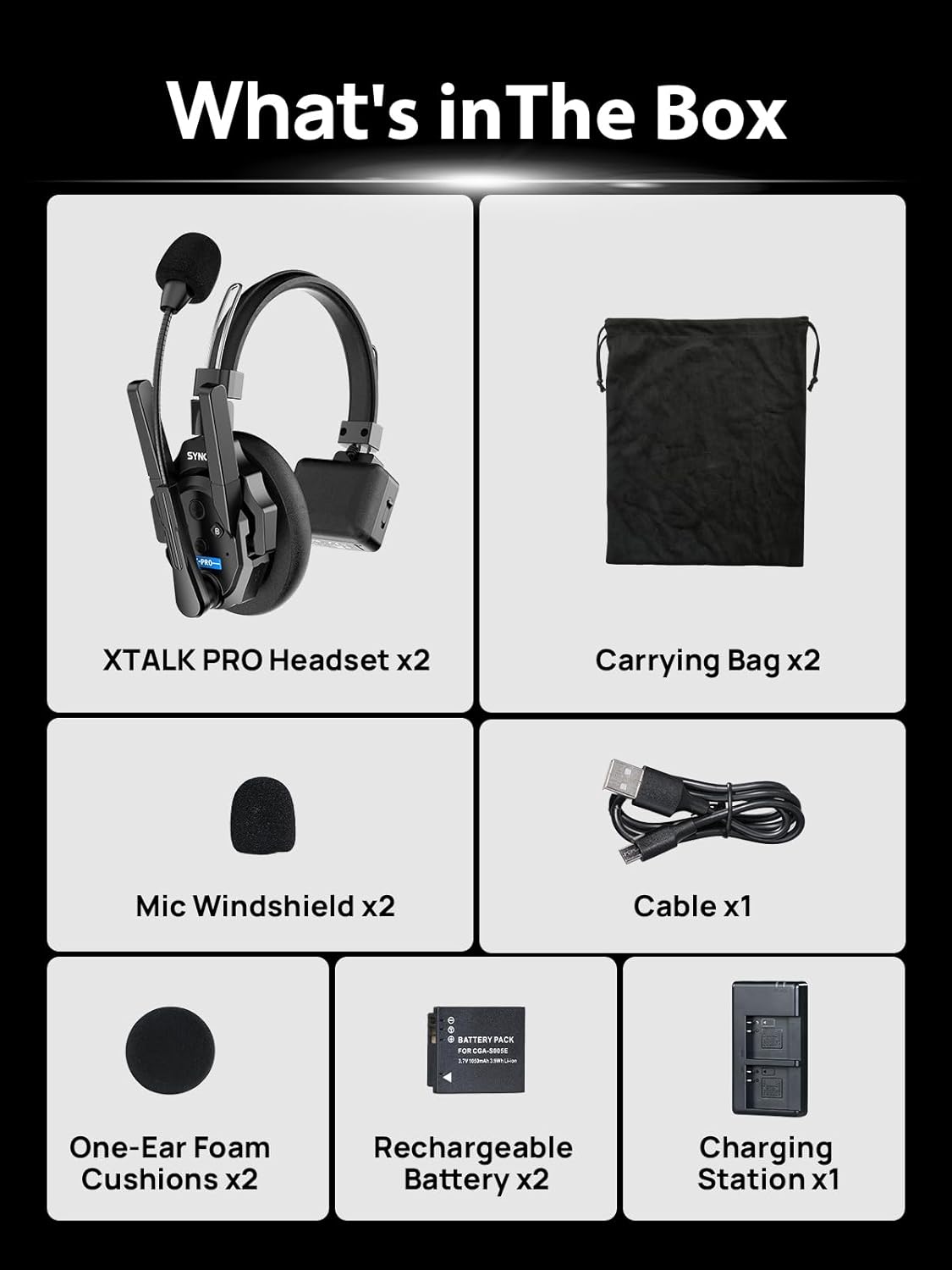
Image: A visual representation of all items included in the SYNCO XTALK XPRO2 package, including two headsets, two carrying bags, two mic windshields, a USB-C cable, two foam ear cushions, two rechargeable batteries, and a charging station.
Асноўныя характарыстыкі
- Expanded Communication Range: The XPRO2 system offers a reliable 500m (1640ft) connection range, supported by two high-gain external antennas for enhanced signal strength and anti-interference capabilities.
- Пашыранае шумапрыглушэнне: Featuring 2.0 AEC (Acoustic Echo Cancellation) technology, the headset effectively eliminates echoes, reverberation, and ambient noise. This ensures clear voice recognition within a frequency range of 150Hz to 7KHz. Noise reduction can be activated with a single button press.
- Boost Mode & Flexible Master Selection: The Boost Mode enhances signal strength for stable communication. The MasterFree Algorithm allows any headset to function as the master unit, facilitating group communication for 2 to 13 users.
- All-Day Battery & Real-Time Monitoring: Enjoy over 24 hours of operation with rechargeable and replaceable batteries. The included 2-slot charging station improves charging efficiency. A 3.5mm monitoring jack allows for simultaneous communication and audio monitoring.
- Unique One-Button Remote Muting Function (Dominant Mode): The Dominant mode allows the master unit to instantly mute all remote headsets with a single button press, useful for managing conversations in dynamic environments.
- Lightweight Comfort & Easy Pairing: Each 194g headset is constructed from lightweight ABS and features smooth leather ear cushions for extended comfort. The SYNCO EasyGo software facilitates one-click pairing, low-latency connections, and OTA firmware updates.

Image: A SYNCO XTALK XPRO2 headset with a stadium background, visually representing the 1640ft communication range.

Image: A diagram illustrating how the external antennas of the SYNCO XTALK XPRO2 provide enhanced signal penetration through multiple walls and floors for clearer wireless calls.

Image: A SYNCO XTALK XPRO2 headset with a graphic overlay demonstrating the advanced AEC noise reduction technology and its 150Hz-7KHz frequency range for clear voice recognition.

Image: A user wearing a SYNCO XTALK XPRO2 headset, with an overlay indicating a one-button mode switch for activating Boost Mode, enhancing the communication experience.

Image: A SYNCO XTALK XPRO2 headset with a clock graphic indicating 24 hours of battery life, alongside icons for Type-C charging and replaceable battery power supply.

Image: A user connecting a 3.5mm TRS cable to the SYNCO XTALK XPRO2 headset, highlighting the real-time monitoring feature without requiring an additional headset.

Image: A user wearing a SYNCO XTALK XPRO2 headset, with a graphic illustrating the Dominant Mode feature that allows the master user to mute other remote users, enhancing team communication control.

Image: A SYNCO XTALK XPRO2 headset connected to a laptop, demonstrating the SYNCO EasyGo software for effortless one-step pairing and operation.
Настройка
1. Пачатковая зарадка
Before first use, fully charge the headset batteries using the provided charging station and USB-C cable. Insert the batteries into the charging station, then connect the station to a power source. The indicator lights on the charging station will show the charging status.
2. Pairing the Headsets
- Power on all headsets you intend to use.
- One headset will automatically be designated as the master unit (indicated by a specific LED pattern, refer to the quick start guide for details).
- Other headsets will connect as remote units. If pairing issues occur, use the SYNCO EasyGo software on a computer for one-click pairing.
3. Нашэнне гарнітуры
Adjust the headband for a comfortable fit. Position the microphone boom approximately 1-2 cm from your mouth for optimal voice pickup. The ear cushions are designed for extended wear comfort.
Інструкцыя па эксплуатацыі
1. Уключэнне/выключэнне харчавання
- Каб уключыць: націсніце і ўтрымлівайце кнопку харчавання, пакуль не загарыцца індыкатар.
- Каб выключыць прыладу: націсніце і ўтрымлівайце кнопку харчавання, пакуль індыкатар не пагасне.
2. Рэгулятар гучнасці
Use the volume up (+) and volume down (-) buttons located on the headset to adjust the listening volume.
3. Mute Function (Dominant Mode)
The master headset can mute all remote headsets. Press the designated mute button on the master unit to activate/deactivate this function. Refer to the quick start guide for specific button identification.
4. Boost Mode Activation
To enhance signal strength in challenging environments, press the Boost Mode button on your headset. This can improve communication stability.
5. Маніторынг гуку
Connect an external audio device to the 3.5mm monitoring jack on the headset to listen to device audio simultaneously with intercom communication.
Тэхнічнае абслугоўванне
1. Уборка
Wipe the headset surfaces with a soft, dry cloth. For ear cushions and microphone windshields, use a slightly damp cloth with mild soap if necessary, then dry thoroughly. Do not use harsh chemicals or abrasive cleaners.
2. Сыход за батарэяй
To prolong battery life, avoid fully discharging the batteries regularly. Store the batteries in a cool, dry place when not in use for extended periods. Replace batteries when their performance significantly degrades.
3. Захоўванне
Store the headset system in the provided protective case or a similar secure container to prevent damage from dust, moisture, and impacts.
Ліквідацыю непаладак
- Няма сувязі: Ensure all headsets are powered on and within range. Re-attempt pairing using the EasyGo software if necessary. Check for obstructions or strong interference sources.
- Дрэнная якасць гуку: Verify microphone position. Activate noise reduction if in a noisy environment. Check for signal interference and ensure headsets are within optimal range.
- Кароткі тэрмін службы батарэі: Ensure batteries are fully charged. Check battery health; replace if necessary. Reduce usage of high-power features if extended battery life is critical.
- Headset Unresponsive: Try performing a hard reset by holding the power button for an extended period (e.g., 10-15 seconds) or removing and reinserting the battery.
Тэхнічныя характарыстыкі
| Асаблівасць | Спецыфікацыя |
|---|---|
| Назва мадэлі | XPRO2 (xpro headset) |
| Нумар мадэлі тавару | S8 |
| Тэхналогія падлучэння | Бесправадная сувязь (РЧ) |
| Кантроль шуму | Active Noise Cancellation (AEC 2.0) |
| Гняздо для навушнікаў | 3.5 мм Jack |
| Дыяпазон частот | 150 Гц - 7 кГц |
| Тэрмін службы батарэі | 24 гадзін |
| Матэрыял | Акрыланітрылбутадыенстырол (АБС) |
| Вага прадмета | 1.7 фунта (прыблізна 771 г) |
| Размяшчэнне вушэй | Над вухам |
| Імпеданс | 32 Ом |
Гарантыя і падтрымка
SYNCO products are designed for reliability and performance. For warranty information, please refer to the warranty card included with your product or visit the official SYNCO website. For technical support, troubleshooting assistance, or service inquiries, please contact SYNCO customer service through their official channels.
Online Reply Team: 24h
Customer Service: 365 Days