
JZAQ BT40
JZAQ BT40 Motorcycle Helmet Bluetooth Headset User Manual
Мадэль: BT40
Уводзіны
Thank you for choosing the JZAQ BT40 Motorcycle Helmet Bluetooth Headset. This manual provides detailed instructions for the proper installation, operation, and maintenance of your device. Please read this manual thoroughly before use to ensure optimal performance and safety.
Змест пакета
Праверце, ці ўсе пералічаныя ніжэй прадметы ўваходзяць у вашу ўпакоўку:
- 1 x Helmet Headset (BT40)
- 6 x Headphone VELCRO (Adhesive Pads)
- 1 х USB-кабель для зарадкі
- 1 х Кіраўніцтва карыстальніка
- 2 x Noise Reducing Sponge Heads (Microphone Covers)

Image: The JZAQ BT40 Helmet Bluetooth Headset, including the main unit with speakers and microphone, USB charging cable, and various adhesive pads and microphone covers.
Тэхнічныя характарыстыкі
| Назва мадэлі | BT40 |
| Версія Bluetooth | V5.0+EDR |
| Bluetooth Адлегласць | Да 10 метраў (33 футаў) |
| Тып батарэі | 3.7V/600mA Lithium Battery |
| Час зарадкі | Прыкладна 2 гадзіны |
| Час чакання | Да 500 гадзін |
| Working Time (Playtime/Talk Time) | Да 90 гадзін |
| Воданепранікальнасць | IP67 Deep Waterproof Technology |
| Headphone Thickness | 0.35 цалі (прыблізна 9 мм) |
| Кантроль шуму | DSP Noise Cancelling Technology |
| Сумяшчальныя прылады | Smartphones, MP3 Players, GPS Devices |

Image: A diagram illustrating the dimensions of the headset's earpieces, speaker, microphone, and control unit, highlighting the 0.35-inch thickness of the earpieces.
Настройка і ўстаноўка
Follow these steps to properly install the BT40 headset into your helmet:
- Prepare Earphones: Take the helmet headphones from the box. Attach the "Magic Tape" (Velcro adhesive pads) to the back of both earphones.
- Position Earphones: Remove the protective tape paper from the Velcro on the earphones. Carefully position and stick the earphones into the helmet's ear recesses on both sides. Ensure proper alignment before pressing firmly.
- Secure Headset: Once the Velcro is attached to the helmet, secure the headset earphones to these Velcro pads.
- Размяшчэнне мікрафона: Position the microphone arm so that the microphone is close to your mouth for clear communication.
- Канчатковая праверка: Ensure all components are securely attached and comfortable within the helmet.
Важная заўвага: Before ordering, please check the inner size of your helmet to ensure a comfortable fit for the headset. The headset's ultra-thin design (0.35 inches) is suitable for most helmets without causing discomfort.

Image: The BT40 headset featuring its ultra-thin speakers, designed to fit comfortably within helmet ear spaces without squeezing the ears.

Image: A motorcycle helmet with the JZAQ BT40 headset microphone arm visible, demonstrating typical installation.
Інструкцыя па эксплуатацыі
Уключэнне/выключэнне і спалучэнне
- Уключэнне: Press and hold the Power button (usually the middle button on the control unit) until the indicator light illuminates.
- Выключэнне: Націсніце і ўтрымлівайце кнопку харчавання, пакуль не пагасне індыкатар.
- Спалучэнне: When powered on for the first time or when entering pairing mode, the headset will automatically search for Bluetooth devices. On your smartphone or other Bluetooth-enabled device, search for "BT40" in the Bluetooth settings and select it to connect.
- Аўтаматычнае падключэнне: After initial pairing, the headset will automatically connect to the last paired device when powered on, if the device is within range.
Кіраванне званкамі
- Адказаць на званок: The headset supports automatic answering of incoming calls.
- Завяршыць выклік: Press the Power button once to end an active call.
- Адхіліць выклік: Press and hold the Power button for approximately 2 seconds to reject an incoming call.
Прайграванне музыкі
- Прайграванне/Паўза: Press the Power button once to play or pause music.
- Павялічыць гучнасць: Press the "+" button to increase volume.
- Паменшыць гучнасць: Press the "-" button to decrease volume.
- Наступная песня: Press and hold the "+" button for approximately 2 seconds to skip to the next track.
- Папярэдняя песня: Press and hold the "-" button for approximately 2 seconds to go to the previous track.
Галасавы памочнік
- Актываваць галасавы памочнік: Double-click the Power button to activate your smartphone's voice assistant (e.g., Siri, Google Assistant).

Выява: Падрабязны view of the headset's control unit, showing the volume up (+), power/play/pause, and volume down (-) buttons, along with the microphone.
Відэа: Оверview of the JZAQ Motorcycle Helmet Bluetooth Headset BT40, demonstrating its components and basic features.
Тэхнічнае абслугоўванне
- Уборка: Для чысткі гарнітуры выкарыстоўвайце мяккую сухую тканіну. Пазбягайце выкарыстання агрэсіўных хімічных рэчываў або абразіўных матэрыялаў.
- Ўздзеянне вады: While the headset is IP67 waterproof, prolonged submersion or exposure to high-pressure water jets should be avoided. Ensure the charging port cover is securely closed when not charging.
- захоўванне: Захоўвайце гарнітуру ў прахалодным, сухім месцы, удалечыні ад прамых сонечных прамянёў і экстрэмальных тэмператур.
- Сыход за батарэяй: Каб падоўжыць тэрмін службы батарэі, пазбягайце частай поўнай разрадкі батарэі. Рэгулярна зараджайце гарнітуру, нават калі яна не выкарыстоўваецца працяглы час.
- Microphone Sponge: Replace the noise-reducing sponge head on the microphone if it becomes worn or damaged to maintain optimal voice clarity.
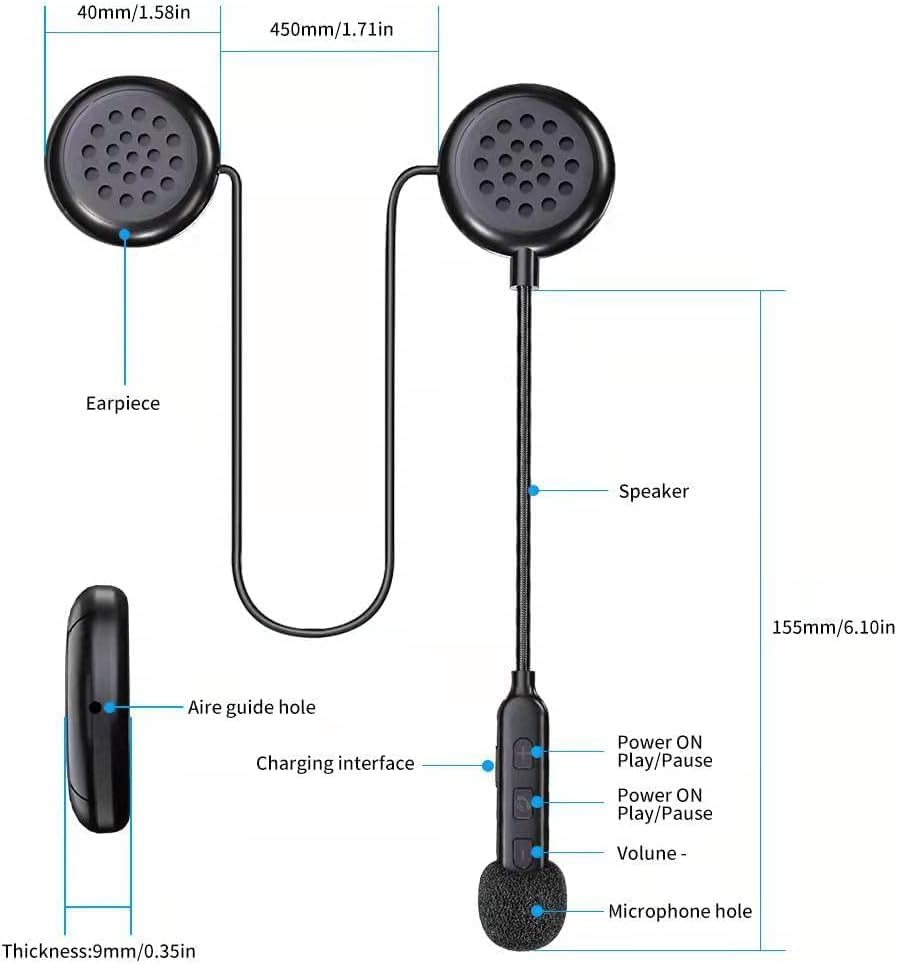
Image: The BT40 headset with water droplets, demonstrating its IP67 deep waterproof capability, suitable for use in rainy or snowy conditions.
Ліквідацыю непаладак
| праблема | Магчымая прычына | Рашэнне |
|---|---|---|
| Гарнітура не ўключаецца. | Нізкі акумулятар. | Charge the headset for at least 2 hours using the provided USB cable. |
| Немагчыма спалучыць прыладу. | Bluetooth is off on the device; headset is not in pairing mode; too far from device. | Ensure Bluetooth is enabled on your device. Make sure the headset is powered on and in pairing mode. Move the headset closer to the device (within 10 meters). Try restarting both devices. |
| Няма гуку або нізкі ўзровень гучнасці. | Volume too low on headset or connected device; improper connection. | Increase volume using the "+" button on the headset and on your connected device. Re-pair the headset with your device. |
| Microphone not picking up voice clearly. | Microphone not positioned correctly; damaged sponge cover. | Adjust the microphone arm so the microphone is close to your mouth. Replace the noise-reducing sponge head if it is worn. |
| Перарывістае злучэнне. | Перашкоды; прылада занадта далёка; нізкі зарад батарэі. | Move away from sources of strong electromagnetic interference. Ensure the headset is within 10 meters of the connected device. Charge the headset. |
Гарантыя і падтрымка
For warranty information or technical support, please refer to the contact details provided with your purchase or visit the official JZAQ website. If you experience any dissatisfaction or issues, please contact customer service for assistance.
Кантакты: Please refer to your purchase documentation or the seller's information on the platform where you purchased the product.