
1. Уводзіны
Thank you for choosing the Moman H4C Motorcycle Helmet Headset with 1080P Camera and the Moman PMS1 Bike Motorcycle Phone Holder. This product combines a high-definition recording camera with a Bluetooth headset for communication and entertainment, alongside a secure phone mounting solution for your motorcycle or bicycle. This manual provides detailed instructions for installation, operation, maintenance, and troubleshooting to ensure optimal performance and safety.
2. Змесціва ўпакоўкі
Калі ласка, пераканайцеся, што ўсе пералічаныя ніжэй прадметы ўваходзяць у ваш пакет:
- Moman H4C Motorcycle Helmet Headset with 1080P Camera
- Moman PMS1 Phone Mount
- Зарадны кабель
- 32GB Memory Card (pre-installed or separate)
- Кіраўніцтва карыстальніка (гэты дакумент)
- Mounting Accessories for H4C and PMS1
3. Асаблівасці прадукту
- HD-камера 1080P: Records video at 1080P resolution with a 120° wide-angle lens and 360° body rotation.
- цыклічны запіс: Automatically overwrites older, unprotected files for continuous recording. Supports up to 256GB memory cards.
- Bluetooth 5.3: Stable connection for single-person use, supporting simultaneous connection to two smartphones for navigation, calls, and music.
- Функцыянальнасць Wi-Fi: Connects to the "RoadCam" app for viewing and downloading recorded videos and photos.
- Галасавы памочнік AI: Кіраванне рознымі функцыямі без дапамогі рук.
- PMS1 Phone Holder: Half-wrapped structure design ensures unobstructed camera use, Face/Touch ID, and charging.
- Triple Protection Phone Mount: Stainless steel telescopic arms, full silicone pads, and a security lock ensure phone stability and protection.
4. Кіраўніцтва па наладцы
4.1 Moman H4C Headset Installation
Attach the Moman H4C headset to the side of your motorcycle helmet using the provided mounting bracket. Ensure the camera lens has a clear, unobstructed view. The headset can be rotated 360 degrees for optimal camera angle adjustment.

Image: Moman H4C 120-degree Wide Angle Lens with 360-degree Rotation. This image illustrates the adjustable camera lens and wide-angle view of the H4C headset.
4.2 Moman PMS1 Phone Holder Installation
Mount the PMS1 phone holder securely to your motorcycle or bicycle handlebars. The clamp is designed to fit various handlebar sizes. Once mounted, adjust the viewing angle for your smartphone.
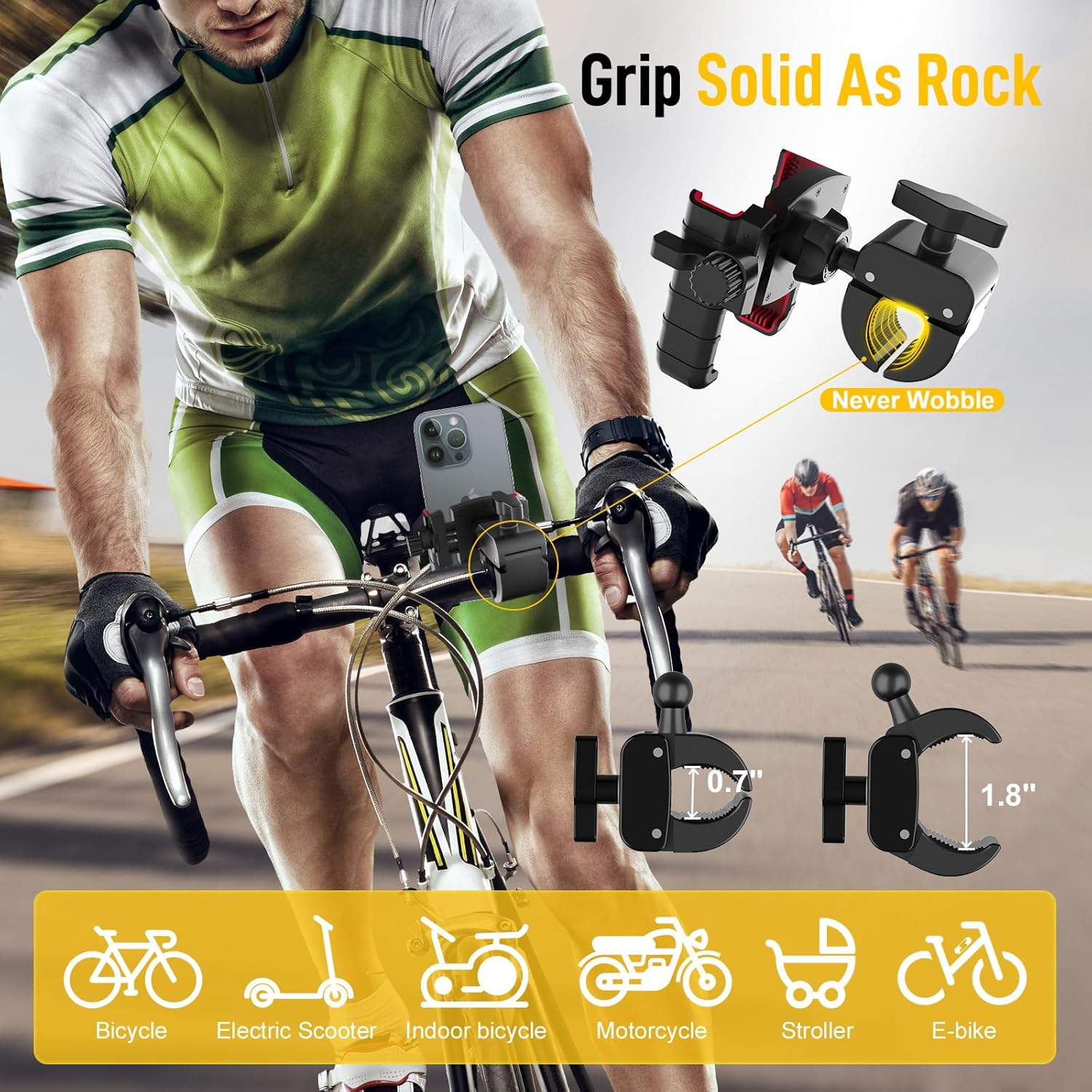
Image: Moman PMS1 Phone Holder Compatibility and Secure Grip. This image demonstrates the PMS1 phone holder mounted on various vehicles, highlighting its secure grip.
To secure your phone:
- Place your phone into the holder, ensuring the stainless steel telescopic arms firmly grip the top and sides.
- Engage the security lock to prevent accidental release.
- Tighten the knob to further secure the phone in place.

Image: Moman PMS1 Phone Holder Double Security Mechanism. This image details the two-step locking and tightening features for enhanced phone stability.
4.3 Устаўка карты памяці
Locate the memory card slot on the H4C headset. Insert the provided 32GB microSD card (or another compatible card up to 256GB) until it clicks into place. Ensure the card is inserted correctly to avoid damage.
5. Інструкцыя па эксплуатацыі
5.1 Уключэнне/выключэнне
- Уключэнне: Press and hold the Power button for approximately 3 seconds until the indicator light illuminates and you hear a power-on prompt.
- Выключэнне: Press and hold the Power button for approximately 3 seconds until the indicator light turns off and you hear a power-off prompt.
5.2 Спалучэнне па Bluetooth
The H4C headset uses Bluetooth 5.3 for stable connections.
- Ensure the H4C headset is powered on.
- На вашым смартфоне перайдзіце ў налады Bluetooth і знайдзіце даступныя прылады.
- Select "Moman H4C" from the list to pair.
- The headset can connect to two smartphones simultaneously. Repeat the pairing process for the second device.
5.3 Camera Recording
The integrated 1080P camera records your rides with a 120° wide-angle view.

Image: Moman H4C Camera Lens and 1080P HD Recording Capability. This image shows the camera lens and highlights the 1080P 30FPS recording feature of the H4C.
- Пачаць запіс: Press the Camera button once to begin recording. The indicator light will change to confirm recording is active.
- Спыніць запіс: Press the Camera button again to stop recording.
- цыклічны запіс: The H4C automatically manages storage by overwriting the oldest unprotected fileкалі карта памяці запоўнена, што забяспечвае бесперапынны запіс.

Image: Moman H4C Loop Recording Feature. This image visually represents the continuous loop recording function of the H4C headset.
5.4 Wi-Fi and App Control (RoadCam)
Download the "RoadCam" app from your smartphone's app store (Google Play or Apple App Store).
- Enable Wi-Fi on your H4C headset (refer to device controls for specific button press).
- On your smartphone, connect to the H4C's Wi-Fi hotspot.
- Open the "RoadCam" app to view жывы footagе, прайграванне запісаных відэа і загрузка files на ваш тэлефон.

Image: Moman H4C Wi-Fi Hotspot and RoadCam App Control. This image illustrates the H4C headset connecting to a smartphone via Wi-Fi for app-based video management.
5.5 Галасавы памочнік са штучным інтэлектам
Activate your smartphone's AI voice assistant (e.g., Siri, Google Assistant) through the H4C headset for hands-free control of music, calls, and navigation.
- Актываваць: Press the Voice Assistant button (or designated button) once to activate.
- Speak your commands clearly after the prompt.

Image: Moman H4C AI Voice Assistant for Hands-Free Control. This image depicts a rider using voice commands with the H4C headset for functions like music, calls, and GPS.
5.6 Зарадка
Connect the H4C headset to a power source using the provided charging cable. The indicator light will show charging status (e.g., red for charging, blue for fully charged).
6. Тэхнічнае абслугоўванне і догляд
- Уборка: Use a soft, dry cloth to clean the headset and phone holder. Avoid using harsh chemicals or abrasive materials.
- захоўванне: Захоўвайце прыладу ў прахалодным, сухім месцы, удалечыні ад прамых сонечных прамянёў і экстрэмальных тэмператур, калі яна не выкарыстоўваецца.
- Сыход за батарэяй: Для аптымальнага тэрміну службы батарэі пазбягайце частай поўнай разрадкі. Рэгулярна зараджайце прыладу, нават калі яна не выкарыстоўваецца пастаянна.
- Карта памяці: Periodically format the memory card (after backing up important files) to maintain optimal recording performance.
7. Выпраўленне непаладак
| праблема | Магчымая прычына | Рашэнне |
|---|---|---|
| Прылада не ўключаецца | Нізкі зарад батарэі; няспраўнасць прылады | Цалкам зарадзіце прыладу. Калі праблема не знікне, звярніцеся ў службу падтрымкі кліентаў. |
| Немагчыма падключыць прыладу праз Bluetooth | Прылада не ў рэжыме спалучэння; Bluetooth на тэлефоне выключаны; Перашкоды | Ensure H4C is in pairing mode. Restart phone's Bluetooth. Move away from other wireless devices. |
| Камера не запісвае | Memory card full or faulty; Camera not activated | Check memory card status, format if necessary (backup files first). Ensure camera recording is initiated. |
| Wi-Fi connection issues with app | Wi-Fi not enabled on H4C; Incorrect Wi-Fi password; App issues | Ensure H4C Wi-Fi is on. Re-enter Wi-Fi password. Restart app or phone. |
| Phone holder not secure | Security lock not engaged; Knob not tightened; Incorrect phone placement | Ensure phone is correctly seated, engage security lock, and tighten the knob firmly. |
8. Тэхнічныя характарыстыкі
| Асаблівасць | Дэталь |
|---|---|
| Марка | Маман |
| Назва мадэлі | H4C |
| Тып абслугоўвання аўтамабіля | Матацыкл |
| Тэхналогія падлучэння | Wi-Fi, Bluetooth 5.3 |
| Асаблівасць | Loop Recording, AI Voice Assistant |
| Дазвол відэазахопу | 1080p |
| Уключаныя кампаненты | Charging Cable, Memory Card, Phone Mount, User Manual |
| Тып мацавання | Helmet Mount (H4C), Handlebar Phone Mount (PMS1) |
| Метад кантролю | Праграма, кнопкі |
| Тэхналогія аптычнага датчыка | CMOS |
| Тып флэш-памяці | microSD |
| Максімальны памер флэш-памяці, які падтрымліваецца | 256 ГБ |
| Частата кадраў | 30 кадраў у секунду |
| Сапраўдны кут View | 120 градусаў |
| Тып элемента батарэі | Літый-іённы |
| Сумяшчальныя прылады | Smartphone, Personal Computer |
9. Падтрымка кліентаў
For further assistance, technical support, or warranty inquiries, please contact Moman customer service through the official Moman website or your purchase platform. Please have your product model (H4C) and purchase details ready when contacting support.
Moman Official Webсайт: www.moman.co