
1. Уводзіны
This manual provides essential information for the safe and efficient operation, installation, and maintenance of your Samsung 14-Place Stainless Steel Dishwasher. Please read it thoroughly before using your appliance and keep it for future reference.
2. Прадукт скончыўсяview
The Samsung DW60DG550FSRBZ dishwasher is designed for deep and quiet cleaning, featuring a 14-place setting capacity. It includes a Hygiene function with high-temperature rinsing and an Auto Cycle function that detects soil levels for optimal cleaning.
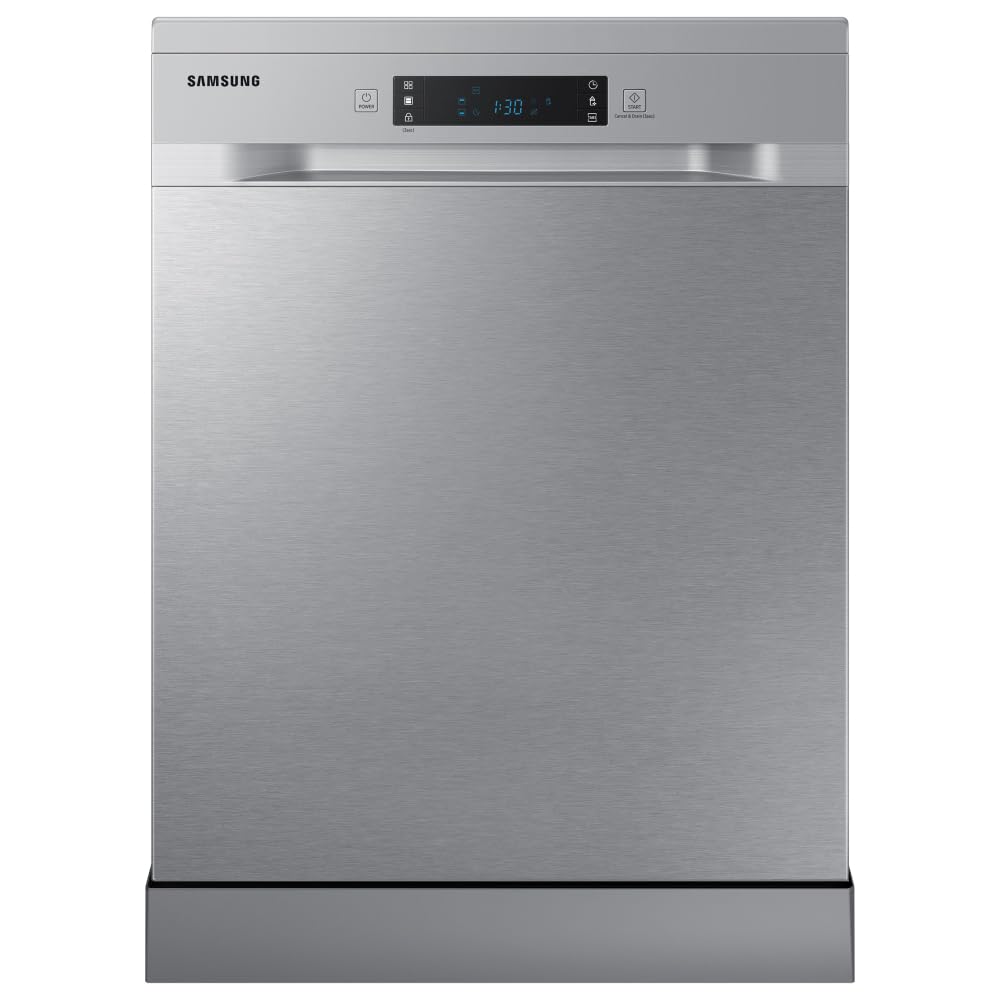
Малюнак 1: Спераду view of the Samsung DW60DG550FSRBZ Dishwasher with the door slightly open, revealing the control panel.

Малюнак 2: падрабязна view of the dishwasher's control panel, featuring a digital display and various program selection buttons.
3. Настройка і ўстаноўка
Proper installation is crucial for the performance and longevity of your dishwasher. It is recommended to have a qualified technician perform the installation.
3.1 Распакаванне
Carefully remove all packaging materials and internal components. Inspect the dishwasher for any damage incurred during transit. Keep packaging materials away from children.
3.2 Размяшчэнне
The dishwasher can be installed freestanding or built-in under a countertop. Ensure the chosen location has access to water supply, drainage, and a suitable electrical outlet (220V).
3.3 Падключэнне вады
Connect the water inlet hose to a cold water supply tap. Ensure all connections are tight to prevent leaks. The water consumption is approximately 10.05 liters per cycle.
3.4 Падключэнне да дрэнажу
Connect the drain hose to your household drainage system. Ensure the hose is properly secured and free from kinks to allow for efficient water discharge.
3.5 Электрычнае падключэнне
Plug the dishwasher into a grounded 220V electrical outlet. Do not use extension cords or adapters.
4. Інструкцыя па эксплуатацыі
Для дасягнення найлепшых вынікаў мыцця выканайце наступныя дзеянні:
- Load the Dishwasher: Arrange dishes, cutlery, and cookware in the racks, ensuring they do not block the spray arms.
- Дадаць сродак для мыцця: Напоўніце дазатар мыйнага сродкі адпаведнай колькасцю мыйнага сродкі для посудамыйнай машыны.
- Выберыце праграму: Choose a wash program suitable for the soil level of your dishes. Available cycles include Automatic, Hygiene, Sensor, and Normal.
- Select Options (Optional): Use extra functions like the Hygiene function for high-temperature rinsing (70°C) or the Half Load setting for smaller loads.
- Пачаць цыкл: Close the dishwasher door firmly and press the Start button.
4.1 Прамыйце праграмы
- Аўтаматычны цыкл: Detects the soil level and automatically selects the ideal cleaning cycle, optimizing water and energy consumption.
- Hygiene Function: Elevates water temperature to 70°C during the final rinse for deep cleaning and sanitization.
- Палова загрузкі: Allows washing smaller quantities of dishes by using only a selected zone, saving water and energy.
5. Загрузка посудамыйнай машыны
Proper loading ensures thorough cleaning and prevents damage to dishes.

Figure 3: Empty interior of the dishwasher, showing the upper and lower racks ready for loading.

Figure 4: Dishwasher interior loaded with various dishes, demonstrating optimal placement for a full cycle.

Малюнак 5: бок view of the dishwasher with racks extended, highlighting the spacious design for easy loading and unloading.
5.1 Верхняя стойка
Ideal for delicate items such as glasses, cups, and small bowls. Place items upside down to ensure proper cleaning and drainage.

Figure 6: Upper rack filled with glasses and small bowls, demonstrating correct placement.
5.2 Ніжняя стойка
Designed for larger and heavily soiled items like dinner plates, pots, pans, and serving dishes. Ensure items do not obstruct the spray arm rotation.

Figure 7: Lower rack loaded with dinner plates, showing how to maximize space and cleaning efficiency.
5.3 Кошык для сталовых прыбораў
Place forks, spoons, and knives in the designated cutlery basket, handles down for forks and spoons, and handles up for knives for safety.
6. Тэхнічнае абслугоўванне
Рэгулярнае абслугоўванне забяспечвае аптымальную прадукцыйнасць і падаўжае тэрмін службы вашай посудамыйнай машыны.
6.1 Ачыстка фільтраў
The dishwasher has a filter system that needs regular cleaning. Remove the filter assembly, rinse it under running water to remove food particles, and reassemble it. Clean at least once a week.
6.2 Чыстка разбрызгівальнікаў
Periodically check the spray arms for clogged nozzles. Use a thin wire or toothpick to clear any blockages. Ensure they rotate freely.
6.3 Знешняя ўборка
Працярыце вонкавыя паверхні мяккай, damp тканіна. Для паверхняў з нержавеючай сталі выкарыстоўвайце спецыяльны сродак для чысткі нержавеючай сталі, каб падтрымліваць яе аздабленне.
7. Выпраўленне непаладак
Перад тым, як звяртацца ў службу падтрымкі кліентаў, азнаёмцеся з наступнымі распаўсюджанымі праблемамі і іх рашэннямі:
- Посудамыйная машына не запускаецца: Праверце, ці надзейна падключаны шнур харчавання і ці шчыльна зачынены дзверы. Пераканайцеся, што падача вады ўключана.
- Посуд нечысты: Verify that the spray arms are not blocked and can rotate freely. Ensure dishes are loaded correctly and not overcrowded. Check detergent levels.
- Вада не зліваецца: Праверце зліўны шланг на наяўнасць перагібаў або закаркаванняў. Ачысціце сістэму фільтрацыі.
- Незвычайны шум: Ensure dishes are not rattling against each other or blocking the spray arms.
8. Тэхнічныя характарыстыкі
| Асаблівасць | Спецыфікацыя |
|---|---|
| Марка | Samsung |
| Нумар мадэлі | DW60DG550FSRBZ |
| Тып ўстаноўкі | корпусная |
| Памеры прадукту (Д х Ш х У) | 60P x 60L x 85A сантыметраў |
| Ёмістасць | 14 Налады месца |
| Спажыванне вады | 10.05 літра |
| тtage | 220 вольт |
| Тып кіравання | Кнопка |
| Асаблівасці | Auto Cycle Function, Hygiene Function (high temperature rinse), Deep and Silent Cleaning |
| Material (Basket/Rack) | Нержавеючая сталь |
| Вага прадмета | 54500 грам |
| Колер | Нержавеючая сталь |
9. Гарантыя і падтрымка
This Samsung dishwasher comes with a Гарантыя 1 год. For technical assistance, repairs, or warranty claims, please contact Samsung customer support. Refer to your purchase documentation for specific contact details and warranty terms.