
Уводзіны
This manual provides detailed instructions for the setup, operation, and maintenance of your ATTACK SHARK L80 Wireless Gaming Headset. Please read this manual thoroughly before using the product to ensure proper function and longevity.
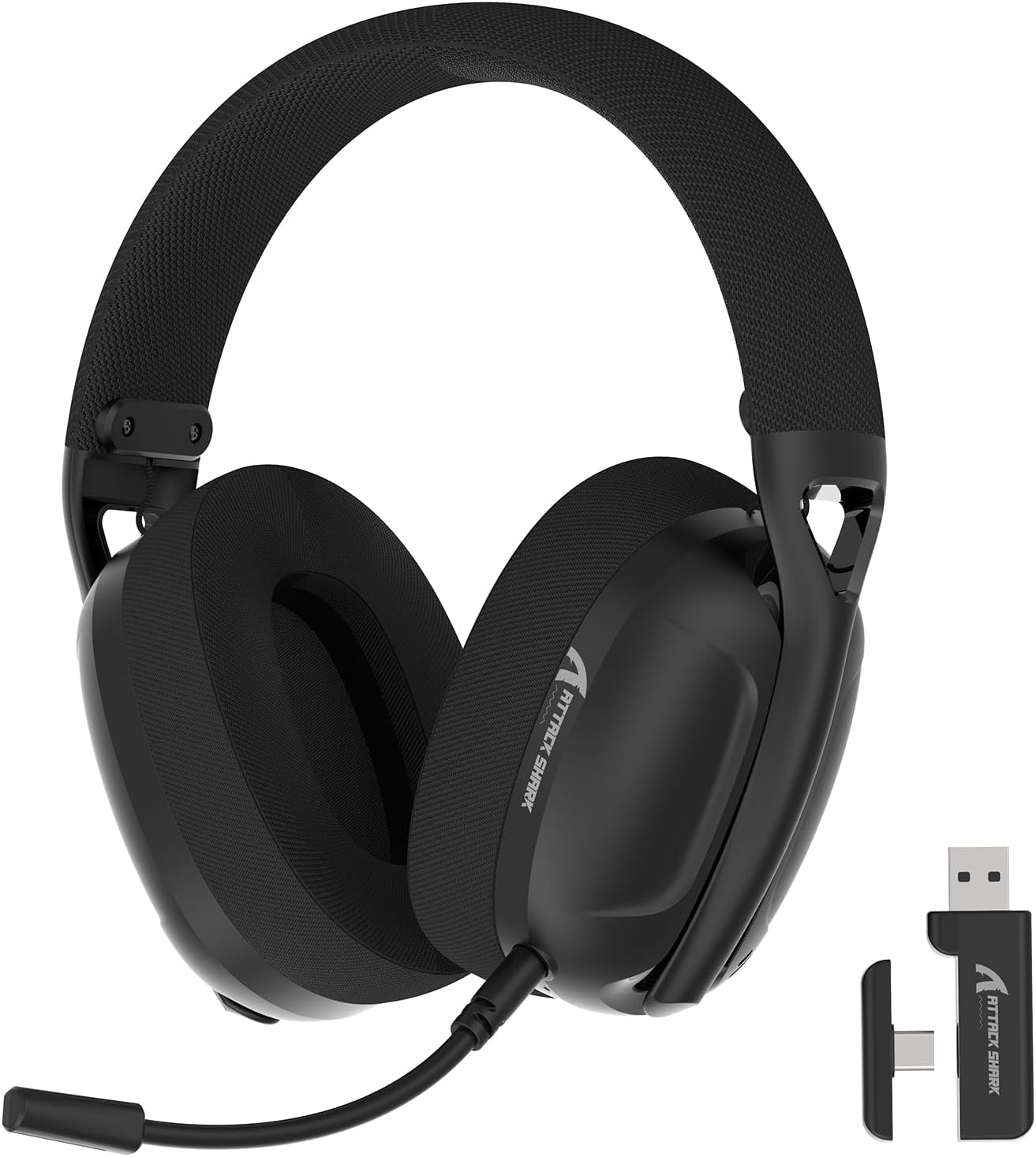
Image: The ATTACK SHARK L80 Wireless Gaming Headset, featuring over-ear cups, a flexible microphone, and a USB dongle.
Змест пакета
Праверце, ці ёсць усе прадметы ў камплекце з вашым прадуктам:
- ATTACK SHARK L80 Wireless Gaming Headset
- Detachable Omni-directional Microphone
- Бесправадны USB-адаптар 2.4 ГГц (USB-A)
- Кабель для зарадкі USB-C да USB-A
- Аўдыёкабель 3.5 мм
- Кіраўніцтва карыстальніка (гэты дакумент)

Image: All components included in the ATTACK SHARK L80 headset package: headset, detachable microphone, 2.4GHz USB dongle, USB-C charging cable, and 3.5mm audio cable.
Прадукт скончаныview
Headset Controls and Ports
Familiarize yourself with the headset's controls and connection points:

Image: Close-up of the ATTACK SHARK L80 headset's left earcup, showing the power button, mode switch button, volume up/previous track button, volume down/next track button, and microphone mute button.
- Кнопка харчавання: Press and hold for 3 seconds to power ON/OFF. Short press to answer/end calls or play/pause media.
- Кнопка пераключэння рэжымаў: Short press 3 times in succession to switch between Bluetooth and 2.4G wireless modes.
- Volume Up / Previous Song: Short press for Volume+, Long press for Previous Song.
- Volume Down / Next Song: Short press for Volume-, Long press for Next Song.
- Кнопка адключэння мікрафона: Short press to toggle microphone ON/OFF.
- Порт мікрафона: For connecting the detachable microphone.
- 3.5 мм аўдыяраз'ём: Для праваднога падключэння.
- Порт для зарадкі USB-C: Для зарадкі гарнітуры.
- Светлавы індыкатар: Паказвае стан падключэння і ўзровень зарада батарэі.
Здымны мікрафон
The L80 headset features a detachable, omni-directional microphone with noise reduction capabilities. It can be adjusted 360 degrees for optimal positioning.

Image: The ATTACK SHARK L80 headset with its detachable, 360-degree adjustable, noise-cancelling microphone attached.
Настройка
The ATTACK SHARK L80 headset offers three connection modes: 2.4GHz wireless, Bluetooth 5.2, and 3.5mm wired. Choose the appropriate method for your device.
1. 2.4GHz Wireless Connection (for PC, PS5, PS4, Nintendo Switch Docked)
- Insert the 2.4GHz USB wireless dongle into an available USB port on your PC, PS5, PS4, or Nintendo Switch dock.
- Power on the L80 headset by pressing and holding the Power Button for 3 seconds.
- The headset will automatically attempt to connect to the dongle. The indicator light will show a stable color once connected.
- On your device, ensure the audio output is set to "ATTACK SHARK L80" or similar.

Image: Diagram illustrating 2.4GHz USB dongle connection to a PS4 and a USB-C dongle connection to a portable device, alongside Bluetooth connectivity for phones.
2. Bluetooth 5.2 Connection (for Phones, Tablets, Laptops)
- Power on the L80 headset by pressing and holding the Power Button for 3 seconds.
- If not already in Bluetooth mode, short press the Mode Switch Button three times in quick succession to enter Bluetooth pairing mode. The indicator light will flash, indicating it is discoverable.
- На вашай прыладзе (тэлефоне, планшэце, ноўтбуку) перайдзіце ў налады Bluetooth і знайдзіце даступныя прылады.
- Select "ATTACK SHARK L80" from the list to pair. The indicator light will become stable once connected.
3. 3.5mm Wired Connection (for various devices)
- Connect one end of the 3.5mm audio cable to the 3.5mm audio jack on the L80 headset.
- Падключыце другі канец аўдыёкабеля 3.5 мм да аўдыёвыхаднога порта вашай прылады.
- The headset will function in wired mode. Note that volume control via the headset buttons may not be available in wired mode, depending on the connected device.

Image: The ATTACK SHARK L80 headset displayed among various compatible platforms including PlayStation consoles, Nintendo Switch, Xbox, PC, tablets, and smartphones.
Інструкцыя па эксплуатацыі
Уключэнне/выключэнне харчавання
- Уключэнне: Press and hold the Power Button for approximately 3 seconds until the indicator light illuminates.
- Выключэнне: Press and hold the Power Button for approximately 3 seconds until the indicator light turns off.
Рэгулятар гучнасці
- Павялічыць гучнасць: Кароткачасова націсніце кнопку павелічэння гучнасці.
- Паменшыць гучнасць: Кароткачасова націсніце кнопку памяншэння гучнасці.
Кіраванне прайграваннем мультымедыя
- Прайграванне/Паўза: Кароткае націсканне кнопкі харчавання.
- Папярэдняя песня: Доўга націсніце кнопку павелічэння гучнасці.
- Наступная песня: Доўга націсніце кнопку памяншэння гучнасці.
Кіраванне званкамі
- Адказ/завяршэнне выкліку: Кароткае націсканне кнопкі харчавання.
Выкарыстанне мікрафона
- Падключыце здымны мікрафон да адведзенага для гэтага порта на гарнітуры.
- Адрэгулюйце становішча мікрафона для аптымальнага ўспрымання голасу.
- Выключыць/уключыць мікрафон: Short press the Microphone Mute Button.
Пераключэнне рэжымаў
- To switch between 2.4GHz wireless mode and Bluetooth mode, short press the Mode Switch Button three times in quick succession.
Зарадка гарнітуры
The headset provides up to 50 hours of playtime at 50% volume and takes approximately 3 hours for a full charge.
- Падключыце канец USB-C зараднага кабеля да порта USB-C гарнітуры.
- Connect the USB-A end of the charging cable to a USB power source (e.g., computer USB port, wall adapter).
- The indicator light will show charging status. A red light alert indicates battery level below 10%.

Image: Visual representation of the ATTACK SHARK L80 headset's battery features, including 45-50 hours gaming time, red light alert for low battery, 3 hours charging time, and electricity saving standby.
Тэхнічнае абслугоўванне
- Уборка: Для чысткі гарнітуры выкарыстоўвайце мяккую сухую тканіну. Не выкарыстоўвайце агрэсіўныя хімічныя рэчывы або абразіўныя матэрыялы.
- захоўванне: Захоўвайце гарнітуру ў прахалодным, сухім месцы, удалечыні ад прамых сонечных прамянёў і экстрэмальных тэмператур.
- Сыход за батарэяй: Каб падоўжыць тэрмін службы батарэі, пазбягайце частай поўнай разрадкі гарнітуры. Рэгулярна зараджайце яе, нават калі яна не выкарыстоўваецца працяглы час.
- Кабельнае кіраванне: Avoid sharp bends or kinks in the cables to prevent damage.

Image: Close-up of the headset's ultra-soft mesh earmuffs, highlighting their breathable and comfortable design for extended wear.
Ліквідацыю непаладак
| праблема | Магчымая прычына | Рашэнне |
|---|---|---|
| Няма гуку з гарнітуры. | Headset not powered on, not connected, or volume too low. |
|
| Не працуе мікрафон. | Microphone muted, not properly attached, or incorrect input device selected. |
|
| Немагчыма падключыцца праз бесправадную сувязь 2.4 ГГц. | Dongle not inserted, headset not in 2.4GHz mode, or interference. |
|
| Немагчыма падключыцца праз Bluetooth. | Headset not in pairing mode, Bluetooth off on device, or previously paired device interfering. |
|
| Headset not charging. | Charging cable faulty, power source issue, or charging port obstruction. |
|
Тэхнічныя характарыстыкі
| Асаблівасць | Дэталь |
|---|---|
| Назва мадэлі | L80 headset |
| Тэхналогія падлучэння | 2.4Ghz Wireless, Bluetooth 5.2, 3.5mm Wired |
| Памер аўдыё драйвера | 40 мм |
| Дыяпазон частот | 20 Гц - 20 000 Гц |
| Імпеданс | 30 Ом |
| Кантроль шуму | Гукаізаляцыя |
| Мікрафон | Detachable, Omni-directional, Noise-reduction |
| Тэрмін службы батарэі | Да 50 гадзін (пры гучнасці 50%) |
| Час зарадкі | Прыкладна 3 гадзіны |
| Вага | 12 унцыі (прыблізна 340 грамаў) |
| Матэрыял | Пластыкавыя |
| Сумяшчальныя прылады | PC, PS5, PS4, Nintendo Switch, Laptops, Tablets, Phones |

Выява: Разрэз view of the ATTACK SHARK L80 headset's earcup, highlighting the powerful 40mm audio drivers responsible for high-fidelity sound.
Гарантыя і падтрымка
For warranty information and technical support, please refer to the official ATTACK SHARK webсайт або звярніцеся ў службу падтрымкі кліентаў. Захоўвайце чэк аб куплі як пацвярджэнне пакупкі для прэтэнзій па гарантыі.
вытворца: АТАКА АКУЛА
Кантакты: Калі ласка, наведайце ATTACK SHARK Store on Amazon для атрымання дадатковай дапамогі або пошуку кантактнай інфармацыі.