
AT&T 4130T
AT&T Essentials True Wireless Bluetooth Comfort Fit Stereo in-Ear Earbuds
Мадэль: 4130T
Прадукт скончаныview
The AT&T Essentials True Wireless Bluetooth Comfort Fit Stereo in-Ear Earbuds are designed for high-quality wireless audio. They feature extended battery life, advanced noise cancellation for clear calls, and intuitive smart controls. The earbuds and charging case are IPX4 water and dust resistant, making them suitable for various environments.

Image: The AT&T Essentials True Wireless Earbuds are shown in their open charging case, displaying the digital battery percentage and individual earbud charge indicators. The earbuds are black and fit snugly within the case.
Налада і пачатковае выкарыстанне
Зарадка навушнікаў і чахла
Before first use, fully charge the earbuds and the charging case. Connect the charging case to a USB power source using the provided cable. The LED display on the case will indicate the charging status and battery level.

Image: A close-up of the AT&T Essentials charging case with the lid open, showing the digital battery display. The display shows "100" indicating a full charge, along with individual battery bars for the left and right earbuds.
Video: This video demonstrates the charging process and the LED battery display of the AT&T Essentials True Wireless Earbuds charging case. It shows the case being plugged in and the digital percentagпавелічэннеasing, indicating the charge level.
Спалучэнне з прыладай Bluetooth
- Пераканайцеся, што навушнікі знаходзяцца ў зарадным чахле, і што зарад чахла дастатковы.
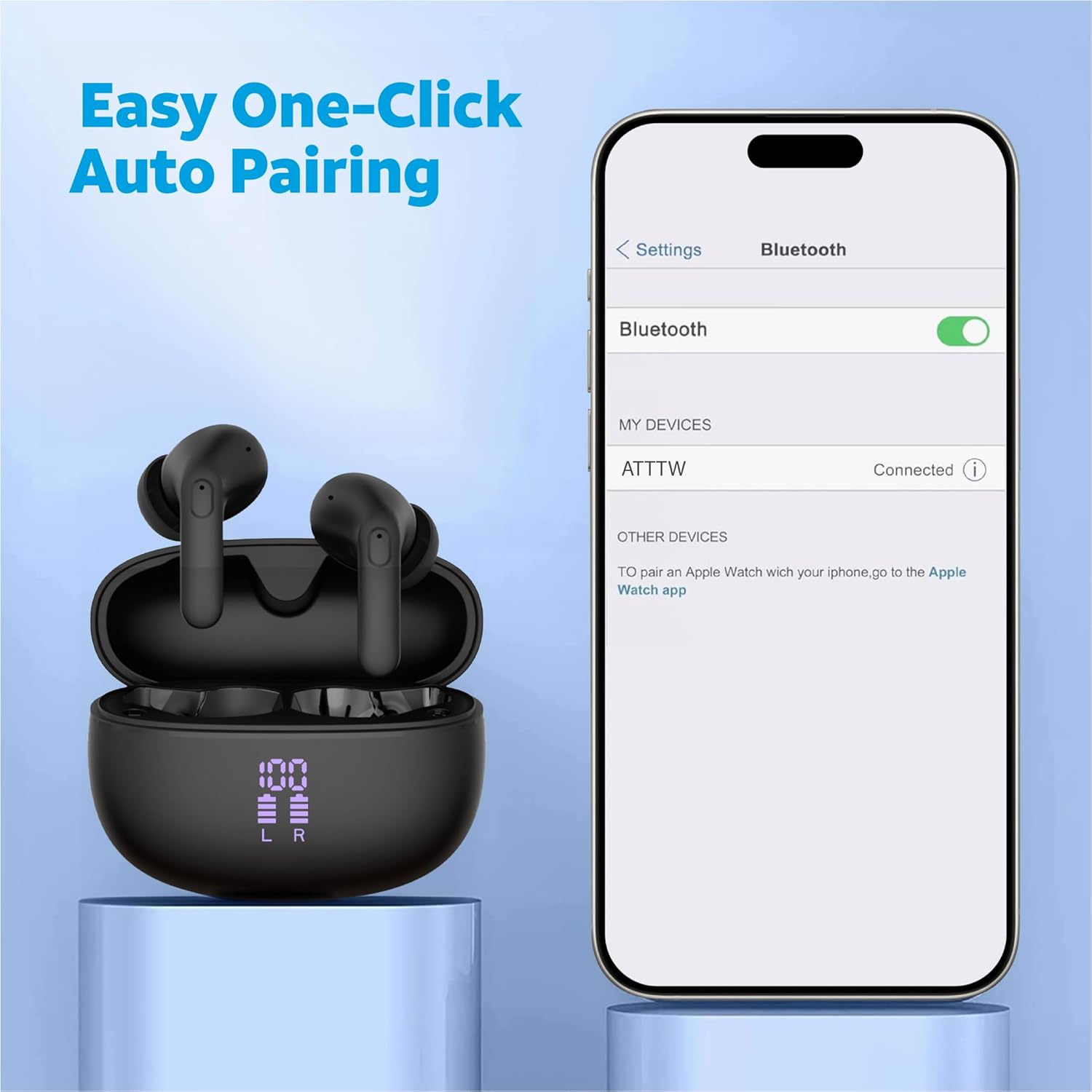
- Адкрыйце зарадны кейс. Навушнікі аўтаматычна пяройдуць у рэжым спалучэння.
- На вашай прыладзе (смартфоне, планшэце і г.д.) перайдзіце ў налады Bluetooth.
- Select "ATTTW" from the list of available devices.
- Once connected, a confirmation sound will play, and the device will show "Connected".

Image: The AT&T Essentials True Wireless Earbuds in their charging case are shown next to a smartphone screen displaying Bluetooth settings. The device name "ATTTW" is highlighted as connected, illustrating the pairing process.
Інструкцыя па эксплуатацыі
Разумнае сэнсарнае кіраванне
The earbuds feature responsive one-touch smart controls for easy management of audio playback and calls.
- Прайграванне/Паўза: Адзін націск на любы навушнік.
- Наступны трэк: Двойчы націсніце на правы навушнік-ўкладыш.
- Папярэдні трэк: Двойчы націсніце на левы навушнік-ўкладыш.
- Адказ/завяршэнне выкліку: Адно націсканне на любы навушнік падчас уваходнага або актыўнага званка.
- Адхіліць выклік: Падчас уваходнага званка націсніце і ўтрымлівайце любы з навушнікаў на працягу 2 секунд.
- Актываваць галасавы памочнік: Тройчы націсніце на любы навушнік.
Выява: Падрабязны view of an AT&T Essentials earbud, highlighting the touch control area with various icons representing functions like call management, music playback, and volume control, indicating its smart touch capabilities.
Падаўленне экалагічнага шуму (ENC)
The built-in quad environmental noise cancellation technology ensures your voice is clear during phone calls, even in noisy environments. This feature automatically activates during calls to filter out background noise.

Выява: Выбухнула view of an AT&T Essentials earbud, showcasing its internal components, including the speaker driver and circuitry. Text overlays indicate "Built-In Quad Environmental Noise Cancellation" and "Experience Crystal-Clear Calls and Immersive Sound with Advanced ENC Technology."
Тэхнічнае абслугоўванне і догляд
Правільнае абслугоўванне забяспечвае даўгавечнасць і аптымальную працу вашых навушнікаў-ўкладышаў.
- Уборка: Рэгулярна працірайце навушнікі і зарадны футляр мяккай, сухой тканінай без ворса. Не выкарыстоўвайце абразіўныя ачышчальнікі або растваральнікі.
- Парады для вушэй: Перыядычна здымайце вушныя насадкі і чысціце іх рэкламайamp тканінай. Перад тым, як зноў прымацаваць іх, пераканайцеся, што яны цалкам высахлі.
- Устойлівасць да вады і пылу: The earbuds and charging case are IPX4 rated, meaning they are resistant to splashing water from any direction. They are not waterproof and should not be submerged in water. Avoid exposure to excessive moisture or dust.
- захоўванне: Калі навушнікі не выкарыстоўваюцца, захоўвайце іх у зарадным чахле, каб абараніць і падтрымліваць зарад. Захоўвайце ў прахалодным, сухім месцы, удалечыні ад прамых сонечных прамянёў і экстрэмальных тэмператур.
Ліквідацыю непаладак
| праблема | Магчымая прычына | Рашэнне |
|---|---|---|
| Навушнікі не спалучаюцца | Навушнікі не ў рэжыме спалучэння; Bluetooth на прыладзе выключаны; раней спалучаная прылада перашкаджае працы. | Ensure earbuds are in case and lid is open. Turn Bluetooth off and on again on your device. Forget "ATTTW" from your device's Bluetooth list and re-pair. |
| Ніякага гуку з аднаго навушніка | Low battery; earbud not properly connected; earbud settings. | Place both earbuds back in the charging case, close the lid for 5 seconds, then open. Ensure both earbuds are charged. Check device audio balance settings. |
| Чахол для зарадкі не зараджаецца | Faulty cable or power adapter; dirty charging port. | Try a different USB-C cable and power adapter. Clean the charging port on the case gently with a dry cotton swab. |
| Дрэнная якасць выкліку | Environmental noise; earbud placement; weak Bluetooth connection. | Ensure earbuds are properly seated in your ears. Move closer to your connected device. Avoid extremely noisy environments if possible. |
Тэхнічныя характарыстыкі
| Асаблівасць | Дэталь |
|---|---|
| Назва мадэлі | True Wireless Comfort Fit Earbuds |
| Нумар мадэлі | 4130T |
| Тэхналогія падлучэння | Бесправадная сувязь (Bluetooth) |
| Battery Life (Listening Time) | Да 35 гадзін (з зарадным футлярам) |
| Кантроль шуму | Актыўнае шумапрыглушэнне (ENC для званкоў) |
| Узровень воданепранікальнасці | IPX4 (воданепранікальнасць) |
| Тып кіравання | Сэнсарнае кіраванне |
| АЧХ | 20 Гц - 20 кГц |
| Імпеданс | 140 Ом |
| Адчувальнасць | 80 дБ |
| Уключаныя кампаненты | Чахол для бесправадной зарадкі |
| Колер | Чорны |
| Вага прадмета | 2.64 унцыі |
| UPC | 849944091350 |
Гарантыя і падтрымка
For warranty information and technical support, please refer to the official AT&T Accessories webсайт або звярніцеся непасрэдна ў службу падтрымкі кліентаў. Захоўвайце пацвярджэнне пакупкі для прэтэнзій па гарантыі.
You can visit the AT&T Store online for more information: AT&T Store
Ask a question about this manual
Ask about setup, troubleshooting, compatibility, parts, safety, or missing instructions. Manuals+ will review the question and use this page’s manual context to help answer it.