
Уводзіны
The Xvive U9 Violin Wireless System provides a reliable 2.4GHz wireless connection for violins and violas, ensuring clear audio transmission with minimal latency. This system is designed for musicians seeking freedom of movement without compromising sound quality. This manual will guide you through the setup, operation, and maintenance of your Xvive U9 system.

Image: The Xvive U9 Violin Wireless System attached to a violin, showcasing its compact design and wireless capabilities.
Што ў скрынцы
Before you begin, please ensure all components are present in your Xvive U9 package:
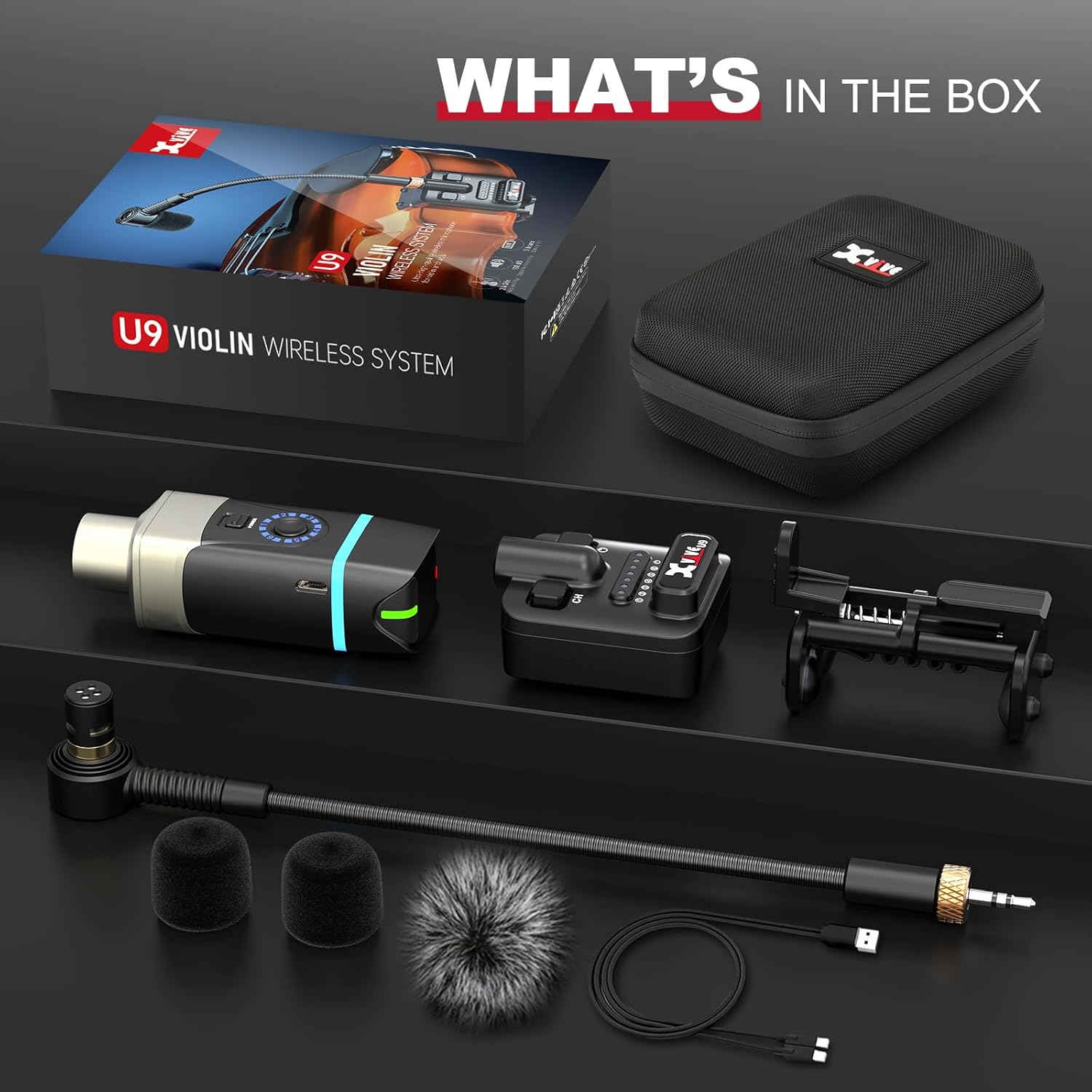
Image: All components of the Xvive U9 Violin Wireless System laid out, including the transmitter, receiver, microphone, clips, and charging cable.
- Xvive U9 Transmitter (x1)
- Xvive U9 Receiver (x1)
- Мікрафон (x1)
- Violin/Viola Clip (x1)
- Foam Windscreen (x2)
- Fur Windshield (x1)
- Кабель USB (x1)
- Carry Case (x1)
Інструкцыя па наладзе
- Зарадзіць адзінкі: Both the transmitter and receiver have built-in rechargeable Lithium Polymer batteries. Use the provided dual USB-C cable to charge both units simultaneously. A red light indicates low battery, and a solid light indicates charging.
- Падключыце мікрафон: Secure the microphone to your violin or viola using the adjustable clip. The clip is designed to securely attach to the instrument's side, preventing accidental falls.

Image: Close-up of the adjustable clip securing the microphone to the edge of a violin, showing the 30-40mm/1.18-1.57" adjustment range.
- Падключыце мікрафон да перадатчыка: Plug the microphone's 3.5mm jack into the input port on the Xvive U9 Transmitter.
- Падключыце прыёмнік да аўдыёпрылады: Plug the Xvive U9 Receiver into your desired audio input device, such as a vocal processor, ampліфёр або міксер.
- Уключэнне: Press and hold the power button on both the transmitter and receiver until the indicator lights illuminate.
- Выберыце канал: The transmitter has a channel switch button. Use this to select one of the available 6 channels. Ensure both the transmitter and receiver are set to the same channel for optimal connection. The system operates on the 2.4GHz ISM band for clear broadcasting.
For a visual guide on setup and initial testing, please refer to the official product video below:
Video: Official Xvive U9 Violin Wireless System demonstration, showing unboxing, setup, and sound test.
Інструкцыя па эксплуатацыі
Прадукцыйнасць бесправадной сувязі
The Xvive U9 system offers a working range of over 100 feet, providing ample freedom for live performances, presentations, or studio use. Its 2.4GHz operation ensures stable and clear signal integrity.

Image: A musician playing a violin equipped with the Xvive U9 system, highlighting the 90ft stable wireless transmission and 2.4G WiFi compatibility.
Low Latency Audio
Experience distraction-free performance with less than 5ms of latency. This ultra-low latency ensures that your audio feedback is instant and uncompromised, crucial for live playing.

Image: A close-up of a musician playing a violin with the Xvive U9 system, emphasizing the ultra-low 5ms latency and high audio quality (48 kHz, 24 bit, 108 dB SNR).
Характарыстыкі мікрафона
The system includes a supercardioid condenser microphone, designed to enhance the clarity and richness of your music. Its directional pickup pattern helps to isolate your instrument's sound while minimizing ambient noise.

Image: A diagram illustrating the supercardioid pickup pattern of the condenser microphone, along with its sensitivity (-45dB) and Max. SPL (142dB) specifications.
Тэхнічнае абслугоўванне
- Зарадка: Recharge the transmitter and receiver using the provided USB-C cable when the battery indicator shows low power. A full charge provides up to 5 hours of battery life.
- Уборка: Use a soft, dry cloth to clean the units. Do not use liquid cleaners or solvents. The included foam windscreens and fur windshield can be cleaned gently or replaced as needed to maintain sound quality.
- захоўванне: Store the system in its compact carry case when not in use to protect it from dust and physical damage.
Ліквідацыю непаладак
- Няма гуку: Ensure both the transmitter and receiver are powered on and set to the same channel. Check all cable connections. Verify the audio device input is correctly configured.
- Перашкоды/Слабы сігнал: The 2.4GHz band can be susceptible to interference from Wi-Fi routers or other wireless devices. Try switching to a different channel on both the transmitter and receiver. Ensure there are no large obstructions between the transmitter and receiver.
- Індыкацыя разраду батарэі: If the red lights appear on the units, recharge them using the dual USB-C cable.
Тэхнічныя характарыстыкі
| Асаблівасць | Спецыфікацыя |
|---|---|
| Назва мадэлі | U9 |
| Бесправадная частата | Дыяпазон ISM 2.4 ГГц |
| Працоўны дыяпазон | Over 100 feet (approx. 30 meters) |
| Затрымка | Менш за 5 мс |
| Тэрмін службы батарэі | Да 5 гадзін |
| Тып батарэі | Літый-палімерны (2 у камплекце) |
| Порт для зарадкі | USB-C |
| Сумяшчальныя прылады | Скрыпка, альт |
| Тып мікрафона | Supercardioid Condenser |
| Вага прадмета | 1.15 фунта |
| Памеры прадукту | 1 х 1 х 1 цалі |
Гарантыя і падтрымка
For warranty information, technical support, or any inquiries regarding your Xvive U9 Violin Wireless System, please refer to the official Xvive website or contact Xvive customer service directly. Keep your proof of purchase for warranty claims.