
1. Уводзіны
This manual provides detailed instructions for setting up, operating, and maintaining your Mercusys MR27BE BE3600 Dual-Band Wi-Fi 7 Router. The MR27BE is designed to deliver high-speed wireless connectivity with Wi-Fi 7 technology, featuring dual-band operation and multiple high-speed Ethernet ports for a robust home or small office network.
2. Змесціва ўпакоўкі
Пераканайцеся, што ваш пакет змяшчае наступныя элементы:
- Mercusys MR27BE Wi-Fi 7 Router
- Адаптар сілкавання
- Кабель Ethernet
- Кіраўніцтва па хуткай ўстаноўцы

This image displays the retail packaging for the Mercusys MR27BE BE3600 Dual Band Wi-Fi 7 Router, highlighting key features and branding.
3. Фізічны канецview
3.1 Задняя панэль
The rear panel of the MR27BE router features various ports and buttons for connectivity and control.
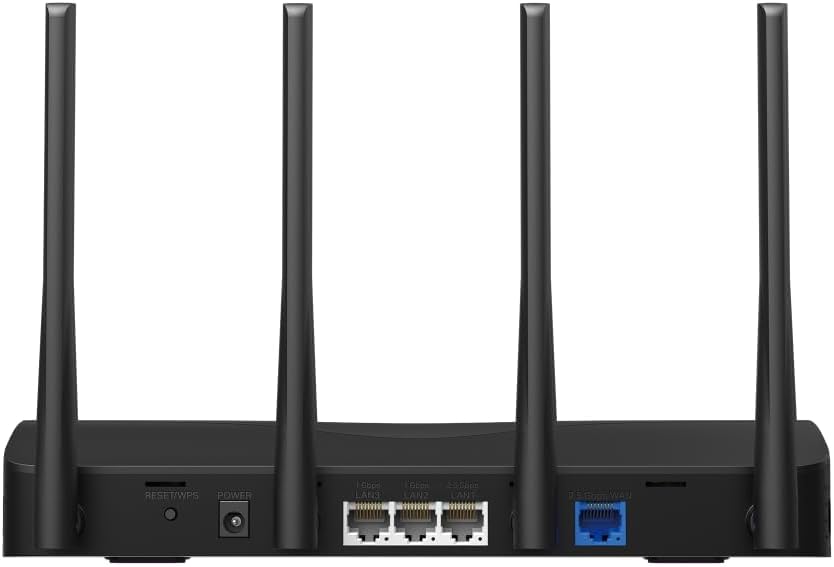
This image displays the rear panel of the MR27BE router, highlighting the 2.5 Gbps WAN port (blue), 2.5 Gbps LAN port, two 1 Gbps LAN ports, the Reset/WPS button, and the power input.
- Порт харчавання: Падключыце сюды прадастаўлены адаптар сілкавання.
- Кнопка скіду/WPS: Press and hold for 1 second to activate WPS. Press and hold for more than 5 seconds to factory reset the router.
- LAN Ports (1 Gbps): Two Gigabit Ethernet ports for connecting wired devices.
- LAN Port (2.5 Gbps): One 2.5 Gigabit Ethernet port for high-speed wired connections.
- WAN-порт (2.5 Гбіт/с): One 2.5 Gigabit Ethernet port for connecting to your modem or internet service provider's (ISP) network.
3.2 Асноўныя магчымасці
The MR27BE router incorporates advanced features for enhanced network performance.

This graphic illustrates key features of the MR27BE, including its Wi-Fi 7 capabilities, the presence of 2x 2.5 Gbps ports and 2x Gigabit ports, four omni-directional high-gain antennas, EasyMesh compatibility, and easy app control.

This image demonstrates the speed performance of the MR27BE router, indicating up to 2880 Mbps on the 5 GHz band and 688 Mbps on the 2.4 GHz band, showcasing its Wi-Fi 7 capabilities.
4. Настройка
4.1 Падлучэнне абсталявання
- Выключэнне: Disconnect the power from your modem (if applicable).
- Падключэнне да WAN-порта: Connect one end of the Ethernet cable to your modem's Ethernet port and the other end to the blue 2.5 Gbps WAN port on your MR27BE router.
- Падключыце харчаванне: Connect the power adapter to the router's Power port and plug it into an electrical outlet.
- Уключэнне: Wait for the router to power on completely. The LED indicator should turn solid green.
- Падключэнне прылад (неабавязкова): For wired devices, connect an Ethernet cable from your computer or other device to one of the yellow LAN ports on the router.

This image shows the 2.5 Gbps ports of the MR27BE router in use, illustrating connections for 2.5 Gbps wired devices and multi-gig internet access, emphasizing high-performance networking.
4.2 Пачатковая канфігурацыя
You can configure your router using the MERCUSYS app or a web браўзер.
Using the MERCUSYS App:
- Download the MERCUSYS app from the App Store or Google Play.
- Connect your smartphone to the router's default Wi-Fi network (SSID and password are on the label at the bottom of the router).
- Open the MERCUSYS app and follow the on-screen instructions to complete the setup.
Выкарыстоўваючы а Web Браўзэр:
- Connect your computer to the router via an Ethernet cable or the default Wi-Fi network.
- Адкрыйце a web браўзэр і ўвядзіце
mwlogin.netor192.168.1.1у адрасны радок. - Стварыце пароль для ўваходу, калі будзе прапанавана.
- Follow the Quick Setup wizard to configure your internet connection and Wi-Fi settings.
5. Кіраванне маршрутызатарам
5.1 Падключэнне прылад
- Бесправадныя прылады: Пошук your Wi-Fi network name (SSID) on your device and enter the Wi-Fi password you set during setup.
- Правадныя прылады: Connect an Ethernet cable from your device to any available LAN port on the router.
5.2 Сумяшчальнасць з EasyMesh
The MR27BE router supports EasyMesh, allowing you to create a seamless whole-home Wi-Fi network by adding compatible EasyMesh range extenders or other routers.

This diagram visually explains how the EasyMesh system, compatible with the MR27BE router, can expand Wi-Fi coverage throughout an entire home, ensuring seamless connections.
To set up an EasyMesh network, refer to the instructions provided with your EasyMesh compatible devices or the MERCUSYS app.
5.3 Advanced Settings (via Web Інтэрфейс)
Доступ да web інтэрфейс (mwlogin.net) каб наладзіць дадатковыя параметры, такія як:
- Гасцявая сетка: Create a separate Wi-Fi network for guests.
- Бацькоўскі кантроль: Кіраваць доступам у Інтэрнэт для пэўных прылад.
- Бяспека сеткі: Configure firewall rules and access control.
- Рэжым працы: Switch between Router, Access Point, or Range Extender modes.
6. Тэхнічнае абслугоўванне
6.1 Абнаўленне прашыўкі
Regularly updating the router's firmware ensures optimal performance and security. You can check for updates via the MERCUSYS app or the web interface under System Tools > Firmware Upgrade.
6.2 Перазагрузка маршрутызатара
If you experience network issues, a simple restart can often resolve them. You can restart the router via the MERCUSYS app, the web interface, or by unplugging and replugging the power adapter.
6.3 Скід да заводскіх налад
A factory reset will restore the router to its default settings. This can be done by pressing and holding the Reset/WPS button on the rear panel for more than 5 seconds until the LED blinks rapidly, or via the web interface under System Tools > Factory Defaults.
7. Выпраўленне непаладак
7.1 Няма доступу да Інтэрнэту
- Check all cable connections, especially the WAN port connection to your modem.
- Пераканайцеся, што ваш мадэм працуе правільна.
- Перазагрузіце і мадэм, і маршрутызатар.
- Праверце налады інтэрнэту ў маршрутызатары web інтэрфейс.
7.2 Праблемы з сігналам Wi-Fi
- Ensure the router is placed in a central location, away from obstructions and interference sources (e.g., microwaves, cordless phones).
- Наладзьце антэны маршрутызатара для аптымальнага пакрыцця.
- Consider using EasyMesh compatible devices to extend coverage in larger homes.
7.3 Forgotten Wi-Fi Password or Login Password
- Пароль Wi-Fi па змаўчанні знаходзіцца на налепцы ў ніжняй частцы маршрутызатара.
- If you changed it and forgot, you will need to perform a factory reset to restore default settings, then reconfigure the router.
8. Тэхнічныя характарыстыкі
| Назва мадэлі | MR27BE |
| бесправадной стандарт | 802.11be (Wi-Fi 7) |
| Клас дыяпазону частот | Двухдыяпазонны |
| Порт WAN | 1x 2.5 Gbps WAN Port |
| Парты LAN | 1x 2.5 Gbps LAN Port, 2x 1 Gbps LAN Ports |
| Асаблівасць | Сумяшчальны з EasyMesh |
| Памеры прадукту | 7.87 х 5.91 х 3.94 цалі |
| Вага прадмета | 2.23 фунта |
| Уключаныя кампаненты | MR27BE, Power Adapter, instruction manual |
9. Падтрымка
For technical support, warranty information, or further assistance, please visit the official Mercusys website or contact Mercusys customer support.
- Афіцыйны прадстаўнік Mercusys Webсайт: www.mercusys.com
- Refer to the Quick Installation Guide for initial setup and contact details.