
AWEI KA26
AWEI Portable Bluetooth Speaker User Manual
Мадэль: KA26
Уводзіны
Thank you for choosing the AWEI Portable Bluetooth Speaker. This speaker is designed to provide high-quality stereo sound with the convenience of wireless Bluetooth 5.0 connectivity. It features a unique rotatable disc for decompression, offering various soothing sounds, and supports multiple play modes including TF card, AUX, and FM radio. Its portable and waterproof design makes it suitable for various environments, from home to outdoor activities.

Image: The AWEI Portable Bluetooth Speaker, showcasing its unique phonograph-style design with a rotatable disc.
Што ў скрынцы
Калі ласка, праверце змесціва пакета пасля распакавання:
- 1 x AWEI Portable Bluetooth Speaker (Model: KA26)
- 1 х зарадны кабель Type-C
- 1 х Кароткае кіраўніцтва
Прадукт скончаныview
Азнаёмцеся з кампанентамі і элементамі кіравання дынамікам.

Image: A top-down perspective of the AWEI speaker, highlighting the central rotatable disc and the adjacent control buttons for various functions.
Асноўныя характарыстыкі:
- Rotatable Disc: For accessing 12 soothing sounds and decompression features.
- Кнопкі кіравання: Power, Volume Up/Down, Play/Pause, Mode selection.
- Падлучэння Парты: TF card slot, 3.5mm AUX jack, Type-C charging port.
- Убудаваны мікрафон: Для званкоў па гучнай сувязі.
- Рашотка дынаміка: Durable fabric covering the speaker drivers.
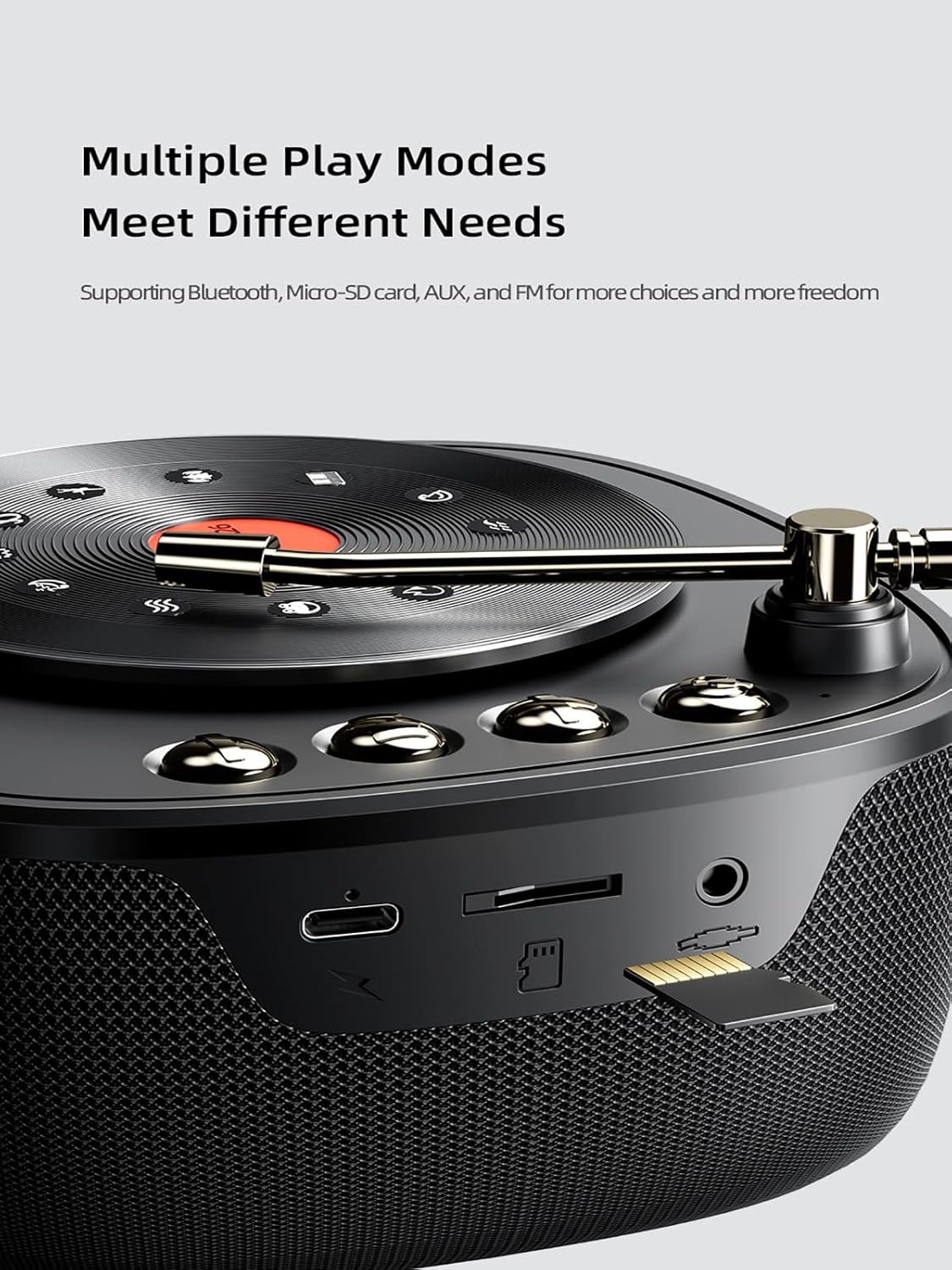
Выява: буйны план view of the speaker's side, illustrating the various input ports including the TF card slot, AUX input, and Type-C charging port, indicating its versatile connectivity options.

Выява: Унутраная view of the speaker's diaphragm and horn, emphasizing the components responsible for delivering high-fidelity stereo sound and vigorous bass.
Настройка
1. Зарадка дынаміка
Before first use, fully charge the speaker. Connect the provided Type-C charging cable to the speaker's charging port and the other end to a USB power adapter (not included) or a computer's USB port. The charging indicator light will show charging status and turn off when fully charged.
2. Уключэнне / выключэнне харчавання
- Уключэнне: Націсніце і ўтрымлівайце кнопку харчавання прыблізна 3 секунды, пакуль не пачуеце гукавое паведамленне.
- Выключэнне: Націсніце і ўтрымлівайце кнопку харчавання прыблізна 3 секунды, пакуль не пачуеце гукавое паведамленне.
Інструкцыя па эксплуатацыі
1. Спарванне Bluetooth
- Пераканайцеся, што дынамік уключаны і знаходзіцца ў рэжыме спалучэння Bluetooth (гэта пазначана міргаючым святлодыёдам).
- На вашай прыладзе (смартфоне, планшэце, камп'ютары) уключыце Bluetooth.
- Пошук "AWEI KA26" or similar in the list of available Bluetooth devices.
- Select "AWEI KA26" to connect. Once connected, the LED indicator will stop flashing, and you will hear a confirmation sound.
Пры ўключэнні дынамік аўтаматычна паспрабуе падключыцца да апошняй спалучанай прылады.
2. Падключэнне True Wireless Stereo (TWS)
For an enhanced stereo experience, you can connect two AWEI KA26 speakers together.
- Пераканайцеся, што абодва дынамікі ўключаны і не падключаны да іншай прылады Bluetooth.
- On one speaker (this will be the primary speaker), double-press the Power button (or a dedicated TWS button if available, refer to quick start guide). The speaker will enter TWS pairing mode.
- Два дынамікі аўтаматычна пачнуць пошук і падключэнне адзін да аднаго. Пасля падключэння вы пачуеце гук пацверджання.
- Now, connect your device to the primary speaker via Bluetooth as described in "Bluetooth Pairing" above. Audio will play through both speakers, creating a stereo soundstage.

Image: A visual representation of two AWEI speakers wirelessly linked to a tablet, demonstrating the True Wireless Stereo (TWS) connection for immersive 3D surround sound.
3. Прайграванне музыкі
- Рэжым Bluetooth: After successful pairing, play audio from your connected device. Use the speaker's Play/Pause button to control playback, and Volume Up/Down buttons to adjust volume.
- Рэжым карты TF: Insert a TF (Micro-SD) card with audio fileУстаўце карту памяці ў слот для карты памяці TF. Дынамік аўтаматычна пераключыцца ў рэжым карты памяці TF і пачне прайграванне.
- AUX рэжым: Connect an audio device using a 3.5mm audio cable (not included) to the AUX input port. The speaker will automatically switch to AUX mode.
- Рэжым FM -радыё: Press the Mode button to cycle through available modes until you reach FM radio. Use the Play/Pause button to auto-scan for stations, and Volume Up/Down buttons to navigate between stations.
4. Rotatable Disc and Soothing Sounds
The unique rotatable disc on top of the speaker provides access to 12 soothing sounds designed for relaxation and decompression.

Выява: Падрабязны view of the speaker's rotatable turntable, displaying icons representing the 12 soothing sounds available for selection, such as Music Box, Alpha Brainwave, Drizzle, Cricket, Rivulet, Frog, Bell, Sea Wave, White Noise, Warble, Piano, and Bonfire.
To activate and select sounds:
- Gently rotate the disc to cycle through the available soothing sounds.
- The speaker will play the selected sound.
- One of the sounds is "White Noise," which can aid in relaxation and sleep.

Image: A person sleeping soundly, with the AWEI speaker placed on a bedside table, illustrating the speaker's function in providing white noise or other soothing sounds to aid in sleep and relaxation.
5. Гучная сувязь
When connected to a smartphone via Bluetooth, the speaker's built-in microphone allows for hands-free calling.
- Адказаць на званок: Націсніце кнопку прайгравання/паўзы адзін раз, каб адказаць на ўваходны званок.
- Завяршыць выклік: Націсніце кнопку прайгравання/паўзы адзін раз падчас размовы, каб завяршыць яе.
- Адхіліць выклік: Націсніце і ўтрымлівайце кнопку прайгравання/паўзы на працягу 2 секунд, каб адхіліць уваходны званок.
Тэхнічнае абслугоўванне
- Уборка: Выкарыстоўвайце мяккую сухую тканіну для працірання паверхні дынаміка. Не выкарыстоўвайце абразіўныя ачышчальнікі, спірт або хімічныя растваральнікі.
- захоўванне: Захоўвайце дынамік у прахалодным, сухім месцы, удалечыні ад прамых сонечных прамянёў і экстрэмальных тэмператур.
- Воданепранікальнасць: While the speaker is waterproof, avoid submerging it for extended periods or exposing it to high-pressure water jets. Ensure the charging port cover is securely closed when near water.
- Сыход за батарэяй: Каб падоўжыць тэрмін службы батарэі, пазбягайце частай поўнай разрадкі батарэі. Рэгулярна зараджайце дынамік, нават калі ён не выкарыстоўваецца працяглы час.
Ліквідацыю непаладак
| праблема | Магчымае рашэнне |
|---|---|
| Дынамік не ўключаецца. | Пераканайцеся, што дынамік зараджаны. Падключыце да крыніцы харчавання і паспрабуйце яшчэ раз. |
| Немагчыма спалучыцца з прыладай Bluetooth. |
|
| Няма гуку або нізкі ўзровень гучнасці. |
|
| Памылка падключэння TWS. |
|
Тэхнічныя характарыстыкі
| Асаблівасць | Дэталь |
|---|---|
| Назва мадэлі | Bluetooth Speaker KA26 |
| Версія Bluetooth | 5.0 |
| Далёкасць бесправадной сувязі | Да 33 футаў (10 метраў) |
| Выходная магутнасць дынаміка | 12 ват |
| Ёмістасць батарэі | Літый-палімерны ёмістасцю 1200 мАг |
| Час гульні | Да 7 гадзін (пры гучнасці 60%) |
| Порт для зарадкі | Тып-C |
| Памеры (Д x Ш x В) | 4.9 цалі х 7.3 цалі х 4.9 цалі (12.4 см х 18.5 см х 12.4 см) |
| Вага прадмета | 1.39 фунта (0.63 кілаграма) |
| Узровень воданепранікальнасці | Воданепранікальны |
| Рэжым выхаду гуку | Стэрэа |
| Параметры падлучэння | Bluetooth, Micro-SD (TF) Card, AUX, FM Radio |
| Асаблівасць | Rotatable disc with 12 soothing sounds |

Image: The AWEI speaker on a wooden table, with an overlay indicating its 1200mAh Li-Polymer battery and up to 7 hours of play time, highlighting its long-lasting companionship.
Гарантыя і падтрымка
The AWEI Portable Bluetooth Speaker comes with a 2-year warranty from the date of purchase, covering manufacturing defects. For warranty claims or technical support, please contact AWEI customer service through their official webсайт або прадаўца, дзе быў набыты прадукт. Калі ласка, захавайце пацвярджэнне пакупкі для пацверджання гарантыі.
For further assistance, you may visit the AWEI Store on Amazon: AWEI Official Store
Ask a question about this manual
Ask about setup, troubleshooting, compatibility, parts, safety, or missing instructions. Manuals+ will review the question and use this page’s manual context to help answer it.