
1. Уводзіны
The DALY Smart Active Balance BMS is a sophisticated Battery Management System designed to protect and optimize the performance of Li-ion, LiFePO4, and LTO battery packs. This model supports 4 to 8 series cells (4S-8S) with a 400A charge/discharge current and features 1A active balancing. It includes built-in Bluetooth for monitoring and communication interfaces like RS485 and CAN, ensuring comprehensive battery management and data accessibility.
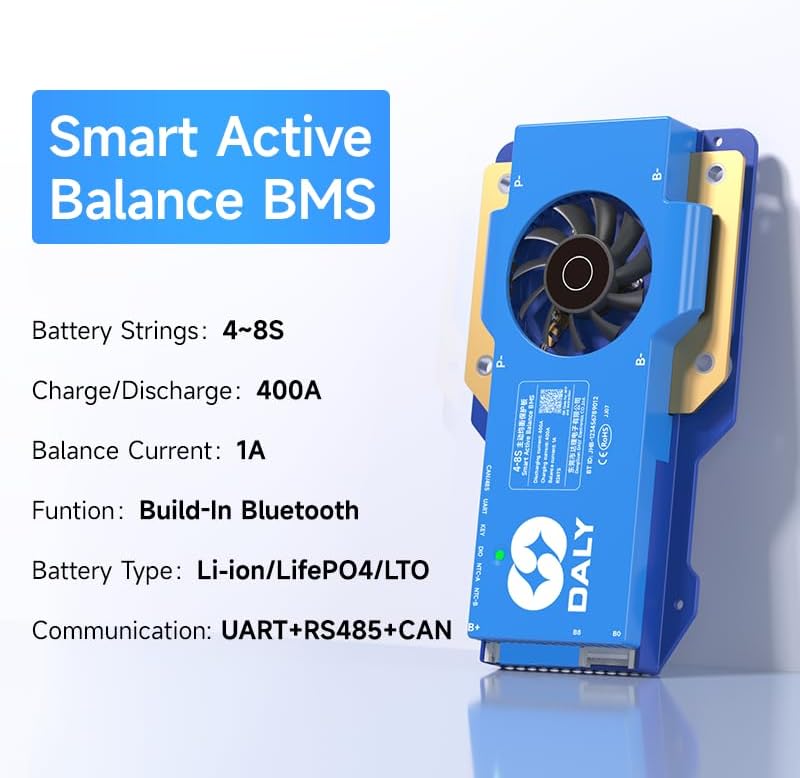
Image 1.1: DALY Smart Active Balance BMS highlighting 4S-8S, 400A, 1A balance, Bluetooth, UART+RS485+CAN.
2. Інфармацыя па бяспецы
Please read and understand all safety instructions before installing or operating the DALY Smart Active Balance BMS. Failure to follow these instructions may result in electric shock, fire, or serious injury.
- Always disconnect power from the battery pack before performing any installation, maintenance, or wiring changes.
- Ensure correct polarity when connecting the BMS to the battery pack. Incorrect wiring can cause severe damage to the BMS and battery.
- Do not short-circuit the battery terminals or the BMS connection points.
- Install the BMS in a well-ventilated area, away from flammable materials and direct sunlight.
- Avoid exposing the BMS to moisture, dust, or extreme temperatures.
- Калі вы не ўпэўненыя ў якіх-небудзь кроках, звярніцеся да кваліфікаванага спецыяліста па ўсталёўцы.
- Use appropriate personal protective equipment (PPE) such as insulated gloves and safety glasses during installation.
3. Прадукт скончыўсяview
The DALY Smart Active Balance BMS provides comprehensive protection and management for your battery system. Key features include:
- Cell Compatibility: Supports 4 to 8 series (4S-8S) Li-ion, LiFePO4, and LTO battery types.
- Высокая магутнасць току: Rated for 400A continuous charge and discharge current.
- Active Balancing: Features 1A active balancing to equalize cell voltages, extending battery life and performance.
- Разумны маніторынг: Integrated Bluetooth for real-time monitoring via a mobile application.
- Інтэрфейсы сувязі: Equipped with UART, RS485, and CAN ports for versatile system integration and data logging.
- Некалькі абарон: Includes overcharge, over-discharge, overcurrent, short circuit, and high-temperature shutdown protections.
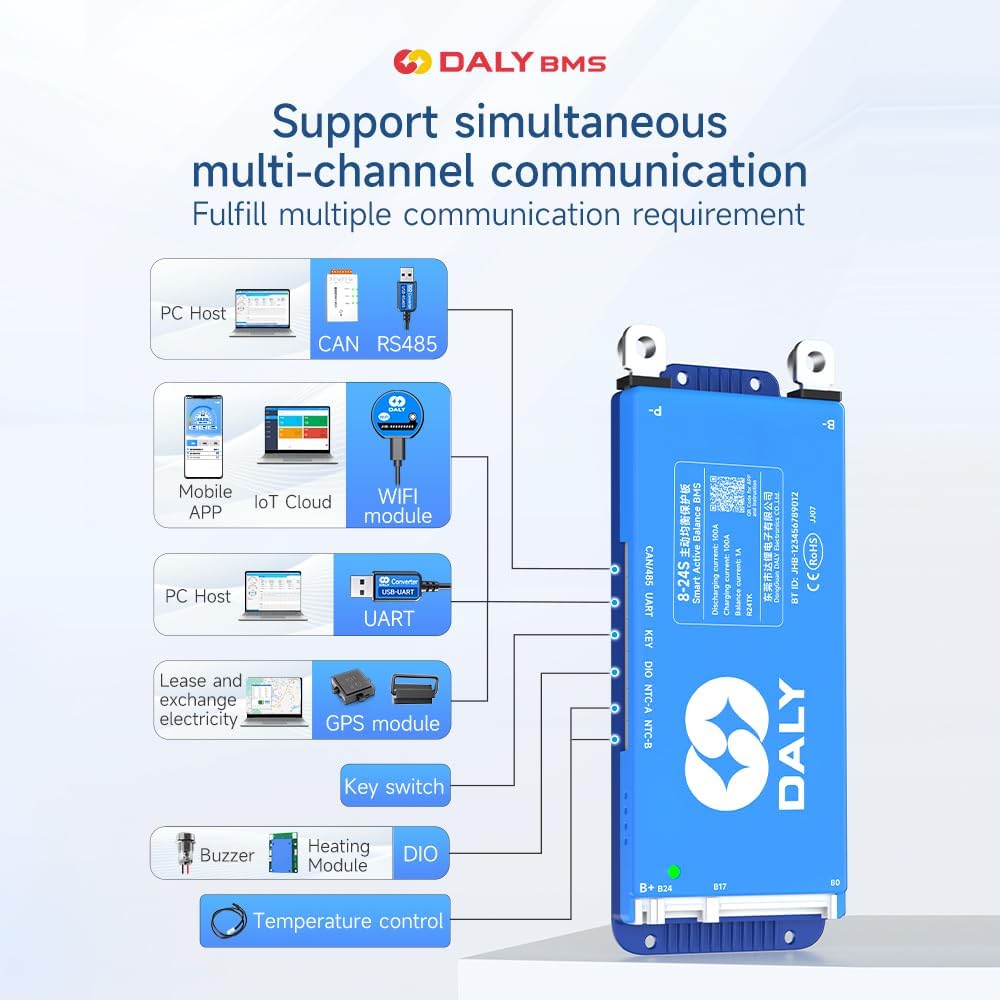
Image 3.1: Diagram illustrating the DALY BMS's support for multi-channel communication including PC Host (CAN, RS485, UART), Mobile APP (Bluetooth, WiFi module), GPS module, Key switch, Buzzer, Heating Module, and DIO for temperature control.
4. Упаковачны ліст
Калі ласка, пераканайцеся, што ўсе пералічаныя ніжэй прадметы ўваходзяць у ваш пакет:
- Smart Active Balance BMS (1 unit)
- P-&B- cable (1 set)
- Screws (2 Pcs)
- Sampling cable (1 set)
- B+ cable (1 unit)
- NTC Temperature Sensor (One standard, two optional)
- Кіраўніцтва карыстальніка (1 асобнік)
- Упаковачная скрынка (1 адзінка)
- RS485/CAN port cable (1 unit)

Image 4.1: Visual representation of the DALY BMS package contents, including the BMS unit, various cables, screws, NTC sensor, and user manual.
5. Настройка і ўстаноўка
Proper installation is crucial for the safe and efficient operation of your BMS. Follow these steps carefully:
5.1 Праверкі перад устаноўкай
- Ensure your battery pack matches the BMS specifications (4S-8S, Li-ion/LiFePO4/LTO).
- Verify all battery cells are balanced and within a healthy voltage range before connecting the BMS.
- Збярыце ўсе неабходныя інструменты і кампаненты.
5.2 Правадныя злучэнні
Важна: Connect the balance wires first, then the main power cables. Disconnect in reverse order.
- Balance Wire Connection: Злучыць сampling cable to each cell's positive terminal, starting from B- (0V) up to B+ (total voltage). Ensure the sequence is correct.
- B- Connection: Connect the main negative terminal of the battery pack to the B- port on the BMS.
- P- Connection: Connect the negative terminal of your load/charger to the P- port on the BMS.
- B+ Connection: Connect the main positive terminal of the battery pack to the B+ port on the BMS.
- Парты сувязі: Connect RS485, CAN, or UART cables as required for external communication or monitoring.
- Датчык NTC: Attach the NTC temperature sensor to a central cell or area within the battery pack to monitor temperature.

Image 5.1: Wiring diagram for BMS pre-charge protection, showing connections to the battery pack.

Image 5.2: Illustration of BMS misconnection protection, highlighting correct balance wire connections.

Image 5.3: Diagram showing how to connect multiple BMS units in parallel for increased capacity.

Image 5.4: Comprehensive wiring diagram for all-in protection, including main power and balance connections.
5.3 Усталёўка прыкладання
Download the "BalanceBMS" app from your device's app store (available on iOS and Android) to monitor and configure your BMS via Bluetooth.
6. Інструкцыя па эксплуатацыі
Once installed, the DALY Smart Active Balance BMS operates automatically to protect your battery. For monitoring and advanced settings, use the mobile application or a PC connection.
6.1 Bluetooth Monitoring (Mobile App)
- Пераканайцеся, што Bluetooth уключаны на вашым смартфоне.
- Open the "BalanceBMS" application.
- The app will scan for nearby DALY BMS devices. Select your BMS from the list to connect.
- Пасля падключэння вы можаце view real-time data such as individual cell voltages, total battery voltage, charge/discharge current, temperature, and battery state of charge (SOC).
- The app also allows for basic parameter adjustments and viewing of protection status.
6.2 PC Monitoring and Configuration (UART/RS485/CAN)
For detailed configuration and data logging, connect the BMS to a PC using a compatible UART, RS485, or CAN adapter. DALY provides dedicated PC software for these connections, allowing for:
- Advanced parameter settings (e.g., over-voltagе, пад-абtage thresholds, balancing current).
- Detailed data logging and analysis.
- Абнаўленне прашыўкі.
7. Тэхнічнае абслугоўванне
Regular maintenance ensures the longevity and optimal performance of your DALY BMS and battery pack.
- Візуальны агляд: Periodically inspect all wiring and connections for signs of wear, corrosion, or looseness. Ensure all screws are tightened.
- Маніторынг: Regularly check battery parameters via the "BalanceBMS" app or PC software. Pay attention to cell voltage differences, temperatures, and any active protection alerts.
- Уборка: Keep the BMS unit clean and free from dust and debris. Use a dry, soft cloth for cleaning. Do not use liquids or abrasive cleaners.
- Асяроддзе: Ensure the BMS is operating within its specified temperature range and in a dry environment.
8. Выпраўленне непаладак
If you encounter issues with your DALY Smart Active Balance BMS, refer to the following common problems and solutions:
| праблема | Магчымая прычына | Рашэнне |
|---|---|---|
| BMS not powering on / No output | Main power cables incorrectly connected or loose. Battery voltagе занадта нізка. | Check B- and P- connections. Verify battery voltage is above the under-voltagе ахоўны парог. |
| Cells are not balancing | Balance wires incorrectly connected or damaged. Balancing function disabled in settings. | Inspect balance wire connections for correct sequence and integrity. Check BMS settings via app/PC software to ensure active balancing is enabled. |
| Праблемы з падключэннем Bluetooth | Bluetooth disabled on phone. App not installed correctly. BMS too far from device. | Ensure phone Bluetooth is on. Reinstall "BalanceBMS" app. Move closer to the BMS. Restart BMS (if possible) and phone. |
| Overcharge/Over-discharge protection triggered frequently | Зарадная прылада выпtage too high/low. Load drawing too much current. Battery capacity degradation. | Праверце гучнасць зараднай прыладыtage and current settings. Reduce load. Check individual cell health. Adjust protection parameters via app/PC software if appropriate for your battery type. |
| BMS gets hot during operation | High current draw. Poor ventilation. Internal fault. | Ensure adequate ventilation around the BMS. Reduce continuous current if possible. If overheating persists at normal loads, contact support. |
If the problem persists after attempting these solutions, please contact DALY customer support for further assistance.
9. Тэхнічныя характарыстыкі
Detailed technical specifications for the DALY Smart Active Balance BMS 400A (4S-8S):
| Асаблівасць | Спецыфікацыя |
|---|---|
| Марка | DALY |
| Нумар мадэлі | R24TS-400A |
| Battery Series Support | 4S-8S |
| Сумяшчальнасць тыпу батарэі | Li-ion, LiFePO4, LTO |
| Continuous Charge/Discharge Current | 400А |
| Active Balance Current | 1A |
| Уваходны кнtagе далёкасць | 12V-24V (Nominal, dependent on cell configuration) |
| Інтэрфейсы сувязі | Built-in Bluetooth, UART, RS485, CAN |
| Памеры прадмета (Д х Ш х У) | 7.72 х 4.29 х 1.02 цалі |
| Вага прадмета | 660 грам |
| Вытворца | Dongguan Daly Electronics Co., Ltd |

Image 9.1: Table showing various DALY BMS models with their current ratings, sizes, and cable specifications, applicable for 4S-24S configurations.
10. Гарантыя і падтрымка
10.1 Гарантыя вытворцы
The DALY Smart Active Balance BMS 400A (4S-8S) comes with a 3-гадовая гарантыя ад вытворцыГэтая гарантыя распаўсюджваецца на дэфекты матэрыялаў і вырабу пры нармальным выкарыстанні. Калі ласка, захавайце пацвярджэнне пакупкі для прэтэнзій па гарантыі.
10.2 Падтрымка кліентаў
For technical assistance, troubleshooting, or warranty inquiries, please refer to the following resources:
- Мабільнае прыкладанне: The "BalanceBMS" app often contains helpful guides and FAQs.
- Інтэрнэт-рэсурсы: Visit the official DALY webсайт з дакументацыяй па прадуктах і падтрымкай.
- Звярніцеся ў службу падтрымкі: For direct support, please reach out to DALY customer service. Contact information can typically be found on the product packaging or the official DALY webсайт.