
AT&T EL51503
AT&T EL51503 DECT 6.0 Cordless Home Phone User Manual
Мадэль: EL51503
Уводзіны
Welcome to your new AT&T EL51503 DECT 6.0 Cordless Home Phone system. This manual provides comprehensive instructions for setting up, operating, and maintaining your phone system. Designed for busy households, this system offers clear, interference-free communication with advanced features.

Image: The AT&T EL51503 cordless phone system, showing the main base unit with one handset and four additional charging cradles with handsets.
Асноўныя характарыстыкі
Your AT&T EL51503 cordless phone system comes equipped with several features designed for convenience and clarity.
Backlit Screen & Lighted Keypad

High-contrast text on the white backlit screen ensures easy readability of incoming caller ID or call history records. The lighted handset keypad allows for effortless dialing even in low-light conditions.
Вельмі вялікі дысплей

The large screen makes it easy to read information at a glance, improving user experience for all.
Вялікія гузікі

Featuring large font and extra-large backlit keys, this design is particularly helpful for users with visual impairments, ensuring comfortable and accurate dialing.
Тэхналогія DECT 6.0
This cordless telephone transmits secure signals via DECT 6.0 channel, ensuring crystal clear sounds, interference-free communication, and a stable operation range up to 1000 ft outdoors.
Што ў скрынцы
Пераканайцеся, што ў вашай пасылцы ёсць усе пералічаныя ніжэй прадметы:
- 1 Базавая адзінка
- 5 Трубкі
- 4 Adaptors (for charging cradles)
- 5 акумулятара
- 1 тэлефонны шнур
- Кароткае кіраўніцтва
Настройка
1. Устаноўка батарэі
Each handset requires a battery pack for operation. Ensure correct polarity when inserting.
- Адкрыйце крышку батарэйнага адсека на задняй панэлі трубкі.
- Шчыльна падключыце раз'ём акумулятарнай батарэі да гнязда ўнутры адсека.
- Змесціце акумулятарную батарэю ў адсек.
- Зачыніце крышку батарэйнага адсека.
2. Зарадка тэлефонаў
For optimal performance, charge each handset for at least 16 hours before initial use.
- Place each handset face forward into its respective charging cradle or the main base unit.
- The CHARGE light on the handset will illuminate, indicating proper charging.
3. Падключэнне базавага блока
Connect the base unit to a power outlet and your telephone line.
- Plug the large end of the power adapter into an electrical outlet not controlled by a wall switch.
- Plug the small end of the power adapter into the POWER jack on the back of the base unit.
- Падключыце адзін канец тэлефоннага шнура да раздыма TEL LINE на задняй панэлі базавага блока.
- Падключыце другі канец тэлефоннага шнура да тэлефоннай разеткі.
Важна: Use only the power adapter and telephone line cord provided with this product.
Operating Your Phone System
Здзяйсненне і адказ на званкі
- To make a call: Press ТЕЛЕФОН / ФЛЕШ or СПІКЕР, а затым набярыце нумар.
- To answer a call: Press ТЕЛЕФОН / ФЛЕШ or СПІКЕР калі званіць тэлефон.
- Каб завяршыць выклік: націсніце ВЫКЛ/АДМЕНА or place the handset back in the cradle.
Выкарыстанне гучнай сувязі
The simulated full-duplex speakerphone allows for natural, two-way conversations.
- Падчас размовы націсніце СПІКЕР каб пераключыцца ў рэжым гучнай сувязі.
- Прэса СПІКЕР again to switch back to handset mode, or press ВЫКЛ/АДМЕНА каб завяршыць выклік.
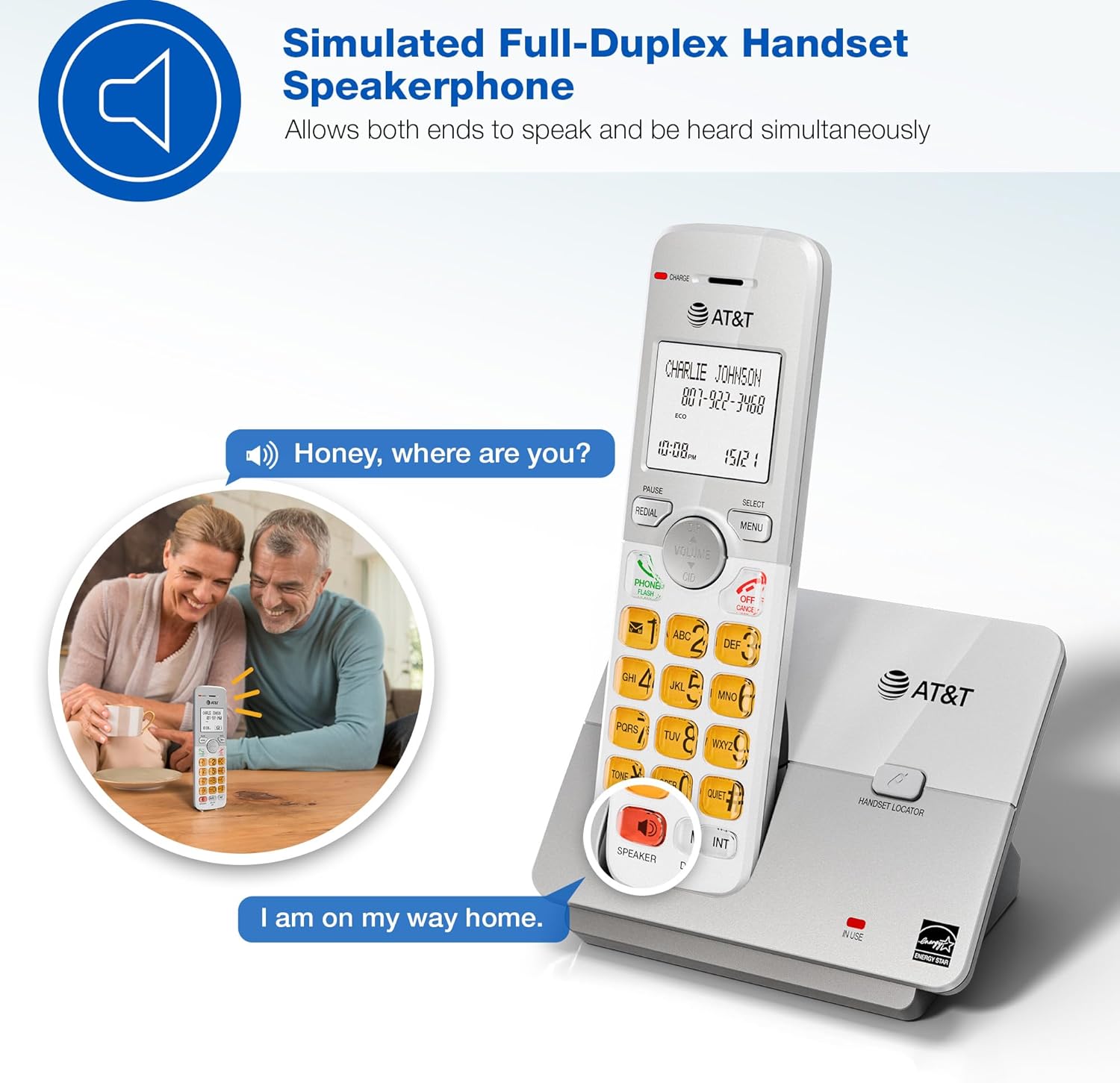
Image: A couple smiling while using the phone's speakerphone feature, demonstrating simultaneous speaking and hearing.
Тэлефонная кніга
Захоўвайце да 50 імёнаў і нумароў для хуткага набору.
- To add an entry: Press МЕНЮ, navigate to "Phonebook", then "Add New Entry". Follow the on-screen prompts.
- To dial from phonebook: Press ДЫР, scroll to the desired entry, then press ТЕЛЕФОН / ФЛЕШ or СПІКЕР.

Image: The phone's display showing a phonebook directory with contact names, illustrating the ability to store up to 50 names and numbers.
Caller ID / Call Waiting
View incoming caller information and manage multiple calls.
- Incoming calls display on the large, backlit LCD screen.
- Каб паўторнаview Caller ID history: Press CID (up/down arrow) to scroll through recent calls.
- To call back a number from Caller ID: Select the entry and press ТЕЛЕФОН / ФЛЕШ.

Image: A close-up of the phone's LCD screen displaying an incoming caller's name and number, along with the current time and date.
Экалагічны рэжым
The phone system features an ECO mode to manage power consumption, extending battery life and reducing energy use.
- ECO mode is typically activated automatically when the handset is close to the base unit.
- Look for the "ECO" indicator on the handset display.
Дамафон
Use the intercom feature to communicate between handsets.
- To initiate an intercom call: Press ІНТ on any handset.
- If you have multiple handsets, you may be prompted to select which handset to call.
- To end an intercom call: Press ВЫКЛ/АДМЕНА.
Ціхі рэжым
Temporarily silence the ringer on all handsets and the base unit for a set period.
- To activate Quiet Mode: Press МЕНЮ, navigate to "Quiet Mode", and set the desired duration.
- Incoming calls will still be logged in Caller ID history.
Тэхнічнае абслугоўванне
Proper care ensures the longevity of your phone system.
- Уборка: Wipe the phone and base unit with a soft, slightly damp тканінай. Не выкарыстоўвайце ачышчальныя спрэі або агрэсіўныя хімікаты.
- Сыход за батарэяй:
- Avoid overcharging by leaving handsets on the charger for extended periods after they are fully charged.
- If the phone will not be used for a long time, remove the battery from the handset.
- Замяняйце батарэйкі, калі прадукцыйнасць пагаршаецца.
- Размяшчэнне: Трымайце тэлефон далей ад крыніц цяпла, прамых сонечных прамянёў і вільгаці.
Ліквідацыю непаладак
If you experience issues with your phone system, try these common solutions:
| праблема | Рашэнне |
|---|---|
| Няма сігналу набору |
|
| Тэлефон не зараджаецца |
|
| Дрэнная якасць гуку / Статычны гук |
|
| Ідэнтыфікатар абанента не адлюстроўваецца |
|
Тэхнічныя характарыстыкі
| Асаблівасць | Дэталь |
|---|---|
| Нумар мадэлі | EL51503 |
| Тып тэлефона | Бесправадной тэлефон DECT 6.0 |
| Колькасць тэлефонаў | 5 (з магчымасцю пашырэння) |
| Дысплей | LCD з падсветкай |
| Клавіятура | Асветлены |
| Гучная сувязь | Simulated Full-Duplex Handset Speakerphone |
| Ёмістасць тэлефоннай кнігі | 50 імёнаў і лічбаў |
| Памяць ідэнтыфікатара абанента | 50 званкоў |
| Экалагічны рэжым | так |
| Дамафон | так |
| Крыніца харчавання | Corded Electric (Base Unit) |
| Батарэі | 5 батарэйкі, прызначаныя для канкрэтнага прадукту (у камплекце) |
| Колер | Чорны |
| Матэрыял | Пластыкавыя |
| Вытворца | VTech |
| Памеры вырабу (аснова) | 4.76 х 3.29 х 6.81 цалі (Д х Ш х У) |
| Вага прадмета | 3.16 фунта |
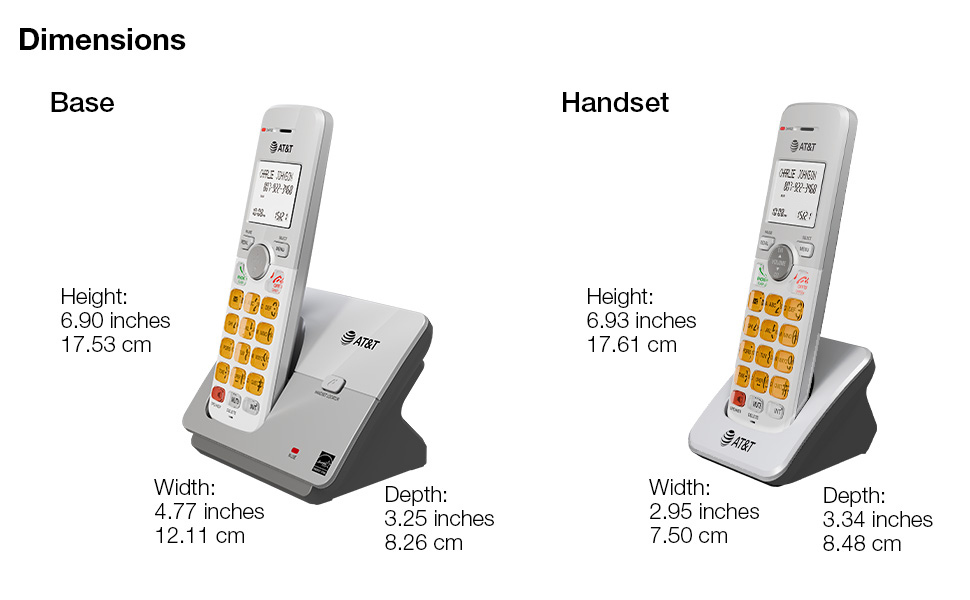
Image: A diagram illustrating the dimensions of both the base unit and a single handset, including height, width, and depth in inches and centimeters.
Гарантыя і падтрымка
For warranty information and technical support, please refer to the quick start guide included in your package or visit the official AT&T support webсайт.
- вытворца: VTech
- Марка: AT&T
- Інтэрнэт-падтрымка: Visit the AT&T Store on Amazon
Таксама даступныя планы абароны для пашыранага пакрыцця:
- 3-гадовы план абароны
- 4-гадовы план абароны
- Поўная абарона (штомесячны план)
Каб даведацца больш пра гэтыя планы, праверце спіс прадуктаў або звярніцеся да прадаўца.
Ask a question about this manual
Ask about setup, troubleshooting, compatibility, parts, safety, or missing instructions. Manuals+ will review the question and use this page’s manual context to help answer it.