
1. Уводзіны
Thank you for choosing the Sharkoon AK6 RGB ATX PC Case. This manual provides essential information for the proper installation, operation, and maintenance of your new PC case. Please read this guide thoroughly before beginning the assembly process to ensure optimal performance and longevity of your components.
2. Інфармацыя па бяспецы
- Always disconnect the power supply from the wall outlet before installing or removing any components inside the PC case.
- Handle tempered glass panels with care. They are fragile and can break if dropped or subjected to impact.
- Avoid exposing the case to extreme temperatures, humidity, or direct sunlight.
- Keep small parts and screws out of reach of children.
- Ensure proper grounding to prevent electrostatic discharge (ESD) damage to sensitive electronic components.
3. Змесціва ўпакоўкі
Калі ласка, пераканайцеся, што ўсе прадметы прысутнічаюць у вашай упакоўцы:
- Корпус для ПК Sharkoon AK6 RGB ATX
- Accessory box (containing screws, cable ties, and other small parts)
- Кіраўніцтва карыстальніка (гэты дакумент)
4. Прадукт скончыўсяview
The Sharkoon AK6 RGB ATX PC Case is designed with a modern glass aesthetic, featuring seamless integration of tempered glass on the front and side panels. It includes four pre-installed 120mm addressable RGB PWM fans for optimal airflow and visual appeal. The case supports a wide range of components, including BTF motherboards, and offers ample space for high-performance hardware.

Figure 4.1: Front interior view of the Sharkoon AK6 RGB PC case, showcasing the pre-installed addressable RGB fans and the spacious main chamber.

Малюнак 4.2: Пад вуглом view of the Sharkoon AK6 RGB PC case, highlighting the tempered glass side panel and the top mesh for ventilation.

Малюнак 4.3: Задняя частка view of the Sharkoon AK6 RGB PC case, showing the I/O shield cutout, rear exhaust fan mount, and expansion slots.
Пярэдняя панэль уводу-вываду
The front I/O panel is located on the side of the case and includes:
- Кнопка харчавання
- Кнопка скіду
- 2 x USB Ports (Type-A)
- 1 порта USB Type-C
- Audio Jacks (TRRS)
5. Настройка і ўстаноўка
Follow these steps to install your components into the Sharkoon AK6 RGB PC Case.
5.1 Падрыхтоўка справы
- Пастаўце корпус на роўную, устойлівую паверхню.
- Carefully remove the tempered glass side panel by unscrewing the thumb screws at the rear and gently pulling the panel away.
- Remove the rear metal side panel by unscrewing the thumb screws.
5.2 Устаноўка мацярынскай платы
The AK6 RGB supports Mini-ITX, Micro-ATX, ATX, and BTF motherboards.
- Install the I/O shield into the cutout at the rear of the case (if not pre-installed on your motherboard).
- Align your motherboard with the standoffs inside the case. Ensure all standoffs match the motherboard's mounting holes.
- Замацуйце матчыну плату адпаведнымі шрубамі з скрынкі з аксэсуарамі.
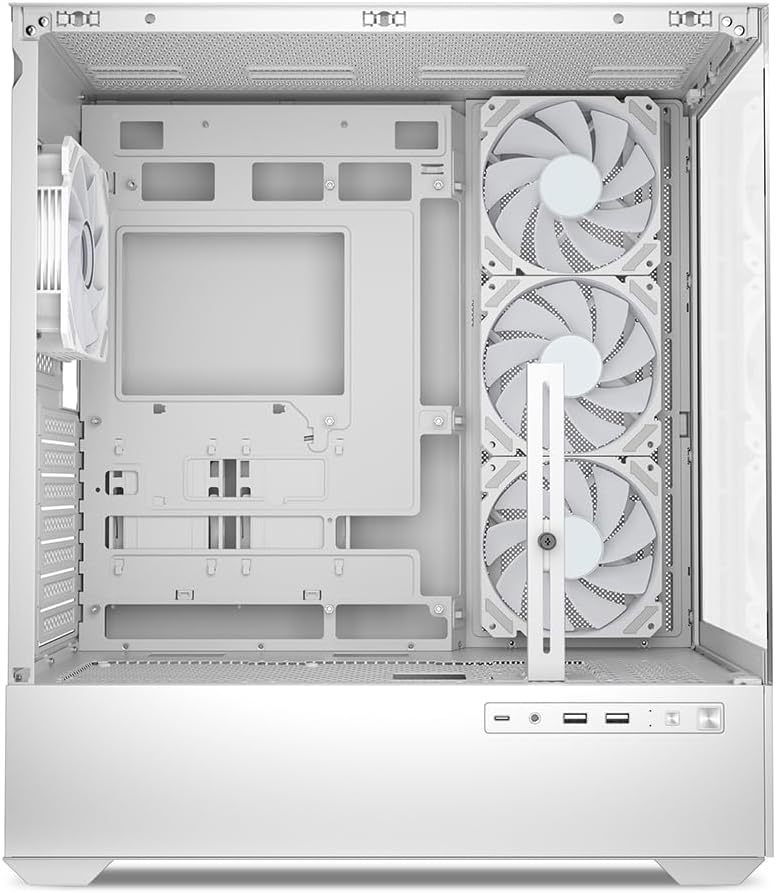
Малюнак 5.1: Інтэр'ер view of the Sharkoon AK6 RGB PC case, illustrating the motherboard tray, cable management cutouts, and front fan mounting points.
5.3 Устаноўка блока харчавання
The case features a bottom-mount power supply design.
- Slide the power supply unit (PSU) into the dedicated compartment at the bottom rear of the case.
- Align the PSU with the screw holes at the rear of the case.
- Secure the PSU with the provided screws.
5.4 Устаноўка запамінальнай прылады
The AK6 RGB supports up to two 3.5" HDDs or four 2.5" SSDs.
- Для жорсткіх дыскаў 3.5 цалі: Locate the drive cages beneath the PSU shroud. Slide the HDD into a drive tray and secure it with screws.
- Для 2.5-цалевых SSD-назапашвальнікаў: SSDs can be mounted on the dedicated brackets behind the motherboard tray or on the 3.5" drive trays using adapter screws.
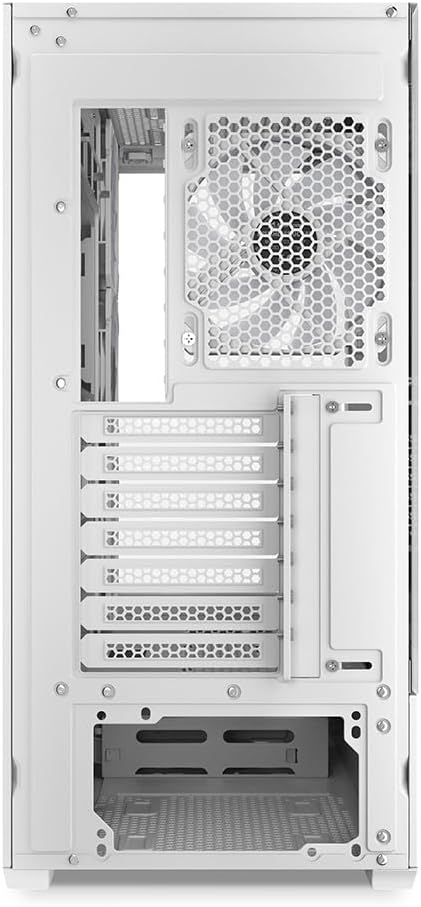
Малюнак 5.2: Задняя частка салона view of the Sharkoon AK6 RGB PC case, detailing the drive cages for 3.5-inch HDDs and 2.5-inch SSDs, and the power supply shroud area.
5.5 Усталёўка відэакарты і платы пашырэння
- Зніміце неабходныя вечкі слотаў пашырэння на задняй панэлі корпуса.
- Устаўце відэакарту або іншыя карты пашырэння ў адпаведныя слоты PCIe на матчынай плаце.
- Secure the cards with screws. The case includes a rubberized graphics card support for larger cards.
5.6 CPU Cooler and Radiator Installation
The case supports CPU coolers up to 17 cm in height and allows for extensive liquid cooling setups.
- Усталюйце кулер працэсара ў адпаведнасці з інструкцыямі вытворцы.
- For liquid cooling, the case can accommodate a 360mm radiator at the top and an additional 280mm radiator.
5.7 Арганізацыя кабеляў
Выкарыстоўвайце адтуліны для арганізацыі кабеляў і кропкі мацавання за паддонам матчынай платы, каб пракласці і замацаваць кабелі. Гэта паляпшае цыркуляцыю паветра і эстэтыку.
6. Інструкцыя па эксплуатацыі
6.1 Уключэнне
After all components are installed and cables are connected, replace the side panels. Connect the power cable to your PSU and a wall outlet, then press the power button on the front I/O panel to start your system.
6.2 RGB Fan Control
The AK6 RGB comes with four pre-installed addressable RGB PWM fans. These fans are connected to an RGB controller which also provides connections for up to four LED elements and four PWM fans. The RGB lighting can typically be controlled via your motherboard's RGB software (if compatible) or through a dedicated button on the case (if present and connected).
6.3 Аптымізацыя паветранага патоку
The case is designed for ideal airflow, with three inverted fans drawing air from the side into the case. The top and rear fan mounts allow for additional exhaust fans. Ensure proper fan orientation for optimal cooling performance.

Малюнак 6.1: Выпample of a fully assembled system within the Sharkoon AK6 RGB PC case, featuring various components and active RGB lighting.
7. Тэхнічнае абслугоўванне
Рэгулярнае тэхнічнае абслугоўванне дапамагае забяспечыць даўгавечнасць і прадукцыйнасць кампанентаў вашага ПК.
- Пылавыя фільтры: Periodically clean the removable dust filters (e.g., on the top and bottom) to maintain optimal airflow and prevent dust buildup inside the case. Use compressed air or a soft brush.
- Шкляныя панэлі: Clean tempered glass panels with a soft, lint-free cloth and a glass cleaner. Avoid abrasive materials that could scratch the surface.
- Уборка інтэр'еру: Use compressed air to remove dust from internal components and fans. Ensure the system is powered off and unplugged before cleaning.
8. Выпраўленне непаладак
If you encounter issues with your PC case, refer to the following common troubleshooting steps:
- Няма харчавання: Ensure the power supply is properly connected to the wall outlet and the motherboard. Check all internal power cables (24-pin ATX, 8-pin CPU, PCIe power).
- Вентылятары не круцяцца/RGB не працуе: Verify that all fan and RGB cables are correctly connected to the motherboard or the included RGB controller. Check your motherboard's BIOS/UEFI settings or RGB software for fan speed and lighting control.
- Front I/O Ports Not Functioning: Confirm that the front panel connectors (USB, audio, power/reset switches) are correctly plugged into the corresponding headers on your motherboard.
- Перагрэў: Ensure all fans are spinning correctly and oriented for proper airflow. Clean dust filters and internal components. Verify CPU cooler installation.
For further assistance, please contact Sharkoon support.
9. Тэхнічныя характарыстыкі
| Асаблівасць | Спецыфікацыя |
|---|---|
| Марка | Шаркун |
| Назва мадэлі | AK6 RGB |
| Нумар мадэлі | C-AK6W |
| Тып корпуса | Вежа ATX |
| Колер | Белы |
| Матэрыял | Загартаванае шкло |
| Сумяшчальнасць матчыных поплаткаў | Mini ITX, Micro ATX, ATX, BTF |
| Тып мацавання блока харчавання | Ніжняе мацаванне |
| Спосаб астуджэння | паветра |
| Папярэдне ўсталяваныя вентылятары | 4 x 120mm Addressable RGB PWM Fans |
| Максімальная вышыня працэсарнага кулера | 17 см |
| Максімальная даўжыня відэакарты | 41 cm (with rubberized support) |
| Максімальная даўжыня БП | 23.5 см |
| Падтрымка радыятара | Top: up to 360mm, Additional: up to 280mm |
| Прывадныя адсекі | 2 x 3.5" HDD or 4 x 2.5" SSD |
| Пярэднія парты I / O | 2 x USB Type-A, 1 x USB Type-C, Audio (TRRS) |
| Вага прадмета | 6.1 кілаграма |
| Асаблівасці | RGB Lighting, Unique Glass Appearance, BTF Motherboard Support |
10. Гарантыя
Sharkoon products are manufactured to high quality standards. For detailed warranty information, please refer to the warranty card included with your product or visit the official Sharkoon webсайт. Гарантыя звычайна распаўсюджваецца на дэфекты матэрыялаў і вырабу пры нармальным выкарыстанні.
11. Падтрымка
If you require technical assistance or have questions regarding your Sharkoon AK6 RGB ATX PC Case, please visit the official Sharkoon website for support resources, FAQs, and contact information. You may also find updated drivers or software for the RGB controller there.
Webсайт: www.sharkoon.com