
1. Прадукт скончыўсяview
The ETOE Seal Pro A1363 is a 1080P Google TV projector designed for home entertainment. It features a built-in Google TV system, native 1080P resolution with 4K UHD decoding, auto-focus, auto-keystone correction, dual 10W speakers, and dual-band Wi-Fi connectivity. Its fully-sealed optical engine ensures a long, maintenance-free lifespan.
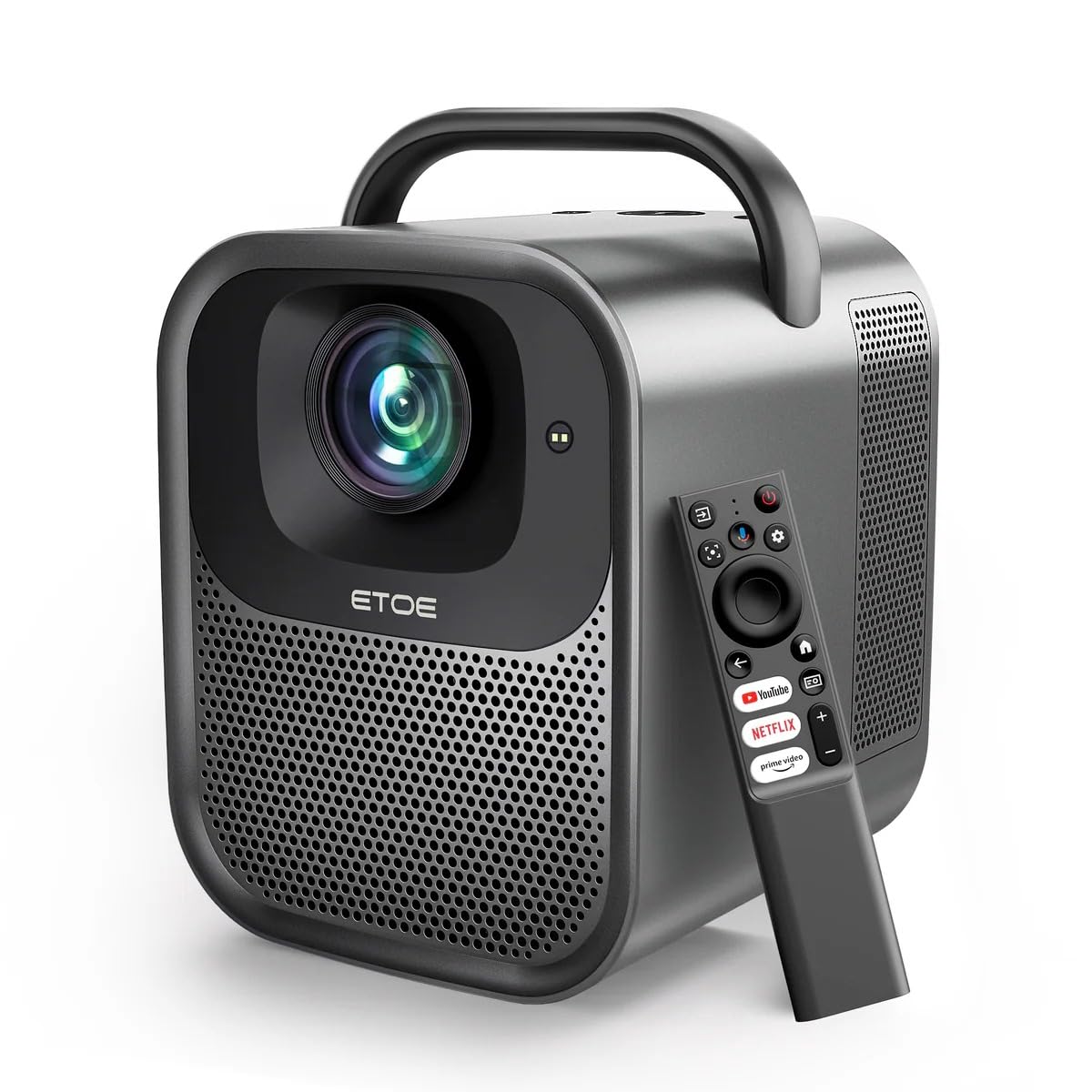
Малюнак 1.1: ETOE Seal Pro A1363 Projector. This image shows the front and side view of the projector, highlighting its compact design and lens.
Асноўныя характарыстыкі:
- Built-in Google TV System: Access streaming services like Netflix, YouTube, Prime Video, Disney+, and HBO directly.
- Native 1080P & 4K UHD Decoding: Delivers sharp visuals with 1920x1080 resolution and HDR enhancement.
- Auto-Focus and Keystone Correction: Ensures perfectly square and stable images from various angles.
- Імерсіўны гук: Equipped with powerful 2x10W dual speakers and multiple audio modes.
- Двухдыяпазонны Wi-Fi: Supports 2.4G & 5G for stable wireless projection from Android, iOS, and PC devices.
- Трывалы дызайн: Features a dust-proof, fully-sealed optical engine for extended lifespan.
Відэа прадуктуview:
Відэа 1.1: ETOE Seal Pro Projector Features. This video provides a visual overview of the projector's main features and capabilities, including its Google TV integration, auto-focus, and sound system.
2. Што ў скрынцы
Калі ласка, праверце змесціва вашай упакоўкі пасля распакавання:
- ETOE Seal Pro A1363 Projector
- Адаптар сілкавання
- Шнур харчавання
- Пульт дыстанцыйнага кіравання
- Кіраўніцтва карыстальніка (гэты дакумент)
3. Кіраўніцтва па наладцы
3.1 Пачатковае размяшчэнне
Размясціце праектар на ўстойлівай, роўнай паверхні. Забяспечце дастатковую вентыляцыю вакол прылады. Для аптымальнай viewing, position the projector directly in front of the screen or wall.
3.2 Падключэнне сілкавання
- Connect the power adaptor to the DC IN port on the projector.
- Plug the power cord into the power adaptor.
- Устаўце шнур сілкавання ў разетку.
3.3 Падключэнне знешніх прылад
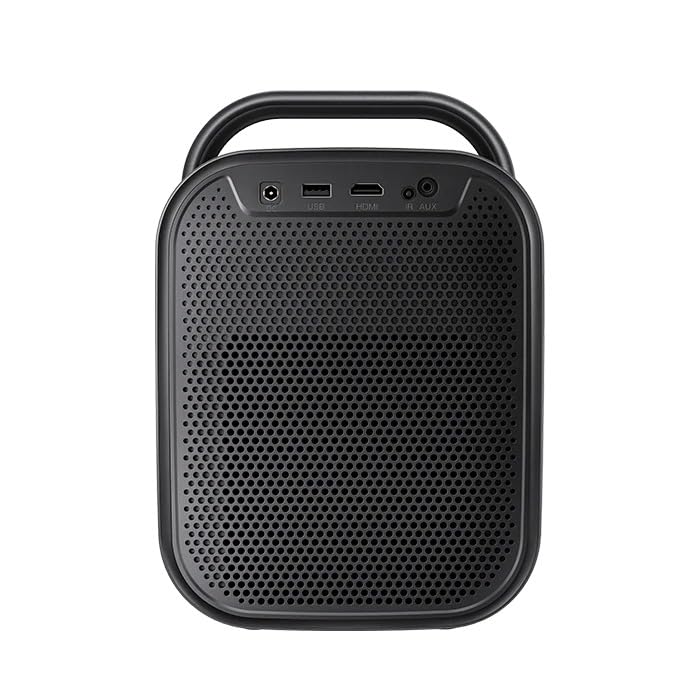
Малюнак 3.1: Тыл view of the ETOE Seal Pro A1363 Projector, showing the DC IN, USB, HDMI, and AUX ports.
Праектар прапануе розныя варыянты падключэння:
- HDMI: Connect Blu-ray players, gaming consoles, laptops, or other HDMI-enabled devices.
- USB: Падключыце USB-назапашвальнікі для прайгравання медыяфайлаў.
- AUX: Connect external audio devices or headphones.
- Bluetooth: Pair with Bluetooth speakers or headphones for wireless audio.
- Wi-Fi: Connect to your home network for online streaming and wireless projection.
4. Інструкцыя па эксплуатацыі
4.1 Уключэнне/выключэнне сілкавання
- Press the Power button on the projector or the remote control to turn the device on.
- To turn off, press the Power button again and confirm the shutdown prompt on the screen.
4.2 Упраўленне надview
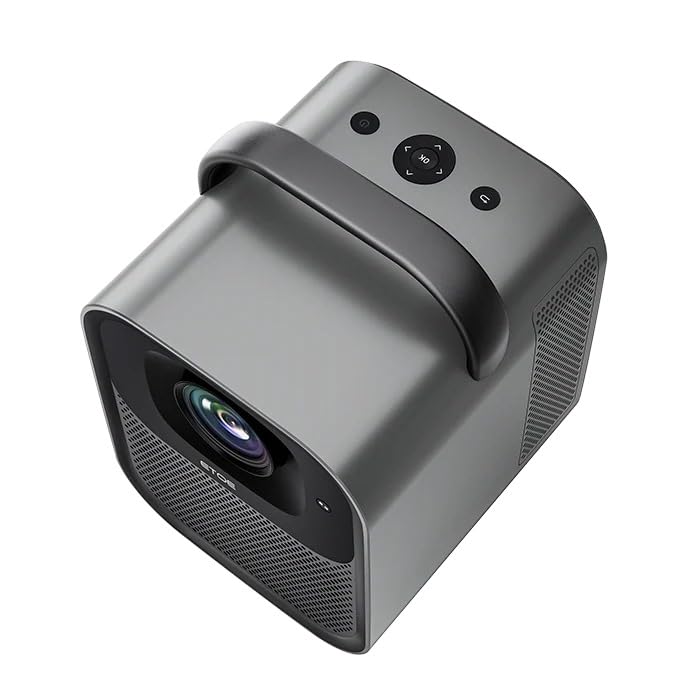
Малюнак 4.1: Топ view of the ETOE Seal Pro A1363 Projector, showing the power button, navigation controls, and back button.
The projector can be controlled using the buttons on the top panel or the included remote control.
- Кнопка харчавання: Уключае або выключае праектар.
- Кнопкі навігацыі (Уверх/Уніз/Улева/Управа): Выкарыстоўваецца для навігацыі па меню і выбару опцый.
- Кнопка ОК: Пацвярджае выбар.
- Кнопка "Назад": Вяртанне да папярэдняга экрана або меню.
4.3 Інтэрфейс Google TV
Upon powering on, the projector will display the Google TV home screen. You will need to log in with your Google account to access personalized content and streaming services.
- Выконвайце падказкі на экране, каб падключыцца да сеткі Wi-Fi.
- Увайдзіце ў свой уліковы запіс Google.
- Install or access your preferred streaming applications (Netflix, YouTube, Prime Video, etc.).
- Use the remote control's navigation buttons and OK button to browse content.
- Utilize Google Assistant for voice commands by pressing the dedicated button on the remote.
4.4 Image Adjustment (Auto-Focus & Keystone)
The ETOE Seal Pro A1363 features automatic focus and keystone correction for a clear and properly shaped image.
- Аўтафокус: The projector automatically adjusts the image focus when powered on or moved.
- Аўтаматычная карэкцыя трапецападобнасці: The projector automatically corrects distorted images to a rectangular shape, even if placed at an angle.
- Лічбавае павелічэнне: If further adjustments are needed, navigate to the image settings in the Google TV menu to use the digital zoom feature (50% to 100%) to fine-tune screen size.
5. Тэхнічнае абслугоўванне
Правільнае абслугоўванне забяспечвае даўгавечнасць і аптымальную прадукцыйнасць вашага праектара.
5.1 Чыстка праектара
- Перад чысткай пераканайцеся, што праектар выключаны і адключаны ад сеткі.
- Выкарыстоўвайце мяккую сухую тканіну для працірання вонкавых паверхняў праектара.
- For the lens, use a lens cleaning cloth and specialized lens cleaning solution. Avoid abrasive materials.
- Do not spray cleaning liquids directly onto the projector.
5.2 Dust-Free Optical Engine
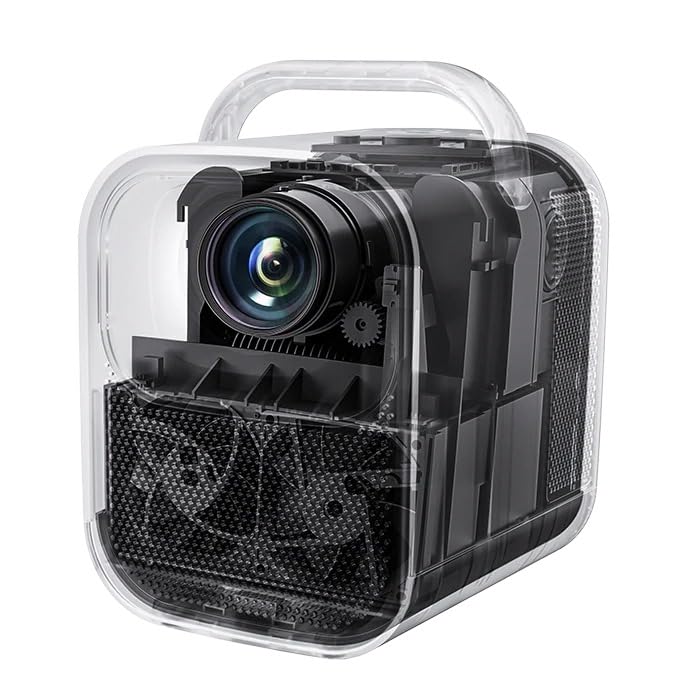
Малюнак 5.1: Унутраны view of the ETOE Seal Pro A1363 Projector, highlighting the fully-sealed optical engine designed to prevent dust accumulation.
The ETOE Seal Pro A1363 features a fully-sealed optical engine, which significantly reduces dust accumulation and minimizes the need for internal cleaning. This design contributes to a maintenance-free lifespan of over 30,000 hours.
6. Выпраўленне непаладак
Калі ў вас узніклі праблемы з праектарам, звярніцеся да наступных распаўсюджаных праблем і рашэнняў:
- Няма харчавання:
- Ensure the power cord is securely connected to the projector and the wall outlet.
- Verify the wall outlet is functional.
- Праверце, ці правільна падключаны адаптар сілкавання.
- Няма выявы:
- Check the input source selection. Ensure it matches the connected device (e.g., HDMI).
- Verify the external device is powered on and sending a signal.
- Пераканайцеся, што вечка аб'ектыва знята.
- Размытая выява:
- The projector has auto-focus. If the image is blurry, try moving the projector slightly or restarting it to trigger auto-focus.
- Пераканайцеся, што паверхня праекцыі роўная і гладкая.
- Distorted Image (Not Rectangular):
- The projector has auto-keystone correction. If distortion persists, try repositioning the projector or restarting it.
- Check for any manual keystone settings in the menu that might override auto-correction.
- Няма гуку:
- Павялічце гучнасць на праектары і падлучанай прыладзе-крыніцы.
- Check audio output settings on the source device.
- Калі выкарыстоўваюцца знешнія дынамікі, пераканайцеся, што яны правільна падключаны і ўключаны.
- Праблемы з падключэннем да Wi-Fi:
- Ensure the projector is within range of your Wi-Fi router.
- Праверце, ці правільна ўведзены пароль Wi-Fi.
- Restart your router and the projector.
7. Тэхнічныя характарыстыкі
| Асаблівасць | Спецыфікацыя |
|---|---|
| Марка | etoe |
| мадэль | A1363 |
| Роднае дазвол | 1920 x 1080 (1080P) |
| Дазвол расшыфроўкі | Да 4K UHD |
| Яркасць выявы | 1000 прасветаў ANSI |
| Каэфіцыент кантраснасці выявы | 3000:1 |
| Тэхналогія адлюстравання | ВК |
| Суадносіны бакоў | 16:9 |
| Сувязь | Dual-Band Wi-Fi (2.4G & 5G), Bluetooth, USB, HDMI, AUX |
| Асаблівасці | Auto Focus, Auto Keystone Correction, Portable, Wireless |
| Выступоўцы | 2 x 10W Dual Speakers |
| Optical Engine Lifespan | 30,000 XNUMX+ гадзін |
| Памеры прадукту | 53 х 34 х 59 см |
| Вага прадмета | 3 кг |
| тtage | 240 вольт |
| Ватtage | 20 ват |
| Частата абнаўлення | 60 Гц |
8. Гарантыя і падтрымка
Каб атрымаць інфармацыю аб гарантыі і падтрымцы кліентаў, звярніцеся да гарантыйнага талона, які пастаўляецца з вашым прадуктам, або звярніцеся непасрэдна да вытворцы.
вытворца: JVDN International
Кантактная інфармацыя: JVDN International (OPC) Private Limited, B-1122 Sun Westbank, Ashram Road, Ahmedabad, Gujarat, India, 380009. Contact person: JAYESH KUMAR JAGETIYA. Tel: +91 91361 87951. Email: jayesh@jvdninternational.com
Калі ласка, захавайце доказы пакупкі для прэтэнзій па гарантыі.