
1. Уводзіны
Thank you for choosing the Inwa MZ-622 Outdoor Bluetooth Speakers. This active and passive speaker system delivers 400W peak power for a loud stereo sound experience, suitable for both indoor and outdoor environments. Featuring Bluetooth 5.2 connectivity and an auxiliary input, these speakers offer versatile audio streaming options. Their weatherproof design ensures durability against splashes and light rain, making them ideal for patios, porches, gazebos, and garages. This manual provides detailed instructions for setup, operation, and maintenance to ensure optimal performance and longevity of your speaker system.

Выява: Зверхуview of Inwa 400W Outdoor Bluetooth Speakers highlighting key features like Bluetooth 5.2, AUX input, weatherproofing, stereo system, and remote control.
2. Што ў скрынцы
Калі ласка, праверце змесціва пакета, каб пераканацца ў наяўнасці ўсіх прадметаў:
- 1 актыўны дынамік
- 1 х пасіўны дынамік
- Адаптар сілкавання 1 х 12 В пастаяннага току
- 1 х пульт дыстанцыйнага кіравання
- 1 x RCA Cable (5m)
- 1 x 3.5mm Auxiliary Input Cable
- Mounting Accessories (4 x Expansion screws, 4 x Fastener screws)
- 1 х Кіраўніцтва карыстальніка
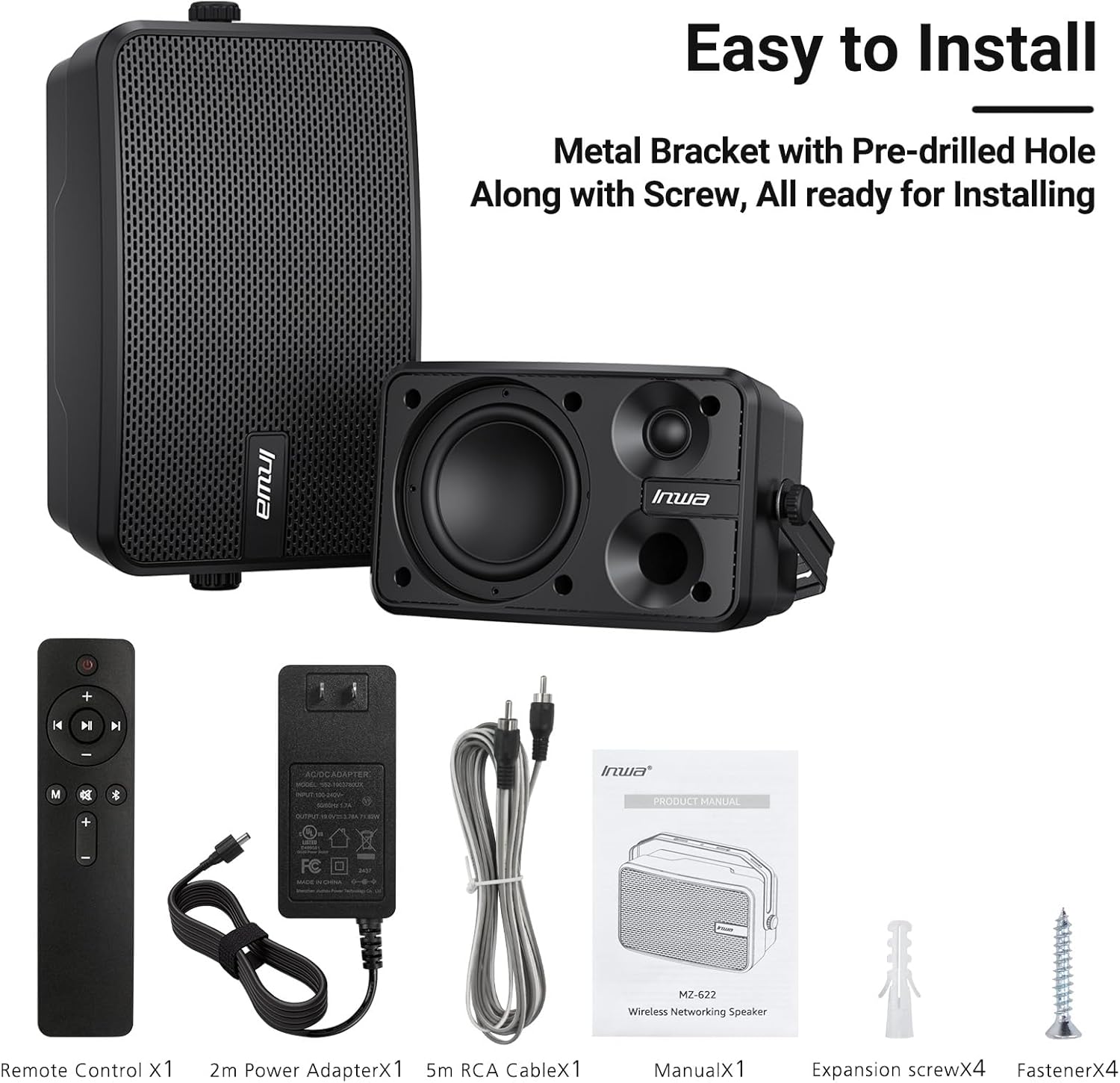
Image: All included components of the Inwa MZ-622 speaker system.
3. Інструкцыі па ўсталёўцы
3.1 Падключэнне дынамікаў
The Inwa MZ-622 system consists of one active speaker and one passive speaker. The active speaker contains the amplifier and controls, while the passive speaker connects to the active speaker.
- Connect the Passive Speaker: Use the provided RCA cable to connect the passive speaker to the active speaker. Ensure a secure connection.
- Падключыце харчаванне: Plug the 12V DC power adapter into the active speaker's power input, then plug the adapter into a power outlet.
- Уключэнне: After connecting the power, the active speaker will automatically power on and enter Bluetooth mode, indicated by a flashing blue light.

Выява: Падрабязная view of the rear connections for the active and passive speakers.
3.2 Падключэнне крыніцы гуку
The speakers support both Bluetooth wireless streaming and wired auxiliary input.
3.2.1 Злучэнне Bluetooth
- Ensure the active speaker is powered on and the blue indicator light is flashing, indicating Bluetooth pairing mode.
- На смартфоне, планшэце або ПК уключыце Bluetooth і знайдзіце даступныя прылады.
- Select "Inwa MZ-622" (or similar name) from the list to pair. Once paired, the blue light will become solid.

Image: Illustration of Bluetooth 5.2 connectivity with a mobile device.
3.2.2 Auxiliary (AUX) Input Connection
- Connect one end of the provided 3.5mm auxiliary input cable to your external device (e.g., mobile phone, laptop, TV).
- Connect the other end of the 3.5mm auxiliary input cable to the AUX IN port on the active speaker.
- Press the 'M' button on the remote control to switch to AUX input mode. The indicator light on the active speaker will turn red.

Image: Connection diagram for AUX input with various devices.
3.3 Video Guide: Connection Method for MZ-622 Active + Passive Speakers
Video: A step-by-step guide demonstrating how to connect the active and passive Inwa MZ-622 speakers, including power and audio cables.
4. Інструкцыя па эксплуатацыі
The Inwa MZ-622 speakers can be easily operated using the included remote control. The remote control primarily functions with the active speaker.
4.1 Функцыі дыстанцыйнага кіравання
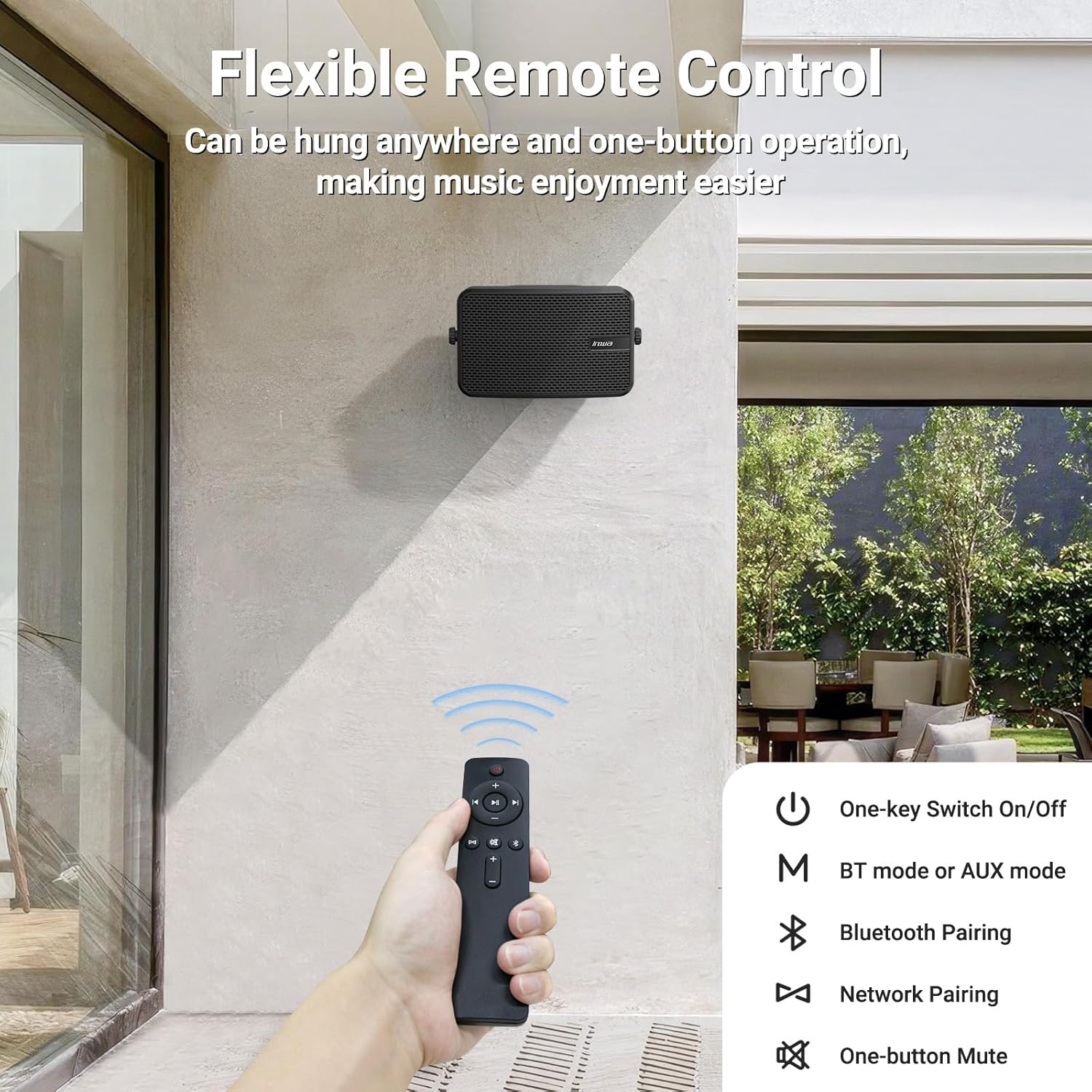
Image: The remote control for the Inwa MZ-622 speakers.
- Кнопка харчавання (⏻): Уключае або выключае акустычную сістэму.
- Кнопка рэжыму (M): Switches between Bluetooth mode (blue indicator light) and AUX input mode (red indicator light).
- Bluetooth Pairing Button (Ⓘ): Запускае рэжым спалучэння Bluetooth.
- Павялічыць гучнасць (+): Павялічвае гучнасць.
- Памяншэнне гучнасці (-): Памяншае гучнасць.
- Кнопка адключэння гуку (🔇): Адключэнне або ўключэнне гуку.
- Кнопка прайгравання/паўзы (⏸): Plays or pauses audio in Bluetooth mode.
- Previous Track (⏮): Skips to the previous track in Bluetooth mode.
- Next Track (⏭): Skips to the next track in Bluetooth mode.
Заўвага: In AUX input mode, track control buttons (Play/Pause, Previous, Next) on the remote are disabled as audio control is managed by the connected external device.
5. Размяшчэнне і мантаж
The Inwa MZ-622 speakers are designed for versatile placement, both indoors and outdoors. Their compact size (9.41"W x 6.54"D x 4.61"H) and included mounting accessories make installation straightforward.
5.1 Outdoor Placement Considerations
While the speakers are weatherproof and can withstand splashes and light rain, it is recommended to install them in locations that offer some protection from direct, heavy downpours or prolonged exposure to harsh elements. Ideal locations include:
- Under a patio cover
- On the underside of a porch roof
- Within a gazebo or outdoor bar area
- Inside a garage or small workshop

Image: The weatherproof construction of the Inwa speaker.
5.2 Інструкцыі па мантажы
The speakers come with metal brackets and pre-drilled holes for easy wall mounting. Use the provided expansion and fastener screws for secure installation.
- Выберыце месцазнаходжанне: Select a suitable mounting location, considering sound dispersion and protection from extreme weather.
- Марк Хоулз: Hold the speaker bracket against the wall and mark the positions for drilling.
- Свідраваць адтуліны: Drill pilot holes at the marked positions. Insert expansion screws if necessary for added stability.
- Бяспечны кранштэйн: Attach the speaker bracket to the wall using the fastener screws.
- Падключыць дынамік: Mount the speaker onto the secured bracket. Adjust the angle as desired for optimal sound direction.

Малюнак: Example of outdoor wall mounting.
6. Тэхнічныя характарыстыкі
| Асаблівасць | Дэталь |
|---|---|
| Назва мадэлі | МЗ-622 |
| Тып дынаміка | На адкрытым паветры |
| Максімальная выхадная магутнасць дынаміка | 400 ват |
| Тэхналогія падлучэння | Дапаможны, Bluetooth |
| Тэхналогія бесправадной сувязі | Bluetooth |
| Версія Bluetooth | 5.2 |
| Рэжым выхаду гуку | Стэрэа |
| Канфігурацыя канала аб'ёмнага гуку | 2.0 |
| Дыяметр НЧ-дынаміка | 4 цалі |
| Памер твітара | 1 цалі |
| Матэрыял | Акрыланітрылбутадыенстырол (АБС) |
| Воданепранікальны | Праўда |
| Памеры прадукту | 6.54" Г x 9.41" Ш x 4.61" У |
| Вага прадмета | 7.78 фунта |
| Крыніца харчавання | Правадная электрычная |
| Метад кантролю | Дыстанцыйнае |
7. Тэхнічнае абслугоўванне
To ensure the longevity and optimal performance of your Inwa MZ-622 speakers, follow these maintenance guidelines:
- Уборка: Працярыце корпусы дынамікаў мяккай губкайamp cloth. Avoid using harsh chemicals or abrasive cleaners, as these can damage the ABS material and mesh grille.
- Абарона ад надвор'я: Although weatherproof, it is advisable to protect the speakers from extreme weather conditions such as heavy storms, prolonged direct sunlight, or freezing temperatures when not in use for extended periods.
- Кабельнае кіраванне: Ensure all cables are securely connected and not under strain. Periodically check cables for any signs of wear or damage.
- захоўванне: If storing the speakers for a long time, disconnect them from power, clean them, and store them in a cool, dry place.
8. Выпраўленне непаладак
If you encounter issues with your Inwa MZ-622 speakers, refer to the following common problems and solutions:
| праблема | Магчымая прычына | Рашэнне |
|---|---|---|
| Няма харчавання/Дынамік не ўключаецца | Адаптар харчавання не падключаны або няспраўны. | Ensure the 12V DC power adapter is securely connected to the active speaker and a working power outlet. Test the outlet with another device. |
| З дынамікаў няма гуку | Volume too low; incorrect input mode; cables loose; device not playing audio. | Increase volume on both the speaker and the connected device. Press the 'M' button on the remote to cycle through modes (Bluetooth/AUX) until the correct mode is selected. Check all audio cables (RCA, AUX) for secure connections. Ensure your audio source is playing. |
| Bluetooth не спалучаецца | Дынамік не ў рэжыме спалучэння; Bluetooth прылады выключаны; перашкоды. | Ensure the active speaker's blue indicator light is flashing. Turn Bluetooth off and on again on your device. Move closer to the speaker. Disconnect other Bluetooth devices from your source. |
| Пульт дыстанцыйнага кіравання не працуе | Battery low/dead; remote out of range; line of sight blocked. | Replace the remote control battery. Ensure you are within range and have a clear line of sight to the active speaker. |
| Скажонае аўдыё | Volume too high; poor audio source quality; damaged cables. | Reduce the volume on both the speaker and the audio source. Test with a different audio source or cable. |
9. Гарантыя і падтрымка
The Inwa MZ-622 speakers come with a limited warranty. For specific warranty terms and conditions, please refer to the warranty information provided with your purchase or contact Inwa customer support.
For technical assistance, troubleshooting, or any other inquiries, please visit the official Inwa website or contact their customer service department. Contact details can typically be found in the product packaging or on the manufacturer's webсайт.