
Уводзіны
Welcome to the user manual for your Maxcom Celin FW27 Smartwatch. This guide provides essential information on how to set up, operate, and maintain your device. The FW27 combines elegant design with advanced technology, offering features such as health monitoring, sports tracking, and smart notifications. Please read this manual thoroughly to ensure proper use and to maximize your smartwatch experience.
Змест пакета
Upon opening your Maxcom Celin FW27 Smartwatch package, please verify that all the following items are included:
- Maxcom Celin FW27 Smartwatch
- Зарадны кабель
- Кіраўніцтва карыстальніка (гэты дакумент)
- Additional Fabric Strap
- Extra Glass Protector
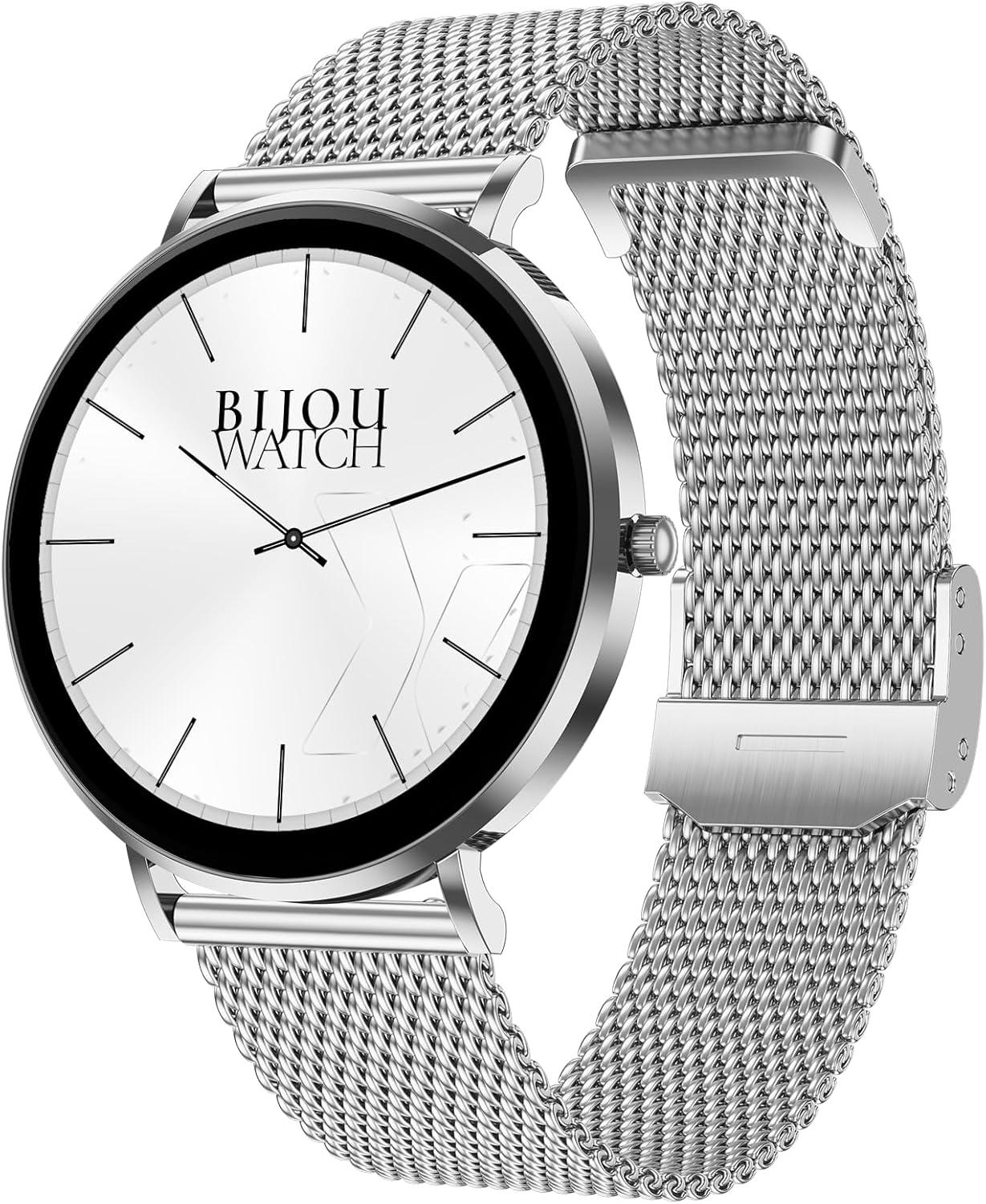
Image: The Maxcom Celin FW27 Smartwatch with its elegant silver mesh strap.
Прадукт скончаныview
The Maxcom Celin FW27 Smartwatch features a sleek, ultra-slim stainless steel design with a vibrant AMOLED display. It is designed for comfort and durability, making it suitable for daily wear and various activities.
Ключавыя кампаненты:
- Дысплей AMOLED: High-resolution 1.35-inch screen (466x466 pixels) for clear visuals and vibrant colors, supporting Always-On Display (AOD).
- Бакавая кнопка/Каронка: Выкарыстоўваецца для навігацыі, уключэння/выключэння харчавання і доступу да меню.
- Датчыкі: Located on the back for heart rate, blood oxygen, and blood pressure monitoring.
- Кантакты для зарадкі: Magnetic contacts on the back for connecting the charging cable.
- Дынамік/мікрафон: For Bluetooth calling functionality.

Image: The smartwatch displaying a digital watch face with time.
Настройка
1. Зарадка разумнага гадзінніка
Перад першым выкарыстаннем цалкам зарадзіце свой разумны гадзіннік.
- Падключыце зарадны кабель да адаптара харчавання USB (не ўваходзіць у камплект) або да USB-порта кампутара.
- Align the magnetic pins of the charging cable with the charging contacts on the back of the smartwatch. The cable will snap into place.
- The watch display will show a charging indicator. Allow approximately 2 hours for a full charge.
2. Уключэнне / выключэнне харчавання
- Уключэнне: Press and hold the side button for a few seconds until the Maxcom logo appears.
- Выключэнне: From the watch face, swipe down to access quick settings, or navigate to the settings menu. Select "Power Off" and confirm. Alternatively, press and hold the side button and select "Power Off".
3. Installing the Da Fit App
To unlock the full potential of your smartwatch, download and install the "Da Fit" app on your smartphone.
- Scan the QR code provided in the quick start guide (if available) or search for "Da Fit" in your smartphone's app store (App Store for iOS, Google Play Store for Android).
- Усталюйце праграму і дайце неабходныя дазволы.
4. Спалучэнне са смартфонам
- Пераканайцеся, што Bluetooth уключаны на вашым смартфоне.
- Open the "Da Fit" app.
- Follow the on-screen instructions to add a new device. The app will search for your FW27 smartwatch.
- Select "FW27" from the list of available devices to pair.
- Пацвердзіце запыт на спалучэнне як на смартфоне, так і на разумным гадзінніку.
- For calling functionality, you may need to pair the watch a second time via your phone's Bluetooth settings (look for "FW27_CALL" or similar).
Кіраванне разумным гадзіннікам
Базавая навігацыя
- Правядзіце пальцам уверх: Access notifications.
- Правядзіце пальцам уніз: Access quick settings (brightness, DND, battery, settings).
- Правядзіце пальцам улева/управа: Cycle through widgets (activity, heart rate, weather, music control, etc.).
- Націсніце бакавую кнопку: Return to the watch face from any screen, or open the app menu from the watch face.
- Long Press Watch Face: Змяніць цыферблаты.
Адсочванне здароўя і фізічнай формы
The FW27 smartwatch is an effective health and sports tracker. It monitors various metrics to help you stay informed about your well-being.
- Маніторынг сардэчнага рытму: Continuously tracks your heart rate. Access this feature from the app menu or a dedicated widget.
- Маніторынг кіслароду ў крыві (SpO2): Вымярае ўзровень насычэння крыві кіслародам.
- Маніторынг артэрыяльнага ціску: Забяспечвае ацэнкі вашага артэрыяльнага ціску.
- Адсочванне сну: Automatically monitors your sleep patterns, including deep sleep, light sleep, and wake times.
- Адсочванне актыўнасці: Запісвае пройдзеныя крокі, пройдзеную адлегласць і спаленыя калорыі на працягу дня.
- Спартыўныя рэжымы: Supports over 70 sports modes, including cycling, running, yoga, and cardio training. Select a mode before starting your workout to track specific metrics.

Image: The smartwatch displaying a watch face with step count and battery status.
Customization (Watch Faces)
The Celin FW27 offers exclusive watch faces that can be changed to match your outfit, occasion, or mood.
- On-Watch: Long-press the watch face and swipe left/right to select from pre-installed faces.
- Праз праграму Da Fit: Open the "Da Fit" app, navigate to the "Watch Faces" section. Choose from over 100 free watch faces or customize your own using personal photos.

Image: The smartwatch displaying an analog watch face with additional health metrics like steps and heart rate.
Calling and Notifications
With the FW27, you can answer and make calls directly from your watch. It also keeps you informed of new messages and app notifications.
- Выкананне/адказ на званкі: Ensure the watch is properly paired for calls (refer to Setup section). You can dial numbers or answer incoming calls directly on the watch.
- Апавяшчэнні: The watch will alert you to new messages and app notifications (e.g., WhatsApp). Manage which app notifications appear on your watch through the "Da Fit" app settings.
Тэрмін службы батарэі
The Maxcom Celin FW27 Smartwatch offers an extended battery life. With average use, the smartwatch can provide up to 10 days of operation on a single charge. This reduces the need for frequent charging.
Тэхнічнае абслугоўванне
Уборка
- Працярыце экран і корпус гадзінніка мяккай тканінай без ворса.
- Для ўстойлівага бруду злёгку ачысціцеampпрамыйце тканіну вадой. Пазбягайце выкарыстання агрэсіўных хімічных рэчываў або абразіўных матэрыялаў.
- Clean the charging contacts regularly to ensure efficient charging.
Сыход за раменьчыкам
- The metal mesh strap can be cleaned with a soft brush and mild soapy water, then rinsed and dried thoroughly.
- The fabric strap can be hand-washed with mild soap and water, then air-dried.
- Ensure straps are completely dry before reattaching to the watch.
Воданепранікальнасць (IP68)
The FW27 smartwatch has an IP68 rating, meaning it is resistant to dust and can withstand immersion in water up to 1.5 meters for up to 30 minutes.
- It is suitable for daily use, such as hand washing or light rain.
- Avoid using it in hot water, saunas, or during diving, as steam and high pressure can compromise the seal.
- After exposure to water, wipe the watch dry before charging or operating buttons.
Ліквідацыю непаладак
| праблема | Магчымае рашэнне |
|---|---|
| Гадзіннік не ўключаецца. | Пераканайцеся, што гадзіннік цалкам зараджаны. Падключыце яго да зараднай прылады як мінімум на 30 хвілін. |
| Немагчыма спалучыць са смартфонам. |
|
| Апавяшчэнні не паступаюць. |
|
| Недакладныя дадзеныя пра здароўе. |
|
Тэхнічныя характарыстыкі
| Асаблівасць | Дэталь |
|---|---|
| Нумар мадэлі | YG01010000262 |
| Марка | Макскам |
| Тып дысплея | AMOLED |
| Памер экрана | 1.35 цаляў |
| дазвол | 466 х 466 пікселяў |
| Сувязь | Bluetooth |
| Воданепранікальнасць | IP68 |
| Асаблівасці | Notifications, Health Tracking (Heart Rate, SpO2, Blood Pressure), Sports Modes, Bluetooth Calling, Always-On Display (AOD) |
| Тэрмін службы батарэі | Up to 10 days (average use) |
| Матэрыял | Stainless Steel (case) |
| Форма | Круглая |
Гарантыя і падтрымка
For warranty information and customer support, please refer to the documentation included with your purchase or visit the official Maxcom webсайт. Захоўвайце пацвярджэнне пакупкі для прэтэнзій па гарантыі.
If you encounter any issues not covered in the troubleshooting section, please contact Maxcom customer service for assistance.