
1. Уводзіны
This manual provides detailed instructions for the installation, configuration, and operation of your SODOLA 6-Port 10G Web Managed Ethernet Switch. This high-performance switch is designed to enhance network connectivity with its 4x10G RJ45 ports and 2x10G SFP+ ports, supporting various speeds and advanced management features.

Figure 1: SODOLA 6-Port 10G Web Managed Ethernet Switch (Model: 4x10G RJ45+2x10G SFP+)
The switch is compliant with IEEE 802.3, IEEE 802.3u, IEEE 802.3ab, IEEE 802.3bz, and IEEE 802.3ae standards, ensuring broad compatibility and reliable performance for demanding network environments.
2. Змесціва ўпакоўкі
Verify that all items are present and in good condition. If any item is missing or damaged, please contact your vendor.
- 1 x SODOLA 6-Port 10G Managed Ethernet Switch
- 1 х Кіраўніцтва карыстальніка
- 1 х Шнур харчавання
- 4 x Footrests
- 1 x Certificate of Inspection
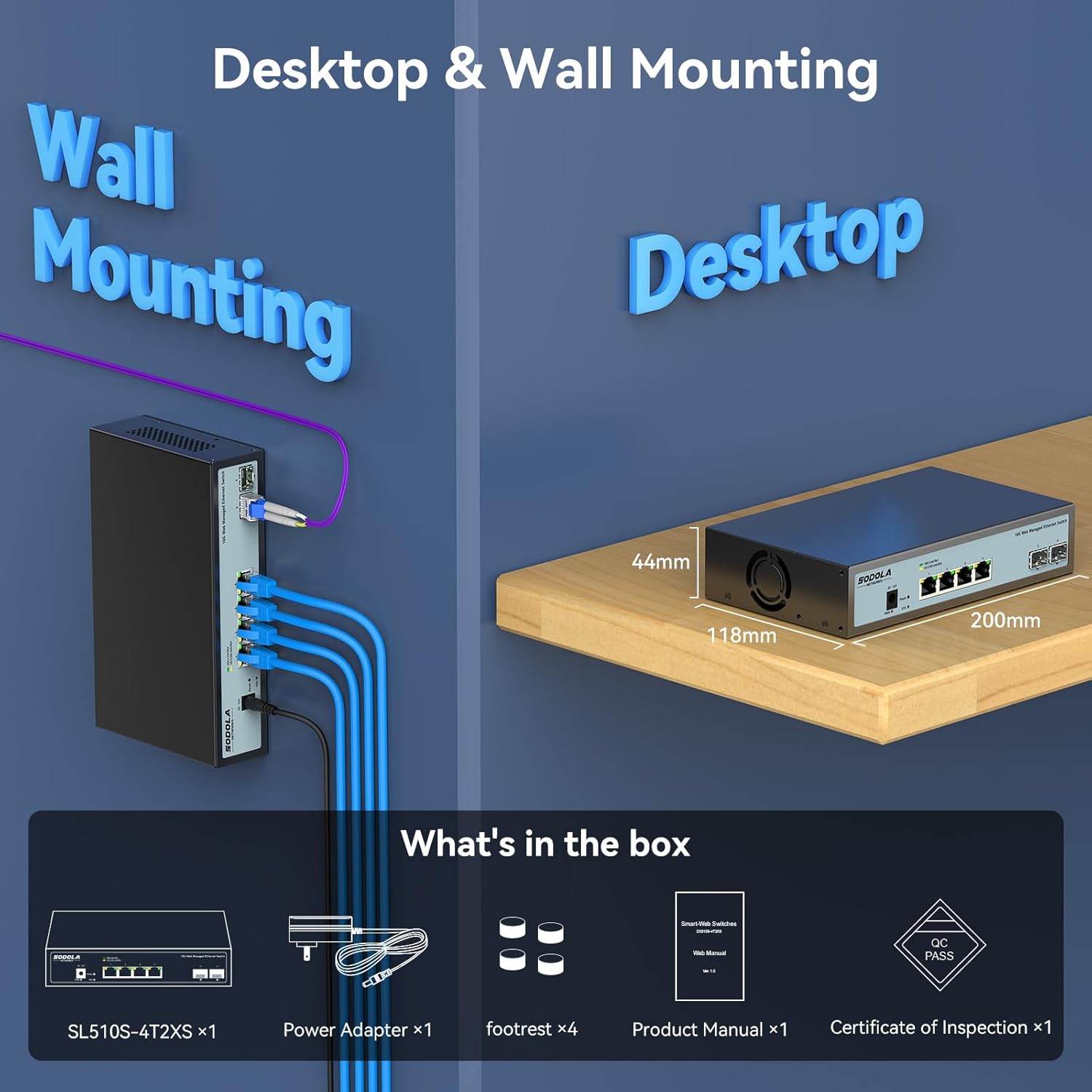
Figure 2: Included items: Switch, Power Adapter, Footrests, Product Manual, and Certificate of Inspection.
3. Абсталяванне скончыласяview
3.1 Пярэдняя панэль
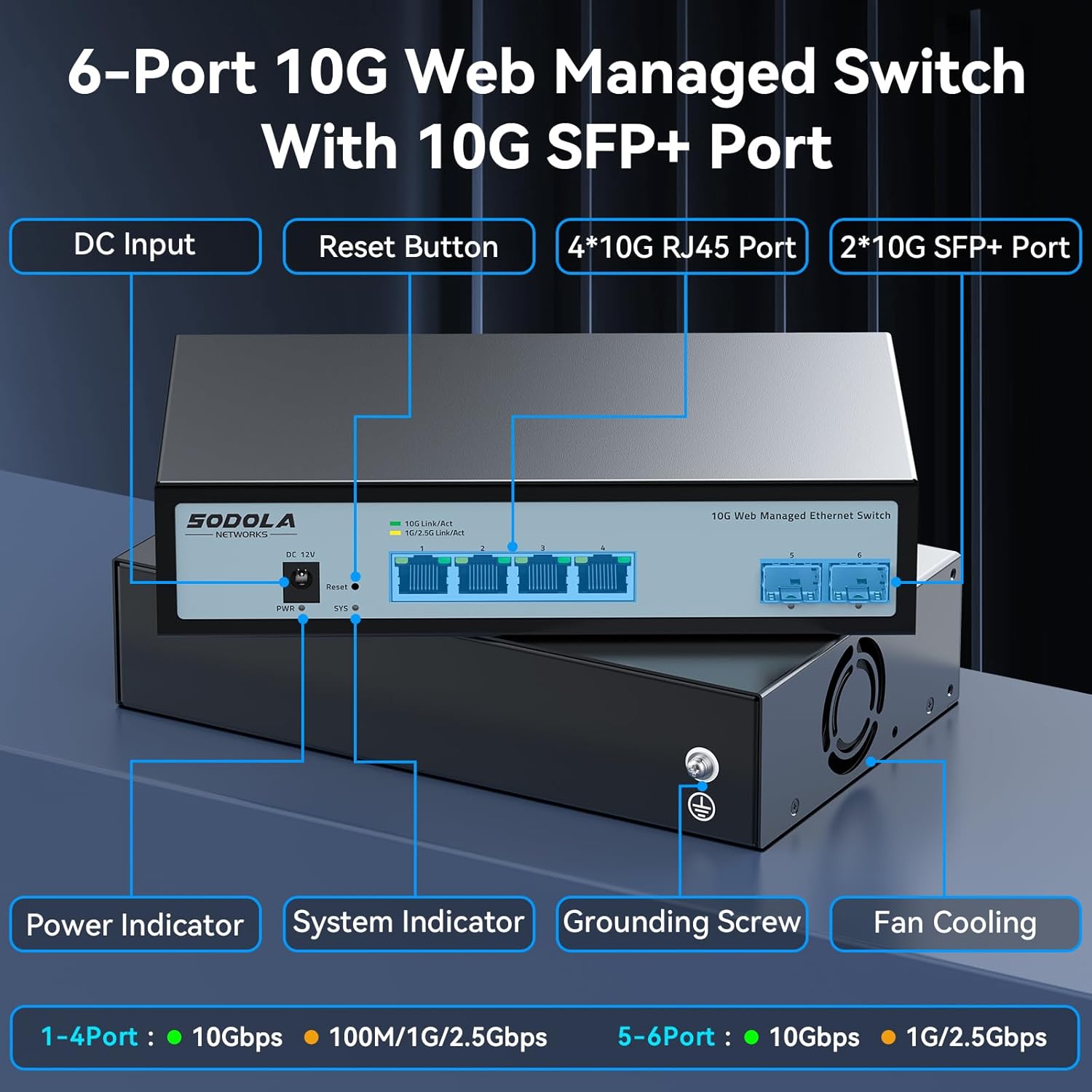
Малюнак 3: Макет пярэдняй панэлі
The front panel features the following components:
- Уваход пастаяннага току: Порт падключэння харчавання.
- Кнопка скіду: Выкарыстоўваецца для скіду прылады да заводскіх налад.
- 4 x 10G RJ45 Ports: Adaptive ports supporting 100M/1G/2.5G/5G/10G speeds.
- 2 парты 10G SFP+: Support manual switching between 10G/1G/100M or 2.5G/1G/100M adaptive.
- Індыкатар харчавання: Паказвае стан харчавання.
- Сістэмны індыкатар: Паказвае працоўны стан сістэмы.
3.2 Задняя панэль
The rear panel includes a grounding screw and fan cooling vents.
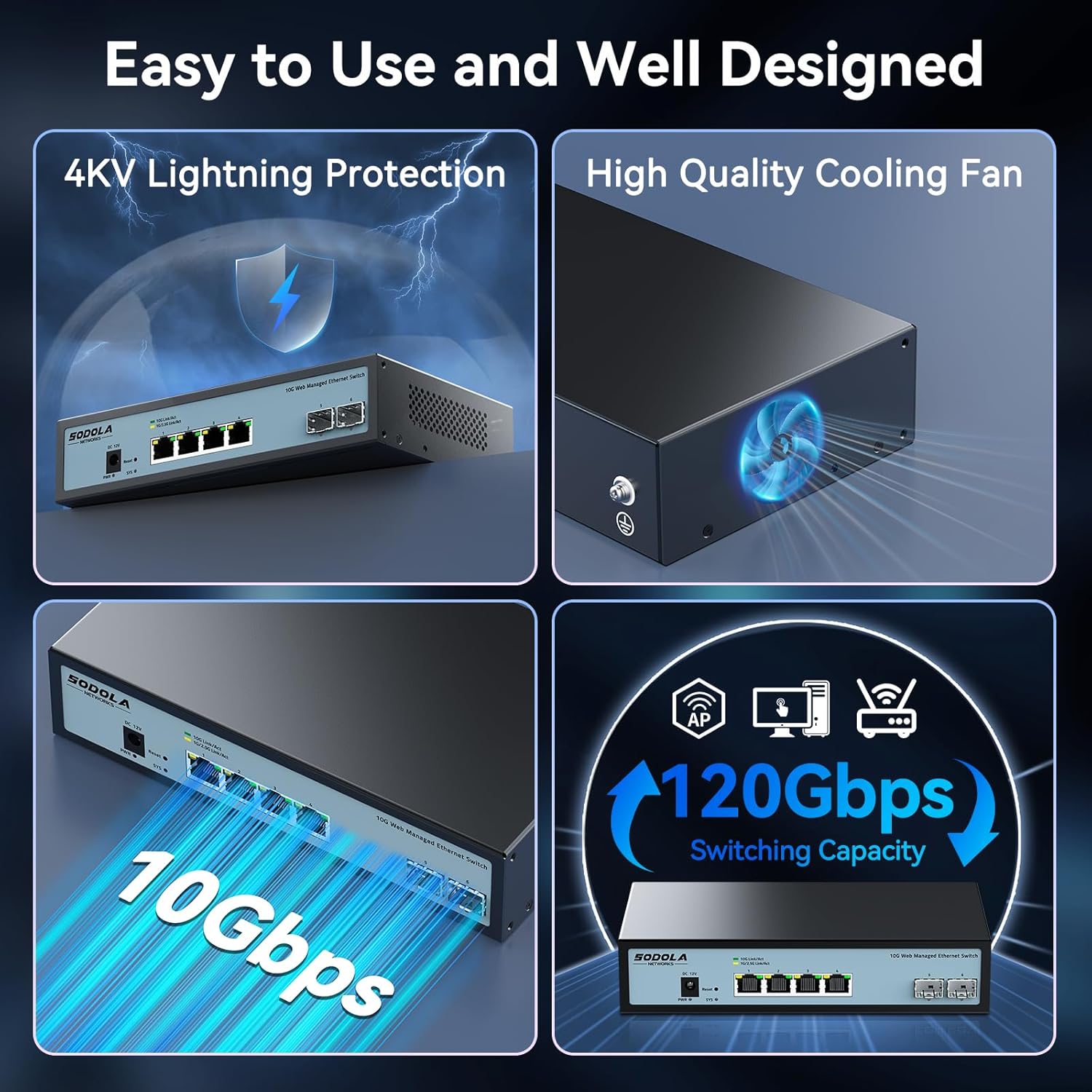
Figure 4: Rear Panel with Cooling Fan and Grounding Screw
- Шруба зазямлення: For proper electrical grounding.
- Вентылятар астуджэння: Internal cooling fan for heat dissipation.
4. Настройка
4.1 Фізічная ўстаноўка
The switch supports both desktop and wall mounting. Choose a stable, well-ventilated location for installation.

Figure 5: Desktop and Wall Mounting Options
4.2 Падключэнне камутатара
- Connect the power adapter to the DC input port on the switch and plug it into a power outlet.
- Connect your network devices (e.g., computers, servers, NAS, routers) to the RJ45 or SFP+ ports using appropriate Ethernet cables or SFP+ transceivers.
- Ensure proper grounding by connecting a grounding wire to the grounding screw.
Video 1: This video demonstrates the basic plug-and-play setup for a 10G Ethernet switch, showing connections to various network devices. While it features an unmanaged switch, the physical connection steps are similar.
5. Кіраванне Web Managed Interface
This switch features a web-based management interface for advanced configuration. To access it, follow these steps:
- Initial IP Configuration: Before logging in, you must set an IP address via IPv4 on your computer to match the switch's default subnet. The default IP address for the switch is typically 192.168.2.1.
- Доступ да інтэрфейсу: Адкрыйце a web browser and enter the switch's default IP address (e.g., http://192.168.2.1) у адрасным радку.
- Лагін: Enter the default credentials. The default username is адмін, and there is typically no default password (leave it blank).

Figure 6: Easy Web Managed Method for Initial Access
5.1 Key Management Features
The web interface provides access to various features for network control and monitoring:
- Налады порта: Configure individual port speeds (auto-negotiation is recommended for RJ45 ports), enable/disable ports, and manage flow control. For SFP+ ports, manual speed setting may be required for 2.5G or 1G devices.
- Кіраванне VLAN: Create and manage Virtual Local Area Networks for network segmentation.
- Link Aggregation (LACP): Combine multiple physical links into a single logical link for increased bandwidth and redundancy.
- Якасць абслугоўвання (QoS): Прыярытэзацыя сеткавага трафіку для крытычна важных праграм.
- Кантроль штормаў: Prevent network disruptions caused by broadcast, multicast, or unknown unicast storms.
- Зеркаванне порта: Monitor network traffic by sending a copy of packets from one port to another.
- DHCP Snooping: Павысьце бяспеку сеткі, фільтруючы ненадзейныя паведамленні DHCP.
- SNMP: Monitor network devices from a central management station.
- RSTP (Rapid Spanning Tree Protocol): Prevent network loops.

Малюнак 7: Закончанаview of Web Асаблівасці кіравання
Video 2: This video provides a demonstration of the web management interface, including login and basic configuration steps for a similar 10G managed switch. It highlights how to navigate and apply settings.
Відэа 3: Оверview of a 10G web managed SFP+ switch, demonstrating its features and management capabilities. This can help users understand the interface and available options.
5.2 Захаванне канфігурацыі
Пасля ўнясення любых змяненняў у web interface, it is crucial to save the configuration to ensure your settings are retained after a reboot or power cycle. Navigate to the "Maintenance" or "System" section and select "Save Configuration" or a similar option, then apply the changes.

Figure 8: Remember to Save Configuration
6. Тэхнічнае абслугоўванне
6.1 Вентылятар астуджэння
The switch is equipped with an internal cooling fan to manage heat dissipation. If fan noise is a concern, the fan can be removed by opening the case. Ensure the device remains in a well-ventilated area if the fan is removed.
6.2 Абнаўленне прашыўкі
Перыядычна правярайце інфармацыю вытворцы website for firmware updates to ensure optimal performance and access to the latest features and security enhancements. Follow the instructions provided with the firmware update package for proper installation.
7. Выпраўленне непаладак
- Няма харчавання: Ensure the power cord is securely connected to the switch and a working power outlet. Check the power indicator LED.
- Няма спасылкі/актыўнасці на порце:
- Verify the Ethernet cable is correctly connected to both the switch and the network device.
- Check the link/activity LED for the specific port.
- Пераканайцеся, што падключаная прылада ўключана і працуе належным чынам.
- For SFP+ ports, confirm the SFP+ module is properly inserted and compatible.
- У ст web interface, check the port status and ensure it is enabled and configured for the correct speed (especially for SFP+ ports).
- Немагчыма атрымаць доступ Web інтэрфейс:
- Ensure your computer's IP address is in the same subnet as the switch's default IP (e.g., 192.168.2.x).
- Clear your browser's cache.
- Паспрабуйце іншае web браўзер.
- If you have changed the switch's IP address and forgotten it, you may need to perform a factory reset using the reset button.
- Павольная хуткасць сеткі:
- Verify that all connected devices and cables support 10G speeds for optimal performance.
- Праверце налады хуткасці порта ў web interface; ensure auto-negotiation is enabled for RJ45 ports or the correct speed is manually set for SFP+ ports.
- Праверце кабелі на наяўнасць пашкоджанняў або няправільнага заключэння.
8. Тэхнічныя характарыстыкі
| Асаблівасць | Дэталь |
|---|---|
| мадэль | 4x10G RJ45+2x10G SFP+ (Managed) |
| Тып інтэрфейсу | 4 x 10G Base-T Ports + 2 x 10G SFP+ Ports |
| Хуткасць перадачы даных | 10 гігабіт у секунду |
| Колькасць партоў | 6 |
| Матэрыял корпуса | Метал |
| Вага прадмета | 2.05 фунта |
| Памеры ўпакоўкі | 12.09 х 7.64 х 2.44 цалі |
| Колер | Чорны |
| Сумяшчальныя прылады | Desktop, Laptop, Router |
9. Гарантыя і падтрымка
SODOLA offers a one-year free replacement for any non-human-induced quality issues and lifetime technical support. For assistance, please contact Sodola Networks customer service.
Для атрымання дадатковай інфармацыі і падтрымкі наведайце Sodola Store on Amazon.