
Уводзіны
Thank you for choosing the HP 14-inch Laptop. This manual provides essential information for setting up, operating, maintaining, and troubleshooting your new device. Please read this guide thoroughly to ensure optimal performance and longevity of your laptop.
The HP 14-inch Laptop is designed for everyday computing tasks, offering a balance of portability and functionality. It features an Intel Celeron N4120 processor, 8GB of RAM, and 256GB of storage, running on Windows 11 Home in S Mode.
Што ў скрынцы
Праверце наяўнасць усіх прадметаў у камплекце:
- 14-цалевы ноўтбук HP
- Адаптар пераменнага току
- 128GB Storage Card
- Дыванок для мышы
- Кабель HDMI
- Кабель USB
- Бесправадныя навушнікі
- Бесправадная мыш

Image: The HP 14-inch Laptop shown with its 5-in-1 value pack bundle, including wireless earbuds, mouse pad, HDMI cable, USB cable, and wireless mouse.
Настройка
1. Пачатковае ўключэнне
- Распакуйце ноўтбук: Акуратна дастаньце ноўтбук і ўсе аксэсуары з упакоўкі.
- Падключыце харчаванне: Plug the AC power adapter into the laptop's AC smart pin port and then into a wall outlet. It is recommended to fully charge the battery before first use.
- Уключэнне: Адкрыйце вечка ноўтбука і націсніце кнопку харчавання, якая звычайна знаходзіцца на клавіятурнай панэлі.
2. Windows 11 S Mode Setup
Follow the on-screen prompts to complete the initial Windows 11 Home S Mode setup. This includes selecting your region, keyboard layout, connecting to a Wi-Fi network, and setting up your Microsoft account.
3. Падключэнне аксесуараў
- Бесправадная мыш: Insert the USB receiver for the wireless mouse into an available USB Type-A port on the laptop. The mouse should connect automatically.
- Бесправадныя навушнікі: Refer to the earphones' specific instructions for pairing via Bluetooth. On your laptop, go to Налады > Bluetooth і прылады да пары.
- 128GB Storage Card: Insert the storage card into the multi-format media card reader slot.
- Кабель HDMI: Connect one end of the HDMI cable to the laptop's HDMI port and the other end to an external display (monitor or TV).
4. Activating Microsoft Office 365
Your laptop includes a 1-year subscription to Microsoft Office 365. To activate:
- Open any Office application (e.g., Word, Excel) from the Start Menu.
- Follow the on-screen prompts to sign in with your Microsoft account and activate your subscription.
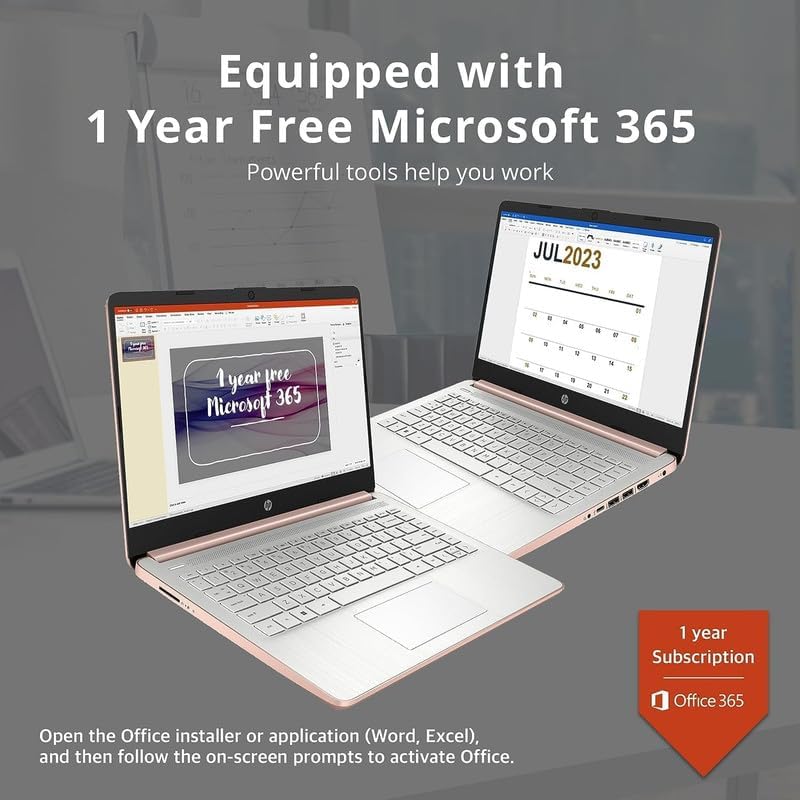
Image: Two HP laptops illustrating the activation process for the included 1-year Microsoft 365 subscription.
Кіраванне ноўтбукам
1. Windows 11 Home in S Mode
Windows 11 Home in S Mode is a streamlined version of Windows configured for security and performance. It exclusively uses apps from the Microsoft Store and requires Microsoft Edge for safe browsing. You can switch out of S Mode if you need to install apps from outside the Microsoft Store, but this action is irreversible.
2. Выкарыстанне партоў і падключэння
Your HP 14-inch Laptop is equipped with various ports for connectivity:
- USB Type-C (1): Для перадачы дадзеных і падключэння сумяшчальных прылад.
- USB Type-A (2): For connecting standard USB devices like external drives, keyboards, or mice.
- HDMI 1.4b (1): Для падлучэння да знешніх дысплеяў.
- Камбінаваны раз'ём для навушнікаў/мікрафона (1): For audio output to headphones or input from a microphone.
- Multi-format Media Card Reader (1): For reading SD cards and other compatible memory cards.
- Разумны кантакт пераменнага току (1): Для падлучэння адаптара сілкавання.

Image: A detailed diagram highlighting the multi-port configuration on the HP 14-inch laptop, including SD Card Reader, Headphone Jack, USB Type-A, USB Type-C, HDMI, and AC Smart Pin.
3. Wi-Fi і Bluetooth
To connect to Wi-Fi or Bluetooth devices:
- Націсніце Сетка icon on the taskbar (bottom right).
- Select the desired Wi-Fi network and enter the password, or turn on Bluetooth and pair with your device.
4. Выкарыстанне Webкамера
The HP True Vision 720p HD camera is integrated for video calls and conferencing. Access it through applications like Camera, Microsoft Teams, or Zoom.

Image: The HP 14-inch laptop demonstrating its remote work capabilities, featuring HP Fast Charge, HP True Vision 720p HD camera, and HD audio with stereo speakers.
5. Кіраванне батарэяй
Ноўтбук працуе да 11.5 гадзін без падзарадкі. Каб аптымізаваць працу батарэі:
- Адрэгулюйце яркасць экрана.
- Зачыніце невыкарыстоўваныя праграмы.
- Выкарыстоўвайце рэжымы энергазберажэння Windows.
- The laptop supports HP Fast Charge, allowing it to charge from 0% to 50% in approximately 45 minutes.
Тэхнічнае абслугоўванне
1. Чыстка ноўтбука
- экран: Выкарыстоўвайце мяккую тканіну без ворса. dampвадой або сродкам для чысткі экранаў. Не распыляйце вадкасць непасрэдна на экран.
- Клавіятура і корпус: Выкарыстоўвайце мяккую, сухую тканіну. Для ўстойлівага бруду злёгкуamp можна выкарыстоўваць тканіну, сачыце за тым, каб вадкасць не трапляла ў адтуліны.
- парты: Выкарыстоўвайце сціснутае паветра, каб акуратна ачысціць пыл ад партоў.
2. Абнаўленне праграмнага забеспячэння
Рэгулярна правярайце наяўнасць абнаўленняў Windows і ўсталёўвайце іх, каб пераканацца, што ў вашай сістэме ёсць апошнія патчы бяспекі і паляпшэнні прадукцыйнасці. Перайдзіце па спасылцы Налады > Цэнтр абнаўлення Windows.
3. Кіраванне сховішчам
Перыядычна пераview і выдаліце непатрэбнае files to free up storage space on your 256GB drive (128GB eMMC + 128GB Storage Card). Utilize the included 128GB storage card for additional file захоўванне.
4. Сыход за батарэяй
- Пазбягайце экстрэмальных тэмператур.
- Do not leave the laptop plugged in constantly after it is fully charged for extended periods.
- Для працяглага захоўвання зарадзіце акумулятар прыкладна да 50% і захоўвайце ноўтбук у прахалодным, сухім месцы.
Ліквідацыю непаладак
This section addresses common issues you might encounter with your HP 14-inch Laptop.
| праблема | Магчымае рашэнне |
|---|---|
| Ноўтбук не ўключаецца | Ensure the AC adapter is securely connected to both the laptop and a working power outlet. Try a different outlet. If the battery is completely drained, it may take a few minutes to respond after plugging in. |
| Экран пусты або чорны | Check if the laptop is powered on. Adjust screen brightness. If an external monitor is connected, ensure it is properly configured (press Клавіша Windows + P to cycle display modes). |
| Праблемы з падключэннем да Wi-Fi | Ensure Wi-Fi is enabled in Windows settings. Restart your router and modem. Forget the network and reconnect. Update Wi-Fi drivers if necessary. |
| Прылада Bluetooth не спалучаецца | Пераканайцеся, што Bluetooth уключаны як на ноўтбуку, так і на прыладзе. Размясціце прылады блізка адна да адной. Выдаліце і зноў дадайце прыладу ў наладах Bluetooth. |
| Laptop performance is slow/lagging | Close unnecessary applications. Check for background processes in Task Manager. Ensure Windows is up to date. Consider running a disk cleanup. If running in S Mode, ensure all apps are from the Microsoft Store. |
| Аўдыё не працуе | Check volume levels. Ensure correct playback device is selected. Update audio drivers. Test with headphones. |
Тэхнічныя характарыстыкі
Detailed technical specifications for the HP 14-inch Laptop:
| Асаблівасць | Дэталь |
|---|---|
| Марка | HP |
| Назва мадэлі | Newest HP 14 Inch Laptop |
| Працэсар | Intel Celeron N4120 (Quad-Core, 1.1 GHz base, up to 2.6 GHz burst) |
| Графіка | Інтэграваная відэакарта Intel UHD Graphics 600 |
| Аперацыйная сістэма | Windows 11 Home у рэжыме S |
| Памяць (RAM) | 8 ГБ DDR4 SDRAM |
| Захоўванне | 256 GB (128GB eMMC + 128GB Storage Card) |
| Дысплей | 14.0-цалевы дысплей па дыяганалі, HD (1366 x 768), мікрарамкі, яркіView, 220 ніт, 45% NTSC |
| Сувязь | Realtek 802.11b/g/n/ac (2x2) Wi-Fi, Bluetooth |
| Парты | 1x SuperSpeed USB Type-C (5Gbps), 2x SuperSpeed USB Type-A (5Gbps), 1x HDMI 1.4b, 1x Headphone/microphone combo, 1x AC smart pin, Multi-format media card reader |
| Webкамера | HD-камера HP True Vision 720p з убудаванымі падвойнымі лічбавымі мікрафонамі |
| Аўдыё | Двайныя дынамікі |
| Клавіятура | US English, Non-Backlit |
| акумулятар | 3-cell, 41 Wh Lithium-Ion Prismatic Battery |
| Тэрмін службы батарэі | Да 11.5 гадзін (прайграванне відэа) |
| Памеры (Д х Ш х У) | 12.76 х 8.86 х 0.71 цалі |
| Вага | 3.24 фунта |
| Колер | Ружовае золата |

Image: The sleek design of the HP 14-inch laptop, highlighting its thin profile і агульныя памеры.

Image: A visual representation of the Intel Celeron N4120 processor, detailing its 4 cores, 4 threads, 2.6GHz Max Turbo Frequency, Intel UHD Graphics 600, and 4MB Smart Cache.

Image: The HP 14-inch laptop displayed in a scenic outdoor setting, emphasizing its core components: Intel Celeron N4020 processor, Intel UHD Graphics 600, and Windows 11 Home in S mode.
Інфармацыя аб гарантыі
Your HP 14-inch Laptop comes with a limited manufacturer's warranty. For specific terms and conditions, please refer to the warranty documentation included with your product or visit the official HP support webсайт. Захоўвайце пацвярджэнне пакупкі для прэтэнзій па гарантыі.
Падтрымка
For further assistance, technical support, or to download updated drivers and manuals, please visit the official HP support webсайт:
You can also find contact information for HP customer service on their webсайт.