
Уводзіны
Thank you for choosing the TECKNET TK-MS017 Ergonomic Wireless Vertical Mouse. This manual provides detailed instructions for setting up, operating, maintaining, and troubleshooting your new mouse. Designed for comfort and efficiency, this vertical mouse helps reduce wrist strain during prolonged use.

The TECKNET Ergonomic Vertical Mouse, designed for comfortable use.
Асаблівасці прадукту
- Эрганамічны вертыкальны дызайн: Mimics a natural handshake posture to reduce wrist and arm pressure, preventing discomfort from prolonged use.
- Рэгуляваны DPI: 5 levels of DPI (800/1600/2400/3200/4800) for precise tracking and adaptable sensitivity.
- Бясшумныя клікі: 99% noise reduction for a quiet working environment. (Forward/Backward buttons are not silent).
- 6 Кнопкі: Includes standard left/right click, scroll wheel, DPI switch, and convenient forward/backward buttons for web навігацыя.
- Stable 2.4G Wireless Connection: Provides a reliable connection up to 10 meters with a plug-and-play USB receiver.
- Доўгі тэрмін службы батарэі: Features an independent power switch and automatic sleep function to conserve battery, offering up to 24 months of use.
- Шырокая сумяшчальнасць: Supports Windows 11/10/8/7/XP, Mac OS X10.4, Chrome OS, and Linux.

Comparison of vertical ergonomic grip and traditional mouse grip, highlighting reduced wrist tension with the vertical design.
Інструкцыя па наладзе
- Усталюйце батарэі:
Locate the battery compartment on the underside of the mouse. Open the cover and insert two AA batteries (not included), ensuring correct polarity. Close the battery cover securely.

The underside of the mouse, illustrating the battery compartment and the storage slot for the USB receiver.
- Падключыце USB-рэсівер:
Remove the USB receiver from its storage slot next to the battery compartment. Plug the receiver into an available USB port on your computer (PC, laptop, Mac, Chromebook, or tablet).
- Уключэнне:
Flip the ON/OFF switch on the bottom of the mouse to the "ON" position. The mouse should automatically connect to your device. No additional drivers are typically required for most operating systems.
Інструкцыя па эксплуатацыі
Функцыі кнопак
- Пстрычка левай кнопкай мышы: Стандартны выбар і актывацыя.
- Пстрыкніце правай кнопкай мышы: Адкрывае кантэкстныя меню.
- Кола пракруткі: Пракручвае дакументы і web pages vertically. Can also be pressed for middle-click functionality.
- Кнопка пераключэння DPI: Located near the scroll wheel. Press to cycle through DPI settings (800/1600/2400/3200/4800). The red indicator light will flash to confirm the change.
- Кнопка "Наперад": Перамяшчаецца наперад web браўзэры або file explorers. (Not supported on Mac OS).
- Кнопка "Назад": Пераходзіць назад у web браўзэры або file explorers. (Not supported on Mac OS).
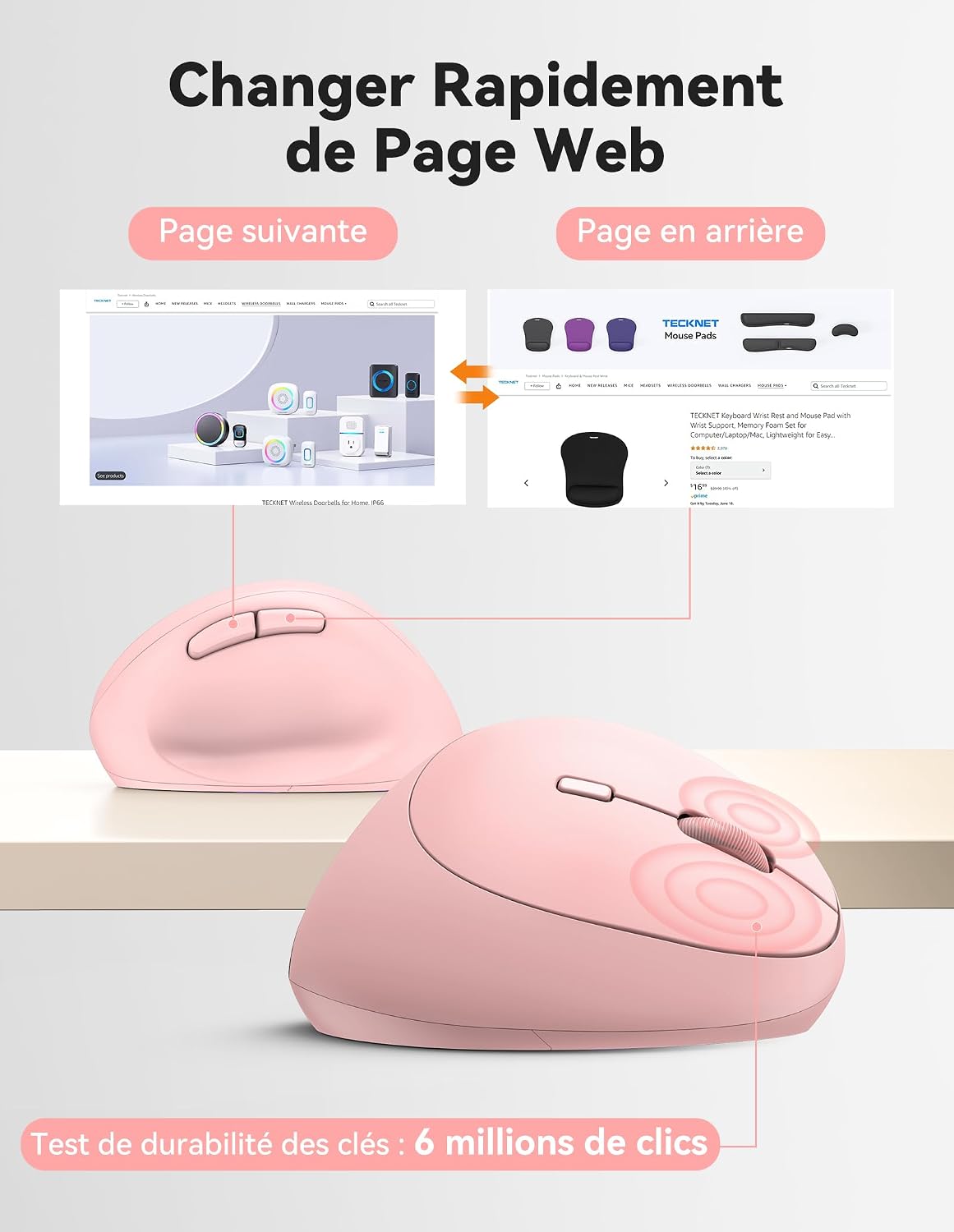
Diagram illustrating the location and function of each button on the TECKNET vertical mouse.
Рэгуляванне DPI
The mouse offers 5 adjustable DPI levels to suit various tasks and preferences. Press the DPI switch button to change the cursor speed. The red indicator light will flash a corresponding number of times to indicate the current DPI setting:
- Flash X1: 800 DPI (Web Navigation)
- Flash X2: 1600 DPI (Excel Editing)
- Flash X3: 2400 DPI (Video Editing)
- Flash X4: 3200 DPI (Photoshop)
- Flash X5: 4800 DPI (Gaming Track)

Visual representation of the 5 adjustable DPI levels for different usage scenarios.
Рэжым энергазберажэння
To conserve battery life, the mouse will automatically enter sleep mode after 8 minutes of inactivity. To wake it up, simply move the mouse or click any button.
Тэхнічнае абслугоўванне
- Уборка: Для чысткі мышы выкарыстоўвайце мяккую сухую тканіну. Пазбягайце выкарыстання агрэсіўных хімічных рэчываў або абразіўных матэрыялаў.
- Замена батарэі: When the mouse performance degrades or the cursor becomes erratic, it's time to replace the batteries. Ensure you use fresh AA batteries and dispose of old batteries responsibly.
- захоўванне: When not in use for extended periods, turn off the mouse using the ON/OFF switch to further conserve battery life. Store the USB receiver inside the mouse's battery compartment to prevent loss.
Ліквідацыю непаладак
- Мышка не рэагуе:
- Пераканайцеся, што мыш уключана.
- Праверце, ці правільна ўсталяваныя батарэйкі і ці дастаткова яны зараджаныя. Пры неабходнасці замяніце іх.
- Пераканайцеся, што USB-прыёмнік надзейна падключаны да спраўнага USB-порта. Паспрабуйце іншы USB-порт.
- Перамясціце мыш бліжэй да USB-прыёмніка, каб пазбегнуць праблем з дыяпазонам.
- Перазагрузіце кампутар.
- Няправільны рух курсора:
- Ачысціце аптычны датчык у ніжняй частцы мышы.
- Ensure you are using the mouse on a suitable surface. The mouse is designed to track on various surfaces like resin, wood, fabric, paper, and metal. Avoid highly reflective or transparent surfaces.
- Знізіце ўзровень DPI, калі курсор занадта адчувальны.
- Forward/Backward buttons not working on Mac:
These side buttons are not supported by Mac OS. This is a system limitation, not a mouse malfunction.
Тэхнічныя характарыстыкі
| Марка | ТЭКНЕТ |
| Нумар мадэлі | ТК-МС017 |
| Тэхналогія падлучэння | 2.4G Wireless (Radio-frequency) |
| Тэхналогія выяўлення руху | Аптычны |
| Ўзроўні DPI | 800, 1600, 2400, 3200, 4800 |
| Колькасць кнопак | 6 |
| Рука арыентацыі | правільна |
| Памеры прадукту | 10.5L x 6.5W centimeters |
| Далёкасць бесправадной сувязі | Да 10 метраў |
| Крыніца харчавання | 2 батарэйкі АА (не ўключаны) |
| Сярэдні тэрмін службы батарэі | Да 24 месяцаў |
| Сумяшчальныя аперацыйныя сістэмы | Windows 11/10/8/7/XP, macOS X10.4+, Chrome OS, Linux |
Гарантыя і падтрымка
TECKNET provides a 36-month support period for registered products. If you encounter any issues during the use of this product, please contact the professional TECKNET customer service team for assistance.
For more information and support, please visit the official TECKNET webсайт або звярніцеся непасрэдна ў службу падтрымкі кліентаў.
Webсайт: Крама TECKNET на Amazon