
1. Уводзіны
The MiBOXER TRI-PW 500W AC Triac Dimmer is designed for precise control of lighting systems in residential and commercial environments. This device integrates WiFi and 2.4GHz technology, allowing for remote operation via compatible applications and MiBOXER remote controls. It supports triac dimming, ensuring compatibility with a wide range of lighting fixtures, including LED, halogen, and incandescent lights, for smooth and consistent dimming from full brightness to a soft glow.
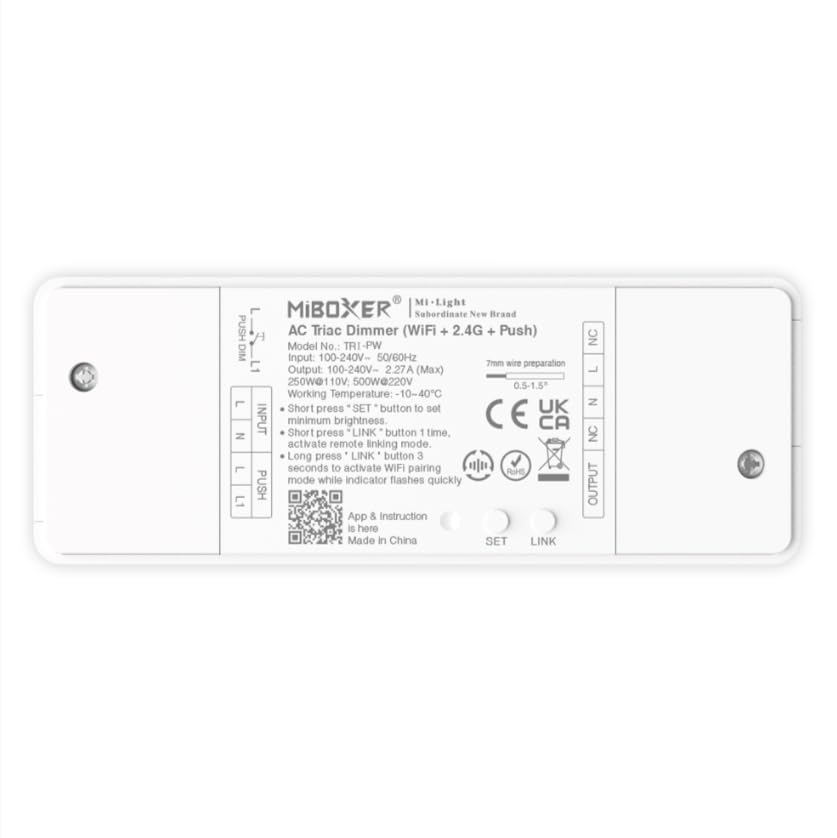
Выява 1.1: Канецview of the MiBOXER TRI-PW 500W AC Triac Dimmer unit.
2. Інфармацыя па бяспецы
- Электрычны мантаж: Усталёўку павінен выконваць кваліфікаваны электрык у адпаведнасці з мясцовымі электрычнымі нормамі і правіламі.
- Адключэнне сілкавання: Always disconnect power at the circuit breaker before installing or servicing the dimmer.
- тtage Сумяшчальнасць: Пераканайцеся, што ўвод voltage matches the dimmer's specifications (100-240V AC).
- Грузападымальнасць: Do not exceed the maximum load capacity of 500W. Overloading can cause damage or fire.
- Толькі для выкарыстання ў памяшканні: This device is intended for indoor use in dry locations. Avoid exposure to moisture or extreme temperatures.
- Сумяшчальнасць: Use only with compatible dimmable lighting fixtures (LED, halogen, incandescent).
3. Змесціва ўпакоўкі
Праверце наяўнасць усіх кампанентаў у камплекце:
- MiBOXER TRI-PW 500W AC Triac Dimmer Unit
- User Manual (may be included as a separate document)

Image 3.1: MiBOXER TRI-PW Dimmer unit shown with its packaging and a user manual.
4. Асаблівасці прадукту
- Powerful 500W Capacity: Supports high-power loads, suitable for various lighting fixtures.
- Triac Dimming Technology: Provides flicker-free dimming for LED, halogen, and incandescent lights.
- WiFi & 2.4GHz Control: Integrates with WiFi and MiBOXER 2.4GHz systems for smartphone or remote control.
- Push Control Compatibility: Allows for quick, on-site dimming adjustments via a push button.
- Праграма і галасавое кіраванне: Compatible with major smart home platforms for app-based and voice command control.
- Функцыя памяці: Retains previous lighting settings after power cycles.
5. Тэхнічныя характарыстыкі
| Асаблівасць | Дэталь |
|---|---|
| Марка | MIBOXER |
| Назва мадэлі | ТРІ-ПВ |
| Асаблівасць | 500 Вт пераменнага току Triac Dimmer |
| Клас дыяпазону частот | Аднапалосны |
| Стандарт бесправадной сувязі | 802.11b |
| Сумяшчальныя прылады | Падтрымка PUSH зацямнення |
| Рэкамендуемае выкарыстанне | Home lighting systems |
| Тэхналогія падлучэння | Wi-Fi |
| Сумяшчальнасць з разумным домам | Smart Home Compatible (e.g., Amazon Alexa, Google Assistant) |
| Пакрыццё | LED, halogen, incandescent, high-power loads |
| Частата | 2.4 ГГц |
| Памеры (прыбл.) | 117 мм (Д) х 45 мм (Ш) х 24 мм (У) |
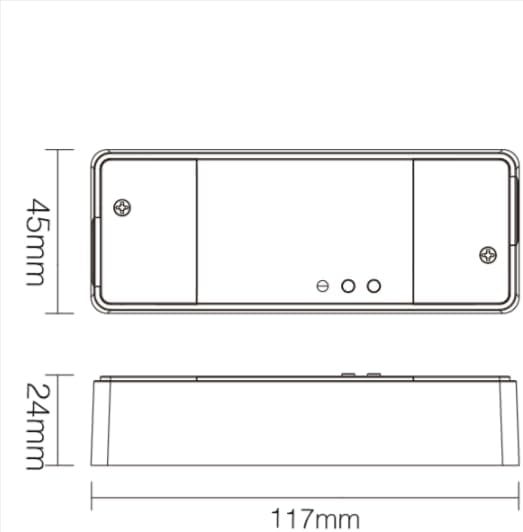
Image 5.1: Technical drawing showing the approximate dimensions of the TRI-PW dimmer.

Image 5.2: Packaging dimensions for the MiBOXER TRI-PW dimmer.
6. Настройка і ўстаноўка
Важна: Перад пачаткам усталёўкі пераканайцеся, што электраэнергія адключана з дапамогай аўтаматычнага выключальніка.
Электрасхема
The MiBOXER TRI-PW dimmer supports two primary wiring methods for integration with a push switch. Both methods are suitable for triac dimming LED lights, traditional filament lamps, і галаген lamps.

Image 6.1: Wiring diagrams for connecting the MiBOXER TRI-PW dimmer with a push switch.
Method 1: Single-Wire Push Switch Connection
- Connect the Live (L) and Neutral (N) input wires from your power supply (100-240V~) to the corresponding 'INPUT' terminals on the dimmer.
- Connect the Live (L) and Neutral (N) output wires to your lighting fixture (100-240V~) from the 'OUTPUT' terminals.
- Connect one wire from the push switch to the 'PUSH' terminal on the dimmer.
- Connect the other wire from the push switch to the Live (L) input terminal.
Method 2: Two-Wire Push Switch Connection
- Connect the Live (L) and Neutral (N) input wires from your power supply (100-240V~) to the corresponding 'INPUT' terminals on the dimmer.
- Connect the Live (L) and Neutral (N) output wires to your lighting fixture (100-240V~) from the 'OUTPUT' terminals.
- Connect the two wires from the push switch directly to the 'PUSH' terminals on the dimmer.
After wiring, secure the dimmer in a suitable electrical box or enclosure. Restore power at the circuit breaker.
7. Інструкцыя па эксплуатацыі
7.1. Push Switch Control
- Кароткі націск: Turn the lights ON or OFF.
- Доўгі націск: Adjust the brightness level. Release the button to set the desired brightness.
7.2. WiFi App Control
The TRI-PW dimmer supports control via a smart app (e.g., Tuya Smart app). No additional 2.4G gateway is required for app control.
- Download the compatible smart home app from your device's app store.
- Зарэгіструйцеся альбо ўвайдзіце ў свой рахунак.
- Put the dimmer into pairing mode (refer to the app's instructions or the dimmer's specific pairing procedure, usually involving a long press of the 'SET' button or power cycling).
- Follow the in-app instructions to add the device to your network.
- Once connected, you can control the dimmer's ON/OFF state and brightness from your smartphone.
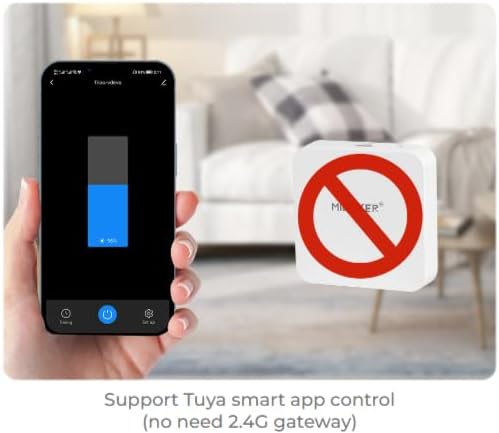
Малюнак 7.1: Прыкладample of controlling the dimmer using a smartphone application.
7.3. 2.4GHz Remote Control
The dimmer can be paired with MiBOXER 2.4GHz remote controls for direct wireless control.
- Ensure the dimmer is powered on.
- Refer to your MiBOXER 2.4GHz remote control's manual for specific pairing instructions. Typically, this involves pressing a "Link" or "Pair" button on the remote within a few seconds of powering on the dimmer or pressing the dimmer's 'SET' button.
- A successful pairing is usually indicated by the connected light flashing.
7.4. Voice Control (Alexa/Google Assistant)
The TRI-PW dimmer is compatible with smart home voice assistants like Amazon Alexa and Google Assistant when integrated through a compatible smart home app.
- Ensure your dimmer is successfully connected to the smart home app (e.g., Tuya Smart).
- Адкрыйце праграму Amazon Alexa або Google Home.
- Enable the skill or service for the smart home app you are using (e.g., "Tuya Smart" skill).
- Discover devices. Your dimmer should appear in the list.
- Assign a name to your dimmer (e.g., "Living Room Light").
- You can now control your light using voice commands, such as "Alexa, turn on Living Room Light" or "Hey Google, dim Living Room Light to 50%."

Image 7.2: The dimmer is compatible with voice control platforms like Amazon Alexa and Google Assistant.
8. Тэхнічнае абслугоўванне
- Уборка: Disconnect power before cleaning. Wipe the dimmer with a soft, dry cloth. Do not use liquid cleaners or aerosols.
- агляд: Перыядычна правярайце злучэнні правадоў на надзейнасць і наяўнасць прыкмет зносу або пашкоджанняў.
- Абнаўленні прашыўкі: If available, check the smart home app for firmware updates to ensure optimal performance and security.
9. Выпраўленне непаладак
| праблема | Магчымая прычына | Рашэнне |
|---|---|---|
| Святло не гарыць. | No power, incorrect wiring, faulty bulb, dimmer not paired. | Check circuit breaker. Verify wiring according to diagrams. Test bulb. Re-pair dimmer with app/remote. |
| Святло мігціць або гудзе. | Incompatible bulb, overloaded circuit, loose wiring. | Ensure bulbs are dimmable and compatible with triac dimmers. Reduce load. Check wiring connections. |
| Dimmer not responding to app/remote. | Dimmer out of range, WiFi issue, not paired. | Ensure dimmer is within WiFi/2.4GHz range. Check WiFi router. Re-pair dimmer with app/remote. |
| Немагчыма падключыцца да Wi-Fi. | Incorrect WiFi password, 5GHz network, dimmer not in pairing mode. | Verify WiFi password. Ensure you are connecting to a 2.4GHz network. Put dimmer into WiFi pairing mode. |
10. Гарантыя і падтрымка
This MiBOXER TRI-PW dimmer comes with a Гарантыя 2 год з дня пакупкі. Гэтая гарантыя распаўсюджваецца на дэфекты матэрыялаў і вырабу пры звычайным выкарыстанні.
The warranty does not cover damage caused by improper installation, misuse, unauthorized modifications, or acts of nature.
For technical support or warranty claims, please contact your retailer or the manufacturer directly. Please have your purchase receipt and product model number (TRI-PW) available when contacting support.
Для атрымання дадатковай інфармацыі вы можаце наведаць MiBOXER Store on Amazon.