
1. Уводзіны
This manual provides detailed instructions for the FREEWOLF M68 60% Wireless Gaming Keyboard. Please read this manual carefully before using the product to ensure proper operation and longevity.

Figure 1: FREEWOLF M68 Wireless Gaming Keyboard (Shimmer color variant)
2. Прадукт скончыўсяview
Асноўныя характарыстыкі:
- Трохрэжымнае падключэнне: Supports wired (USB-C), 2.4GHz wireless, and Bluetooth 5.0 connections.
- Сумяшчальнасць некалькіх прылад: Connects to Windows, Mac, Linux, PC, Laptop, iPad, iOS, and Android devices.
- Кампактны макет 60%: Features 67 keys, optimizing desktop space.
- Каўпачкі клавіш PBT: Durable Polybutylene Terephthalate keycaps with clear legends.
- Вясёлкавая святлодыёдная падсветка: Offers constant and breathing modes with adjustable brightness and speed.
- Працяглая батарэя: Built-in 2000mAH battery provides extended usage.
- Эрганамічны дызайн: Double leg braces allow for three adjustable typing angles.
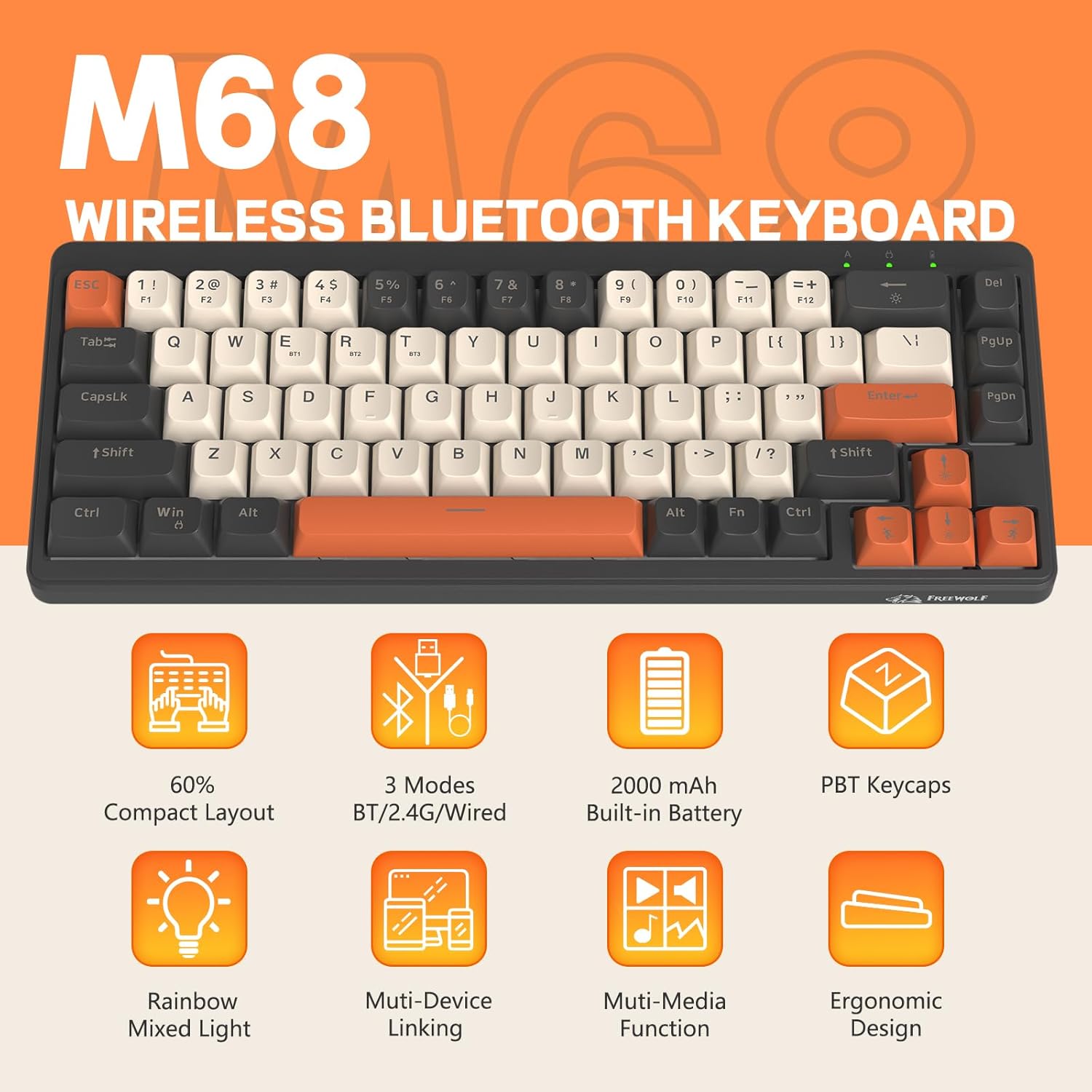
Малюнак 2: Закончанаview of FREEWOLF M68 key features.
3. Налада і падключэнне
3.1. Tri-Mode Connection Overview
The M68 keyboard supports three connection methods: wired via USB-C, 2.4GHz wireless via a USB receiver, and Bluetooth 5.0. You can switch between these modes using the dedicated switch on the keyboard.

Малюнак 3: падрабязна view of the 3-mode connection options.
3.2. Правадное падключэнне
- Знайдзіце порт USB-C на клавіятуры.
- Connect the provided USB-C cable to the keyboard and the other end to your computer's USB port.
- Ensure the mode switch on the keyboard is set to the wired (USB) position.
- Клавіятура будзе аўтаматычна распазнана вашай сістэмай.
3.3. Бесправадное злучэнне 2.4 ГГц
- Locate the 2.4GHz USB receiver (often stored in a compartment on the keyboard).
- Падключыце USB-прыёмнік да вольнага порта USB на вашым кампутары.
- Set the mode switch on the keyboard to the 2.4GHz wireless position.
- The keyboard should connect automatically. If not, press FN + R каб пачаць спалучэнне.
3.4. Злучэнне Bluetooth
The M68 can connect to up to three Bluetooth devices simultaneously.
- Усталюйце перамыкач рэжымаў на клавіятуры ў становішча Bluetooth.
- To enter pairing mode for a specific channel (BT1, BT2, or BT3), press and hold FN + Q (для BT1), FN + W (для BT2), або FN + E (for BT3) until the corresponding indicator light flashes rapidly.
- On your device (PC, laptop, tablet, phone), open Bluetooth settings and search for "FREEWOLF M68".
- Выберыце клавіятуру для спалучэння. Пасля падключэння індыкатар будзе гарэць пастаянна.
- Каб пераключыцца паміж падлучанымі прыладамі Bluetooth, націсніце FN + Q/W/E коратка.
4. Аперацыя
4.1. Кіраванне падсветкай
The M68 features customizable rainbow LED backlighting.
- FN + Backspace: Toggle backlight on/off or switch between constant and breathing modes.
- FN + стрэлка ўлева: Паменшыць хуткасць падсвятлення.
- FN + стрэлка ўправа: Павялічце хуткасць падсветкі.
- FN + стрэлка ўверх: Павялічце яркасць падсветкі.
- FN + стрэлка ўніз: Паменшыць яркасць падсветкі.

Figure 4: Backlight adjustment key combinations.
4.2. Эрганамічная рэгуляванне
The keyboard includes double leg braces on the back to adjust the typing angle for comfort.
- Flip the keyboard over to access the leg braces.
- Adjust the two-stage leg braces to achieve your preferred typing angle (flat, one stage, or two stages).

Figure 5: Ergonomic angle adjustments.
4.3. Кіраванне батарэяй
The keyboard has a built-in 2000mAH rechargeable battery.
- Зарадка: Connect the keyboard via the USB-C cable to a power source (computer USB port or wall adapter). The charging indicator will show status.
- Тэрмін службы батарэі: Up to 60 hours with backlight on, and up to 200 hours with backlight off.
- Энергазберажэнне: The keyboard will enter sleep mode after a period of inactivity to conserve battery. Press any key to wake it up.

Figure 6: Battery capacity information.
5. Тэхнічнае абслугоўванне
- Уборка: Use a soft, dry cloth to clean the keyboard surface. For keycaps, you may use a slightly damp тканінай. Пазбягайце празмернай вільгаці.
- Зняцце каўпачка клавіш: If necessary, use a keycap puller to carefully remove PBT keycaps for deeper cleaning or replacement.
- захоўванне: Захоўвайце клавіятуру ў прахалодным, сухім месцы, удалечыні ад прамых сонечных прамянёў і экстрэмальных тэмператур.
- Пазбягайце вадкасці: Do not expose the keyboard to liquids to prevent damage to internal components.
6. Выпраўленне непаладак
| праблема | Магчымая прычына | Рашэнне |
|---|---|---|
| Клавіятура не рэагуе (правадная) | Слабае падключэнне кабеля, няправільны рэжым. | Ensure USB-C cable is securely connected. Check if the mode switch is set to wired. Try a different USB port. |
| Keyboard not responding (2.4GHz) | USB receiver not connected, incorrect mode, pairing issue. | Ensure USB receiver is plugged in. Set mode switch to 2.4GHz. Re-pair by pressing FN + R. Try a different USB port for the receiver. |
| Клавіятура не рэагуе (Bluetooth) | Not paired, incorrect mode, device Bluetooth off. | Ensure device Bluetooth is on. Set mode switch to Bluetooth. Enter pairing mode (FN + Q/W/E) and re-pair. Forget the device on your system and re-pair. |
| Падсветка не працуе або завісла | Backlight off, low battery, software glitch. | Прэса FN + Backspace to toggle. Charge the keyboard. Try resetting the keyboard (refer to advanced functions if available, or disconnect/reconnect). |
| Клавішы не рэгіструюцца або ўводзяцца два разы | Dust/debris under keycap, switch issue. | Carefully remove keycap and clean. If issue persists, contact support. |
7. Тэхнічныя характарыстыкі
| мадэль | М68 |
| Марка | ВОЛЬНЫ ВОЎК |
| Сувязь | Правадны (USB-C), бесправадны 2.4 ГГц, Bluetooth 5.0 |
| Раскладка клавіш | 60% (67 клавіш) |
| Матэрыял клавішы | PBT (полібутылентэрэфталат) |
| Падсвятленне | Rainbow LED (RGB) |
| Ёмістасць батарэі | 2000 мАг |
| Сумяшчальныя прылады | Laptop, PC, Tablet (Windows, Mac, Linux, iOS, Android) |
| Памеры прадукту | 32.51 х 12.5 х 3.99 см |
| Вага | 600 г |
| Асаблівасці | Ergonomic (adjustable angles), Backlit |
8. Гарантыя і падтрымка
For warranty information, technical support, or customer service inquiries, please refer to the contact information provided with your purchase or visit the official FREEWOLF webсайт.
Калі ласка, захавайце пацвярджэнне пакупкі для любых гарантыйных прэтэнзій.