
ILIFE T20s Pro
ILIFE T20s Pro Robot Vacuum Cleaner Instruction Manual
Model: T20s Pro | Brand: ILIFE
Уводзіны
The ILIFE T20s Pro Robot Vacuum Cleaner is designed to provide an efficient and comprehensive cleaning solution for your home. Featuring advanced LiDAR navigation, powerful suction, and simultaneous vacuuming and mopping capabilities, this device simplifies your cleaning routine. This manual provides essential information for setting up, operating, and maintaining your robot vacuum cleaner to ensure optimal performance and longevity.
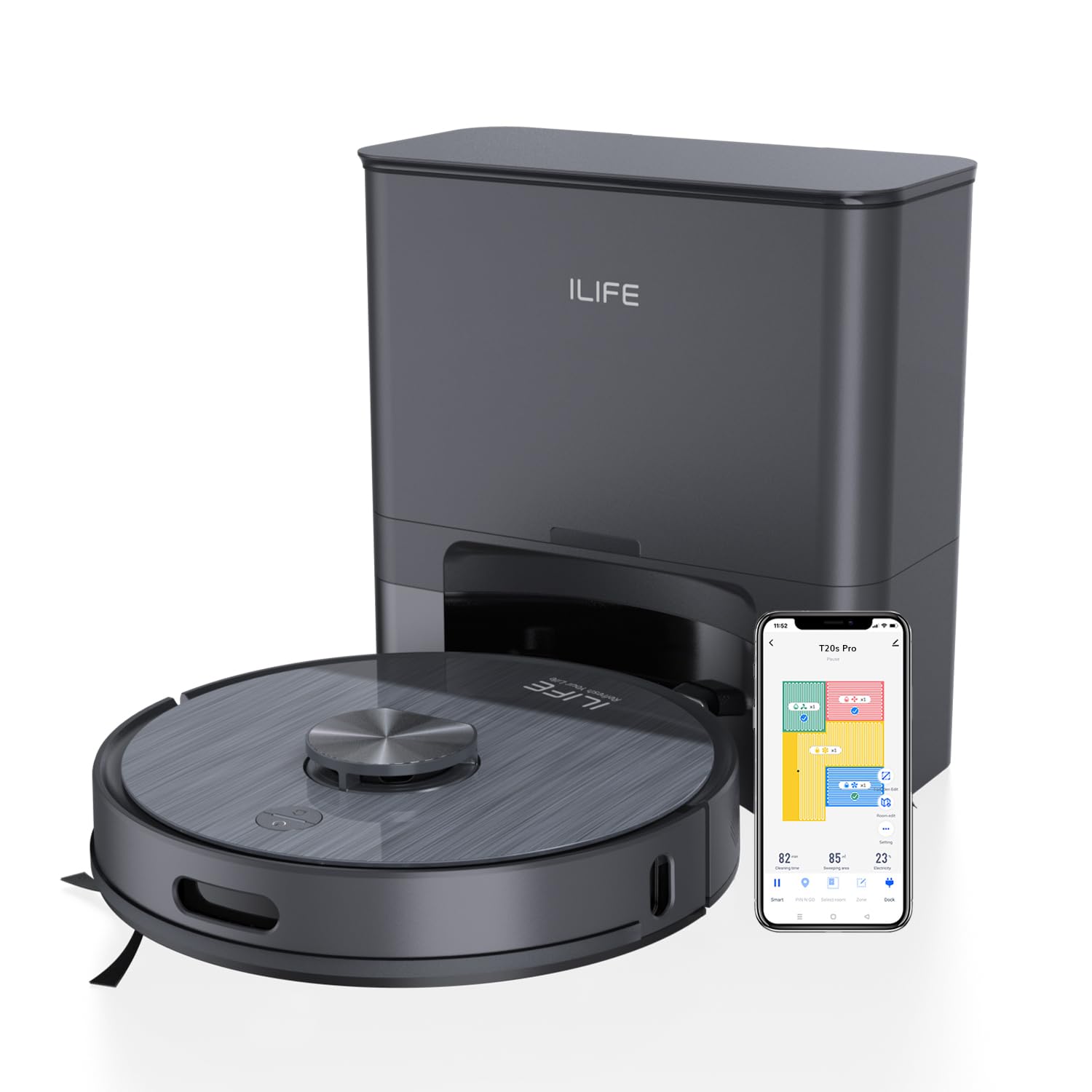
Figure 1: The ILIFE T20s Pro Robot Vacuum Cleaner with its self-emptying station.
Што ў скрынцы
Калі ласка, праверце змесціва вашай упакоўкі па спісе ніжэй:
- 1x T20s Pro Robot Vacuum
- 1x Self-empty Station
- 2x бакавыя шчоткі
- 2x Mop Cloths
- 1x 2-in-1 Water Tank
- 1x Mop Stand
- 1x Cleaning Tool
- 1x фільтр
- 2 пылазборнікі
- 1x Кіраўніцтва карыстальніка
Настройка
1. Распакаванне і размяшчэнне
- Remove all packaging materials and protective films from the robot and the self-empty station.
- Place the self-empty station against a wall on a hard, level surface. Ensure there is at least 0.5 meters of clear space on both sides and 1.5 meters in front of the station for optimal robot navigation.
- Plug the self-empty station into a power outlet.
2. Пачатковая зарадка
- Place the robot onto the charging pins of the self-empty station. Ensure the charging contacts on the robot align with those on the station.
- Allow the robot to fully charge before its first use. The indicator light on the robot will change to solid green when fully charged.
3. App Connection (ILIFE Clean App)
To unlock smart control features, download the ILIFE Clean App from your smartphone's app store.
- Open the ILIFE Clean App and create an account or log in.
- Tap 'Add Device' and select the T20s Pro model.
- Follow the in-app instructions to connect your robot to your 2.4GHz Wi-Fi network. This typically involves pressing and holding the Power and Home buttons on the robot simultaneously for 3 seconds until you hear an AP mode voice prompt and see the Wi-Fi indicator light flash.
- Once connected, you can manage cleaning tasks, set schedules, and customize maps.
4. Інтэграцыя галасавога памочніка
The T20s Pro is compatible with Amazon Alexa and Google Home for hands-free operation.
- In the ILIFE Clean App, go to the 'Me' option, then 'Third-Party Services'.
- Select either Alexa or Google Assistant and follow the instructions to link your ILIFE account.
- You can now use voice commands like "Alexa, turn on ILIFE robot" to start cleaning.
Інструкцыя па эксплуатацыі
1. Уключэнне / выключэнне харчавання
- Уключэнне: Long press the power button on the robot until the indicator light turns on.
- Выключэнне: Long press the power button until the indicator light turns off.
2. Рэжымы ачысткі
The robot offers various cleaning modes to suit different needs, accessible via the ILIFE Clean App:
- Рэжым Smart: Cleans the entire home automatically.
- Рэжым паставы: Allows you to pick an exact spot on the map for targeted cleaning.
- Рэжым пакоя: Select one or multiple rooms for focused cleaning.
- Рэжым зоны: Draw a specific area on the map you want the robot to clean.
- Area Designation Cleaning: Mark no-go, to-go, and to-mop areas on the map.

Figure 2: The ILIFE Clean App allows for area designation cleaning, including no-go zones.
3. Adjusting Suction and Water Levels
You can customize the suction power and water flow for different floor types and cleaning needs through the ILIFE Clean App. The robot also features an auto-boost function for carpets, increasing suction for deeper cleaning.

Figure 3: The robot automatically boosts suction when detecting carpets for a deeper clean.
4. Планаванне ўборкі
Use the ILIFE Clean App to set cleaning schedules for specific times and days. The robot will automatically start and return to its station after cleaning.
Асаблівасці большview
1. Advanced LiDAR Navigation
Equipped with LiDAR technology, the T20s Pro maps your home quickly and accurately, creating efficient cleaning routes. It can store up to 5 multi-floor maps, making it suitable for multi-level homes. Smart sensors prevent collisions, falls, and getting stuck.

Figure 4: LiDAR navigation ensures precise and efficient path cleaning.
2. Powerful 6500Pa Suction
The T20s Pro delivers a powerful 6500Pa suction, effectively lifting dust, debris, and pet hair from various floor types including tiles, hardwood, marble, and carpets. The 2-in-1 roller brush adapts to different surfaces for thorough cleaning.

Figure 5: The 6500Pa suction power ensures deep and thorough cleaning.
3. Simultaneous Vacuum and Mop
With its hybrid dust and water tank, the robot can vacuum and mop simultaneously. The 'Y'-shaped mopping mimics manual scrubbing for deeper and more efficient cleaning, capturing fine dust particles.

Figure 6: The 2-in-1 dustbin and water tank allow for efficient simultaneous vacuuming and mopping.
4. Станцыя самаапаражнення
The self-emptying station features a 3.5L disposable dust bag and 20,000Pa cyclone power, allowing for up to 10 weeks (70 days) of hands-free cleaning without manual emptying.

Figure 7: The self-emptying station automatically clears the robot's dustbin into a 3.5L bag.
5. Доўгавечны акумулятар
A high-capacity 5200mAh battery provides up to 260 minutes of runtime in quiet mode, suitable for cleaning large areas up to 4500 sq.ft. The robot automatically returns to its charging dock when the battery is low and resumes cleaning from where it left off once recharged.
Тэхнічнае абслугоўванне
Regular maintenance is crucial for the optimal performance and longevity of your ILIFE T20s Pro. Follow these steps to keep your robot in top condition:
1. Cleaning the Dust Tank and Filters
- Open the 2-in-1 dust and water tank.
- Use the provided cleaning tool to thoroughly clean the dust tank.
- Clean the sponge filter once a week and allow it to dry completely before reuse.
- For the HEPA filter, tap it gently on the floor weekly to remove dust. Replace it every 4 to 5 months.
2. Cleaning Brushes and Wheels
- Regularly inspect and clean the side brushes to avoid tangling from hair and debris.
- Keep the nose wheel and roller brush clean and dry for optimal performance.
3. Cleaning Sensors and Charging Pins
- Regularly check and clean the cliff sensors for uninterrupted navigation.
- Wipe the charging pins on both the robot and the docking station to prevent dust buildup and ensure proper charging.
4. Replacing Dust Bags
- When the 3.5L dust bag in the self-emptying station is full, properly replace it with a new one.
Ліквідацыю непаладак
If you encounter any issues with your ILIFE T20s Pro, please refer to the troubleshooting section in the full user manual or contact customer support. Common issues may include:
- Робат не зараджаецца.
- Robot getting stuck or lost.
- Зніжэнне эфектыўнасці ачысткі.
- Праблемы з падключэннем да праграмы.
Тэхнічныя характарыстыкі
| Асаблівасць | Спецыфікацыя |
|---|---|
| Марка | ЖЫЦЦЁ |
| Назва мадэлі | T20s Pro |
| Максімальнае ўсмоктванне | 6500 Па |
| Тып навігацыі | Advanced LDS (LiDAR) Navigation |
| Self-Emptying | Yes, with 3.5L Disposable Dust Bag |
| Simultaneous Vac & Mop | так |
| Multi Floor Maps | Да 5 карт |
| Ёмістасць батарэі | 5200 мАг |
| Тэрмін службы батарэі | Up to 260 Minutes (Quiet Mode) |
| Метад кантролю | App Control, Amazon Alexa, Google Home |
| Тып фільтра | 4 Layer Filter, High Efficiency Filter, HEPA, Microfilter |
| Памеры прадмета (Д х Ш х У) | 33 Д х 33 Ш х 9 У сантыметраў |
| Вага прадмета | 7000 грам |
Гарантыя і падтрымка
The ILIFE T20s Pro Robot Vacuum Cleaner comes with a standard manufacturing warranty. For specific warranty terms and conditions, please refer to the warranty card included in your package or visit the official ILIFE webсайт.
For customer support, technical assistance, or service requests, please contact ILIFE India:
- тэлефон: 1800-274-5433
- Кантактная асоба імпарцёра: ILIFE Innovations | Shariden Pvt. Ltd. B-37, Devasandra Industrial Estate, Mahadevapura, Bengaluru, Karnataka 560048
Відэа прадуктуview
Відэа 1: Афіцыйная відэапрэзентацыя прадуктуasing the features and operation of the ILIFE T20s Pro Robot Vacuum Cleaner.