
Уводзіны
Welcome to your RCA Wave-68 True Wireless Earbuds. This manual provides detailed instructions on how to set up, operate, maintain, and troubleshoot your earbuds to ensure optimal performance and a seamless audio experience. Please read this manual thoroughly before using your device.
Змест пакета
- Бесправадныя навушнікі RCA Wave-68 (левыя і правыя)
- Чахол для зарадкі
- USB-кабель для зарадкі
- Кіраўніцтва карыстальніка
Прадукт скончаныview
Familiarize yourself with the components of your RCA Wave-68 earbuds and charging case.

выява: The RCA Wave-68 earbuds are shown inside their open charging case. The case features a digital display indicating the battery levels of both the case and individual earbuds.
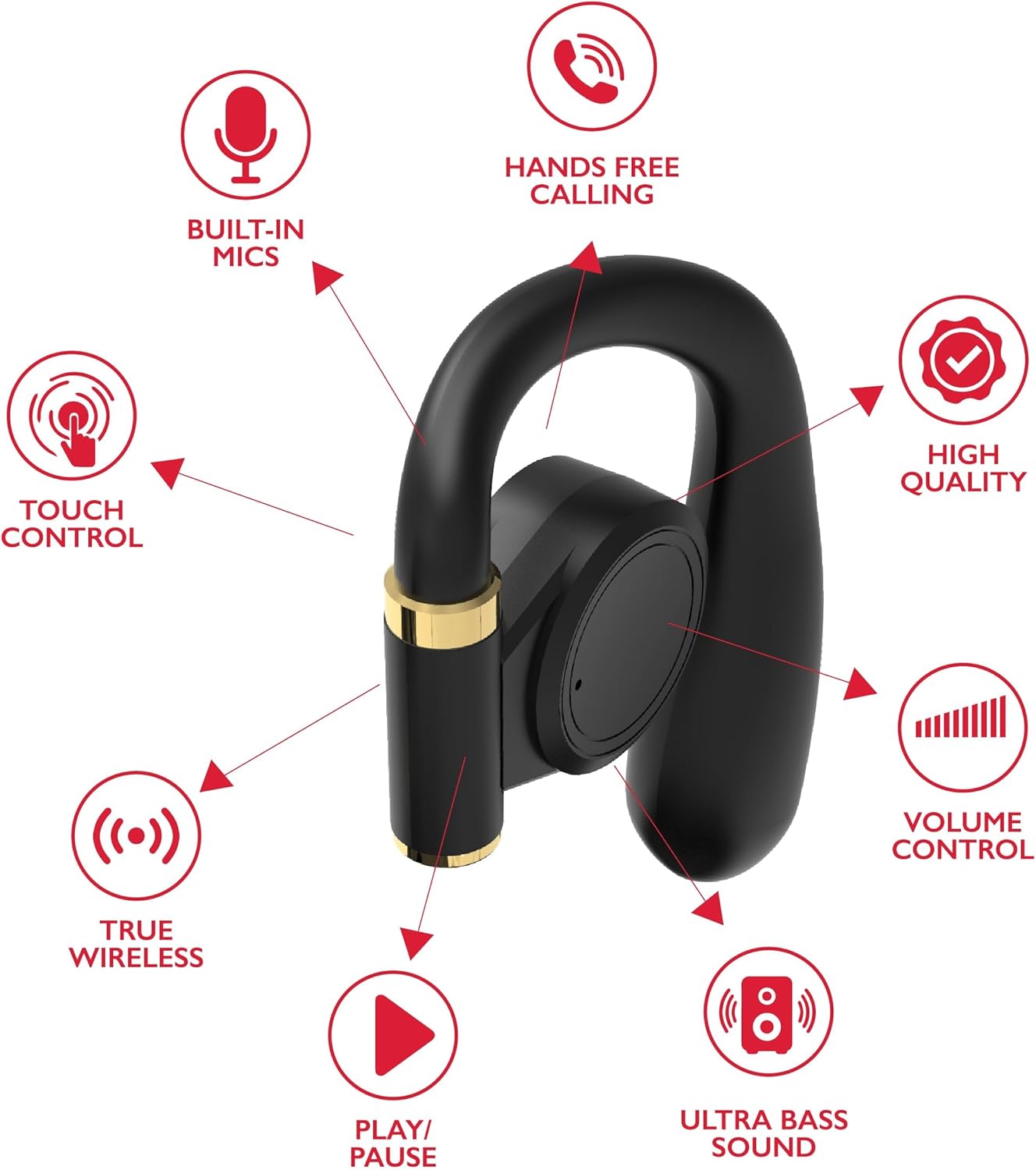
выява: A diagram highlights key features of a single RCA Wave-68 earbud, including built-in mics, hands-free calling, touch control, true wireless connectivity, play/pause function, ultra bass sound, volume control, and high-quality audio.
Настройка
1. Зарадка навушнікаў і чахла
Before first use, fully charge the earbuds and charging case. Place the earbuds into the charging case. Connect the USB charging cable to the charging port on the case and to a power source. The digital display on the case will show the charging status. A full charge provides approximately 20 hours of total playtime with the charging case.
2. Спарванне Bluetooth
- Уключэнне: Open the charging case. The earbuds will automatically power on and enter pairing mode. You may see a blinking light indicator on the earbuds.
- Актываваць Bluetooth: На вашай прыладзе (смартфоне, планшэце і г.д.) уключыце Bluetooth.
- Выберыце прыладу: Пошук «RCA Wave-68» у спісе даступных прылад Bluetooth і выберыце яе для падключэння.
- Пацверджанне: Once connected, the earbuds will indicate successful pairing, and the light indicator may stop blinking or turn off.
If pairing fails, ensure the earbuds are charged and within range of your device. Turn off Bluetooth on other nearby devices to avoid interference.
Інструкцыя па эксплуатацыі
Уключэнне/выключэнне харчавання
- Уключэнне: Адкрыйце зарадны футляр, і навушнікі аўтаматычна ўключацца. Акрамя таго, можна націснуць і ўтрымліваць сэнсарную вобласць кіравання на абодвух навушніках на працягу 3 секунд.
- Выключэнне: Змесціце навушнікі назад у зарадны футляр і зачыніце вечка. Яны аўтаматычна выключацца. Акрамя таго, можна націснуць і ўтрымліваць сэнсарную вобласць кіравання на абодвух навушніках на працягу 5 секунд.
Сэнсарныя элементы кіравання
Навушнікі RCA Wave-68 маюць інтуітыўна зразумелае сэнсарнае кіраванне для прайгравання аўдыё, званкоў і функцый галасавога памочніка.
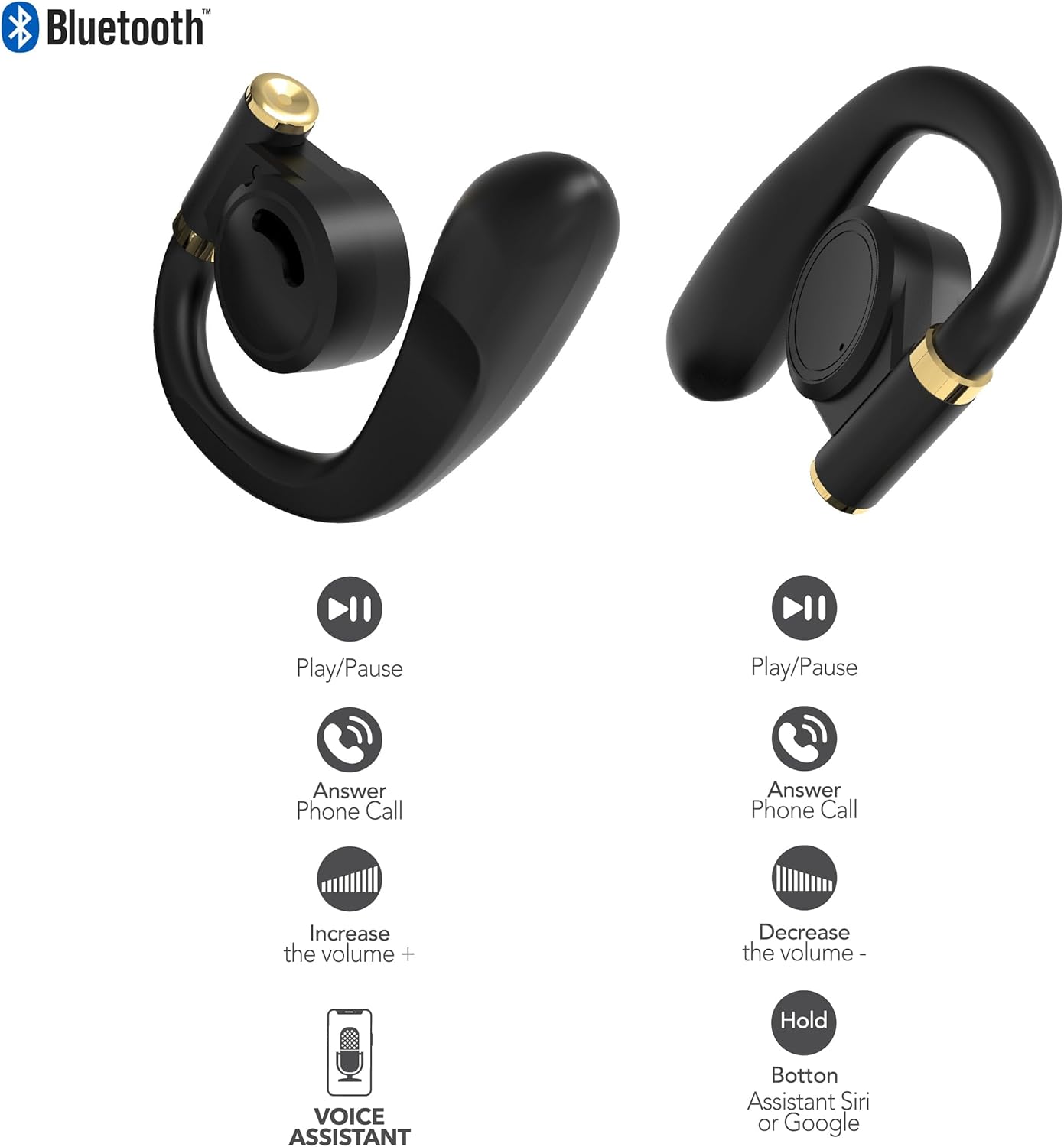
выява: This diagram illustrates the touch control functions for both the left and right RCA Wave-68 earbuds, including play/pause, answer phone call, volume increase/decrease, and activating the voice assistant.
- Прайграванне/Паўза: Адзін націск на любы навушнік.
- Наступны трэк: Двойчы націсніце на правы навушнік.
- Папярэдні трэк: Двойчы націсніце левы навушнік.
- Павялічыць гучнасць: Тройчы націсніце на правы навушнік.
- Паменшыць гучнасць: Тройчы націсніце левы навушнік.
- Адказ/завяршэнне выкліку: Адно націсканне на любы навушнік падчас уваходнага або актыўнага званка.
- Адхіліць выклік: Падчас уваходнага званка націсніце і ўтрымлівайце любы з навушнікаў на працягу 2 секунд.
- Актывацыя галасавога памочніка (Siri/Google Assistant): Націсніце і ўтрымлівайце любы навушнік на працягу 3 секунд.
Рэжым празрыстасці
The Transparency Mode allows you to hear your surroundings while still enjoying your audio. This feature is useful for awareness in environments like busy streets or public transport.
- Уключыць/выключыць рэжым празрыстасці: Consult your device's Bluetooth settings or specific app if available, or refer to the product's quick start guide for a specific touch control gesture if not listed above.
Тэхнічнае абслугоўванне
Уборка
Рэгулярная ўборка дапамагае падтрымліваць якасць гуку і гігіену.
- Выкарыстоўвайце мяккую, сухую тканіну без ворса, каб праціраць навушнікі і зарадны футляр.
- Не выкарыстоўвайце абразіўныя ачышчальнікі, спірт або хімічныя растваральнікі.
- Акуратна выдаліце вушную серу або смецце з наканечнікаў навушнікаў і сеткі дынаміка з дапамогай невялікай чыстай шчотачкі або ватовага тампона.
Захоўванне
Калі навушнікі не выкарыстоўваюцца, захоўвайце іх у зарадным футляры, каб абараніць ад пылу і пашкоджанняў.
- Захоўваць у прахалодным, сухім месцы, удалечыні ад экстрэмальных тэмператур.
- Пазбягайце працяглага знаходжання пад прамымі сонечнымі прамянямі або вільгаццю.
Ліквідацыю непаладак
Калі ў вас узніклі праблемы з навушнікамі RCA Wave-68, звярніцеся да наступных распаўсюджаных рашэнняў:
- Earbuds not powering on automatically: Ensure the charging case is charged. Place earbuds back in the case, close the lid, then open it again. If issues persist, manually power on by pressing and holding the touch control area for 3 seconds.
- Навушнікі не спалучаюцца: Make sure both earbuds are fully charged. Turn off Bluetooth on your device, then turn it back on. Forget "RCA Wave-68" from your device's Bluetooth list and attempt to pair again. Ensure no other devices are actively connected to the earbuds.
- Няма гуку з аднаго навушніка: Place both earbuds back into the charging case, close the lid, and then take them out again. This often re-syncs them. Check your device's audio balance settings.
- Charging case not displaying battery info/not charging: Ensure the USB cable is securely connected to both the case and the power source. Try a different USB cable or power adapter. Clean the charging port on the case for any debris.
- Нізкая гучнасць або дрэнная якасць гуку: Adjust the volume on both your device and the earbuds. Ensure the earbuds are properly seated in your ears for a good seal. Clean any debris from the earbud speaker mesh.
- Выпадаюць навушнікі: Ensure you are using the correct ear tip size for a secure and comfortable fit.
Тэхнічныя характарыстыкі
| Асаблівасць | Дэталь |
|---|---|
| Назва мадэлі | Хваля-68 |
| Марка | RCA |
| Тэхналогія падлучэння | Бесправадная сувязь (Bluetooth) |
| Версія Bluetooth | 5.3 |
| Тэрмін службы батарэі | Да 20 гадзін (з зарадным футлярам) |
| Метад кантролю | Дакранацца |
| Размяшчэнне вушэй | У вуха |
| Формаў-фактар | У вуха |
| Матэрыял | Пластык, сілікон |
| Асаблівасці | Built-In Voice Assistant, Transparency Mode |
| UPC | 850068964468 |
Інфармацыя па бяспецы
- Не разбірайце і не мадыфікуйце навушнікі або зарадны футляр.
- Пазбягайце ўздзеяння на прыладу экстрэмальных тэмператур, вільготнасці або вадкасцей.
- Не выкарыстоўвайце навушнікі на высокай гучнасці працяглы час, каб пазбегнуць пашкоджання слыху.
- Захоўваць у месцах, недаступных дзецям і хатнім жывёлам.
- Утылізуйце прыладу адказна ў адпаведнасці з мясцовымі правіламі.
Гарантыя і падтрымка
RCA products are designed for reliability and performance. For warranty information or technical support, please refer to the warranty card included in your package or visit the official RCA support webсайт. Калі ласка, захавайце пацвярджэнне пакупкі для прэтэнзій па гарантыі.