
1. Уводзіны
Thank you for choosing the Intenso O400HA Over-Ear Headphones. These headphones are designed to provide a superior audio experience with advanced features such as Hybrid Active Noise Cancelling (ANC), Transparency Mode, and Bluetooth 5.3 connectivity. This manual will guide you through the setup, operation, and maintenance of your new headphones.
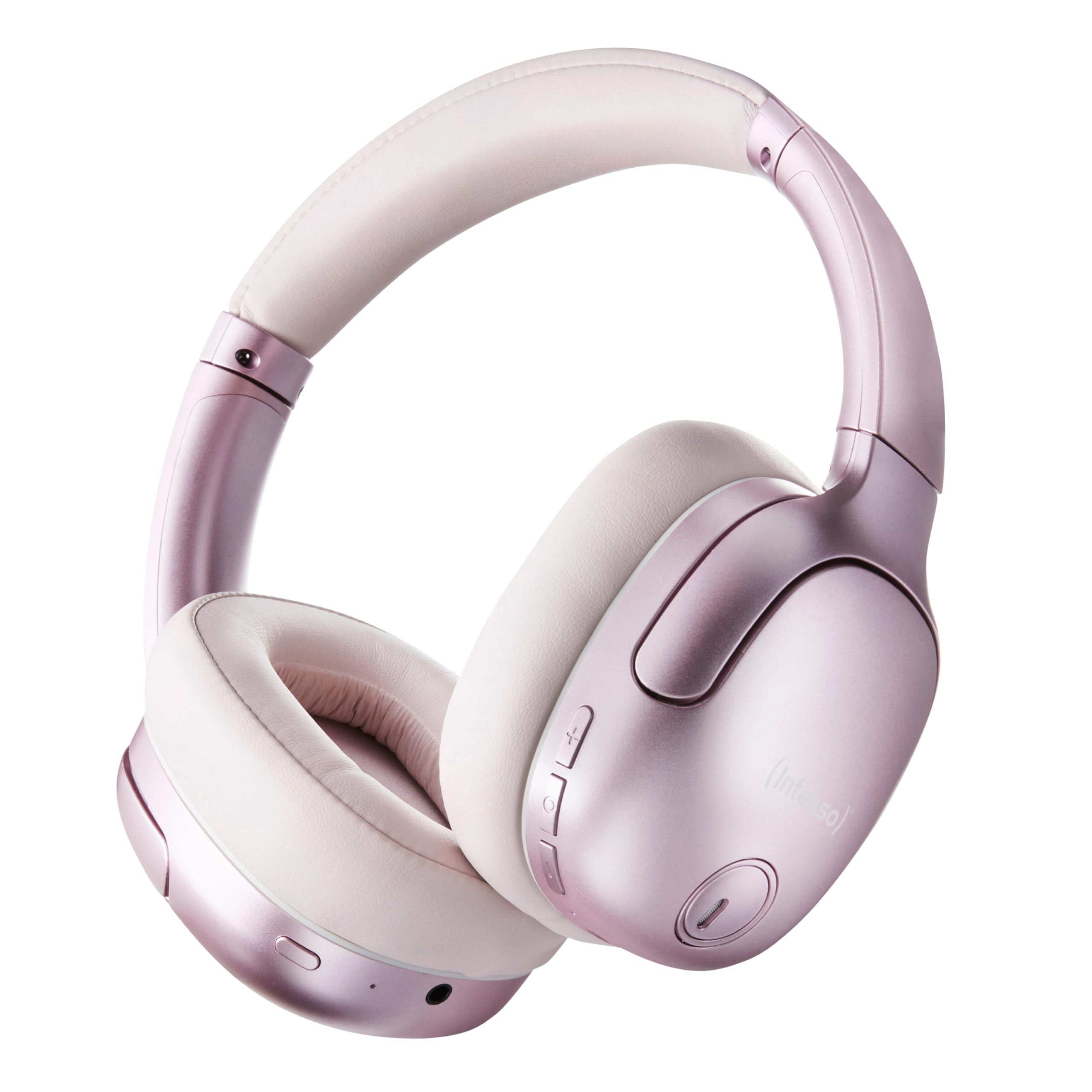
Image 1.1: Intenso O400HA Over-Ear Headphones (Pink)
The Intenso O400HA headphones feature a comfortable over-ear design with soft ear pads, an adjustable headband, and intuitive controls on the earcups.
2. Змесціва ўпакоўкі
Калі ласка, праверце ўпакоўку на наяўнасць наступных прадметаў:
- Intenso O400HA Over-Ear Headphones
- Кабель для зарадкі ад USB-C да USB-C
- 1.5m Audio Cable (3.5mm jack)
- Кіраўніцтва карыстальніка
3. Прадукт скончыўсяview
Familiarize yourself with the various parts and controls of your Intenso O400HA headphones.

Малюнак 3.1: Збоку view of Intenso O400HA headphones with controls
This image displays the right earcup with its control buttons and ports. These typically include power, volume, multi-function buttons, and a charging port.
Элементы кіравання і парты:
- Кнопка харчавання: Выкарыстоўваецца для ўключэння/выключэння навушнікаў і пачатку спалучэння праз Bluetooth.
- Кнопка павелічэння гучнасці/наступнага трэка: Кароткім націскам павялічваецца гучнасць, доўгім націскам пераключаецца на наступны трэк.
- Кнопка памяншэння гучнасці/пераключэння на папярэдні трэк: Кароткім націскам памяншае гучнасць, доўгім націскам пераходзіць да папярэдняй кампазіцыі.
- Шматфункцыянальная кнопка (МФК): Controls playback (play/pause), answers/ends calls, activates voice assistant.
- ANC/Transparency Mode Button: Toggles between Hybrid Active Noise Cancelling, Transparency Mode, and normal mode.
- Порт для зарадкі USB-C: Для зарадкі навушнікаў.
- 3.5 мм аўдыяраз'ём: Для праваднога падключэння.
- Мікрафоны: Internal and external microphones for ANC and calls.
4. Настройка
4.1. Зарадка навушнікаў
Перад першым выкарыстаннем цалкам зарадзіце навушнікі.
- Падключыце зарадны кабель USB-C з камплекта да порта USB-C на навушніках.
- Падключыце другі канец кабеля да адаптара харчавання USB (не ўваходзіць у камплект) або да USB-порта кампутара.
- Святлодыёдны індыкатар будзе паказваць стан зарадкі. Звычайна ён выключаецца або змяняе колер пры поўнай зарадцы.
A full charge takes approximately 2 hours. A quick charge of 15 minutes provides up to 6 hours of playtime.
4.2. Спарванне Bluetooth
Каб падключыць навушнікі да прылады з падтрымкай Bluetooth:
- Пераканайцеся, што навушнікі выключаны.
- Націсніце і ўтрымлівайце кнопку харчавання прыблізна 5-7 секунд, пакуль святлодыёдны індыкатар не пачне міргаць сінім і чырвоным колерамі, што паказвае на рэжым спалучэння.
- На вашай прыладзе (смартфоне, планшэце, ноўтбуку) перайдзіце ў налады Bluetooth і ўключыце Bluetooth.
- Пошук available devices and select "Intenso O400HA" from the list.
- Пасля падключэння святлодыёдны індыкатар звычайна будзе павольна міргаць сінім колерам або будзе гарэць пастаянна.
Пры ўключэнні навушнікі аўтаматычна паспрабуюць падключыцца да апошняй спалучанай прылады.
5. Кіраванне навушнікамі
5.1. Уключэнне/выключэнне харчавання
- Уключэнне: Націсніце і ўтрымлівайце кнопку харчавання на працягу 2-3 секунд.
- Выключэнне: Націсніце і ўтрымлівайце кнопку харчавання на працягу 3-4 секунд.
5.2. Audio Modes: ANC, Transparency, Music
The Intenso O400HA headphones offer three distinct audio modes to suit your environment.

Выява 5.1: Канецview of Noise Control Modes
This image illustrates the key noise control technologies: Hybrid Active Noise Cancellation (ANC) for reducing ambient noise, Environmental Noise Cancellation (ENC) for clear calls, and Transparency Mode for hearing your surroundings.

Image 5.2: Hybrid Active Noise Cancelling Explained
This diagram shows how Hybrid ANC works using both external and internal microphones to filter out up to 95% of ambient noise, such as engine sounds.
- Гібрыднае актыўнае шумапрыглушэнне (ANC): Press the ANC/Transparency Mode button to activate. This mode significantly reduces ambient noise, ideal for travel or noisy environments.
- Рэжым празрыстасці: Press the ANC/Transparency Mode button again to switch to Transparency Mode. This allows external sounds to pass through, enabling you to hear your surroundings without removing the headphones.
- Normal Mode (Music Mode): Press the ANC/Transparency Mode button a third time to return to normal mode, where ANC and Transparency are off. This mode provides balanced sound for a comprehensive listening experience.
5.3. Music Playback and Calls
- Прайграванне/Паўза: Short press the Multi-function Button (MFB).
- Наступны трэк: Доўга націсніце кнопку павелічэння гучнасці.
- Папярэдні трэк: Доўга націсніце кнопку памяншэння гучнасці.
- Павялічыць гучнасць: Кароткачасова націсніце кнопку павелічэння гучнасці.
- Паменшыць гучнасць: Кароткачасова націсніце кнопку памяншэння гучнасці.
- Адказ/завяршэнне выкліку: Кароткае націсканне MFB.
- Адхіліць выклік: Доўга націсніце на шматфункцыянальную кнопку.
- Актываваць галасавы памочнік: Двойчы націсніце MFB.
5.4. Wired Connection (Passive Mode)
You can use the headphones in passive mode even if the battery is depleted or if you prefer a wired connection.
- Падключыце адзін канец аўдыёкабеля 3.5 мм да аўдыёраздыма на навушніках.
- Падключыце другі канец да 3.5-мм аўдыёвыхаду вашай прылады.
Note: ANC and Transparency modes may not function or may have reduced performance when using the wired connection without power.
6. Тэхнічнае абслугоўванне
To ensure the longevity and optimal performance of your Intenso O400HA headphones, follow these maintenance guidelines:
- Уборка: Use a soft, dry cloth to clean the headphones. Do not use abrasive cleaners, solvents, or harsh chemicals.
- захоўванне: Store the headphones in a cool, dry place away from direct sunlight and extreme temperatures. When not in use, it is recommended to store them in a protective case (if provided or purchased separately).
- Ўздзеянне вады: These headphones are not waterproof. Avoid exposure to water, moisture, or rain.
- Сыход за батарэяй: For optimal battery life, avoid fully discharging the battery frequently. Charge the headphones regularly, even if not used for extended periods.
- Сыход за кабелем: Handle the charging and audio cables gently. Avoid bending or twisting them excessively.
7. Выпраўленне непаладак
Калі ў вас узніклі праблемы з навушнікамі, звярніцеся да наступных распаўсюджаных праблем і іх рашэнняў:
| праблема | Магчымая прычына | Рашэнне |
|---|---|---|
| Навушнікі не ўключаюцься | Нізкі акумулятар | Поўнасцю зарадзіце навушнікі. |
| Немагчыма падключыць прыладу праз Bluetooth | Headphones not in pairing mode; Device Bluetooth off; Interference | Ensure headphones are in pairing mode (flashing blue/red). Turn Bluetooth on your device. Move closer to the device. Forget previous pairings and try again. |
| Няма гуку альбо малая гучнасць | Volume too low; Incorrect audio source; Loose cable (wired mode) | Increase volume on headphones and device. Check if the correct audio output is selected on your device. Ensure 3.5mm cable is securely connected. |
| АНК неэфектыўны | ANC not activated; Improper fit | Націсніце кнопку ANC для актывацыі. Адрэгулюйце навушнікі так, каб яны шчыльна прылягалі да вушэй. |
| Скажэнне гуку | Distance from device; Interference; Low battery | Move closer to your device. Avoid strong electromagnetic fields. Charge the headphones. |
8. Тэхнічныя характарыстыкі
| Асаблівасць | Дэталь |
|---|---|
| Назва мадэлі | Over-Ear O400HA |
| Тэхналогія падлучэння | Wireless (Bluetooth 5.3) / Wired (3.5mm jack) |
| Кантроль шуму | Гібрыднае шумапрыглушэнне |
| Тэрмін службы батарэі | Да 75 гадзін |
| Час зарадкі | Approximately 2 Hours (15 min for 6 hours playtime) |
| Далёкасць бесправадной сувязі | Да 15 метраў |
| АЧХ | 20 Гц да 20 кГц |
| Імпеданс | 32 Ом |
| Метад кантролю | Touch/Buttons |
| Вага | 0.25 кілаграма |
| Матэрыял | Тэрмапластычны эластамер (TPE) |
| Сумяшчальныя прылады | Mobile phones, Laptops, Tablets, Gaming Consoles, Car Audio Systems |
9. Гарантыя і падтрымка
Intenso products are designed for reliability and performance. For warranty information and customer support, please refer to the warranty card included with your purchase or visit the official Intenso webсайт. Захоўвайце пацвярджэнне пакупкі для любых гарантыйных прэтэнзій.
For further assistance, you may contact Intenso customer service through their official channels.