
1. Уводзіны
Thank you for choosing the FLEXISPOT 28-Inch Height Adjustable Standing Desk Converter. This product is designed to transform your existing desk into an active sit-stand workstation, promoting a healthier and more dynamic work environment. Its unique two-tier design provides ample space for your monitor, keyboard, and mouse, allowing for seamless transitions between sitting and standing positions.
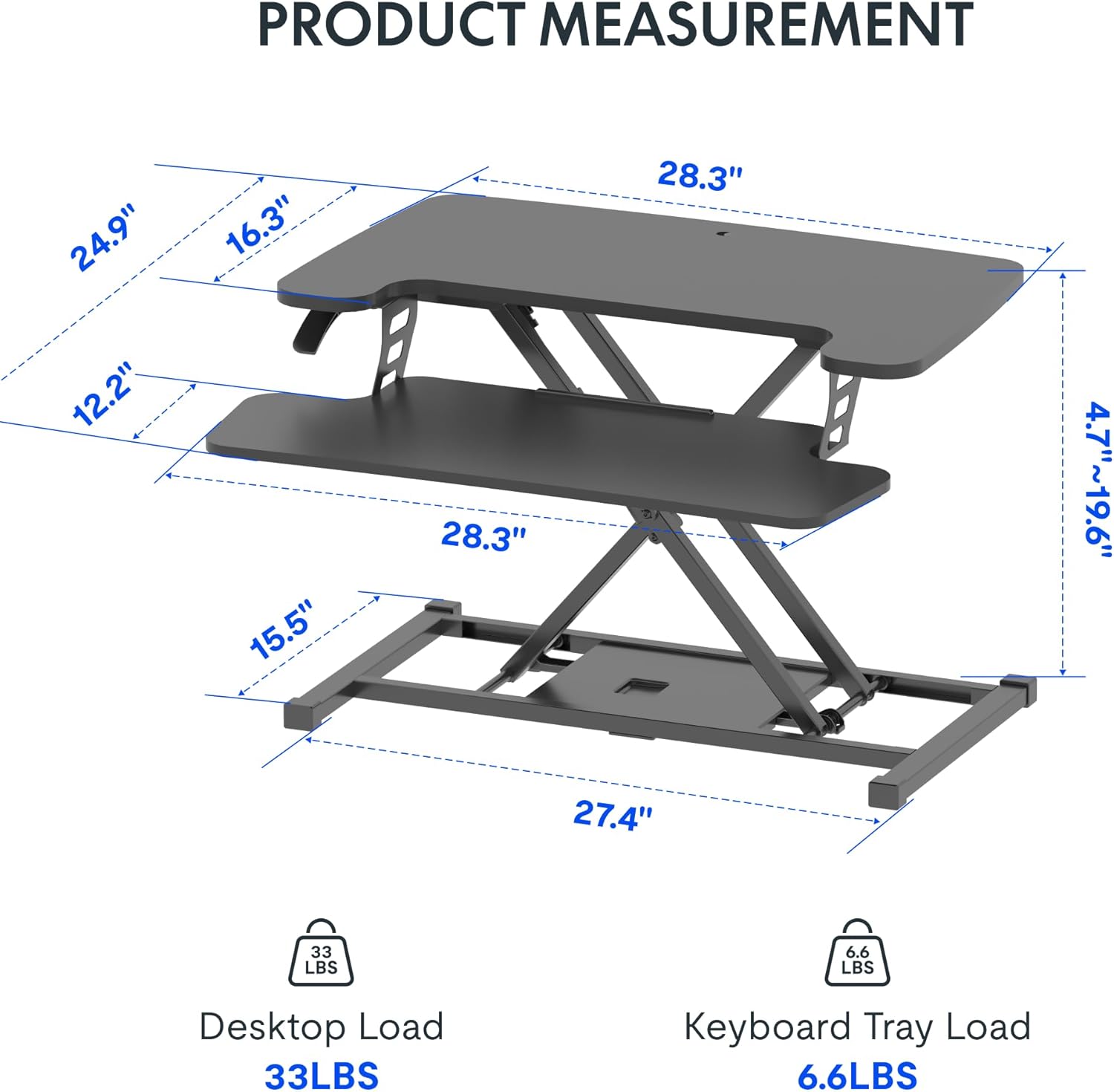
Image: The FLEXISPOT 28-Inch Height Adjustable Standing Desk Converter in a typical office setup, showcasing its two-tier design and compact footprint.
2. Інфармацыя па бяспецы
- Уважліва прачытайце ўсе інструкцыі перад зборкай і выкарыстаннем.
- Ensure all components are securely fastened before placing items on the desk converter.
- Do not exceed the maximum weight capacity: 33 lbs for the desktop and 6.6 lbs for the keyboard tray.
- Keep hands and fingers clear of moving parts during height adjustment to prevent injury.
- Place the desk converter on a stable, level surface.
- Avoid placing liquids directly on the surface to prevent spills and potential damage to electronic devices.
3. Змесціва ўпакоўкі
Upon opening your package, verify that all the following components are present:
- FLEXISPOT 28-Inch Height Adjustable Standing Desk Converter (main unit)
- Панэль клавіятуры
- Зборныя элементы (шрубы, шасцігранны ключ)
- Інструкцыя па эксплуатацыі (гэты дакумент)
4. Налада і зборка
The FLEXISPOT 28-Inch Height Adjustable Standing Desk Converter comes largely pre-assembled. The primary step required is attaching the keyboard tray.
- Распакуйце: Акуратна дастаньце ўсе кампаненты з упакоўкі.
- Position the Main Unit: Place the main desk converter unit on your existing desk in the desired location.
- Падключыце падстаўку для клавіятуры: Align the keyboard tray with the pre-drilled holes on the underside of the main unit's lower platform. Secure it using the provided screws and Allen wrench. Ensure it is firmly attached.
- Арганізуйце кабелі: Route any monitor or peripheral cables to prevent interference with the height adjustment mechanism.
No complex steps are required for assembly. A Phillips screwdriver may be needed for some keyboard tray attachments, though an Allen wrench is typically included for the main connections.
5. Інструкцыя па эксплуатацыі
Рэгуляванне вышыні:
The desk converter features a powerful gas spring system for smooth and effortless height adjustment. It allows you to transition between sitting and standing positions with a single lever.
- Каб падняць: Gently lift the adjustment lever located on the side of the desk converter. While holding the lever, apply slight upward pressure to the desktop. The gas spring will assist in raising the unit. Release the lever once the desired height (between 4.7" and 19.7") is reached.
- Каб панізіць: Gently lift the adjustment lever. While holding the lever, apply downward pressure to the desktop. The unit will smoothly lower. Release the lever once the desired height is reached.
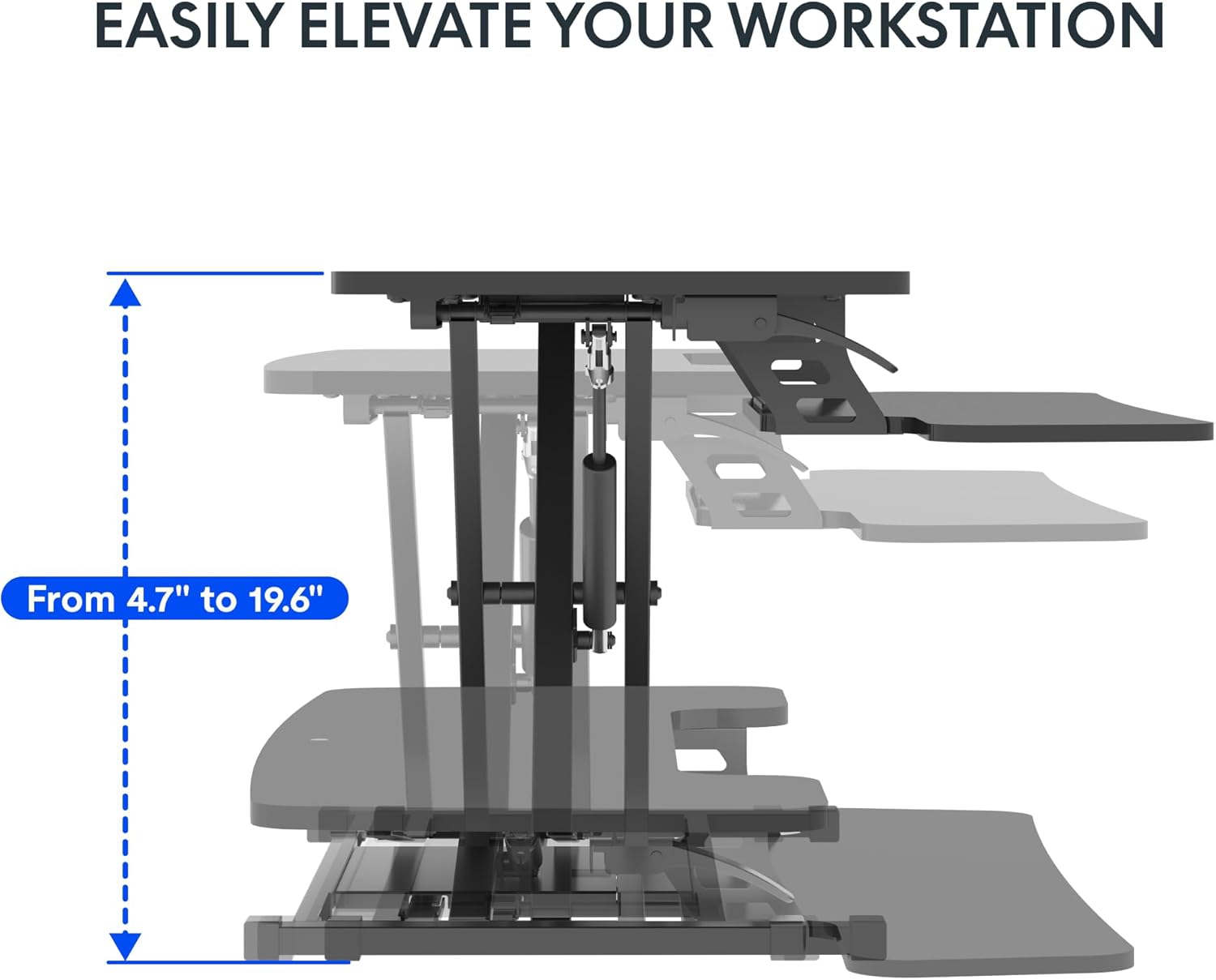
Image: Visual representation of the desk converter's height adjustment range, showing the smooth transition from minimum to maximum height.
Keyboard Tray Angle Adjustment (if applicable):
Some models may offer an adjustable angle for the keyboard tray. Consult your specific model's features for details on how to adjust if this functionality is present.
6. Тэхнічнае абслугоўванне
- Уборка: Працярыце паверхні мяккай, damp тканінай. Пазбягайце абразіўных ачышчальнікаў або агрэсіўных хімічных рэчываў, якія могуць пашкодзіць пакрыццё.
- агляд: Перыядычна правярайце ўсе шрубы і злучэнні, каб пераканацца, што яны зацягнуты. Пры неабходнасці падцягвайце.
- Пераезд: When moving the desk converter, ensure it is in its lowest position and lift it carefully to avoid strain or damage.
7. Выпраўленне непаладак
| праблема | Магчымая прычына | Рашэнне |
|---|---|---|
| Desk converter is difficult to raise or lower. | Excessive weight on the desktop; mechanism not fully engaged. | Reduce weight on the desktop. Ensure the adjustment lever is fully engaged when attempting to move the unit. Apply even pressure. |
| Unit feels wobbly. | Слабыя злучэнні; няроўная паверхня. | Check and tighten all assembly screws. Ensure the desk converter is placed on a flat, stable surface. |
| Keyboard tray is not stable. | Keyboard tray not securely attached. | Verify that the keyboard tray is correctly installed and all screws are tightened. |
8. Тэхнічныя характарыстыкі
- мадэль: 28-Inch Height Adjustable Standing Desk Converter
- Марка: ФЛЕКСІСПОТ
- Памеры працоўнага стала: 28.3 цалі х 16.3 цалі
- Памеры падстаўкі для клавіятуры: 28.3 цалі х 12.2 цалі
- Базавыя памеры: 27.4 цалі х 15.5 цалі
- Дыяпазон рэгулявання вышыні: 4.7" - 19.6"
- Грузападымальнасць працоўнага стала: 33 фунта
- Keyboard Tray Weight Capacity: 6.6 фунта
- матэрыял: Метал, дрэва
- колер: Класічны чорны
- Вага прадмета: 23.2 фунта
- Неабходная зборка: Так (мінімальны)
- UPC: 840460420143
- ASIN: B0DMSHH497

Image: Detailed product measurements for the FLEXISPOT 28-Inch Height Adjustable Standing Desk Converter, including desktop, keyboard tray, base, and height range.
9. Гарантыя і падтрымка
For warranty information, technical support, or to inquire about replacement parts, please contact FLEXISPOT customer service. Refer to the official FLEXISPOT webна сайце або ў дакументацыі па куплі, каб атрымаць найноўшую кантактную інфармацыю і ўмовы гарантыі.
You can visit the official FLEXISPOT store for more information: FLEXISPOT Store