
Уводзіны
This manual provides detailed instructions for the installation, operation, and maintenance of your Generic C260M Thermal Receipt Printer. Please read this manual thoroughly before using the printer to ensure proper function and to extend the product's lifespan. The C260M printer offers fast and clear printing with flexible USB and LAN connectivity, making it an ideal solution for various retail and point-of-sale environments.
Змест пакета
Перад тым, як працягнуць наладу, пераканайцеся, што ў камплекце ёсць усе неабходныя рэчы:
- C260M Thermal Printer
- Кіраўніцтва карыстальніка (гэты дакумент)
- Сілавы кабель
- Кабель USB
- Лакальны кабель
Кіраўніцтва па ўстаноўцы
1. Распакаванне і размяшчэнне
Carefully remove the printer from its packaging. Place the printer on a stable, flat surface away from direct sunlight, excessive heat, or moisture. Ensure adequate ventilation around the device.
2. Падключэнне сілкавання
Connect the provided power cable to the printer's power port and then plug it into a standard electrical outlet. Ensure the power switch is in the 'Off' position before connecting.
3. Connecting Data Cables
The C260M printer supports both USB and LAN connections.
- USB-злучэнне: Падключыце адзін канец USB-кабеля да USB-порта прынтара, а другі канец — да даступнага USB-порта вашага камп'ютара або POS-сістэмы.
- Падключэнне да лакальнай сеткі: Connect one end of the LAN cable to the printer's Ethernet port and the other end to your network router or switch.

Выява: Задняя частка view of the C260M printer, highlighting the various connectivity ports including USB, LAN, and power input.
4. Загрузка тэрмапаперы
- Open the printer's top cover by pressing the cover release button (if applicable) or lifting it gently.
- Insert a new thermal paper roll into the paper compartment. Ensure the paper feeds from the bottom of the roll and the leading edge is straight.
- Выцягніце невялікі кавалак паперы з-за разака.
- Шчыльна зачыніце верхнюю крышку, пакуль яна не зафіксуецца на месцы.

Image: The C260M printer with its top cover open, revealing the internal mechanism for loading a thermal paper roll.
5. Ўстаноўка драйвера
After connecting the printer, turn on your computer/POS system. For USB connections, the operating system may automatically detect and install a generic driver. For optimal performance and LAN connectivity, it is recommended to install the official printer drivers. These drivers are typically provided on a CD with the printer or can be downloaded from the manufacturer's webсайт. Выконвайце інструкцыі на экране падчас усталёўкі.
Інструкцыя па эксплуатацыі
1. Уключэнне / выключэнне харчавання
To power on the printer, flip the power switch to the 'On' position. The indicator lights will illuminate. To power off, flip the switch to 'Off'.
2. Асноўны друк
Once the printer is connected and drivers are installed, you can initiate printing from your application. Ensure the printer is selected as the default or desired printer in your software settings.
3. Indicator Lights and Buttons
The printer features indicator lights and buttons for status and control:
- Індыкатар харчавання: Загараецца, калі прынтар уключаны.
- Індыкатар памылкі: Flashes or illuminates to indicate an error (e.g., paper out, print head overheating). Refer to the troubleshooting section for details.
- Paper Out Indicator: Illuminates when the paper roll is empty or nearly empty.
- Кнопка падачы: Press to manually feed paper. Hold to perform a self-test print.
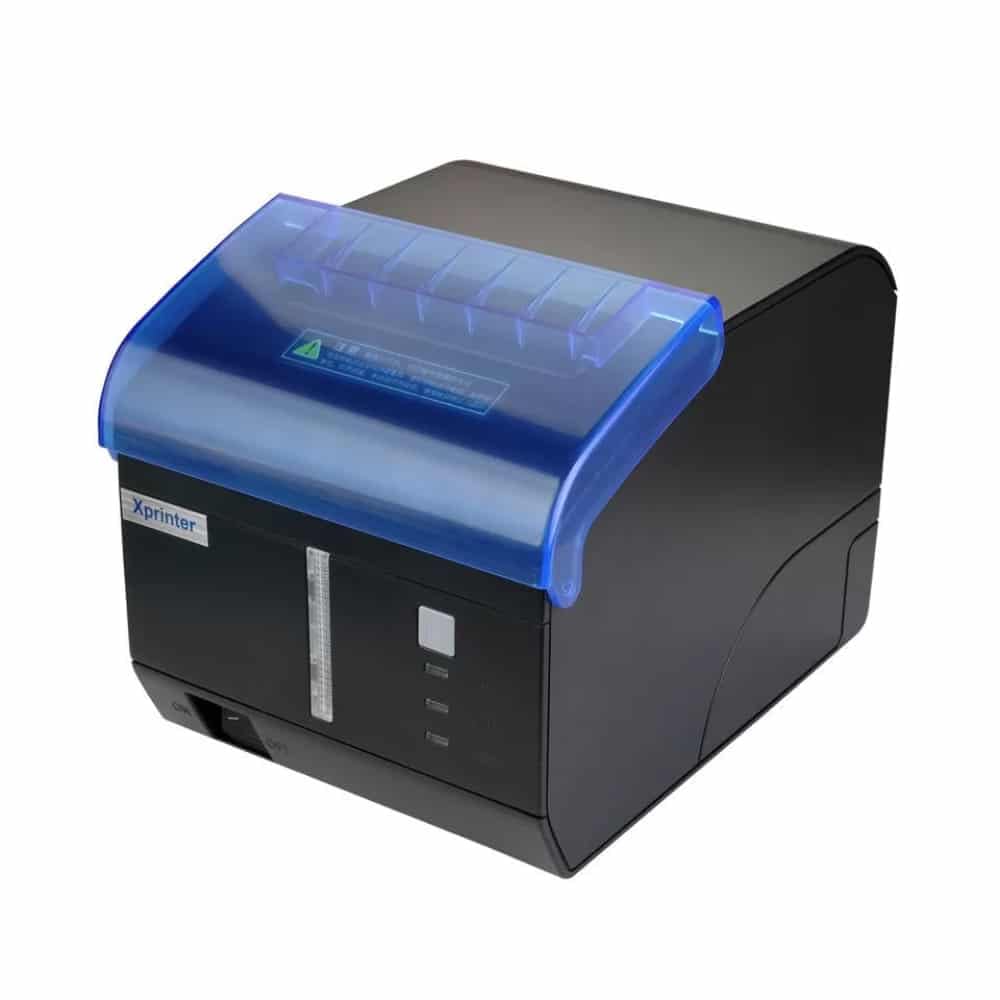
Выява: спераду view of the C260M printer, showing the power, error, and paper out indicator lights, along with the feed button.
4. Automatic Cutter
The C260M printer is equipped with an automatic cutter that neatly cuts receipts after printing, ensuring clean and professional output.
Тэхнічнае абслугоўванне
1. Ачыстка друкавальнай галоўкі
Regular cleaning of the print head ensures optimal print quality and extends its lifespan. Use a soft, lint-free cloth dampпрамыйце ізапрапілавым спіртам. Акуратна працярыце паверхню друкавальнай галоўкі. Дайце ёй цалкам высахнуць перад выкарыстаннем.
2. Замена рулона паперы
When the paper out indicator illuminates or print quality degrades, it's time to replace the paper roll. Follow the steps outlined in the 'Loading Thermal Paper' section of the Setup Guide.
3. Агульны догляд
Keep the printer free from dust and debris. Avoid spilling liquids on the device. Do not attempt to disassemble the printer yourself, as this may void the warranty and cause damage.
Ліквідацыю непаладак
This section addresses common issues you might encounter with your C260M printer.
| праблема | Магчымая прычына | Рашэнне |
|---|---|---|
| Прынтэр не друкуецца | Power off, cable disconnected, driver issue, paper out. | Check power, reconnect cables, reinstall drivers, load paper. |
| Дрэнная якасць друку | Dirty print head, low quality paper, incorrect settings. | Clean print head, use recommended thermal paper, check print settings. |
| Замяцце паперы | Improper paper loading, foreign object. | Open cover, remove jammed paper carefully, reload paper correctly. |
| Error indicator on | General error, paper out, cover open. | Check paper, ensure cover is closed, power cycle the printer. |
Тэхнічныя характарыстыкі
Below are the technical specifications for the Generic C260M Thermal Receipt Printer:
- Спосаб друку: Direct Thermal (no ink required)
- Шырыня друку: Да 79 мм
- Хуткасць друку: Да 260 мм/с
- Раздзяленне друку: 576 кропак / радок
- Папера, якая падтрымліваецца: Thermal paper roll, 79.5±0.5 mm width, 80 mm diameter
- Падключэнне: USB, лакальная сетка (Ethernet)
- Barcode Support: 1D (UPC-A, EAN-13, etc.), 2D (QR Code, PDF417)
- Cutter Life: 1.5 мільёна парэзаў
- Тэрмін службы друкавальнай галоўкі: Up to 150 km of printing
- Памяць: 256 КБ
- Вывад на прынтэр: Манахромны
- колер: Чорны
- Вага прадмета: 1700 грамаў
- Памеры вырабу (Г х Ш х В): 18 см х 13 см х 14 см
- Краіна паходжання: Кітай
Гарантыя і падтрымка
Інфармацыя аб гарантыі
This product comes with a 14-day warranty from the date of purchase. Please retain your proof of purchase for any warranty claims. The warranty covers manufacturing defects under normal use. It does not cover damage caused by misuse, accidents, unauthorized modifications, or improper installation.
Падтрымка кліентаў
For technical assistance, troubleshooting, or warranty inquiries, please contact your retailer or the manufacturer's customer service. Refer to the contact information provided with your purchase documentation.