
1. Прадукт скончыўсяview
The ANJIELO SMART 94218B is a 4-wire video intercom system designed for enhanced home security and convenience. It features a 7-inch touchscreen indoor monitor and an HD 1080P outdoor doorbell camera. The system supports WiFi connectivity for remote access via a mobile application, allowing you to monitor and interact with visitors from anywhere. Key features include a 148° wide-angle lens, integrated infrared sensor for night vision, and robust IP65 waterproof and dustproof construction for the outdoor unit. It is compatible with 12V electronic locks for integrated access control.
2. Змесціва ўпакоўкі
Акуратна распакуйце скрынку і пераканайцеся, што ўсе пералічаныя ніжэй прадметы наяўныя і ў добрым стане. Калі якія-небудзь прадметы адсутнічаюць або пашкоджаныя, звярніцеся ў службу падтрымкі кліентаў.

Выява: Зверхуview of the ANJIELO SMART 94218B package contents, including the doorbell, IC cards, wiring, user manual, screwdriver, screws, and connection lines.
- Вонкавы дзвярны званок
- Indoor Monitor (7-inch Touchscreen)
- IC Cards (Multiple for access control)
- 4-Core Wiring Cable
- External Power Supply (1.2m)
- Кіраўніцтва карыстальніка
- Адвёртка
- Мантажныя шрубы і дзюбелі
- Connection Lines for electronic locks
3. Інфармацыя па бяспецы
Please read and understand all safety instructions before installation and operation. Failure to follow these instructions may result in electric shock, fire, or damage to the product.
- Электрабяспека: Ensure power is disconnected before performing any wiring or installation. All electrical work should be performed by a qualified electrician if you are unsure.
- Ўздзеянне вады: While the outdoor unit is waterproof (IP65), avoid submerging it in water. Ensure all connections are sealed properly during installation.
- тэмпература: Do not expose the device to extreme temperatures or direct sunlight for prolonged periods, which could affect performance and lifespan.
- Уборка: Выкарыстоўвайце для чысткі мяккую сухую тканіну. Пазбягайце абразіўных ачышчальнікаў або растваральнікаў.
- дзеці: Keep packaging materials and small components away from children to prevent choking hazards.
4. Камплектуючыя і памеры прадукту
Familiarize yourself with the different parts of your outdoor doorbell unit and its physical dimensions.

Выява: Падрабязная view of the outdoor doorbell unit with labels for the rain cover, IR-LED, camera, speaker, keypad, card reader, microphone, call button, and fingerprint sensor.
- Покрыва ад дажджу: Provides additional protection against weather elements.
- IR-LED: Infrared LEDs for night vision illumination.
- Камера: 1080P HD camera for video capture.
- Дакладчык: Для двухбаковай гукавой сувязі.
- Клавіятура: Numeric keypad for password-based unlocking.
- Чытальнік карт: For IC card access control.
- Мікрафон: Для двухбаковай гукавой сувязі.
- Кнопка выкліку: To alert the indoor monitor and mobile app.
- Датчык адбіткаў пальцаў: For fingerprint-based unlocking.
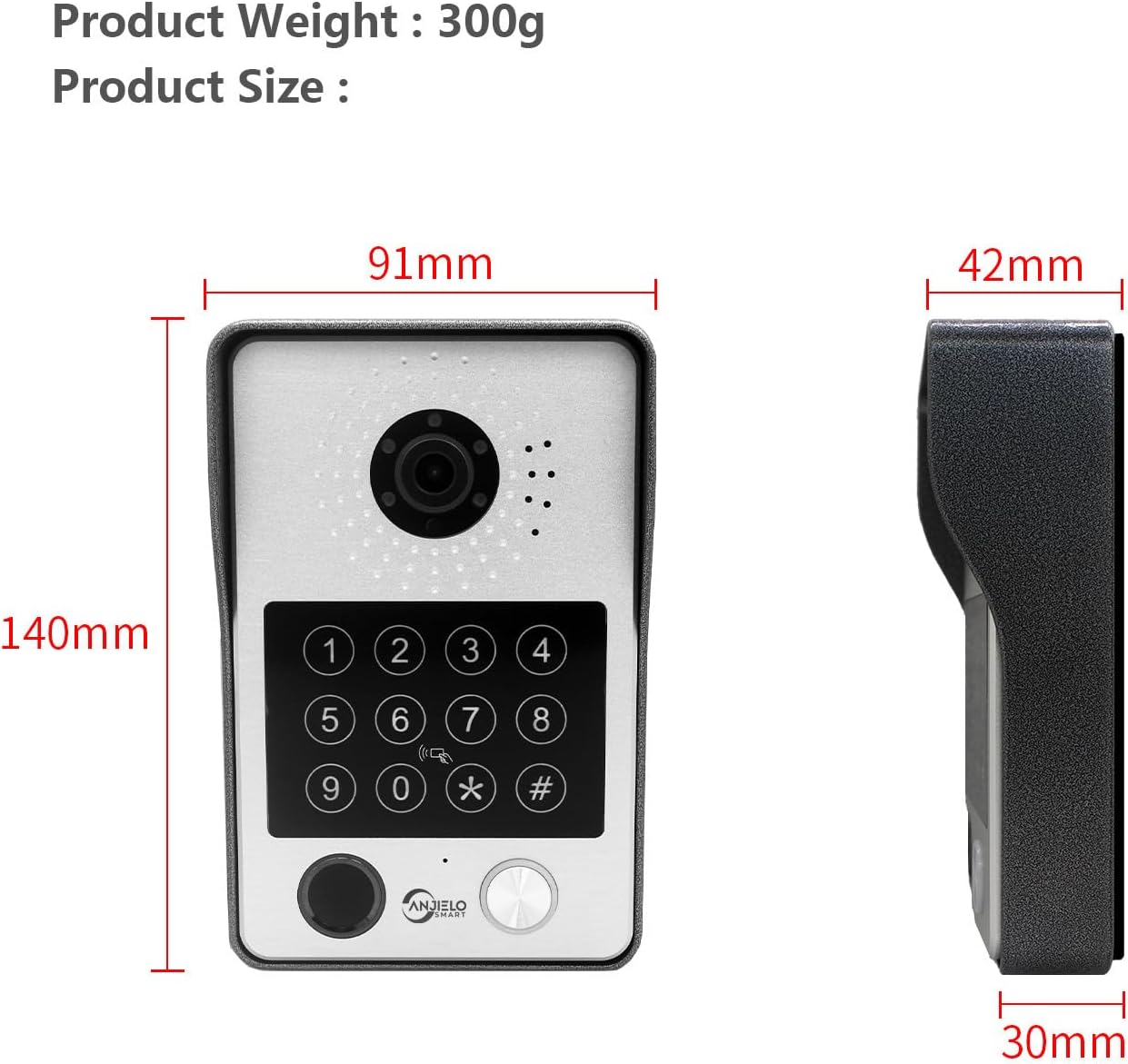
Image: Dimensions of the outdoor doorbell unit: 140mm (height) x 91mm (width) x 42mm (depth, including rain cover) / 30mm (unit depth).
5. Настройка і ўстаноўка
5.1 Інструкцыі па падключэнні
The ANJIELO SMART 94218B system uses a 4-wire connection between the outdoor doorbell unit and the indoor monitor. Ensure all power is disconnected before beginning wiring.
- Падрыхтуйце праводку: Use the provided 4-core cable to connect the outdoor unit to the indoor monitor. For extended distances, a high-quality 4-core wire is recommended.
- Падключыце харчаванне: Connect the external 1.2m power supply to the indoor monitor.
- Electronic Lock Connection: If connecting to a 12V electronic lock, use the provided connection lines. Refer to the lock's manual for specific wiring requirements.
- Бяспечныя злучэнні: Ensure all wire connections are secure and properly insulated to prevent short circuits.
5.2 Мантаж вонкавага блока
The outdoor unit is designed for wall mounting and features IP65 waterproofing.

Image: The outdoor unit is IP65 waterproof, dustproof, and anti-vandal, featuring an aluminum alloy shell with a rain cover.
- Выберыце месцазнаходжанне: Select a suitable location near your door, ensuring the camera has a clear view of visitors and is at an appropriate height.
- Свідраваць адтуліны: Use the mounting bracket (if provided, or mark holes directly) to mark and drill holes for the mounting screws.
- Бяспечны блок: Attach the outdoor unit securely to the wall using the provided screws and wall plugs. Ensure the rain cover is correctly positioned.
5.3 Initial Configuration (Wi-Fi and App)
The main indoor monitor can connect to your home Wi-Fi network for remote access via the mobile application.
- Уключэнне: Once all wiring is complete, connect the power supply to an electrical outlet.
- Настройка манітора: Follow the on-screen prompts on the 7-inch touchscreen monitor to complete the initial setup.
- Падключэнне Wi-Fi: Navigate to the network settings on the monitor and connect to your home Wi-Fi network.
- Загрузка прыкладання: Download the dedicated mobile application (e.g., Tuya APP) from your smartphone's app store.
- Спалучыць прыладу: Follow the instructions within the app to pair your video intercom system. This typically involves scanning a QR code displayed on the monitor or entering a device ID.
6. Інструкцыя па эксплуатацыі
6.1 5-у-1 метады разблакіроўкі
The ANJIELO SMART 94218B offers multiple convenient ways to unlock your door.

Image: Visual representation of the five unlocking methods: Fingerprint, Password, IC Card, unlocking via the Indoor Monitor, and unlocking via the Tuya mobile application.
- адбіткаў пальцаў: Place your registered fingerprint on the sensor on the outdoor unit.
- Пароль: Enter your pre-set password on the keypad of the outdoor unit.
- карта IC: Tap a registered IC card on the card reader area of the outdoor unit.
- Манітор: Use the unlock function on the indoor touchscreen monitor.
- Мабільнае прыкладанне: Use the unlock function within the paired mobile application.
6.2 Two-Way Audio and Monitoring
Communicate with visitors and monitor your entrance from various devices.

Image: The system enables two-way audio communication with visitors through the indoor monitor or a connected mobile phone, showing live views on both devices.
- Званок наведвальніка: When a visitor presses the call button on the outdoor unit, all connected indoor monitors and paired mobile phones will ring.
- Адказаць на званок: You can answer the call from any indoor monitor or your mobile phone to see, hear, and speak with the visitor.
- Функцыя дамафона: Indoor monitors support call forwarding and internal audio-only conversations between multiple monitors within the home.
6.3 Выяўленне і запіс руху
The system provides security by detecting motion and recording events.

Image: The system's smart PIR motion detection sends alerts to your mobile phone and monitor when movement is detected, automatically recording video or snapshots.
- Аўтаматычны запіс: When motion is detected or the doorbell is pressed, the camera automatically records video or captures snapshots.
- захоўванне: Recordings are saved to an additional Micro SD card (not included, or included as a component) for later review.
- Viewзапісы: Вы можаце view recorded events directly on the indoor monitor or through the mobile application.
6.4 Начное бачанне
The outdoor unit provides clear visibility even in low-light conditions.

Image: Comparison of day and night vision capabilities, highlighting the 1080P resolution and 148-degree wide-angle view provided by the outdoor unit's integrated IR-LEDs.
The integrated infrared sensor and IR-LEDs enable clear night vision, ensuring you can identify visitors and monitor your entrance effectively, even in complete darkness.
7. Тэхнічнае абслугоўванне
7.1 Сыход і чыстка
- Знешні блок: Periodically wipe the camera lens and keypad with a soft, damp сурвэткай для выдалення пылу і бруду. Пазбягайце выкарыстання агрэсіўных хімікатаў.
- Унутраны манітор: Clean the touchscreen with a microfiber cloth. Do not spray cleaning solutions directly onto the screen.
- Сувязі: Regularly check wiring connections for any signs of wear or corrosion, especially for outdoor components.
8. Выпраўленне непаладак
If you encounter issues with your ANJIELO SMART video intercom system, refer to the following common problems and solutions.
| праблема | Магчымая прычына | Рашэнне |
|---|---|---|
| No power to monitor/doorbell | Power adapter unplugged; wiring issue; power outage. | Check power connections; verify power outlet; inspect wiring for damage. |
| Няма відэа/аўдыё з вонкавага блока | Loose wiring connection; camera/microphone fault. | Ensure 4-core wiring is securely connected; restart the system. |
| Cannot unlock door | Incorrect password/fingerprint/IC card; electronic lock issue; wiring problem. | Verify credentials; check electronic lock power and wiring; ensure correct unlock method is selected. |
| Мабільная праграма не падключаецца | Monitor not connected to Wi-Fi; incorrect app pairing; internet issue. | Check monitor's Wi-Fi status; re-pair device in app; verify home internet connection. |
| Слабы начны зрок | IR-LEDs obstructed or faulty; dirty camera lens. | Clean camera lens; ensure no obstructions; contact support if IR-LEDs are not functioning. |
Калі праблема не знікне пасля спробы гэтых рашэнняў, звярніцеся ў службу падтрымкі кліентаў ANJIELO SMART для атрымання дадатковай дапамогі.
9. Тэхнічныя характарыстыкі
Detailed technical specifications for the ANJIELO SMART 94218B video intercom system.
| Асаблівасць | Спецыфікацыя |
|---|---|
| Марка | АНХІЕЛА СМАРТ |
| Нумар мадэлі | 94218Б |
| Тэхналогія падлучэння | Правадное, бесправадное (Wi-Fi) |
| Дазвол відэазахопу | 1080p |
| Асаблівасці | Night Vision, Motion Detection, 5-in-1 Unlock (Fingerprint, Password, IC Card, App, Monitor) |
| Выкарыстанне ў памяшканні/на вуліцы | У памяшканні (манітор), на вуліцы (дзвярны званок) |
| Сумяшчальныя прылады | Смартфон |
| Тып мацавання | Насценнае мацаванне |
| Колер | Чорны |
| Тып сігналізацыі | Толькі рух |
| Метад кантролю | дадатак |
| Пратакол злучэння | Wi-Fi |
| тtage | 12 Вольт |
| Ватtage | 2 ват |
| Колькасць каналаў | 2 |
| Фармат захопу відэа | AVI |
| Памеры прадмета | 27 х 2 х 18 см |
| Unit Volume/Weight | 1.0 Граф |
| Краіна паходжання | Кітай |
| Вытворца | АНХІЕЛА СМАРТ |
10. Гарантыя і падтрымка
10.1 Інфармацыя аб гарантыі
For specific warranty details regarding your ANJIELO SMART 94218B video intercom system, please refer to the warranty card included in your package or contact the seller directly. Warranty terms typically cover manufacturing defects for a specified period from the date of purchase.
10.2 Падтрымка кліентаў
If you require technical assistance, have questions about installation, or need to report a product issue, please contact ANJIELO SMART customer support. You can usually find contact information on the product packaging, the seller's webсайце або ў мабільным дадатку.


