
1. Уводзіны
Thank you for choosing the TechniSat DIGITRADIO 52 BT. This DAB+ FM alarm clock radio is designed to provide reliable timekeeping, radio reception, and Bluetooth audio streaming. This manual will guide you through the setup, operation, and maintenance of your device.
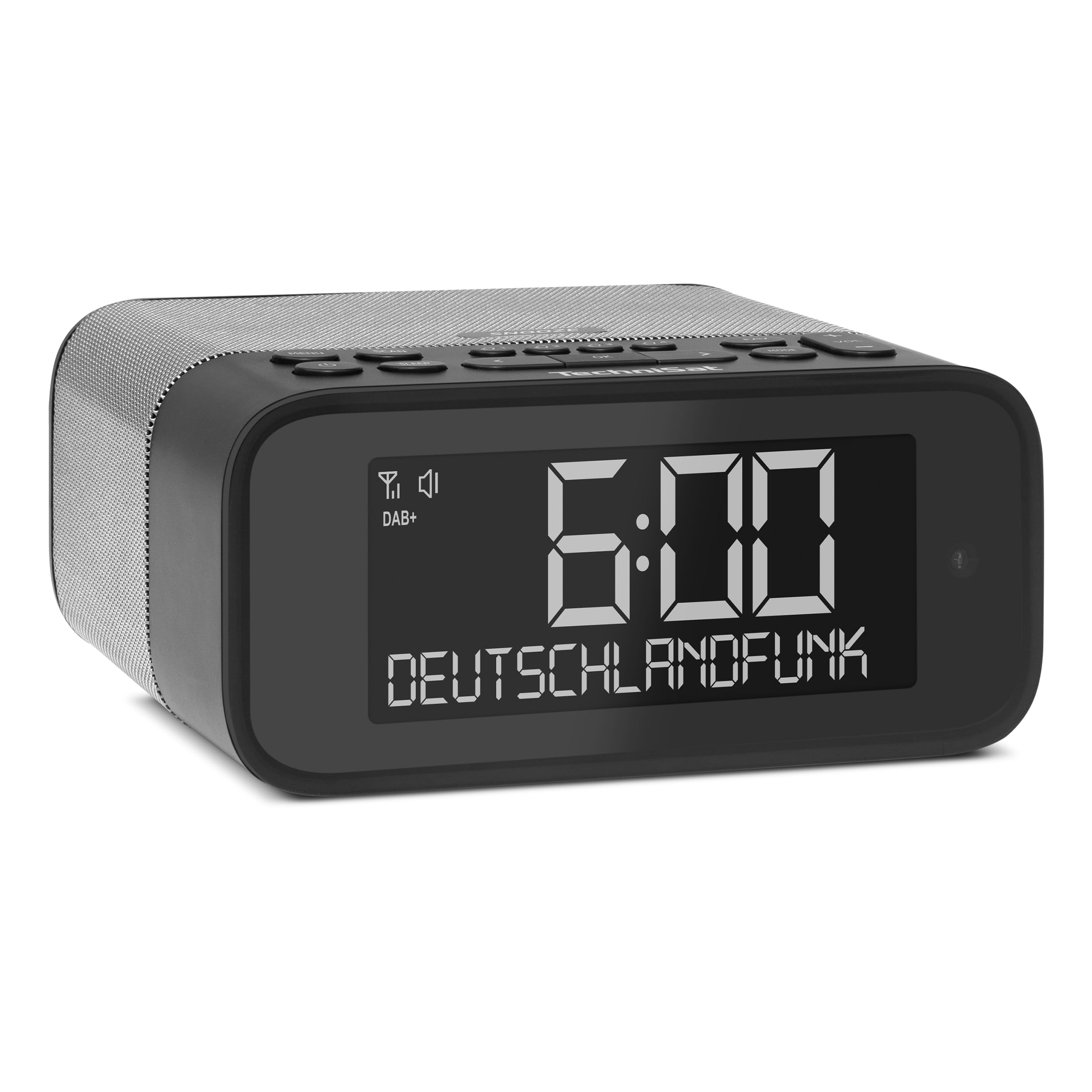
Выява 1: Спераду view of the TechniSat DIGITRADIO 52 BT. The device is black with a large digital display showing "6:00" and "DEUTSCHLANDFUNK". Control buttons are visible on the top panel.
2. Інфармацыя па бяспецы
- Перад выкарыстаннем уважліва прачытайце ўсе інструкцыі.
- Трымайце прыладу далей ад вады, вільгаці і прамых крыніц цяпла.
- Не спрабуйце разбіраць або мадыфікаваць прыладу. Звяртайцеся па ўсё абслугоўванне да кваліфікаванага персаналу.
- Выкарыстоўвайце толькі адаптар сілкавання, які ўваходзіць у камплект.
- Забяспечце належную вентыляцыю вакол прылады.
- Працірайце прыладу мяккай сухой тканінай. Не выкарыстоўвайце вадкія ачышчальнікі.
3. Змесціва ўпакоўкі
Калі ласка, праверце ўпакоўку на наяўнасць наступных прадметаў:
- TechniSat DIGITRADIO 52 BT unit
- Адаптар сілкавання
- Кіраўніцтва карыстальніка
4. Прадукт скончыўсяview
4.1. Элементы кіравання і дысплей
The DIGITRADIO 52 BT features an intuitive layout for easy access to all functions.
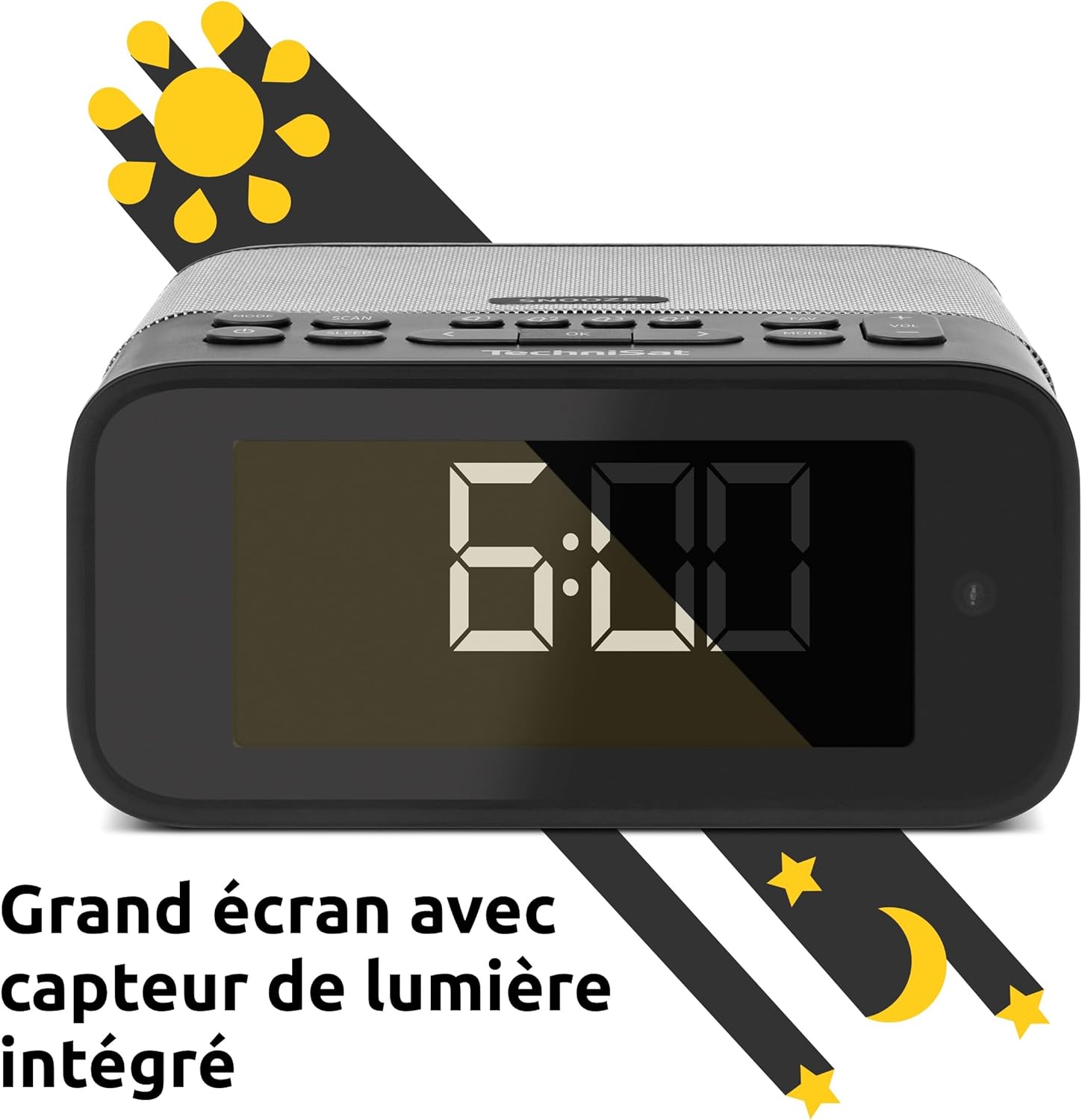
Image 2: Close-up of the large display with integrated light sensor. The display shows "6:00". The light sensor automatically adjusts screen brightness based on ambient light.
4.2. Злучэнне задняй панэлі
The rear panel provides essential connectivity options.
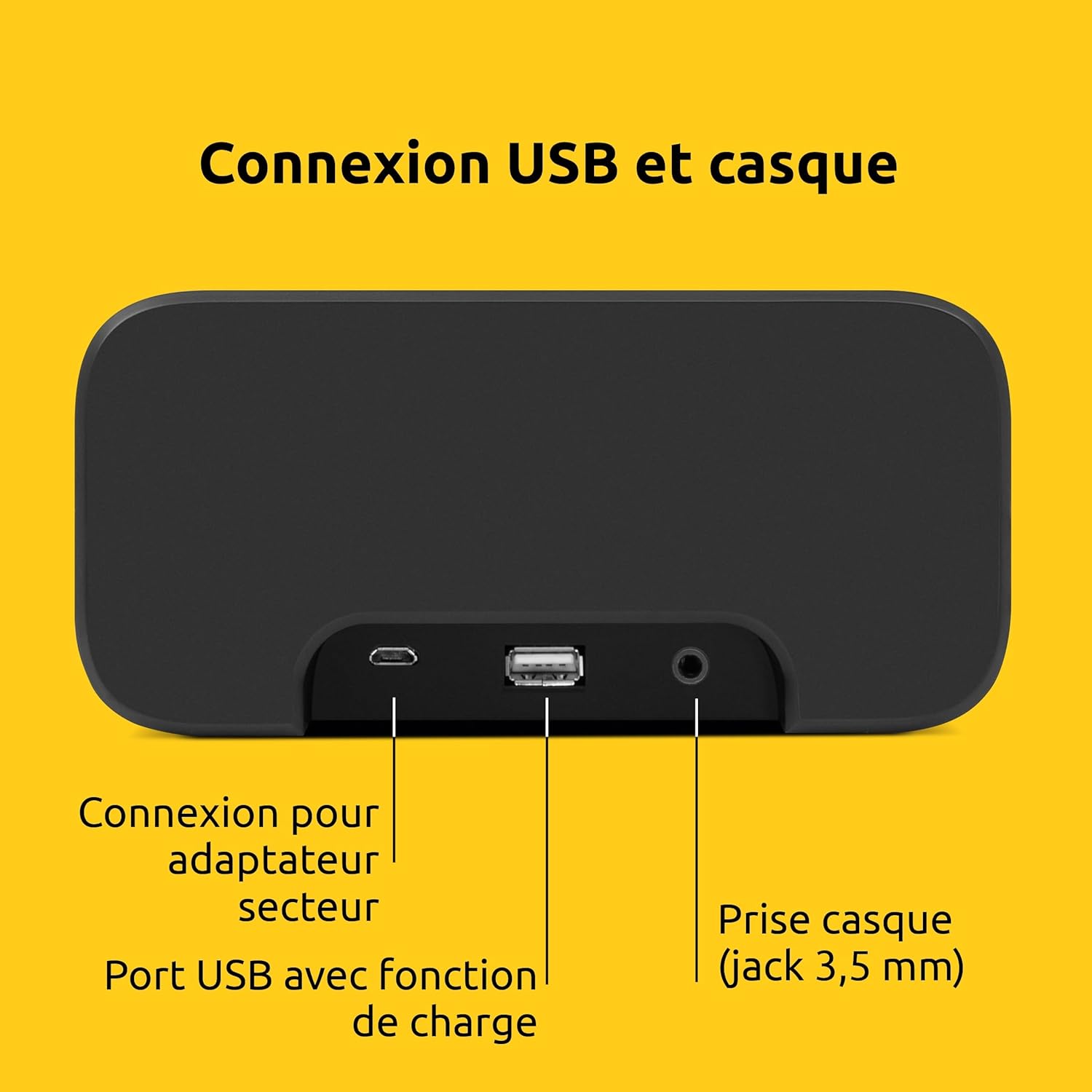
Малюнак 3: ззаду view of the device showing the power adapter connection, a USB port with charging function, and a 3.5mm headphone jack.
- Падключэнне сілкавання: Падключыце сюды адаптар сілкавання, які пастаўляецца.
- Порт USB: For charging external devices (e.g., smartphones, tablets).
- Раз'ём для навушнікаў (3.5 мм): Для прыватнага праслухоўвання.
5. Настройка
5.1. Падключэнне сілкавання
- Connect the power adapter to the DC input on the rear of the DIGITRADIO 52 BT.
- Plug the power adapter into a standard wall outlet (230 Volts).
- The device will power on and enter standby mode or begin initial setup.
5.2. Initial Scan (DAB+ and FM)
Upon first power-on, the radio will automatically scan for available DAB+ and FM stations. This process may take a few minutes.

Image 4: The radio display showing "DAB+" and "6:00 DEUTSCHLANDFUNK", indicating successful reception of a DAB+ station.
5.3. Устаноўка часу і даты
The time and date are usually synchronized automatically via DAB+ or FM signals. If manual adjustment is needed, refer to the "Operating" section for menu navigation.
6. Аперацыя
6.1. Уключэнне/выключэнне і рэжым чакання
- Націсніце Магутнасць кнопку, каб уключыць або выключыць прыладу.
- In standby mode, the display shows the current time.
6.2. Radio Tuning (DAB+ / FM)
- Націсніце Рэжым button to select DAB+ or FM radio.
- Выкарыстоўвайце Наладзіць/Выбраць knob or buttons to scan for stations.
- To save a favorite station, press and hold the Прадусталяваная button, then select a preset number.
- To recall a favorite station, press the Прадусталяваная button, then select the desired preset number. Up to 20 favorite stations can be stored for both DAB+ and FM.
6.3. Струменевая перадача аўдыё праз Bluetooth
- Націсніце Рэжым button to select Bluetooth mode. The display will show "Bluetooth Pairing".
- On your Bluetooth-enabled device (e.g., smartphone, tablet), search for "DIGITRADIO 52 BT" in the Bluetooth settings.
- Select the device to pair. Once paired, you can stream audio from your device to the radio.
6.4. Рэгулятар гучнасці
- Выкарыстоўвайце Аб'ём buttons or knob to adjust the audio output level.
7. Функцыі сігналізацыі
The DIGITRADIO 52 BT supports up to four programmable alarms, a snooze function, and a sleep timer.

Image 5: Visual representation of the alarm features: 4 adjustable alarms, adjustable alarm rhythm, sleep timer, and a tactile snooze button.
7.1. Налада сігналізацыі
- Націсніце Сігналізацыя кнопку для ўваходу ў налады сігналізацыі.
- Select one of the four available alarms (Alarm 1-4).
- Set the desired alarm time, alarm source (radio or beep), and alarm volume.
- Choose the alarm rhythm: daily, weekdays (Mon-Fri), or weekends (Sat-Sun).
- Confirm settings to activate the alarm.
7.2. Функцыя паўтору будзільніка
- When an alarm sounds, gently touch the Адкласці area on the top of the device to temporarily silence the alarm. The alarm will sound again after a set interval.
7.3. Таймер сну
- Націсніце спаць button to activate the sleep timer.
- Select the desired duration (e.g., 15, 30, 60 minutes). The radio will play for the set duration and then automatically switch to standby.
8. Налады дысплея
The large display's brightness can be adjusted manually or automatically.
- Аўтаматычная яркасць: The integrated light sensor automatically adjusts the display brightness based on ambient light conditions. This ensures comfortable viewing during the day and minimal disturbance at night.
- Ручная яркасць: Access the display settings through the menu to manually set the desired brightness level.
9. USB-зарадка
The USB port on the rear panel can be used to charge external devices.
- Connect your smartphone, tablet, or other USB-powered device to the USB port using a compatible charging cable.
- Прылада пачне зараджацца аўтаматычна.
10. Выпраўленне непаладак
| праблема | Магчымая прычына | Рашэнне |
|---|---|---|
| Няма ўлады | Адаптар сілкавання не падключаны або няспраўная разетка. | Пераканайцеся, што адаптар сілкавання надзейна падключаны, а разетка спраўная. |
| Дрэнны прыём радыё | Weak signal, antenna position. | Adjust the antenna position. Try moving the radio to a different location. Perform a new station scan. |
| Спалучэнне Bluetooth не атрымалася | Device not in pairing mode, out of range, or already paired. | Ensure the radio is in Bluetooth pairing mode. Move your device closer. Disconnect from other Bluetooth devices. |
| Будзільнік не гучыць | Alarm not activated, volume too low. | Check alarm settings to ensure it is enabled and the volume is adequate. |
| Дысплей занадта цьмяны/яркі | Automatic brightness setting, manual override needed. | Adjust manual brightness settings or ensure the light sensor is not obstructed. |
11. Тэхнічныя характарыстыкі
| Асаблівасць | Дэталь |
|---|---|
| Марка | TechniSat |
| мадэль | DR 52 (0000/2938) |
| Радыё цюнэр | DAB+, FM |
| Bluetooth | Так (Bluetooth 5) |
| Выходная магутнасць | 3W RMS (mono) |
| Дысплей | 4.2-inch Dimmable LCD with Light Sensor |
| Сігналізацыя | 4 programmable alarms (radio/beep) |
| Функцыя адкладання | Yes (tactile button) |
| Таймер сну | так |
| Сувязь | USB (charging), 3.5mm Headphone Jack |
| Крыніца харчавання | Electric Cable (230V input) |
| Памеры (Д х У х Г) | 15 см х 7 см х 14 см |
| Вага | 606 грам |
| Матэрыял | Пластыкавыя |

Image 6: The compact design of the radio with its dimensions indicated as 15 cm (length), 7 cm (height), and 14 cm (depth).
12. Гарантыя і падтрымка
12.1. Гарантыя вытворцы
The TechniSat DIGITRADIO 52 BT comes with a 2-гадовая абмежаваная гарантыя з даты пакупкі. Гэтая гарантыя распаўсюджваецца на дэфекты матэрыялаў і вырабу пры нармальным выкарыстанні. Калі ласка, захавайце пацвярджэнне пакупкі для прэтэнзій па гарантыі.
12.2. Падтрымка кліентаў
For technical assistance, troubleshooting, or warranty inquiries, please contact TechniSat customer support. Refer to the official TechniSat webсайт для кантактных дадзеных і дадатковай інфармацыі.
Note: Software updates are not guaranteed. Information on spare parts availability is not provided.