
1. Уводзіны
Дзякуй за пакупкуasing the LONPOO LP-816 Compact Micro HiFi System. This manual provides essential information for the safe and efficient operation of your new audio system. Please read this manual thoroughly before use and retain it for future reference.
2. Інструкцыі па тэхніцы бяспекі
- Крыніца харчавання: Пераканайцеся, што аб'ём блока харчаванняtage адпавядае намінальнаму значэнню, пазначанаму на прыладзе.
- Вентыляцыя: Не блакуйце вентыляцыйныя адтуліны. Пакіньце дастатковую прастору вакол прылады для належнай цыркуляцыі паветра.
- Вада і вільгаць: Не падвяргайце прыладу ўздзеянню дажджу, вільгаці або кропель/пырскаў вадкасцей. Не стаўце на прыладу прадметы, напоўненыя вадкасцямі, такія як вазы.
- Цяпло: Трымайце прыладу далей ад крыніц цяпла, такіх як радыятары, абагравальнікі, пліты або іншыя прыборы (у тым ліку ampLifiers), якія вырабляюць цяпло.
- Уборка: Адключыце прыладу ад разеткі перад чысткай. Выкарыстоўвайце толькі мяккую сухую тканіну. Не выкарыстоўвайце вадкія або аэразольныя ачышчальнікі.
- Абслугоўванне: Не спрабуйце самастойна абслугоўваць гэты прадукт. Звярніцеся да ўсіх абслугоўванняў кваліфікаванага абслуговага персаналу.
- Размяшчэнне: Размясціце прыладу на ўстойлівай, роўнай паверхні, каб прадухіліць яе падзенне.
3. Змесціва ўпакоўкі
Праверце, ці ўсе пералічаныя ніжэй прадметы ўваходзяць у вашу ўпакоўку:
- LONPOO LP-816 Micro HiFi System Unit
- Пульт дыстанцыйнага кіравання
- Адаптар сілкавання
- FM-антэна
- Кіраўніцтва карыстальніка (гэты дакумент)
4. Прадукт скончыўсяview
4.1 Front and Rear Panel Controls
Familiarize yourself with the various buttons, ports, and indicators on your LP-816 system.
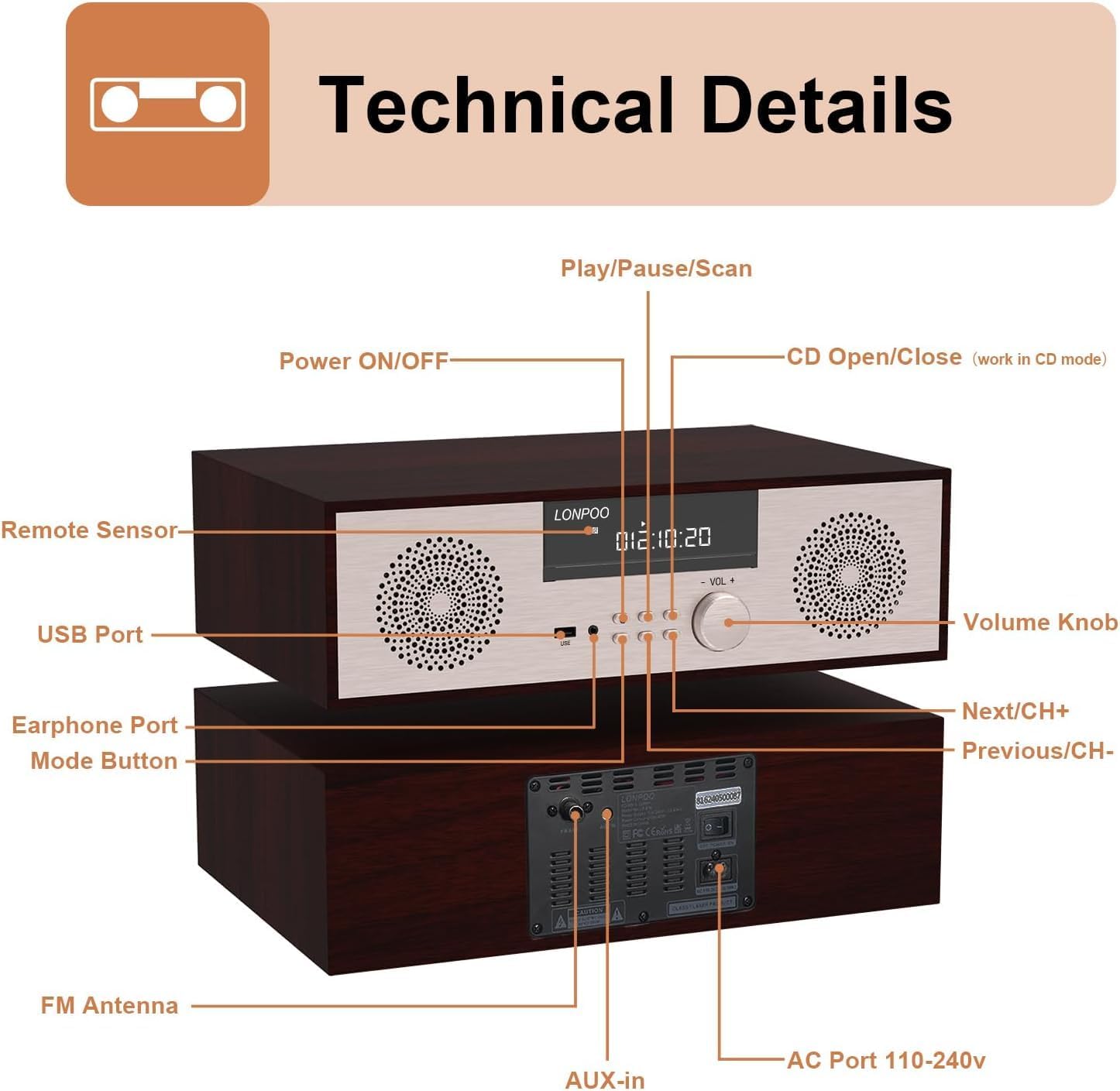
Выява: спераду і ззаду view of the LONPOO LP-816 system, highlighting the LCD display, control buttons, volume knob, USB port, earphone port, mode button, remote sensor, CD compartment, AUX-in, FM antenna port, and AC power port.
- Уключэнне/выключэнне харчавання: Уключае або выключае прыладу.
- ВК-дысплей: Shows current mode, track information, frequency, and time.
- Адсек для кампакт-дыскаў: Для ўстаўкі аўдыё-CD-дыскаў.
- Порт USB: Connect USB flash drives for audio playback.
- Порт для навушнікаў: Раз'ём 3.5 мм для падлучэння навушнікаў.
- Кнопка рэжыму: Switches between CD, FM, Bluetooth, AUX, and USB modes.
- Play/Pause/Scan Button: Controls playback and initiates FM scan.
- Кнопка «Далей/CH+»: Skips to the next track or FM preset.
- Кнопка «Папярэдні/CH-»: Skips to the previous track or FM preset.
- Рэгулятар гучнасці: Рэгулюе гучнасць гуку.
- Дыстанцыйны датчык: Прымае сігналы з пульта дыстанцыйнага кіравання.
- AUX-ўваход: 3.5-мм раз'ём для падлучэння знешніх аўдыёпрылад.
- FM-антэна: Connects the included FM antenna for radio reception.
- AC Port 110-240V: Падключае адаптар харчавання.
4.2 Пульт дыстанцыйнага кіравання
The remote control provides convenient access to all functions of the LP-816 system.

Image: Close-up of the LONPOO LP-816 remote control, showing various buttons for power, mode selection, volume, track control, EQ, and numeric input.
Insert two AAA batteries (not included) into the remote control, observing the correct polarity.
5. Настройка
5.1 Размяшчэнне
Place the LP-816 system on a flat, stable surface. Ensure there is adequate space around the unit for proper ventilation. Avoid placing it near strong magnetic fields or direct sunlight.
5.2 Падключэнне FM-антэны
Connect the supplied FM antenna to the 'FM Antenna' port on the rear of the unit. Extend the antenna fully for optimal FM reception.
5.3 Падключэнне харчавання
Connect the power adapter to the 'AC Port 110-240V' on the rear of the unit, then plug the adapter into a wall outlet.
6. Інструкцыя па эксплуатацыі
6.1 Уключэнне/выключэнне сілкавання
Press the 'Power ON/OFF' button on the front panel or the remote control to turn the unit on or off.
6.2 Прайграванне кампакт-дыскаў
To play an audio CD:
- Press the 'Mode' button until 'CD' mode is selected on the display.
- Press the 'CD Open/Close' button (if available on the unit or remote) or gently insert the CD into the slot. The unit will automatically load the CD.
- The CD will begin playing automatically. If not, press the 'Play/Pause' button.
- Use the 'Next/CH+' and 'Previous/CH-' buttons to skip tracks.
- Press 'Play/Pause' to pause or resume playback.

Image: The LONPOO LP-816 system with its CD player compartment open, ready to accept a disc.
6.3 FM -радыё
Каб слухаць FM-радыё:
- Націскайце кнопку «Рэжым», пакуль не будзе абраны рэжым «FM».
- Аўтаматычнае сканаванне: Press and hold the 'Play/Pause/Scan' button to automatically scan and save available FM stations.
- Ручная настройка: Use the 'Next/CH+' and 'Previous/CH-' buttons to manually tune to a specific frequency.
- Выбар прэсетаў: Use the 'Next/CH+' and 'Previous/CH-' buttons (short press) to cycle through saved preset stations.

Image: The LONPOO LP-816 system displaying an FM radio frequency (87.50 MHz) on its screen, with a visual representation of the FM band.
6.4 Злучэнне Bluetooth
Каб падключыць прыладу Bluetooth:
- Press the 'Mode' button until 'BT' (Bluetooth) mode is selected. The display will show 'BT' and the unit will enter pairing mode.
- На прыладзе з падтрымкай Bluetooth (напрыклад, смартфоне) уключыце Bluetooth і знайдзіце даступныя прылады.
- Select 'LP-816' from the list of devices.
- Once paired, the unit will indicate a successful connection, and you can play audio from your device through the LP-816.

Image: The LONPOO LP-816 system displaying 'BT' on its screen, with a smartphone nearby showing a successful Bluetooth connection to 'LP-816'.
6.5 Падключэнне да ўваходу AUX
To play audio from an external device via AUX-in:
- Connect a 3.5mm audio cable (not included) from the headphone jack or line-out of your external device to the 'AUX-in' port on the rear of the LP-816.
- Націскайце кнопку «Рэжым», пакуль не будзе абраны рэжым «AUX».
- Play audio from your external device. The sound will be output through the LP-816 speakers.
6.6 Прайграванне з USB
Для прайгравання аўдыё files from a USB flash drive:
- Insert a USB flash drive into the 'USB Port' on the front panel.
- Press the 'Mode' button until 'USB' mode is selected.
- Прылада аўтаматычна выявіць і пачне прайграваць сумяшчальны аўдыёзапіс files з USB-дыска.
- Use the 'Next/CH+' and 'Previous/CH-' buttons to skip tracks.

Image: A close-up of the LONPOO LP-816 system's front panel, showing a USB flash drive inserted into the USB port.
6.7 Выхад для навушнікаў
Connect standard 3.5mm headphones to the 'Earphone Port' on the front panel for private listening. When headphones are connected, sound will no longer be output from the main speakers.
7. Тэхнічнае абслугоўванне
7.1 Ачыстка
To clean the unit, first unplug it from the power outlet. Use a soft, dry, lint-free cloth to wipe the exterior surfaces. Do not use abrasive cleaners, waxes, or solvents as they may damage the finish.
7.2 Сыход за CD-плэерам
Handle CDs by their edges to avoid fingerprints and scratches. If a CD is dirty, wipe it gently with a soft, dry cloth from the center outwards. Do not use solvents or abrasive cleaners on CDs.
8. Выпраўленне непаладак
| праблема | Магчымая прычына | Рашэнне |
|---|---|---|
| Няма ўлады | Кабель харчавання не падключаны; разетка неактыўная | Пераканайцеся, што кабель харчавання надзейна падключаны. Паспрабуйце іншую разетку. |
| Няма гуку | Volume too low; Mute function active; Incorrect mode selected; Headphones connected | Increase volume. Deactivate mute. Select correct input mode. Disconnect headphones. |
| Кампакт-дыск не прайграваецца | CD inserted incorrectly; CD is dirty or scratched; CD format not supported | Reinsert CD correctly. Clean or replace CD. Ensure CD is an audio CD. |
| Bluetooth не падключаецца | Bluetooth not in pairing mode; Device too far; Device already connected to another unit | Ensure unit is in BT pairing mode. Move device closer. Disconnect from other devices. |
| Дрэнны прыём FM | Антэна не высунута; Слабы сігнал; Перашкоды | Extend and adjust FM antenna. Relocate unit for better signal. |
9. Тэхнічныя характарыстыкі
- мадэль: ЛП-816
- Памеры прадукту (Д х Ш х У): 15.8 х 10.5 х 4.5 цалі
- Вага прадмета: 11.57 фунта
- Тэхналогія падключэння: Дапаможны, Bluetooth, USB
- Тып дынаміка: Стэрэа
- Аўдыявыхад: 40 Вт RMS
- Асаблівасці: CD Player, FM Radio, Bluetooth, AUX-in, Headphone Output, DSP Technology
10. Гарантыя і падтрымка
LONPOO products are designed and manufactured to the highest quality standards. For warranty information and technical support, please refer to the warranty card included with your product or visit the official LONPOO webсайт. Захоўвайце чэк аб куплі як пацверджанне пакупкі.