
FIREBAT AK2 PLUS
User Manual: FIREBAT Mini PC AK2 PLUS
Model: AK2 PLUS | Brand: FIREBAT
1. Уводзіны
Thank you for choosing the FIREBAT Mini PC AK2 PLUS. This manual provides essential information for setting up, operating, maintaining, and troubleshooting your new mini PC. Please read this manual thoroughly before use to ensure optimal performance and longevity of your device.
2. Змесціва ўпакоўкі
Carefully unpack your FIREBAT Mini PC and verify that all items listed below are included:
- 1 x FIREBAT AK2 N150 Mini PC
- 1 x 12V/2.5A US Adapter
- 1 x VESA Mount
- 1 х кабель HDMI
- 1 х Кіраўніцтва карыстальніка (гэты дакумент)

Image: Contents of the FIREBAT Mini PC AK2 PLUS package, including the mini PC, power adapter, VESA mount, HDMI cable, and user manual.
3. Прадукт скончыўсяview
The FIREBAT Mini PC AK2 PLUS is a compact and powerful desktop computer designed for various applications, from office work to home entertainment. It features an Intel 13th Gen N150 processor, ample storage, and versatile connectivity options.
3.1 Асноўныя магчымасці
- Працэсар: Intel 13th Gen Twin Lake N150 (4 cores/4 threads, up to 3.6GHz)
- Памяць: 16 ГБ аператыўнай памяці DDR4
- захоўванне: 512GB M.2 2280 SSD (expandable up to 4TB with 2.5" SSD/HDD)
- Графіка: Intel UHD Graphics (1000MHz, 4K support)
- Дысплей: Supports dual HDMI output for simultaneous 4K display
- Падключэнне: Dual-band Wi-Fi, Bluetooth 4.2, Gigabit Ethernet
- парты: Multiple USB 2.0 and USB 3.0 ports, HDMI, LAN
- Астуджэнне: Ultra-quiet fans with intelligent cooling technology

Выява: спераду і ззаду view of the FIREBAT Mini PC AK2 PLUS, highlighting its compact design and various ports.
3.2 Парты і інтэрфейсы
Азнаёмцеся з даступнымі партамі на вашым міні-ПК:
- Пярэдняя панэль: Power Button, USB 3.2 Type-A ports
- Задняя панэль: DC Power Input, 2 x HDMI 2.0 Type-A ports, LAN RJ45 port, USB 2.0 Type-A ports

Image: Detailed diagram of the FIREBAT Mini PC AK2 PLUS interfaces, showing the location of USB, HDMI, LAN, and power ports.
3.3 Internal Components and Expansion
The Mini PC comes with pre-installed RAM and SSD. You can expand the storage capacity:
- Аператыўная памяць: DDR4 SO-DIMM
- SSD: M.2 2280 SATA SSD
- Пашырэнне: Supports adding a 2.5" SSD/HDD (not included) for additional storage up to 2TB.

Image: Illustration of the M.2 2280 SSD and SO-DIMM DDR4 memory modules used in the Mini PC.
4. Кіраўніцтва па наладцы
Follow these steps to set up your FIREBAT Mini PC:
4.1 Падключэнне перыферыйных прылад
- Падключэнне дысплея: Use the provided HDMI cable to connect the Mini PC to your monitor or TV. The Mini PC supports dual display output via its two HDMI ports.
- Падключэнне клавіятуры і мышы: Plug your USB keyboard and mouse into the available USB ports on the Mini PC.
- Падключэнне да сеткі (неабавязкова): For a wired connection, connect an Ethernet cable from your router/modem to the LAN RJ45 port on the Mini PC. For wireless, ensure your Wi-Fi network is available.
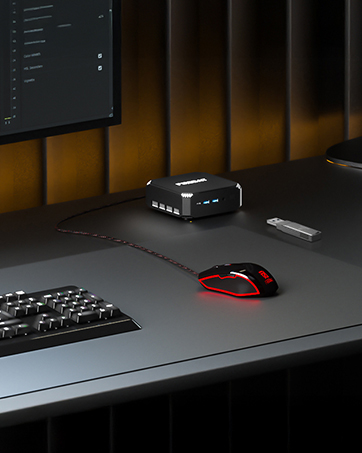
Image: The Mini PC connected to a monitor, keyboard, and mouse on a desk, illustrating a typical setup.
4.2 Уключэнне
- Падключыце адаптар сілкавання: Plug the 12V/2.5A US Adapter into the DC power input port on the Mini PC, then plug the adapter into a power outlet.
- Уключэнне: Націсніце кнопку харчавання, размешчаную на пярэдняй панэлі міні-ПК. Індыкатар харчавання загарыцца.

Image: The Mini PC connected to its power adapter, demonstrating the correct power connection.

Image: Close-up of the Mini PC's power button, indicating its location for powering on the device.
4.3 Усталёўка мацавання VESA (дадаткова)
The included VESA mount allows you to attach the Mini PC to the back of a compatible monitor or to a wall, saving desk space.
- Attach the VESA bracket to the back of your monitor or desired surface using appropriate screws.
- Устаўце міні-ПК у кранштэйн VESA, пакуль ён надзейна не зафіксуецца пачуўшы пстрычку.

Image: The Mini PC shown with its VESA mount, demonstrating how it can be attached to the back of a monitor for a space-saving setup.
5. Інструкцыя па эксплуатацыі
5.1 Пачатковая загрузка і налада аперацыйнай сістэмы
Upon first power-on, the Mini PC may guide you through the initial setup of its default operating system. Follow the on-screen prompts to configure language, region, network, and user accounts.
5.2 Dual Display Setup
To utilize the dual display feature:
- Connect two monitors to the two HDMI ports on the rear of the Mini PC.
- Once both monitors are connected and powered on, the operating system should automatically detect them.
- Adjust display settings (e.g., extend, duplicate, resolution) through your operating system's display configuration panel.

Image: The Mini PC connected to two monitors via HDMI, demonstrating its dual display capability for enhanced productivity.
5.3 Падключэнне да сеткі
The Mini PC supports both wired and wireless network connections:
- Правадны (Ethernet): Connect an Ethernet cable to the RJ45 port. The connection will be established automatically.
- Бесправадная сувязь (Wi-Fi): Access your operating system's network settings, select your Wi-Fi network, and enter the password to connect.
- Bluetooth: Enable Bluetooth in your operating system settings to pair with compatible devices like headphones, keyboards, or mice.
6. Тэхнічнае абслугоўванне
Правільнае абслугоўванне забяспечвае даўгавечнасць і аптымальную прадукцыйнасць вашага міні-ПК.
6.1 Ачыстка
- Рэгулярна працірайце знешнія паверхні міні-ПК мяккай сухой тканінай.
- Use compressed air to gently clear dust from the ventilation openings to maintain proper airflow and cooling.
- Do not use liquid cleaners or sprays directly on the device.

Image: An illustration showing the internal cooling fan of the Mini PC, emphasizing the importance of keeping ventilation clear for efficient heat dissipation.
6.2 Захоўванне і навакольнае асяроддзе
- Store the Mini PC in a cool, dry place away from direct sunlight and extreme temperatures.
- Avoid placing the device in dusty environments or near sources of moisture.
- Ensure adequate ventilation around the Mini PC during operation.
7. Выпраўленне непаладак
If you encounter issues with your FIREBAT Mini PC, refer to the following common problems and solutions:
| праблема | Магчымая прычына | Рашэнне |
|---|---|---|
| Няма харчавання/Не ўключаецца | Адаптар харчавання не падключаны або няспраўны; праблема з разеткай. | Ensure power adapter is securely connected to both the Mini PC and a working power outlet. Try a different outlet. |
| Няма адлюстравання на маніторы | HDMI cable loose or faulty; Monitor input not selected correctly; Monitor not powered on. | Check HDMI cable connections. Ensure monitor is powered on and set to the correct input source (HDMI). Try a different HDMI cable or monitor. |
| Няма падключэння да Інтэрнэту (Wi-Fi) | Няправільны пароль Wi-Fi; праблема з маршрутызатарам; адключаны адаптар Wi-Fi. | Verify Wi-Fi password. Restart your router. Check operating system settings to ensure Wi-Fi is enabled. |
| No internet connection (Wired) | Ethernet cable loose or faulty; Router issue; Network adapter disabled. | Check Ethernet cable connections. Restart your router. Check operating system settings to ensure the wired network adapter is enabled. |
| Сістэма павольная або не рэагуе | Занадта шмат запушчаных праграм; мала месца на дыску; перагрэў. | Close unnecessary applications. Free up disk space. Ensure proper ventilation and clean dust from vents. Restart the Mini PC. |
If the problem persists after trying these solutions, please contact FIREBAT customer support.
8. Тэхнічныя характарыстыкі
Detailed technical specifications for the FIREBAT Mini PC AK2 PLUS:
| Асаблівасць | Спецыфікацыя |
|---|---|
| Нумар мадэлі | AK2 PLUS |
| Працэсар | Intel 13th Gen Twin Lake N150 (4 Cores, 4 Threads, up to 3.6 GHz) |
| АЗП | 16 ГБ DDR4 SDRAM |
| Захоўванне | 512GB M.2 2280 SSD (eSATA interface) |
| Графічны супрацэсар | Intel UHD Graphics (Integrated, 1000MHz) |
| Максімальны дазвол экрана | 4096 x 2160 пікселяў (4K) |
| Бесправоднае падключэнне | 802.11a/b/g/n/ac (Dual-band Wi-Fi), Bluetooth 4.2 |
| Парты USB | 2 х USB 2.0, 2 х USB 3.0 |
| Відэавыхад | 2 х HDMI |
| порт LAN | Гігабітная Ethernet RJ45 |
| Аперацыйная сістэма | Default (Pre-installed) |
| Вага прадмета | 12.8 унцыі (прыблізна 0.36 кг) |
| Памеры прадукту | 5.5 х 5.5 х 1.9 цалі (прыблізна 14 х 14 х 4.8 см) |
| Колер | Шэры |
9. Гарантыя і падтрымка
FIREBAT is committed to providing quality products and excellent customer service. Your Mini PC comes with a standard warranty. For specific warranty terms and conditions, please refer to the documentation included with your purchase or visit the official FIREBAT webсайт.
9.1 Падтрымка кліентаў
If you require technical assistance, have questions about your product, or need to claim warranty service, please contact FIREBAT customer support:
- электронная пошта: support@firebatpc.com
- Webсайт: www.firebatpc.com
Please provide your product model (AK2 PLUS) and a detailed description of the issue when contacting support to facilitate a quicker resolution.