
1. Уводзіны
Thank you for choosing the Inskam 451 Handheld Endoscope. This device is designed for visual inspection in hard-to-reach areas, offering clear imaging and ease of use. Please read this manual carefully before operating the device to ensure proper usage and to maximize its lifespan.
Асноўныя характарыстыкі:
- 4.5-цалевы IPS-экран: Provides instant, high-definition viewing of images and videos.
- 720p Camera: Captures clear visuals for detailed inspection.
- 5-meter Rigid Cable: Allows access to deep or distant areas.
- Воданепранікальная камера IP67: Suitable for use in wet or submerged environments.
- 6 рэгуляваных святлодыёдных лямпачак: Illuminates dark inspection areas.
- Акумулятар 2000 мАг: Offers extended operating time.
- Інтэграваная падстаўка: Frees your hands for easier operation.
2. Прадукт скончыўсяview і змест пакета
Familiarize yourself with the components of your Inskam 451 Endoscope.

Малюнак 2.1: The Inskam 451 Handheld Endoscope, showing the main display unit and the attached flexible camera cable with its LED-equipped lens.
Змест пакета:
- 1 x Inskam 451 Handheld Endoscope Unit
- 1 x Lens Cable (5-meter rigid cable)
- 1 х зарадны кабель USB Type-C
3. Настройка
3.1 Зарадка прылады
Before first use, fully charge the endoscope. Connect the provided USB Type-C charging cable to the device's charging port and a suitable USB power adapter (not included).

Малюнак 3.1: The endoscope features a 2000mAh battery, providing approximately 3 hours of use on a full charge, with a charging time of about 2 hours.
3.2 Inserting TF Card (Optional)
To save images and videos, insert a Micro SD (TF) card (up to 32GB, not included) into the designated TF card slot on the side of the device. Ensure the device is powered off before inserting or removing the card.

Малюнак 3.2: Detail showing the USB Type-C charging port and the hidden TF card slot, covered by a silicone flap for protection.
3.3 Attaching the Lens Cable
Connect the rigid lens cable to the main unit. Ensure it clicks securely into place. The cable is detachable for easy storage and replacement.
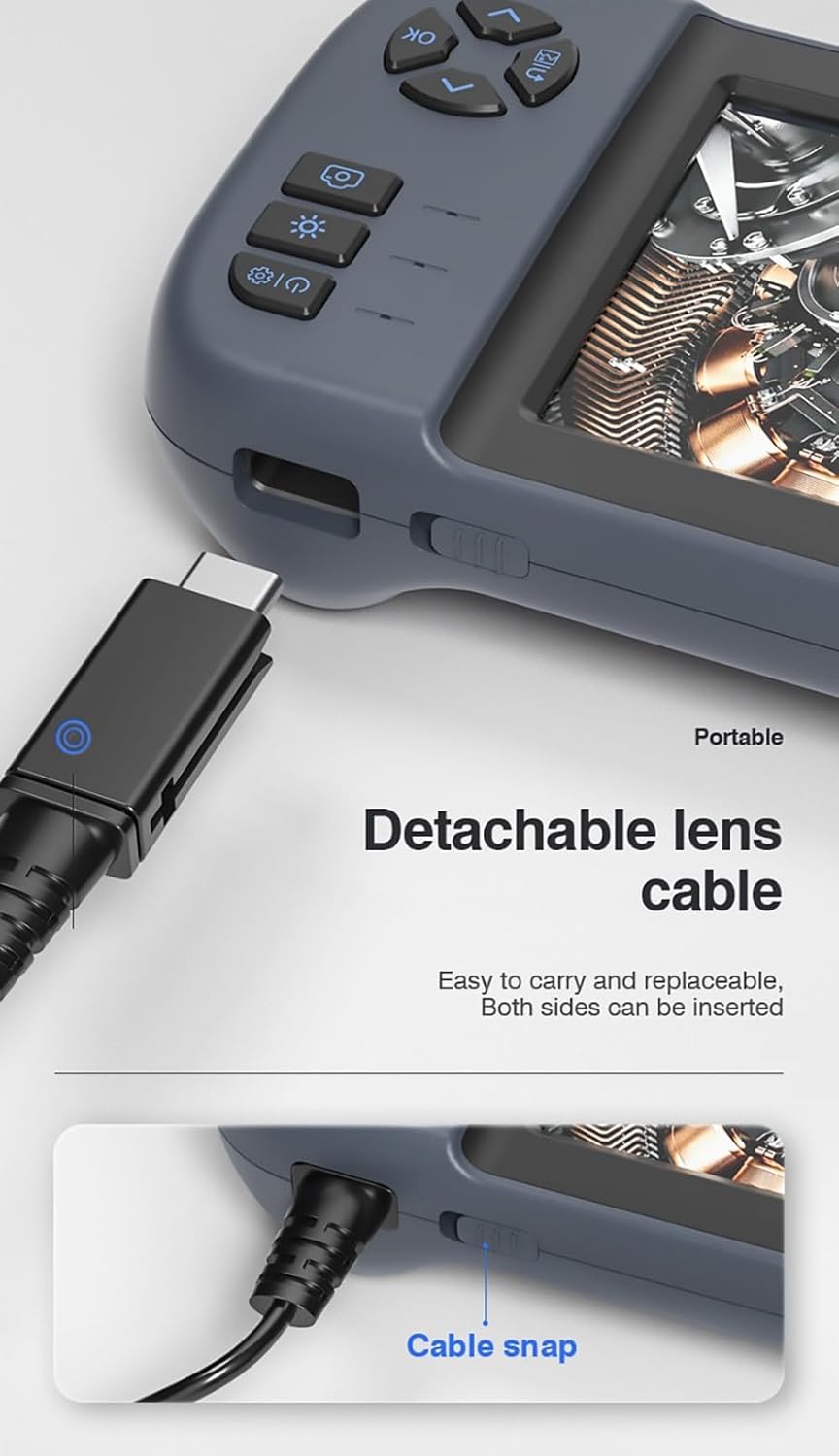
Малюнак 3.3: The detachable lens cable, designed for easy connection and removal. Both sides of the connector can be inserted.
3.4 Выкарыстанне ўбудаванай падстаўкі
The Inskam 451 features a built-in bracket on the back, allowing it to stand upright on a flat surface. This frees your hands during inspection tasks.

Малюнак 3.4: The integrated bracket on the back of the device, which can be extended to allow the endoscope to stand on a desktop.
4. Інструкцыя па эксплуатацыі
4.1 Уключэнне/выключэнне
Press and hold the power button (usually marked with ⑂) to turn the device on or off. The IPS screen will illuminate upon startup.

Малюнак 4.1: The 4.5-inch IPS HD screen provides vivid colors and a wide viewкут агляду для выразнага агляду.
4.2 Рэгуляванне яркасці святлодыёда
The camera head is equipped with 6 adjustable LED lights. Use the dedicated brightness control button (often marked with an asterisk or light icon) to cycle through different brightness levels or turn the lights off.

Малюнак 4.2: The IP67 waterproof camera head with 6 adjustable LED lights, suitable for harsh environments including submerged conditions.
4.3 Capturing Images and Recording Videos
Once the device is powered on and the camera is positioned, use the dedicated buttons to capture still images or start/stop video recording. Refer to the on-screen icons for current mode (photo/video).
4.4 ViewСМІ
Перайдзіце ў рэжым прайгравання з дапамогай кнопак меню, кабview captured images and videos stored on the TF card. You can scroll through files and play videos directly on the screen.
5. Тэхнічнае абслугоўванне
5.1 Cleaning the Lens and Screen
Gently wipe the camera lens and the IPS screen with a soft, lint-free cloth. For stubborn smudges, a small amount of lens cleaning solution can be applied to the cloth (not directly to the lens/screen).
5.2 Сыход за акумулятарам
Каб падоўжыць тэрмін службы батарэі, пазбягайце частай поўнай разрадкі батарэі. Рэгулярна зараджайце прыладу, нават калі яна не выкарыстоўваецца працяглы час (напрыклад, раз на 3 месяцы).
5.3 Захоўванне
Store the endoscope in a cool, dry place, away from direct sunlight and extreme temperatures. Ensure the lens cable is neatly coiled without sharp bends.
5.4 Меры засцярогі адносна воданепранікальнасці
While the camera head is IP67 waterproof, the main unit is not. Do not submerge the main unit in water or expose it to heavy rain. Ensure the USB and TF card ports are properly sealed with their silicone covers when not in use, especially in damp асяроддзях.
6. Выпраўленне непаладак
| праблема | Магчымая прычына | Рашэнне |
|---|---|---|
| Прылада не ўключаецца | Нізкі зарад батарэі; кнопка харчавання націснута недастаткова доўга | Charge the device; Press and hold the power button for 3-5 seconds |
| Няма выявы на экране | Lens cable not connected properly; Camera lens obstructed | Ensure lens cable is securely connected; Clean the camera lens |
| Cannot save images/videos | No TF card inserted; TF card full or corrupted; TF card not supported | Устаўце карту TF; выдаліце старую files or use a new card; Use a TF card up to 32GB, formatted to FAT32 |
| Святлодыёдныя ліхтары не працуюць | Яркасць усталявана на мінімум; Няспраўнасць | Press the LED brightness button to increase illumination; Contact support if issue persists |
7. Тэхнічныя характарыстыкі
| Асаблівасць | Спецыфікацыя |
|---|---|
| мадэль | 451 |
| Памер экрана | 4.5 цалі IPS |
| Дазвол экрана | 480 х 854 пікселяў |
| Дазвол выявы | 1920 x 1080 (JPG) |
| Дазвол запісу відэа | 1280 x 720 (AVI) |
| Воданепранікальнасць камеры | IP67 |
| Даўжыня кабеля | 5 meters (Rigid) |
| Глыбіня рэзкасці | 4-10 см |
| Viewing кут | 70 градусаў |
| Крыніца святла | 6 рэгуляваных святлодыёдных ліхтароў |
| Ёмістасць батарэі | 2000 мАг |
| Працоўная тэмпература | -10 ℃ да 50 ℃ |
| Сувязь | USB Type-C |
| Падтрымка захоўвання | TF-карта (да 32 ГБ) |
| Сертыфікаты | CE/RoHS/ISO9001 |
| Вага прадукту | 488 грамаў |
| Памеры прадукту (Д х Ш х У) | 18 х 11 х 7 см |
8. Гарантыя і падтрымка
The Inskam 451 Handheld Endoscope comes with a standard manufacturer's warranty. Please refer to your purchase documentation for specific warranty terms and duration. For technical support, troubleshooting assistance, or warranty claims, please contact the retailer or manufacturer directly.
вытворца: Інскам
ASIN: B0DNFSDNXC
For further assistance, please visit the official Inskam webсайт або звярніцеся ў службу падтрымкі кліентаў.