
Уводзіны
Thank you for choosing the Blaupunkt Infinite 20W Party Speaker with Wired Mic. This manual provides essential information for the safe and efficient operation of your speaker. Please read it thoroughly before use and retain it for future reference.
Важная інфармацыя па бяспецы
- Не падвяргайце дынамік уздзеянню вады або празмернай вільгаці.
- Пазбягайце размяшчэння дынаміка паблізу крыніц цяпла або пад прамымі сонечнымі прамянямі.
- Не спрабуйце разбіраць або рамантаваць прыладу самастойна. Звяртайцеся па любыя паслугі па абслугоўванні да кваліфікаванага персаналу.
- Выкарыстоўвайце толькі пазначаны зарадны кабель.
- Захоўваць у месцах, недаступных дзецям.
Прадукт скончаныview
The Blaupunkt Infinite 20W Party Speaker (Model BSP101) is a portable audio system designed for powerful sound and entertainment. It features Bluetooth connectivity, USB/TF card playback, FM radio, karaoke function with a wired microphone, and dynamic flash lights.
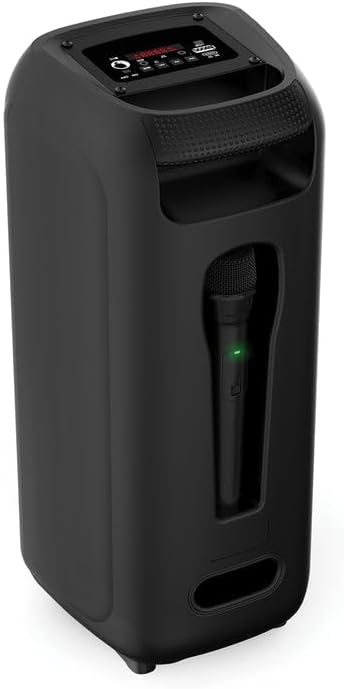
Малюнак 1: Спераду View спікера

Малюнак 2: Назад View спікера
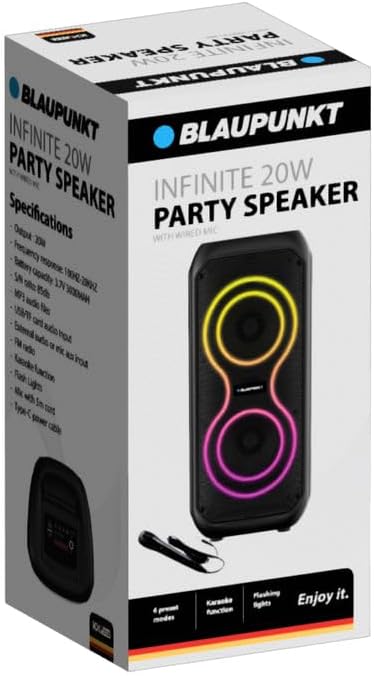
Figure 3: Wired Microphone
Кіраўніцтва па ўстаноўцы
1. Распакаванне і першапачатковы агляд
Асцярожна выміце ўсе кампаненты з упакоўкі. Пераканайцеся, што ў наяўнасці наступныя прадметы:
- Blaupunkt Infinite 20W Party Speaker
- Wired Microphone with 5m Cord
- Сілавы кабель Type-C
Inspect the speaker and accessories for any signs of damage. If any items are missing or damaged, contact customer support.
2. Зарадка дынаміка
Before first use, fully charge the speaker. Connect the supplied Type-C power cable to the DC 5V port on the speaker and the other end to a compatible USB power adapter (not included). The charging indicator (if present) will show the charging status.
3. Connecting the Wired Microphone
Insert the 6.35mm jack of the wired microphone into the "MIC" input port on the speaker's control panel.
Інструкцыя па эксплуатацыі

Малюнак 4: Схема панэлі кіравання
1. Уключэнне/выключэнне харчавання
Locate the "ON/OFF" switch on the control panel. Slide it to the "ON" position to power on the speaker. Slide it to "OFF" to power off.
2. Спарванне Bluetooth
- Power on the speaker. It will automatically enter Bluetooth pairing mode, indicated by a flashing LED or an audible prompt.
- На мабільнай прыладзе ўключыце Bluetooth і знайдзіце даступныя прылады.
- Select "Blaupunkt Infinite" (or similar name) from the list.
- Once paired, the speaker will confirm with an audible sound, and the LED indicator will become solid.
3. Прайграванне з USB/TF-карты
Insert a USB flash drive or TF (microSD) card containing MP3 audio files into the respective "USB" or "TF" port. The speaker will automatically detect the storage device and begin playing music. Use the track control buttons (previous/next) to navigate songs.
4. FM-радыё
Press the "MODE" button repeatedly until "FM" mode is selected. Press and hold the "Play/Pause" button to auto-scan and save available FM stations. Use the previous/next track buttons to switch between saved stations.
5. Функцыя караоке
Ensure the wired microphone is connected to the "MIC" input. Play music via Bluetooth, USB, TF card, or AUX. Adjust the microphone volume (if available) and speaker volume to your preference. Sing along with the music.
6. Flash Lights
The speaker features dynamic flash lights. These lights typically activate automatically when the speaker is on and playing music. There may be a dedicated button or a combination of buttons to cycle through light modes or turn them off (refer to control panel for specific button if available).
7. External Audio (AUX) Input
Connect an external audio device (e.g., smartphone, MP3 player) to the "AUX" input port using a 3.5mm audio cable (not included). Press the "MODE" button until "AUX" mode is selected. Audio will play from the connected device.
Тэхнічнае абслугоўванне
- Уборка: Выкарыстоўвайце мяккую сухую тканіну для чысткі вонкавага боку дынаміка. Не выкарыстоўвайце абразіўныя ачышчальнікі або растваральнікі.
- захоўванне: Калі дынамік не выкарыстоўваецца працяглы час, захоўвайце яго ў прахалодным, сухім месцы, удалечыні ад прамых сонечных прамянёў і экстрэмальных тэмператур.
- Сыход за батарэяй: Каб падоўжыць тэрмін службы батарэі, пазбягайце частай поўнай разрадкі батарэі. Рэгулярна зараджайце дынамік, нават калі ён не выкарыстоўваецца.
Ліквідацыю непаладак
| праблема | Магчымая прычына | Рашэнне |
|---|---|---|
| Дынамік не ўключаецца. | Battery is discharged. Power switch is off. | Charge the speaker using the Type-C cable. Ensure the power switch is in the "ON" position. |
| Няма гуку. | Гучнасць занадта нізкая. Выбраны няправільны рэжым уводу. Прылада падключана няправільна. | Increase speaker and source device volume. Press "MODE" to select the correct input (Bluetooth, USB, TF, AUX). Reconnect the device. |
| Bluetooth часта адключаецца. | Device is out of range. Interference from other devices. Low speaker battery. | Move the paired device closer to the speaker. Avoid obstacles. Charge the speaker fully. Try re-pairing the device. |
| Не працуе мікрафон. | Microphone not fully plugged in. Microphone switch is off (if applicable). | Ensure the microphone jack is securely inserted into the "MIC" port. Check if the microphone has an ON/OFF switch and ensure it is ON. |
Тэхнічныя характарыстыкі
| Марка | БЛАЎПУНКТ |
| Нумар мадэлі | BSP101 |
| Выходная магутнасць | 20 Вт |
| Тэхналогія падлучэння | Bluetooth |
| Рэжым выхаду гуку | Стэрэа |
| АЧХ | 100 Гц-20 кГц |
| Ёмістасць батарэі | 3.7 В 3000 мАг |
| Суадносіны сігнал/шум | 85 дБ |
| Падтрымка аўдыё | MP3, USB, TF card |
| Увод магутнасці | Тып C (DC 5 В) |
| Уключаныя кампаненты | Wired Mic, Type-C Power Cable |
| Памеры прадукту (Д х Ш х У) | 22D x 20W x 48H millimetres |
| Матэрыял | Пластыкавыя |
| Колер | Чорны |
Гарантыя і падтрымка
For warranty information or technical support, please refer to the warranty card included with your product or visit the official Blaupunkt website. Do not attempt to repair the product yourself.