
1. Уводзіны
This manual provides detailed instructions for the proper use, setup, and maintenance of your Caliber Scientific Calculator, Model 297208. Designed for students, engineers, and professionals, this calculator offers 240 functions for a wide range of mathematical and scientific calculations.
Please read this manual thoroughly before using the calculator to ensure optimal performance and longevity.
2. Інфармацыя па бяспецы
- Keep the calculator away from extreme temperatures, direct sunlight, and high humidity.
- Avoid dropping the calculator or subjecting it to strong impacts.
- Do not attempt to disassemble or modify the calculator. This will void the warranty.
- Use only the specified battery type. Incorrect battery usage may cause leakage or explosion.
- Папярэджанне аб батарэі: Захоўвайце акумулятары далей ад дзяцей і хатніх жывёл. Батарэі могуць нанесці шкоду пры праглынанні. Калі дзіця ці жывёла праглынулі батарэйку, неадкладна звярніцеся па медыцынскую дапамогу.
3. Змесціва ўпакоўкі
Upon opening your Caliber Scientific Calculator package, please verify that all items are present and in good condition:
- Caliber Scientific Calculator (Model 297208)
- Protective Hard Sliding Cover
- One AG10 Button Cell Battery (pre-installed or included separately)
- Кіраўніцтва карыстальніка (гэты дакумент)

Image 1: Caliber Scientific Calculator in retail packaging, showing key features.
4. Настройка
4.1. Крыніца харчавання
The Caliber Scientific Calculator operates on dual power sources: solar power and battery power. The solar panel provides power in well-lit environments, while the battery ensures operation in low-light conditions.
4.2. Устаноўка/замена батарэі
Your calculator includes one AG10 button cell battery. If battery replacement is needed:
- Пераканайцеся, што калькулятар выключаны.
- Знайдзіце батарэйны адсек на задняй панэлі калькулятара.
- Выкарыстоўваючы невялікую адвёртку, асцярожна адкрыйце вечка батарэйнага адсека.
- Remove the old battery and insert a new AG10 button cell battery, ensuring the correct polarity (+/-).
- Замяніце крышку батарэйнага адсека і замацуеце яе шрубай.
Note: Some models may require a AAA battery. Refer to the specific markings on your calculator's battery compartment if different from AG10.
5. Ключавыя функцыіview
The calculator features a 10-digit LCD display and 240 functions. Familiarize yourself with the key layout:
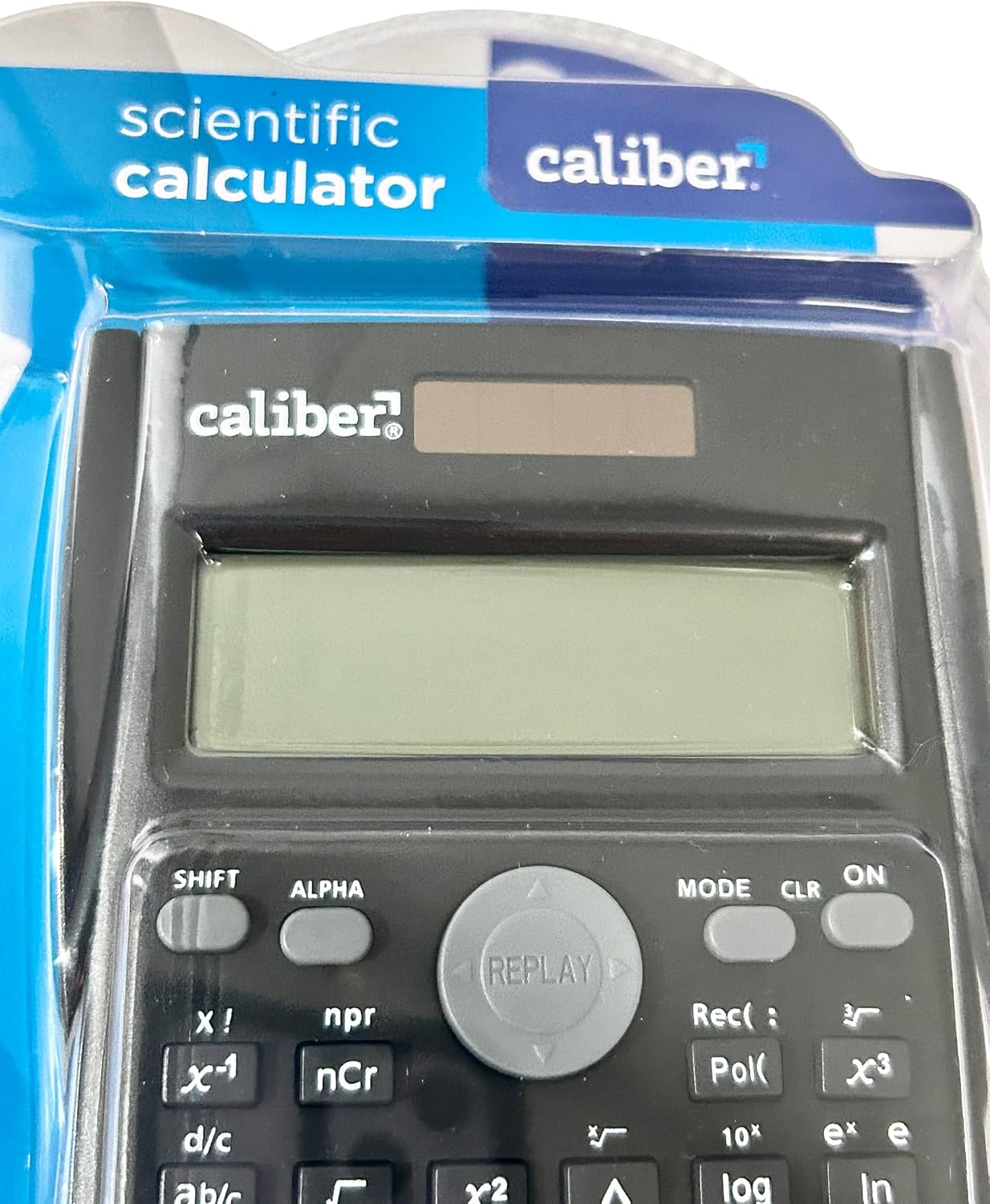
Image 2: Close-up of the calculator's display and key layout.
- Дысплей: 10-digit LCD for clear viewing of inputs and results.
- ВКЛ/ВЫКЛ: Power on/off the calculator.
- ЗРУХ: Accesses secondary functions printed above the keys (typically in yellow or orange).
- АЛЬФА: Accesses alpha characters and variables (typically in red or green).
- Рэжым: Changes calculation modes (e.g., COMP, STAT, EQN).
- CLR: Clears memory or settings.
- OF: Deletes the last entered digit.
- кандыцыянер: Clears all entries and resets the calculation.
- Клавішы са стрэлкамі: Navigate through entries and results.
- = (Роўна): Executes the calculation.
6. Інструкцыя па эксплуатацыі
6.1. Асноўныя разлікі
Каб выканаць асноўныя арыфметычныя дзеянні:
- Націсніце ON key to turn on the calculator.
- Увядзіце першы нумар.
- Націсніце патрэбную клавішу аперацыі (+, -, ×, ÷).
- Увядзіце другую лічбу.
- Націсніце = клавішу для адлюстравання выніку.
6.2. Пашыраныя функцыі
The calculator supports 240 functions, including trigonometric, logarithmic, statistical, and more. To access secondary functions (printed above keys), press the ЗРУХ key before the desired function key.
- Трыганаметрычныя функцыі: грэх, cos, загар і іх адваротныя функцыі (ЗРУХ + sin⁻¹і г.д.).
- Лагарыфмічныя функцыі: часопіс (base 10), ln (натуральны лагарыфм).
- Функцыі ўзвядзення ў ступень і ўзвядзення ў корань: x², √, xʸ.
- Функцыі памяці: Выкарыстоўвайце STO (Крама) і RCL (Recall) to save and retrieve values.
- Статыстычныя разлікі: Увайдзіце РЭЖЫМ and select STAT mode for statistical computations.
For detailed instructions on specific functions, refer to the comprehensive instructions enclosed with your product (if applicable) or consult online resources for scientific calculator usage.
7. Тэхнічнае абслугоўванне
7.1. Уборка
To clean your calculator:
- Працярыце знешнюю частку мяккай сухой тканінай.
- Для ўстойлівага бруду злёгку ачысціцеampen the cloth with water and mild soap, then wipe dry immediately.
- Не выкарыстоўвайце абразіўныя ачышчальнікі, растваральнікі або спірт, бо яны могуць пашкодзіцьasing або дысплей.
7.2. Захоўванне
When not in use, store the calculator in a cool, dry place, away from direct sunlight and extreme temperatures. Always use the protective hard sliding cover to prevent damage to the keys and display.

Image 3: Packaging detail showing features including the hard sliding cover and dual power.
8. Выпраўленне непаладак
| праблема | Магчымая прычына | Рашэнне |
|---|---|---|
| Калькулятар не ўключаецца. | Insufficient light for solar power, or dead battery. | Move to a brighter area or replace the AG10 button cell battery. |
| Display shows "ERROR". | Mathematical error (e.g., division by zero, invalid input). | Прэса AC to clear the error and re-enter the calculation correctly. |
| Няправільныя вынікі разлікаў. | Incorrect mode selected, or input error. | Праверце бягучы рэжым (РЭЖЫМ key) and ensure correct data entry. Clear all memory (ЗРУХ + CLR) калі неабходна. |
9. Тэхнічныя характарыстыкі
| Нумар мадэлі | 297208 |
| Марка | Калібр |
| Тып дысплея | 10-значны ВК-дысплей |
| Колькасць функцый | 240 |
| Тып калькулятара | Інжынерныя / Навук |
| Крыніца харчавання | Падвойнае харчаванне (сонечная энергія і батарэя) |
| Тып батарэі | 1 x AG10 Button Cell (included) or 1 x AAA (may vary by model) |
| Памер экрана | 3 цаляў |
| Памеры (Д х Ш) | 6 цалі х 3 цалі |
| Матэрыял корпуса | Пластыкавыя |
| UPC | 050428205495 |
10. Гарантыя і падтрымка
10.1. Інфармацыя аб гарантыі
This product is subject to a return policy. For details regarding returns, exchanges, or warranty claims, please refer to the retailer's return policy where the product was purchased.
10.2. Падтрымка кліентаў
For further assistance, technical support, or inquiries not covered in this manual, please contact Caliber customer service through their official webсайт або прадаўца, у якога вы набылі тавар.