1. Уводзіны
Thank you for choosing the Lubluelu SL60 Pro Robot Vacuum Cleaner and Mop. This manual provides essential information for the safe operation, maintenance, and troubleshooting of your device. Please read it thoroughly before use and retain it for future reference.
2. Важныя інструкцыі па бяспецы
Каб знізіць рызыку траўмаў або пашкоджанняў, уважліва прачытайце гэтыя інструкцыі па тэхніцы бяспекі і трымайце іх даступнымі падчас выкарыстання вырабу.
- Гэтым прыборам могуць карыстацца дзеці ва ўзросце ад 8 гадоў і асобы з паніжанымі фізічнымі, сэнсарнымі або разумовымі здольнасцямі або з адсутнасцю вопыту і ведаў, калі яны знаходзяцца пад наглядам або атрымалі інструкцыі адносна бяспечнага выкарыстання прыбора і разумеюць звязаныя з гэтым небяспекі .
- За дзецьмі трэба сачыць, каб яны не гулялі з прыборам.
- Чыстка і абслугоўванне карыстальнікам не павінны праводзіцца дзецьмі без нагляду.
- Выкарыстоўвайце толькі адаптар сілкавання, які пастаўляецца вытворцам.
- Не выкарыстоўвайце прыладу ў месцах з адкрытым агнём або далікатнымі прадметамі.
- Перад чысткай або тэхнічным абслугоўваннем пераканайцеся, што робат выключаны і адключаны ад сеткі.
- Do not immerse the robot or charging base in water.
- Трымайце валасы, свабодную вопратку, пальцы і ўсе часткі цела далей ад адтулін і рухомых частак.
3. Змесціва ўпакоўкі
Пасля распакавання пераканайцеся, што ўсе кампаненты ў наяўнасці і ў добрым стане. Калі якія-небудзь элементы адсутнічаюць або пашкоджаныя, звярніцеся ў службу падтрымкі кліентаў.
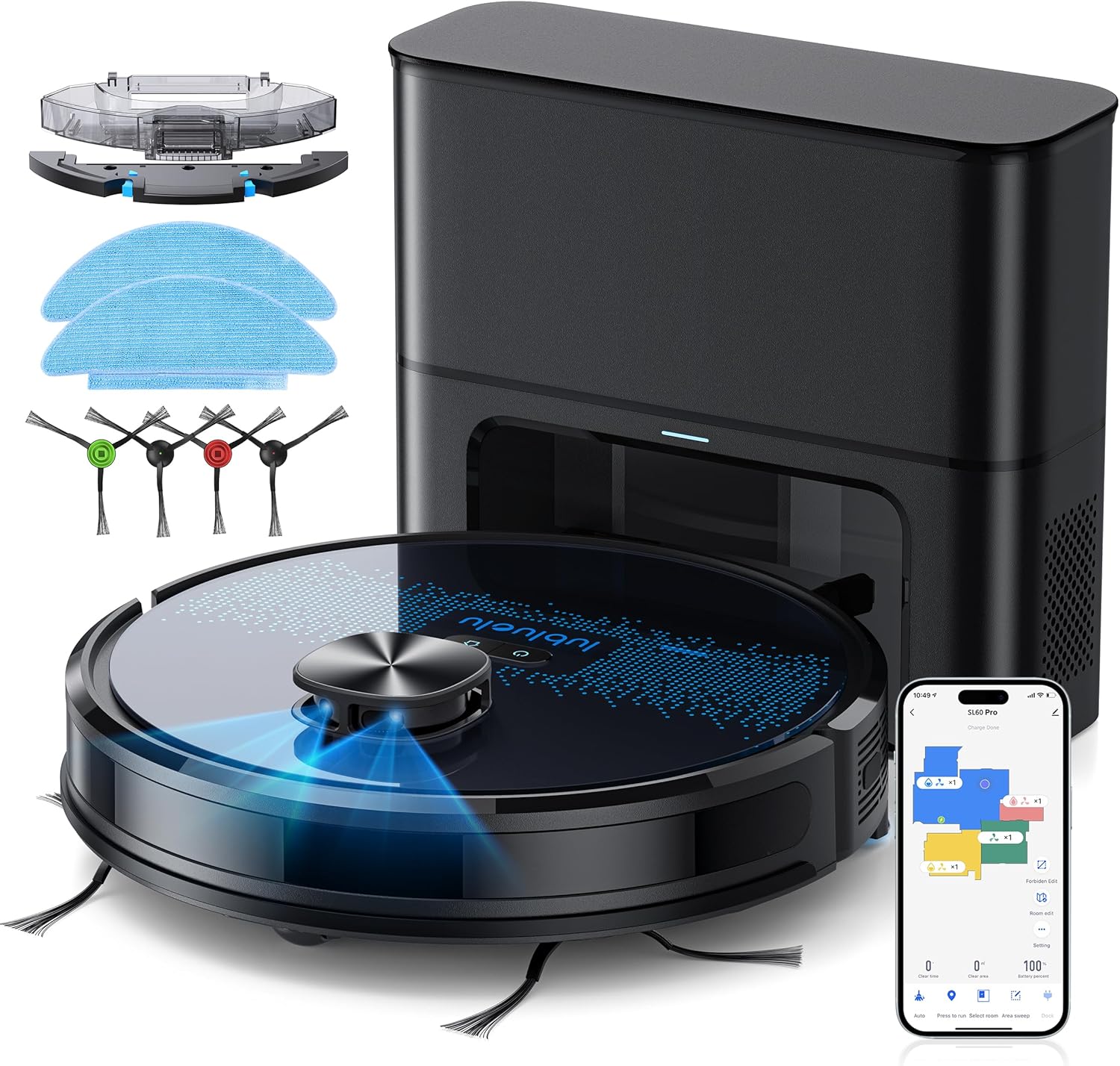
- Lubluelu SL60D Robot Vacuum Cleaner
- D3 Self-Emptying Station
- Extra Dust Bag (2.5L capacity)
- Губка для швабры (2 штукі)
- Інструмент для ачысткі
- Бакавыя шчоткі (2 пары)
- Дадатковы фільтр HEPA
- Кіраўніцтва карыстальніка
4. Прадукт скончыўсяview
The Lubluelu SL60 Pro is an advanced robot vacuum and mop designed for efficient home cleaning. It features LIDAR navigation, 4000Pa suction power, a 2.5L self-emptying dust station, and smart app control.
4.1 Асноўныя магчымасці
- LIDAR Navigation: Equipped with 8-meter laser range and SLAM algorithm for accurate mapping and efficient route planning.
- Self-Emptying Station: Automatically empties the robot's dustbin into a 2.5L disposable bag, requiring manual emptying only every 60 days.
- Магутнасць ўсмоктвання 4000 Па: Powerful brushless motor with three adjustable suction levels for effective cleaning on various surfaces, including carpets.
- 3-у-1 уборка: Sweeps, vacuums, and mops simultaneously with electronic water control and Y-shaped mopping patterns.
- Шматпавярховае картаграфаванне: Stores up to 5 maps for multi-level homes, allowing for customized cleaning plans.
- Наладжвальная ўборка: Set no-go zones, virtual walls, spot cleaning, edge cleaning, and scheduled cleaning via the app.
- Аўтаматычная падзарадка: Returns to the charging base when battery is low (below 15%) and resumes cleaning from where it left off once charged to 80%.
- Праца з нізкім узроўнем шуму: Operates at approximately 55dB.

5. Настройка
5.1 Зарадка робата
Before first use, fully charge the robot. Place the self-emptying station against a wall with at least 0.5 meters of clear space on either side and 1.5 meters in front. Ensure the power cable is securely connected.

5.2 Усталёўка бакавых шчотак
Attach the side brushes by pressing them onto the square posts at the bottom of the robot until they click into place.
5.3 Installing the Dust Bin/Water Tank
The robot comes with a combined dust bin and water tank. Fill the water tank with clean water (do not use cleaning solutions that may clog the system). Attach the mop pad to the bottom of the tank. Insert the assembly into the robot until it locks.
5.4 Падключэнне да Wi-Fi і праграмы
To unlock all smart features, connect your robot to the Lubluelu app (Smartlife app). Ensure your Wi-Fi network is 2.4GHz.
- Download the 'Smartlife' app from your mobile app store.
- Зарэгіструйцеся альбо ўвайдзіце ў свой рахунак.
- Press and hold the power button on the robot for 3-5 seconds until the Wi-Fi indicator light blinks rapidly.
- In the app, tap 'Add Device' and select 'Robot Vacuum (Wi-Fi)' under 'Small Home Appliances'.
- Follow the in-app instructions to connect the robot to your 2.4GHz Wi-Fi network.
6. Аперацыя
6.1 Запуск/прыпыненне ўборкі
- Пачаць: Press the power button on the robot or tap 'Start' in the app.
- Паўза: Press the power button again or tap 'Pause' in the app.
- Вяртанне на базу: Press the home button on the robot or tap 'Recharge' in the app.
6.2 Рэжымы ачысткі
The robot offers various cleaning modes accessible via the Smartlife app:
- Аўтаматычная ачыстка: The robot intelligently maps and cleans your home using its LIDAR navigation.
- Ачыстка плям: Накіроўвае робата на інтэнсіўную ўборку пэўнай невялікай плошчы.
- Ачыстка зоны: Вызначце на карце канкрэтныя зоны, якія павінен убіраць робат.
- Ачыстка краю: Робат прыбірае ўздоўж сцен і па краях мэблі.
- Планавая ўборка: Усталюйце пэўны час для аўтаматычнай уборкі робата.

6.3 Выкарыстанне функцыі мыцця падлогі
Ensure the water tank is filled and the mop pad is attached. The app allows you to adjust water flow levels for different floor types.
6.4 Managing Maps and No-Go Zones
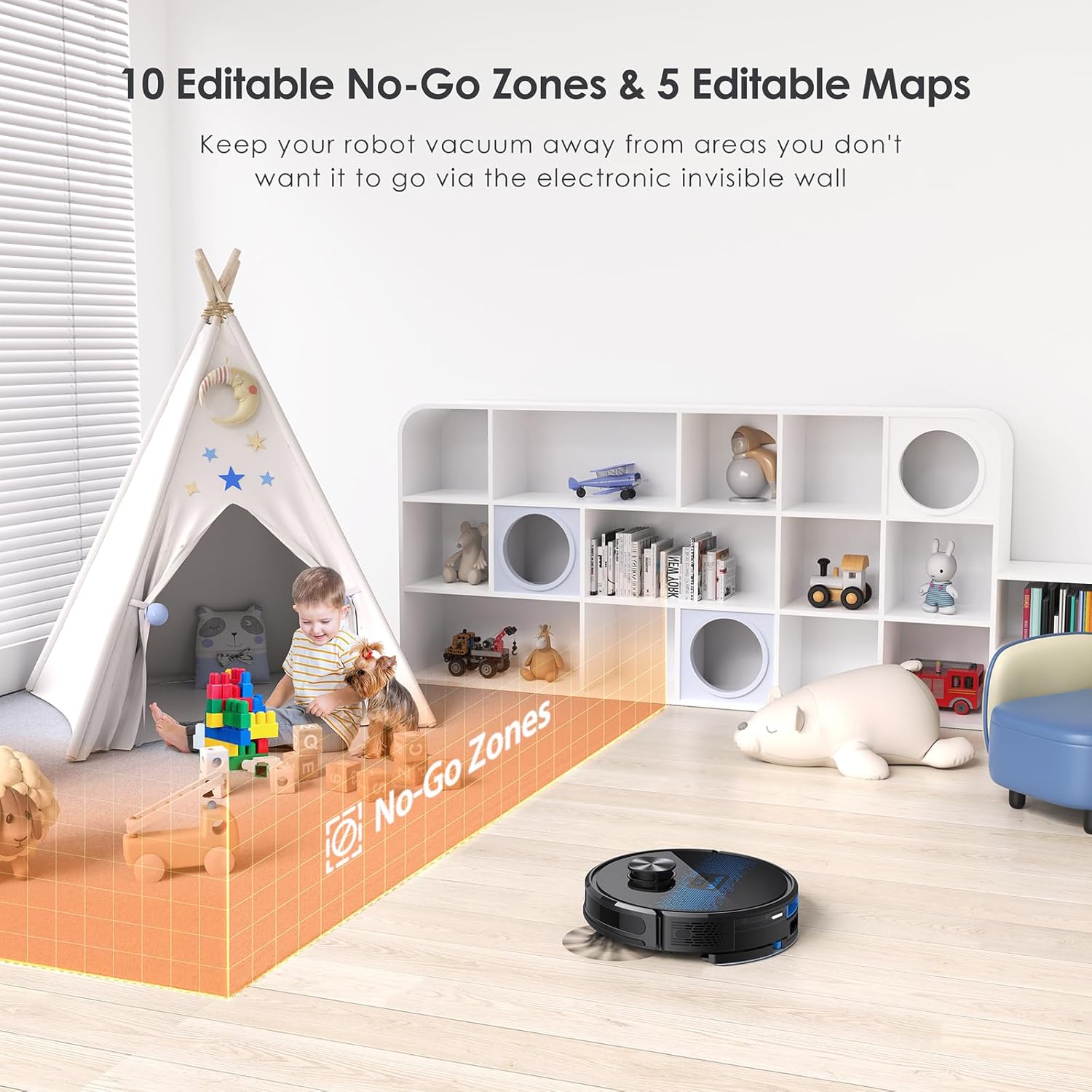
The SL60 Pro can store up to 5 different maps, useful for multi-level homes. You can also define up to 10 no-go zones or virtual walls to restrict the robot from certain areas.
6.5 Галасавое кіраванне
The robot is compatible with Amazon Alexa and Google Assistant. Follow the instructions in the Smartlife app to link your device for voice commands.
7. Тэхнічнае абслугоўванне
Рэгулярнае тэхнічнае абслугоўванне забяспечвае аптымальную прадукцыйнасць і падаўжае тэрмін службы вашага робата-пыласоса.
7.1 Апаражненне пылазборніка
The self-emptying station automatically handles dust collection. The 2.5L dust bag in the station should be replaced approximately every 60 days, depending on usage.

7.2 Чыстка галоўнай шчоткі
Periodically remove the main brush and clean it using the provided cleaning tool to remove tangled hair and debris.
7.3 Чыстка бакавых шчотак
Check side brushes for wear and tear. Remove any tangled hair or debris. Replace if damaged.
7.4 Чыстка фільтра
Tap the filter to remove loose dirt. Rinse the filter with water if necessary, ensuring it is completely dry before reinstallation.
7.5 Ачыстка рэзервуара для вады і швабры
After each mopping session, empty any remaining water from the tank and clean the mop pad. The mop pad can be hand-washed or machine-washed.
7.6 Ачыстка датчыкаў і зарадных кантактаў
Wipe all sensors and charging contacts on both the robot and the charging station with a clean, dry cloth to ensure proper function.
8. Выпраўленне непаладак
If you encounter issues with your Lubluelu SL60 Pro, refer to the following common problems and solutions:
| праблема | Магчымая прычына | Рашэнне |
|---|---|---|
| Робат не ўключаецца. | Нізкі зарад батарэі або выключэнне харчавання. | Ensure the power switch is on and charge the robot. |
| Робат не можа падключыцца да Wi-Fi. | Incorrect Wi-Fi band (not 2.4GHz), wrong password, or router too far. | Ensure 2.4GHz Wi-Fi, verify password, move robot closer to router, or reset Wi-Fi on robot. |
| Робат часта захрасае. | Obstacles, tangled cables, or uneven surfaces. | Clear the cleaning area of obstacles, cables, and small items. Use no-go zones for problematic areas. |
| Слабая эфектыўнасць уборкі. | Full dustbin, dirty brushes/filter, or low suction setting. | Empty dustbin, clean brushes and filter, increase suction power via the app. |
| Функцыя мыцця падлогі не працуе. | Empty water tank, dry mop pad, or clogged water nozzle. | Fill water tank, moisten mop pad, clean water nozzle. |
For further assistance, please contact Lubluelu customer support.
9. Тэхнічныя характарыстыкі
| Асаблівасць | Дэталь |
|---|---|
| Марка | Лублуэлу |
| Назва мадэлі | SL60 Прафесійны |
| Колер | Сіні Чорны |
| Памеры прадукту (робат) | 32 х 32 х 10 см |
| Вага прадмета | 4.4 кілаграма |
| Магутнасць ўсмоктвання | Да 4000 Па |
| Ёмістасць пылазборніка (станцыя) | 2.5 літра |
| Ёмістасць бака для вады | 250 мілілітраў |
| тtage | 14.4 вольт |
| Узровень шуму | 55 дэцыбел |
| Час выканання | Да 2 гадзін 30 хвілін |
| Тып навігацыі | ЛІДАР |
| Сумяшчальныя прылады | Smartphone (Wi-Fi 2.4GHz), Amazon Alexa, Google Assistant |
| Асаблівасці | LIDAR Navigation, Smart Mapping, Obstacle Avoidance, Edge Cleaning, Wet/Dry Mopping, App Control, No-Go Zones, Continuous Breakpoint Cleaning, Multi-Stage Mapping |
10. Гарантыя і падтрымка
Lubluelu is committed to customer satisfaction. For any issues with your robot vacuum, please contact our customer service team. We provide lifetime technical support.
- Гарантыя: Калі ласка, звярніцеся да дакументацыі па куплі, каб атрымаць падрабязную інфармацыю аб гарантыі.
- Звязацца са службай падтрымкі: For technical assistance or service inquiries, please email us or visit our official webсайт.