
1. Уводзіны
The Abestop ET738 is a versatile network cable tester integrated with a digital multimeter, designed for comprehensive network installation and maintenance. This device combines multiple functions including cable length measurement, wire tracing, PoE testing, optical power measurement, and visual fault location, making it an essential tool for professionals.
2. Прадукт скончыўсяview
2.1 Асноўныя магчымасці
- Integrated Multifunctions: Capable of cable length measurement/calibration, cable display, wire tracing (scan), crystal connector crimping (QC), optical power measurement/calibration, red laser/visual fault location (VFL), Digital Multimeter (DMM), and PoE measurement and calculation.
- DMM Functionality: Features a 60,000-count digital multimeter with automatic detection of AC/DC current and voltage. Includes functions for AC/DC voltage, AC/DC current, continuity, buzzer, diode, resistance, capacitance, and frequency.
- Шырокае прымяненне: Ideal for cabling, network, and routine equipment maintenance, including quick cable location, wire connectivity testing, and cable type identification.
2.2 Кампаненты
- Signal Emitter (Main Unit)
- Corresponding Receiver Unit
- Compatible Cables: RJ45 cable, alligator clip cable, USB cable, 3 remote ID test cables.
- Integrated rechargeable lithium battery: 1500 mAh (host) / 800 mAh (receiver).
- Supports 5V/2A/10W or Type-C charging.

Figure 1: Abestop ET738 Main Unit and Receiver
3. Інфармацыя па бяспецы
- Перад выкарыстаннем уважліва прачытайце ўсе інструкцыі.
- Do not operate the device in wet conditions or explosive atmospheres.
- Ensure proper battery charging and avoid overcharging.
- Выкарыстоўвайце толькі прызначаныя аксэсуары і кабелі.
- Avoid direct eye exposure to the laser from the Visual Fault Locator (VFL).
- Disconnect power from circuits before performing any tests, especially with the multimeter function, unless specifically designed for live circuit testing.
4. Настройка
4.1 Распакаванне
Carefully remove all components from the packaging. Verify that all items listed in the 'Components' section are present and undamaged.
4.2 Зарадка акумулятара
The main unit and receiver have integrated rechargeable lithium batteries. Connect the device to a 5V/2A/10W power source or a Type-C charger using the provided USB cable. The charging indicator will show the charging status. Ensure both units are fully charged before first use for optimal battery life.
4.3 Уключэнне/выключэнне сілкавання
Press and hold the power button on the main unit to turn it on or off. The device will display the main menu upon startup.
5. Інструкцыя па эксплуатацыі
5.1 Агульная навігацыя
The device features a 3.2-inch HD screen for clear display of functions and results. Use the navigation buttons (up, down, left, right, OK) to select and confirm options in the menu. The main screen provides access to various testing modes.

Figure 2: Main menu on the 3.2-inch HD screen, showing various function icons.
5.2 Cable Length Measurement
This function measures the length of network cables. Connect one end of the cable to the main unit and the other end to the remote unit or leave it open, depending on the cable type and measurement method. Select 'Cable Length' from the menu and follow the on-screen prompts for calibration and measurement.
5.3 Cable Wiremap Testing
The wiremap function checks the continuity and correct wiring configuration of network cables (RJ45). Connect the cable to both the main unit and the receiver. The screen will display the wiring status, indicating any short circuits, open circuits, or cross-overs.

Figure 3: Cable Wiremap test results, illustrating short, cross, and open circuit conditions.
5.4 Wire Tracing (Scan)
Use the wire tracing function to locate specific cables within a bundle. Connect the main unit to the cable to be traced. The receiver unit can then be used to detect the signal emitted by the main unit, helping to identify the target cable.
5.5 PoE Testing
The PoE (Power over Ethernet) test function measures the voltage and power supplied by PoE switches or injectors. Connect the device to a PoE-enabled port. The screen will display the PoE voltage and pin configuration providing power.

Figure 4: PoE test in progress, displaying voltage and active pins from a PoE switch.
5.6 Digital Multimeter (DMM) Function
The integrated DMM allows for various electrical measurements. Connect the test leads to the appropriate ports on the main unit. Select the desired measurement mode (e.g., AC/DC voltage, current, resistance, capacitance, frequency, diode, continuity) from the DMM menu and perform the measurement.

Малюнак 5: Закончанаview of available functions, including DMM, PoE Test, and Remote ID.
5.7 Візуальны лакатар няспраўнасцей (VFL)
The VFL function uses a red laser to identify breaks or bends in fiber optic cables. Connect the fiber optic cable to the VFL port. The laser light will escape at the point of fault, making it visible.
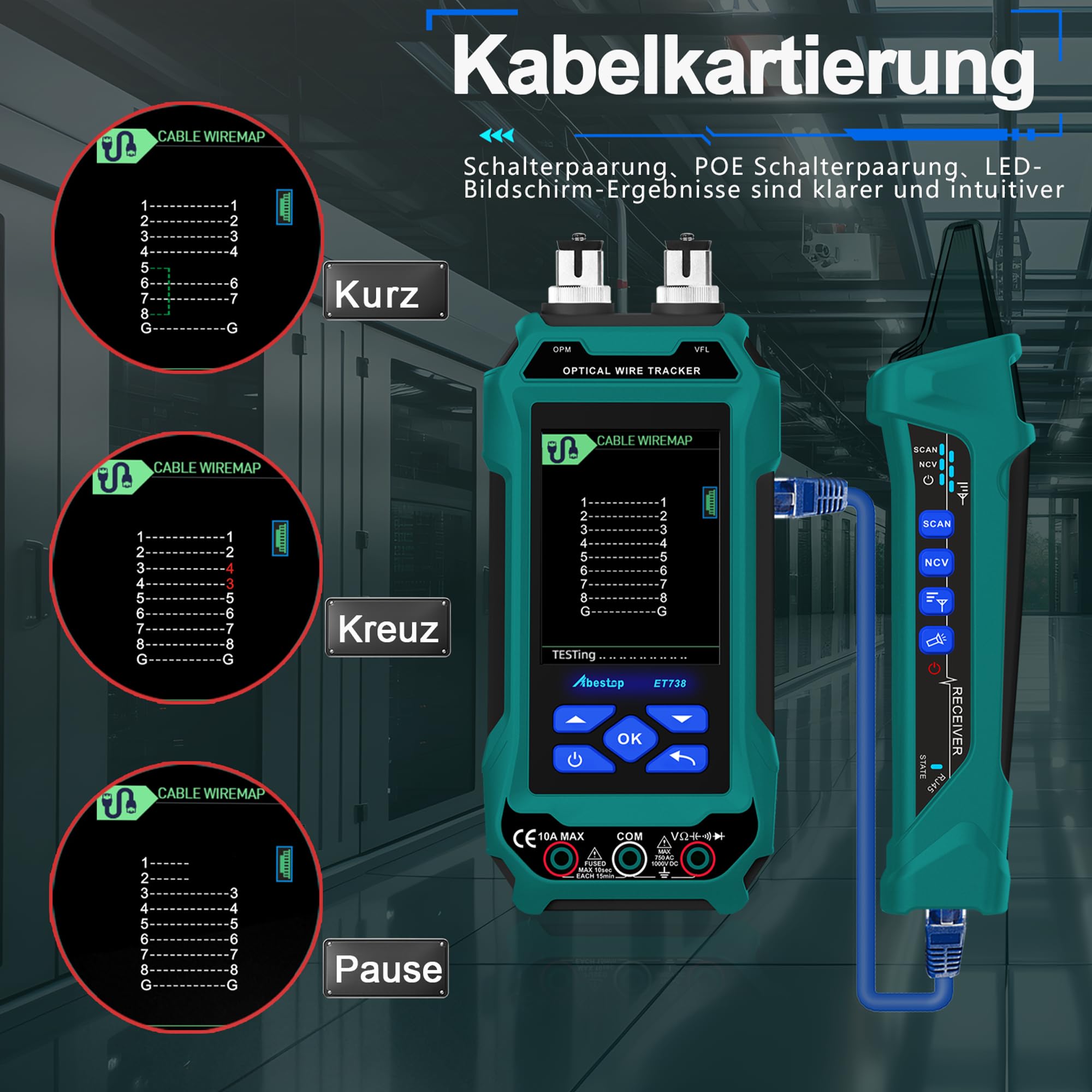
Figure 6: Visual Fault Locator (VFL) mode, showing a fiber optic cable and laser output.
5.8 Вымяральнік аптычнай магутнасці (OPM)
The OPM measures the power of optical signals in fiber optic cables. Connect the fiber optic cable to the OPM port. Select the appropriate wavelength and the device will display the optical power reading.
5.9 Crimping QC Test
This function tests the quality of crimped crystal connectors (RJ45). Insert the crimped connector into the designated port. The device will analyze the connection and indicate if the crimp is correct or if there are issues with individual wires.

Figure 7: Crimping QC test in progress, indicating an issue with a crimped connector.
5.10 Remote ID Testing
Use the remote ID test cables to identify multiple network cables simultaneously. Connect the main unit to one end of the cables and the remote ID units to the other ends. The device will display the corresponding ID for each cable.
6. Тэхнічнае абслугоўванне
6.1 Ачыстка
Wipe the device with a soft, dry cloth. Do not use abrasive cleaners or solvents. Keep the ports and connectors free from dust and debris.
6.2 Захоўванне
Захоўвайце прыладу ў прахалодным, сухім месцы, удалечыні ад прамых сонечных прамянёў і экстрэмальных тэмператур. Пры працяглым захоўванні пераканайцеся, што акумулятар часткова зараджаны (каля 50%), каб падоўжыць тэрмін яго службы.
6.3 Сыход за акумулятарам
Recharge the battery regularly, even if the device is not in frequent use. Avoid fully discharging the battery repeatedly, as this can reduce its overall capacity.
7. Выпраўленне непаладак
- Прылада не ўключаецца: Пераканайцеся, што акумулятар зараджаны. Падключыце да крыніцы харчавання і паспрабуйце яшчэ раз.
- Inaccurate cable length readings: Ensure proper calibration. Check for damaged cables or connectors. Verify the correct cable type setting if applicable.
- Wiremap errors: Check for proper connection of both main and receiver units. Inspect the cable for physical damage or incorrect crimping.
- Няма выяўлення PoE: Ensure the connected device is a PoE source and is active. Check the cable connection.
- VFL not working: Ensure the fiber optic cable is properly connected and clean. Check if the VFL function is enabled.
8. Тэхнічныя характарыстыкі
| Асаблівасць | Спецыфікацыя |
|---|---|
| Вытворца | Абестоп |
| Нумар мадэлі тавару | ET738 |
| Памеры прадукту (Д х Ш х У) | 26 х 17 х 7.5 см |
| Вага | 600 грамаў |
| Дысплей | 3.2-inch HD Color LCD |
| Battery (Host) | 1500 mAh Rechargeable Lithium |
| Battery (Receiver) | 800 mAh Rechargeable Lithium |
| Зарадка | 5V/2A/10W or Type-C |
| Краіна паходжання | Кітай |
| ASIN | B0DP213B99 |
9. Гарантыя і падтрымка
Specific warranty information and detailed support contacts are not provided in the product data. Please refer to the product packaging or the manufacturer's official website for the most up-to-date warranty terms and customer support options.