
1. Уводзіны
This manual provides essential information for the safe and efficient operation of your Meizu mblu 21 smartphone. Please read it thoroughly before using the device.
The Meizu mblu 21 features a Prism Edge Design with a radiant gradient and a large immersive 6.79-inch HD display. It is equipped with a 13MP main camera and an 8MP front camera, powered by Android 14. The device includes a 4900mAh battery for extended use and supports 4G LTE connectivity, Dual-Band Wi-Fi, and Bluetooth 5.0.
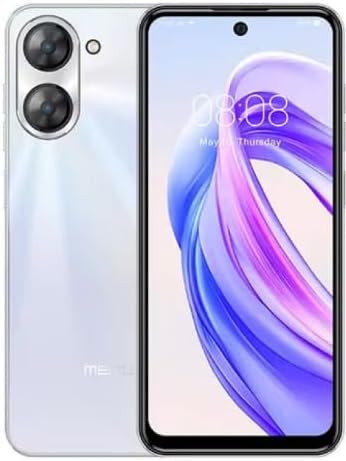
Малюнак 1.1: Пярэдняя і задняя часткі view of the Meizu mblu 21 smartphone in White Diamond color.
2. Што ў скрынцы
Праверце наяўнасць усіх прадметаў у камплекце:
- Meizu mblu 21 Smartphone
- Адаптар сілкавання
- Кабель USB
- Інструмент выцягвання SIM-карты
- Кароткае кіраўніцтва

Figure 2.1: Meizu mblu 21 smartphone alongside its power adapter.
3. Настройка
3.1. Устаўка SIM-карт і карты MicroSD
The Meizu mblu 21 supports Dual Nano SIM cards and a MicroSD card for expandable storage. Locate the SIM tray on the side of the device.
- Power off the device before inserting or removing SIM/MicroSD cards.
- Use the provided SIM ejector tool to open the SIM tray.
- Carefully place the Nano SIM cards and/or MicroSD card into the designated slots on the tray, ensuring correct orientation.
- Акуратна ўстаўце латок назад у прыладу, пакуль ён не ўстане на роўную паверхню.
3.2. Пачатковае ўключэнне і майстар налады
- Press and hold the Power button until the Meizu logo appears.
- Follow the on-screen instructions to complete the initial setup, including selecting your language, connecting to a Wi-Fi network, and setting up your Google account.
4. Кіраванне прыладай
4.1. Дысплей і навігацыя
The 6.79-inch HD display features a 90Hz adaptive refresh rate for smooth visuals. Navigate the interface using touch gestures: tap, swipe, pinch-to-zoom.
4.2. Функцыі камеры
The device is equipped with a 13MP main camera and an 8MP front camera. Open the Camera application to capture photos and videos.
- 13MP Smart Camera: Ideal for capturing everyday moments with sharpness and true-to-life colors.
- 8-мегапіксельная франтальная камера: Designed for clear selfies and video calls.
4.3. Функцыі бяспекі
- Side Unlock: A fast and secure fingerprint sensor integrated into the side power button for instant access.
- Smart Face Unlock: Use the front camera to unlock your device quickly and conveniently.
4.4. Сувязь
Your mblu 21 supports various connectivity options:
- 4G LTE: For mobile data connectivity. In the USA, this device is compatible with T-Mobile. Outside the USA, it works with any carrier worldwide.
- Двухдыяпазонны Wi-Fi: Supports both 2.4GHz and 5GHz bands for seamless internet access.
- Bluetooth 5.0: For connecting wireless accessories with improved energy efficiency.
- VoLTE HD Calls: Enjoy sharper, clearer voice calls over LTE networks.

Figure 4.1: Key technology features of the Meizu mblu 21, including Android 14, Dual-Band Wi-Fi, Bluetooth 5.0, and VoLTE.
5. Тэхнічнае абслугоўванне
5.1. Сыход за батарэяй
The mblu 21 is equipped with a 4900mAh battery. To maximize battery lifespan:
- Пазбягайце экстрэмальных тэмператур.
- Use only the provided power adapter or certified compatible chargers.
- Пазбягайце частай поўнай разрадкі акумулятара.

Малюнак 5.1: Унутраны view of the Meizu mblu 21, showcasing the 4900mAh battery and internal components.
5.2. Ачыстка прылады
Выкарыстоўвайце мяккую тканіну без ворса для чысткі экрана і корпуса тэлефона. Пазбягайце выкарыстання агрэсіўных хімічных рэчываў або абразіўных матэрыялаў.
5.3. Абнаўленне праграмнага забеспячэння
Regularly check for and install software updates to ensure optimal performance and security. Updates can be found in the device's settings menu.
6. Выпраўленне непаладак
If you encounter issues with your Meizu mblu 21, try the following solutions:
- Прылада не адказвае: Націсніце і ўтрымлівайце кнопку харчавання каля 10-15 секунд, каб прымусова перазагрузіць кампутар.
- Праблемы з падключэннем да сеткі:
- Пераканайцеся, што SIM-карта ўстаўлена правільна.
- Уключэнне і выключэнне рэжыму палёту.
- Check network settings (APN, preferred network type).
- Хуткая разрадка батарэі:
- Зачыніце праграмы, якія не выкарыстоўваюцца ў фонавым рэжыме.
- Паменшыць яркасць экрана.
- Disable unnecessary features like GPS or Bluetooth when not in use.
- Праблемы з прадукцыйнасцю:
- Clear cache and data of problematic apps.
- Вызваліце месца для захоўвання.
- Consider a factory reset (Note: This will erase all data on your device. Back up important data first.).
7. Тэхнічныя характарыстыкі
| Асаблівасць | Дэталь |
|---|---|
| Назва мадэлі | mblu 21 |
| Нумар мадэлі | M416L |
| Аперацыйная сістэма | Android 14 |
| Памер экрана | 6.79 цалі |
| Ёмістасць памяці | 64 ГБ |
| Памер усталяванай аператыўнай памяці | 4 ГБ |
| Ёмістасць батарэі | 4900 Міліamp Гадзіны |
| Асноўная камера | 13 МП |
| Пярэдняя камера | 8 МП |
| Wireless Carrier (USA) | T-Mobile |
| Сотавая тэхналогія | 4G LTE |
| Тэхналогіі падключэння | 4G, Dual-Band Wi-Fi, Bluetooth 5.0 |
| Вага прадмета | 14 унцыі |
| Памеры ўпакоўкі | 7 х 4 х 2 цалі |
| Колер | White Diamond |
8. Гарантыя і падтрымка
Your Meizu mblu 21 smartphone comes with a manufacturer's warranty. Please refer to the warranty card included in your product packaging for specific terms and conditions.
For technical support, service, or further inquiries, please contact Meizu customer support through their official channels. Contact information can typically be found on the manufacturer's webсайце або ў дакументацыі па прадукту.