
1. Уводзіны
This manual provides essential information for the proper setup, operation, maintenance, and troubleshooting of your Meizu mblu 21 4G LTE smartphone. Please read this manual thoroughly before using your device to ensure optimal performance and longevity.
The Meizu mblu 21 features a 6.79-inch HD display, a 13MP dual camera system, and runs on Android 14. It is designed for efficient performance and reliable connectivity.
2. Настройка
2.1 Змест пакета
Пераканайцеся, што ваш пакет змяшчае наступныя элементы:
- Meizu mblu 21 Smartphone
- Адаптар сілкавання
- Кароткае кіраўніцтва карыстальніка (калі ўключана)
2.2 Усталёўка SIM-карты і карты MicroSD
The Meizu mblu 21 supports Dual Nano SIM cards and a MicroSD card for expandable storage.
- Знайдзіце латок для SIM-карты на бакавой частцы прылады.
- Insert the SIM ejector tool (not included, use a thin pin if necessary) into the small hole on the SIM tray to eject it.
- Place your Nano SIM card(s) and/or MicroSD card into the designated slots on the tray, ensuring proper orientation.
- Асцярожна ўстаўце латок для SIM-карты назад у тэлефон, пакуль ён не зафіксуецца на месцы.
2.3 Initial Power On and Network Configuration
- Press and hold the power button until the Meizu logo appears.
- Выконвайце падказкі на экране, каб завяршыць пачатковую наладу, у тым ліку выбар мовы, падключэнне да Wi-Fi і наладу ўліковага запісу Google.
- For cellular connectivity, ensure your SIM card is active. This device is an international version and in the USA market, it operates exclusively on T-Mobile's 4G LTE network. Outside the USA, it is compatible with various carriers worldwide.
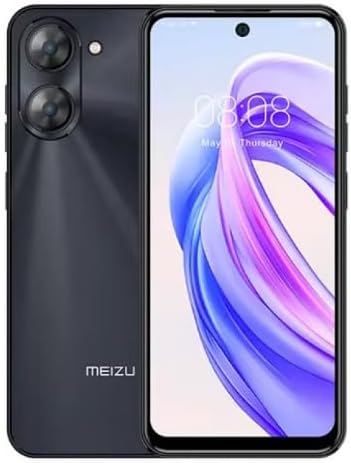
Малюнак 2.3.1: Спераду і ззаду view of the Meizu mblu 21 smartphone. The front displays the screen with a punch-hole camera, while the rear shows the dual camera module and the Meizu branding.
3. Інструкцыя па эксплуатацыі
3.1 Асноўная навігацыя (Android 14)
Your Meizu mblu 21 runs on Android 14, offering an intuitive user experience. Use gestures or on-screen navigation buttons to move between apps, access settings, and manage notifications.
3.2 Выкарыстанне камеры
The device features a 13MP Smart Camera on the rear and an 8MP front camera. Open the Camera app to capture photos and videos. Utilize various modes and settings for optimal results.
3.3 Функцыі бяспекі
Unlock your device using the side-mounted fingerprint sensor for instant access or the 8MP front camera for Smart Face Unlock.
3.4 Падключэнне
- Wi-Fi: Supports Dual-Band Wi-Fi (2.4GHz and 5GHz) for stable internet access.
- Bluetooth: Bluetooth 5.0 for connecting to wireless accessories.
- VoLTE: Enjoy clearer voice calls with VoLTE HD Calls.

Малюнак 3.4.1: Visual representation of key connectivity and operating system features, including Android 14, Dual-Band Wi-Fi, Bluetooth 5.0, and VoLTE HD Calls.
4. Тэхнічнае абслугоўванне
4.1 Агульны догляд
- Трымайце прыладу ў сухім месцы і ад экстрэмальных тэмператур.
- Працірайце экран і корпус мяккай тканінай без ворса. Пазбягайце выкарыстання агрэсіўных хімічных рэчываў.
- Абараніце экран ахоўнай плёнкай, а корпус — ахоўным чахлом, каб прадухіліць драпіны і пашкоджанні.
4.2 Кіраванне батарэяй
The 4900mAh battery is designed for all-day performance. To prolong battery life:
- Пазбягайце частай поўнай разрадкі акумулятара.
- Выкарыстоўвайце для зарадкі адаптар сілкавання, які ўваходзіць у камплект.
- Optimize background app usage and screen brightness in settings.

Малюнак 4.2.1: Унутраны view of the Meizu mblu 21 smartphone highlighting the 4900mAh battery, emphasizing its capacity for extended use.
5. Выпраўленне непаладак
5.1 Агульныя праблемы і рашэнні
- Прылада не ўключаецца: Пераканайцеся, што акумулятар зараджаны. Падключыце адаптар сілкавання і паспрабуйце яшчэ раз.
- Праблемы з падключэннем да сеткі: Check if your SIM card is properly inserted and active. Verify network settings and ensure you are within T-Mobile's coverage area in the USA.
- Павольная прадукцыйнасць: Зачыніце непатрэбныя фонавыя праграмы. Ачысціце кэш і часовую памяць. files. Restart the device.
- Акумулятар хутка разраджаецца: Reduce screen brightness, disable unused features like Bluetooth or GPS, and check for power-intensive apps.
Калі праблемы не знікнуць, паспрабуйце выканаць скід налад да заводскіх (спачатку зрабіце рэзервовую копію дадзеных) або звярнуцца ў службу падтрымкі кліентаў.
6. Тэхнічныя характарыстыкі
| Нумар мадэлі | M416L |
| Аперацыйная сістэма | Android 14 |
| Дысплей | 6.79 Inches HD, 2340 x 1080 Resolution, 90Hz Adaptive Refresh Rate |
| Працэсар | Octa Core 1.6GHz ARM Mali-G57 |
| Памяць | 64 GB Internal Storage, 4 GB RAM |
| акумулятар | 4900mAh (4.9E+3 Milliamp Hours) Lithium Polymer |
| Задняя камера | 13MP Smart Camera, 5P Precision Lens |
| Пярэдняя камера | 8 МП |
| Сотавая тэхналогія | 4G LTE FDD: 2,3,4,5,7,8,12,17,26,28,66; 3G WCDMA: 2/4/5/8; 2G Quad Band |
| Тып SIM | Dual Nano SIM + MicroSD |
| Wi-Fi | Двухдыяпазонны (2.4 ГГц і 5 ГГц) |
| Bluetooth | 5.0 |
| Аўдыёраз'ём | USB тыпу C |
| Вага прадмета | 14 унцыі |
| Ідэнтыфікатар FCC | 2ANQ6-M416L |

Малюнак 6.1: The Meizu mblu 21 smartphone presented in its Titan Black color variant, showcasinг яго дызайн.
7. Гарантыя і падтрымка
For warranty information, please refer to the warranty card included with your product or consult the retailer where the device was purchased. Meizu provides support for its products. For further assistance, please visit the official Meizu webсайт або звярніцеся ў службу падтрымкі кліентаў.