
Jonsbo ZA-360B
Інструкцыя па эксплуатацыі вентылятара для корпуса ПК JONSBO ZA-360B
мадэль: ZA-360B | Брэнд: Ёнсба
1. Уводзіны
This manual provides comprehensive instructions for the installation, operation, maintenance, and troubleshooting of your JONSBO ZA-360B PC Case Fan. The ZA-360B is an all-in-one single frame unit featuring three 120mm ARGB fans, designed for efficient cooling and stunning visual effects with its 4-sides infinity mirror design.

Figure 1: JONSBO ZA-360B PC Case Fan, showcasing its integrated design with three fans and ARGB lighting.
2. Інфармацыя па бяспецы
Please read and understand all safety instructions before installing or operating the fan. Failure to do so may result in damage to the product, other components, or personal injury.
- Always disconnect power from your PC before installing or removing any components.
- Handle the fan by its frame to avoid damaging the blades or wiring.
- Ensure proper grounding to prevent electrostatic discharge (ESD) when handling PC components.
- Do not attempt to modify the fan or its cables. Unauthorized modifications may void your warranty and pose safety risks.
- Keep the fan away from liquids and excessive moisture.
- Ensure cables are routed safely and do not obstruct fan blades or other moving parts.
3. Змесціва ўпакоўкі
Праверце наяўнасць усіх прадметаў у камплекце:
- 1 x JONSBO ZA-360B PC Case Fan Unit (integrated 3x120mm fans)
- Крапежныя шрубы
- Connection Cables (4-Pin PWM, 3-Pin ARGB)
4. Настройка і ўстаноўка
Follow these steps to properly install your JONSBO ZA-360B PC Case Fan:
4.1 Перад устаноўкай
- Power off your computer and disconnect it from the power outlet.
- Адкрыйце корпус кампутара, каб атрымаць доступ да месцаў мацавання вентылятараў.
- Identify a suitable mounting location for a 360mm radiator or three 120mm fans (e.g., top, front, or bottom of the case).
4.2 Mounting the Fan Unit
The ZA-360B is a single frame unit, simplifying installation. It can be fixed with 4 screws, regardless of its orientation, thanks to its 360-degree four-sided mirror design.
- Position the fan unit in your desired mounting location, ensuring proper airflow direction (intake or exhaust).
- Align the screw holes on the fan frame with the corresponding holes on your PC case.
- Secure the fan unit using the provided mounting screws. Tighten them evenly to prevent warping.

Figure 2: The JONSBO ZA-360B fan unit installed within a PC case, demonstrating its fit and aesthetic integration.
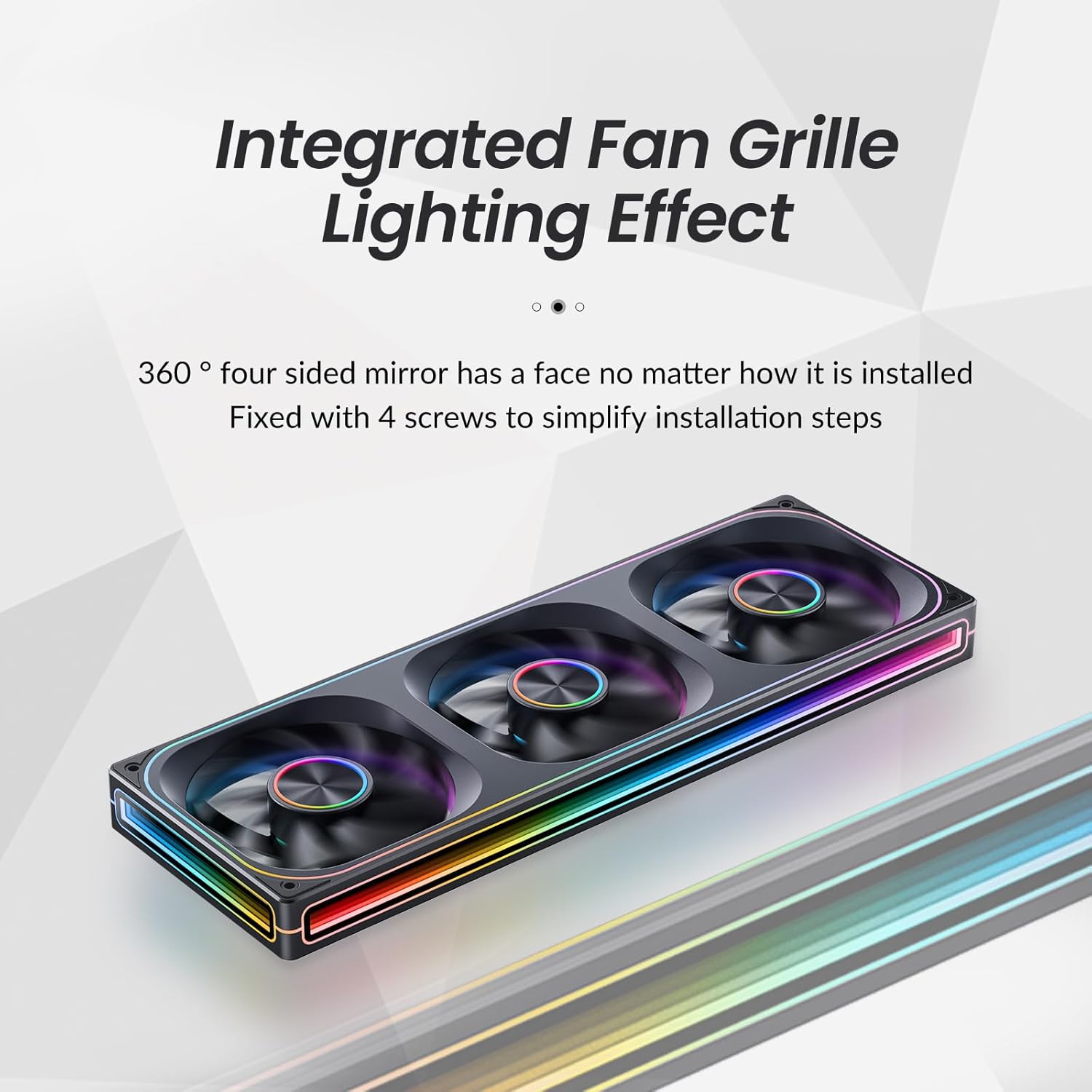
Малюнак 3: Буйны план view of the integrated fan grille and lighting effect, highlighting the ease of installation with 4 screws.
4.3 Злучальныя кабелі
The ZA-360B features simplified wiring with a single line connection to the motherboard for both power and ARGB control.
- Падключэнне ШІМ: Connect the 4-Pin PWM cable from the fan unit to an available 4-Pin fan header on your motherboard (e.g., "CPU_FAN", "SYS_FAN"). This allows for automatic fan speed control based on system temperature.
- Падключэнне ARGB: Connect the 3-Pin ARGB cable from the fan unit to a compatible 3-Pin 5V Addressable RGB header on your motherboard (e.g., "D_LED", "ARGB_HEADER"). Ensure the arrow on the connector aligns with the +5V pin on the motherboard header to prevent damage.

Figure 4: Illustration of the simplified wiring, showing a single cable connecting the fan unit to the motherboard for power and ARGB control.
Important Note on ARGB Control: The ZA-360B model has a large number of LED beads (68 LEDs around + 27 LEDs in parallel). If your motherboard has a low-end ARGB controller that cannot support this quantity of LEDs, the fan border lights may not illuminate fully. In such cases, it is recommended to add an external ARGB light controller that supports the required number of LEDs. For ASUS motherboard users, try adjusting the controllable number of LED chips through the latest version of Aura Sync software. Regular motherboards typically do not require an additional controller.
5. Інструкцыя па эксплуатацыі
5.1 Рэгуляванне хуткасці вентылятара (ШІМ)
The JONSBO ZA-360B fan supports Pulse Width Modulation (PWM), allowing your motherboard to dynamically adjust fan speed based on CPU or system temperatures. This ensures optimal cooling performance while minimizing noise when not under heavy load.
- Access your motherboard's BIOS/UEFI settings or a compatible software utility (e.g., ASUS AI Suite, MSI Dragon Center, Gigabyte SIV) to configure fan curves and monitor fan speeds.
- The fan operates within a rotational speed range of 700-2400 RPM (±10%).
5.2 Кіраванне асвятленнем ARGB
The Addressable RGB (ARGB) lighting allows for over 16 million color effects and various dynamic lighting modes, synchronized directly with your motherboard's ARGB software.
- Once the 3-Pin ARGB cable is connected to your motherboard, use the motherboard's RGB synchronization software (e.g., ASUS Aura Sync, MSI Mystic Light Sync, Gigabyte RGB Fusion, ASRock Polychrome Sync) to customize the lighting effects.
- Explore different static colors, breathing effects, wave patterns, and other dynamic modes to personalize your PC's aesthetics.
- The unique light strip layout and 4-sides infinity mirror design create a "Thousand-layer Mirror Illusion," providing a distinctive and elegant lighting experience.

Figure 5: Detail of the front aluminum CD pattern nameplate, contributing to the fan's minimalist aesthetic and light effect integration.
6. Тэхнічнае абслугоўванне
Regular maintenance helps ensure optimal performance and longevity of your JONSBO ZA-360B PC Case Fan.
- Ачыстка ад пылу: Periodically (e.g., every 3-6 months), power off your PC and use compressed air or a soft brush to gently remove dust accumulation from the fan blades and frame. Dust can impede airflow and increase noise levels.
- агляд: Check cables for any signs of wear or damage. Ensure all connections remain secure.
- Do not use liquid cleaners directly on the fan or its electrical components.
7. Выпраўленне непаладак
If you encounter issues with your JONSBO ZA-360B PC Case Fan, refer to the following common problems and solutions:
| праблема | Магчымая прычына | Рашэнне |
|---|---|---|
| Вентылятар не круціцца. |
|
|
| ARGB lights are not illuminating or are incomplete. |
|
|
| Fan is making excessive noise. |
|
|
8. Тэхнічныя характарыстыкі
Technical specifications for the JONSBO ZA-360B PC Case Fan:
| Нумар мадэлі | ZA-360B |
| Памеры прадукту | 42 х 15.5 х 4.2 см |
| Вага | 998 г |
| Тып вентылятара | PC Case Fan (Integrated 3x120mm ARGB Fans) |
| Спосаб астуджэння | Air Cooling (FAN) |
| Тып раздыма харчавання | Fan: 4-Pin PWM / LED: 3-Pin ARGB |
| тtage | DC 12 Volts (Fan) / 5 Volts (LED) |
| Ватtage | Fan: 5.16W / LED: 5.80W (Total: 10W as per general specifications) |
| Узровень шуму | 21.3-37.3 dB(A) (Max: 37 dB) |
| Максімальная хуткасць кручэння | 700-2400 абаротаў у хвіліну (±10%) |
| Сумяшчальныя прылады | Корпус ПК |
| Тып святлодыёда | Addressable RGB (ARGB) |
| LED Count | 68 LEDs (around frame) + 27 LEDs (in parallel) |
9. Гарантыя і падтрымка
For warranty information and technical support, please refer to the official Jonsbo webсайт або звярніцеся да прадаўца. Захоўвайце пацвярджэнне пакупкі для прэтэнзій па гарантыі.
For further assistance, you may also consult online PC building communities and forums for tips and shared experiences related to Jonsbo products.
Ask a question about this manual
Ask about setup, troubleshooting, compatibility, parts, safety, or missing instructions. Manuals+ will review the question and use this page’s manual context to help answer it.