
1. Уводзіны
This manual provides detailed instructions for the setup, operation, maintenance, and troubleshooting of your ATTACK SHARK X66 Gasket Wireless Mechanical Keyboard. Please read this manual thoroughly before using the product to ensure optimal performance and longevity.

Выява: зверху ўніз view of the ATTACK SHARK X66 Gasket Wireless Mechanical Keyboard, showcasinдзякуючы кампактнай кампаноўцы і дызайну клавіш.
2. Прадукт скончыўсяview
2.1 Асноўныя магчымасці
- 60% Compact Design: Features 66 keys and a volume knob, optimizing desktop space while maintaining portability.
- Upgraded Gasket Mount: Incorporates 5 layers of sound insulation (PORON Sandwich Foam, Foamed IXPE Under Shaft Pads, PET Acoustic Premium Pads, Shaft Seat Sound Deadening Foam, Customized Bottom Foams) for reduced noise and a smooth typing experience.
- Патройны рэжым падключэння: Падтрымлівае Bluetooth, бесправадную сувязь 2.4 ГГц і правадныя падключэнні USB-C.
- Multi-Device Tasking: Three Bluetooth channels (FN+Q/FN+W/FN+E) for efficient switching between devices.
- Працяглая батарэя: Equipped with a 3000mAh large-capacity rechargeable battery.
- Hot Swappable Switches: Full hot-swappable design compatible with 3-pin/5-pin switches, featuring pre-lubed Strawberry switches for a creamy sound and smooth keystroke.
- Дынамічная RGB-падсветка: Offers 9 backlight colors and 18 lighting effects with 16 million LED colors, customizable via software.
- Трывалыя накладкі на клавішы: Features side-printed gradient PBT keycaps that are resistant to oiling, non-slip, and wear-resistant.

Выява: Зверхуview of the X66 keyboard highlighting key features such as RGB Backlight, Triple Mode Connectivity, Hot Swappable switches, PBT Keycaps, 60% Layout, 3000mAh Battery, and Gasket Structure.
2.2 Змест пакета
- ATTACK SHARK X66 Mechanical Keyboard
- USB-C Cable (1.5 meters)
- 2-in-1 Key Puller and Switch Puller
- Additional Strawberry Switches (2 pieces)
- Кіраўніцтва карыстальніка
3. Настройка
3.1 Рэжымы падключэння
The X66 keyboard supports three connection modes: 2.4GHz wireless, Bluetooth, and USB-C wired.

Image: Diagram illustrating the three connectivity modes: Bluetooth 5.0, 2.4GHz Wireless with a USB dongle, and Type-C Wired connection.
- Бесправадное злучэнне 2.4 ГГц:
- Знайдзіце USB-прыёмнік 2.4 ГГц.
- Падключыце прыёмнік да вольнага порта USB на вашым кампутары.
- On the keyboard, slide the mode switch to the '2.4G' position. The keyboard will automatically connect.
- Злучэнне Bluetooth:
- On the keyboard, slide the mode switch to the 'BT' position.
- Каб увайсці ў рэжым спалучэння, націсніце і ўтрымлівайце FN + Q, FN + W, або FN + E for 3-5 seconds until the corresponding key's backlight flashes rapidly.
- On your device (PC, Mac, Tablet), search for Bluetooth devices and select 'ATTACK SHARK X66' to pair.
- Once paired, the key's backlight will stop flashing and remain steadily lit. You can pair up to three Bluetooth devices and switch between them using FN + Q/W/E.
- Правадное падключэнне USB-C:
- Падключыце кабель USB-C з камплекта да порта USB-C клавіятуры.
- Падключыце іншы канец кабеля да вольнага порта USB на вашым кампутары.
- The keyboard will automatically switch to wired mode and begin charging.
3.2 Пераключэнне аперацыйнай сістэмы
The keyboard features a dedicated switch for Windows and Mac operating systems.
- Locate the 'Win/Mac' switch on the side or back of the keyboard.
- Slide the switch to the appropriate operating system setting for optimal key mapping.
4. Інструкцыя па эксплуатацыі
4.1 Volume Knob Functionality
The aluminum CNC metal knob provides convenient control over audio.
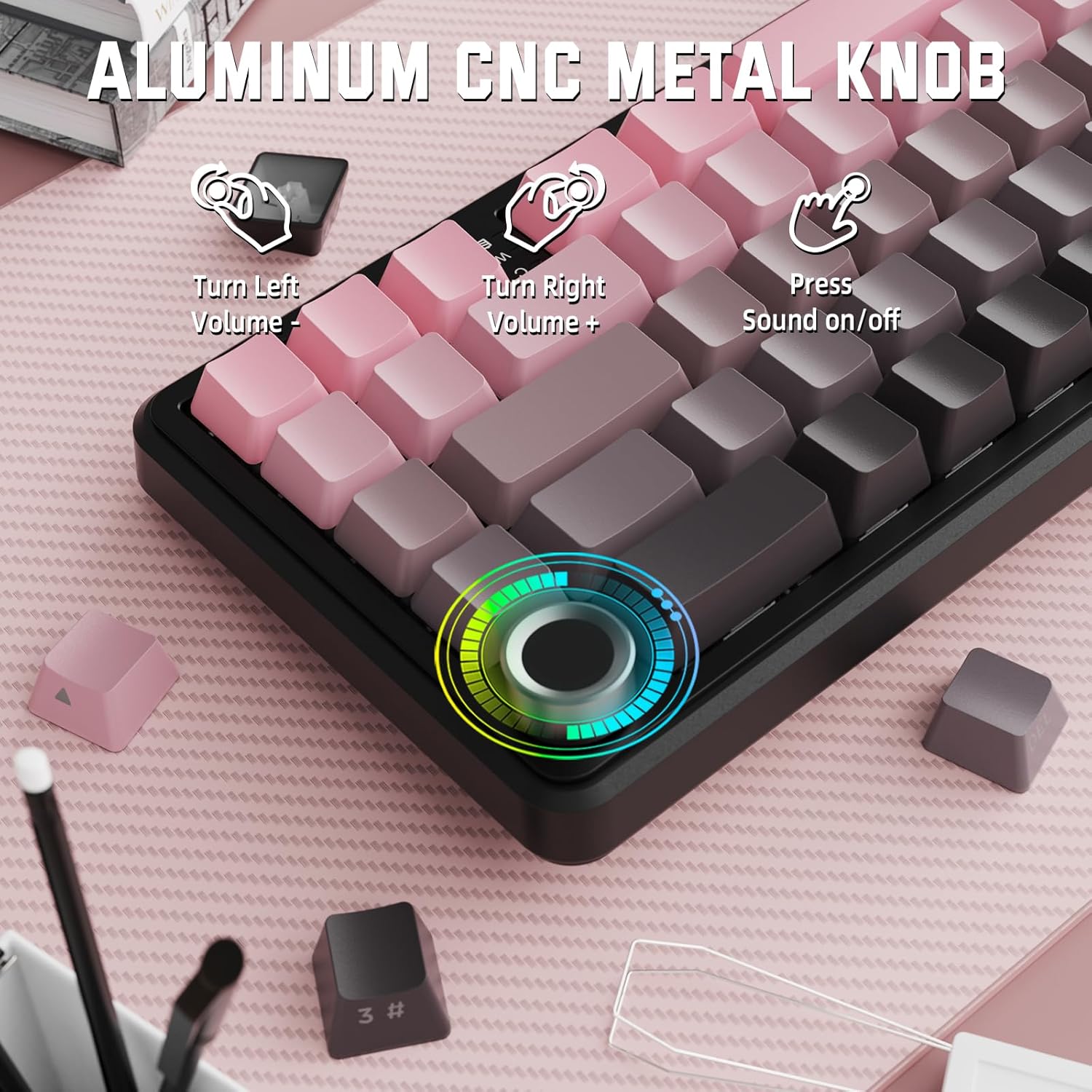
Image: Close-up of the volume knob with icons indicating its functions: Turn Left (Volume -), Turn Right (Volume +), Press (Sound on/off).
- Паварот налева: Паменшыць гучнасць.
- Павярніце направа: Павялічыць гучнасць.
- Націсніце: Уключыць/выключыць гук.
4.2 Камбінацыі функцыянальных клавіш (клавіша FN)
Due to the compact 60% layout, some functions are accessed via the FN key.
| Камбінацыя | Функцыя |
|---|---|
| FN + Q/W/E | Switch between Bluetooth devices 1, 2, and 3 |
| FN + Backspace | Праверце ёмістасць батарэі |
| FN + 1-0 (top row) | F1-F10 functions (e.g., FN+1 for F1) |
| FN + -/= | F11/F12 functions |
| FN + \| | Выдаліць |
| FN + P | Print Screen |
| FN + [ { | дадому |
| FN +]} | Канец |
| FN + ; : | Page Up |
| FN + ' " | Page Down |
| FN + клавішы са стрэлкамі | Navigation (e.g., FN+Up Arrow for Page Up) |
5. Налада
5.1 RGB Backlight Settings
The keyboard features dynamic RGB backlighting with multiple effects and colors.

Image: Visual representation of RGB backlight controls including turning on/off, changing lighting mode, speed, direction, brightness, and color, often in combination with the FN key.
- Turn on/off Lighting / Power Saving Mode: Specific key combination (refer to keyboard legends or software).
- Рэжым асвятлення: Cycle through 18 lighting effects.
- Хуткасць асвятлення: Адрэгулюйце хуткасць дынамічных светлавых эфектаў.
- Кірунак асвятлення: Change the direction of certain lighting effects.
- Lighting Brightness: Adjust the intensity of the backlight.
- Колер асвятлення: Select from 9 preset backlight colors or customize via software.
5.2 Праграмаванне праграмнага забеспячэння
For advanced customization of RGB modes, macros, and key remapping, dedicated software is available.
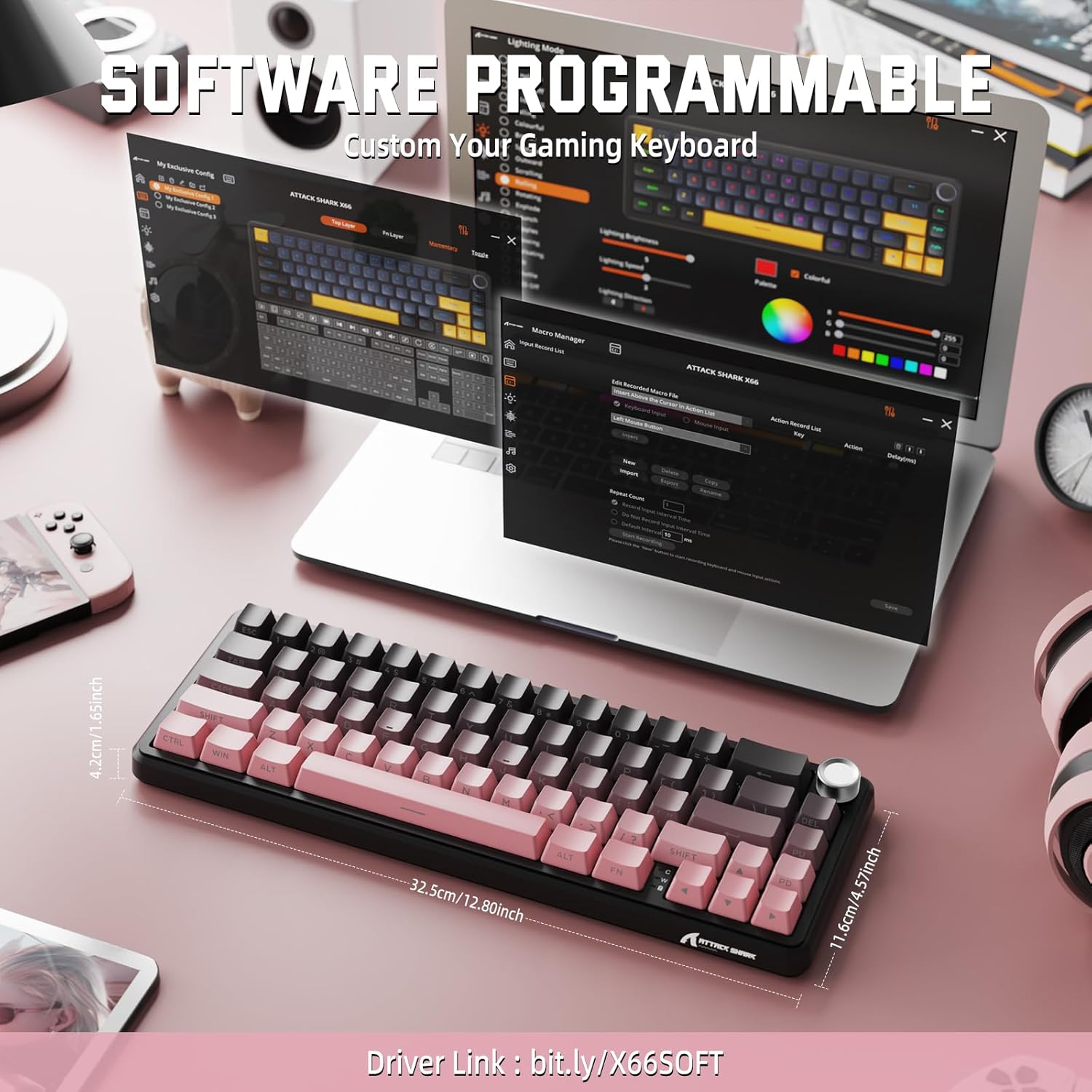
Image: Screenshot of the keyboard's software interface, showing options for custom key assignments, macro recording, and RGB lighting customization. A driver link is provided for download.
Download the official software from the manufacturer's webсайт. Праграмнае забеспячэнне дазваляе вам:
- Наладзьце эфекты і колеры RGB-падсветкі.
- Program macros for complex key sequences.
- Пераназначце асобныя клавішы на розныя функцыі.
- Стварыць і захаваць некалькі прафесіяналаўfileдля розных праграм або гульняў.
6. Тэхнічнае абслугоўванне
6.1 Чыстка клавіятуры
- Перад чысткай адключыце клавіятуру ад усіх крыніц харчавання.
- Выкарыстоўвайце мяккую безворсовую тканіну, злёгку dampпрамыйце вадой або мяккім ачышчальным растворам, каб праціраць клавішы і корпус.
- Для выдалення пылу і смецця паміж клавішамі выкарыстоўвайце сціснутае паветра.
- Пазбягайце выкарыстання агрэсіўных хімікатаў, абразіўных сродкаў або растваральнікаў.
6.2 Hot Swappable Switch Replacement
The keyboard's hot-swappable design allows for easy switch replacement without soldering.

Image: Illustration showing how to remove and insert mechanical switches on the X66 keyboard, highlighting compatibility with 3-pin and 5-pin switches.
- Выкарыстоўвайце прадугледжаны здымнік для клавіш, каб акуратна зняць патрэбную клавішу.
- З дапамогай прадастаўленага здымніка перамыкача асцярожна вазьміцеся за верхні і ніжні заціскі перамыкача і пацягніце яго вертыкальна ўверх.
- Сумясціце кантакты новага перамыкача з адтулінамі на друкаванай плаце. Пераканайцеся, што кантакты размешчаны прама, каб пазбегнуць згінання.
- Акуратна ўстаўце новы перамыкач на месца, пакуль ён не пачуе пстрычку.
- Зноў прымацуйце каўпачок клавішы.
6.3 Кіраванне батарэяй
The keyboard is equipped with a 3000mAh rechargeable battery.

Image: Visual guide on how to check the battery capacity using FN + Backspace, showing different battery level indicators (30%, 50%, 100%) with corresponding key light patterns.
- Зарадка: Connect the keyboard via the USB-C cable to a computer or a USB power adapter. The charging indicator will show the charging status.
- Праверка ўзроўню зарада батарэі: Прэса FN + Backspace to display the current battery capacity via the key backlights.
- Тэрмін службы батарэі: A full charge provides long-lasting usage, but actual duration varies based on RGB lighting usage and connection mode.
7. Выпраўленне непаладак
| праблема | Магчымая прычына | Рашэнне |
|---|---|---|
| Клавіятура не адказвае | Low battery, incorrect connection mode, driver issue. | Charge the keyboard. Ensure the mode switch is set correctly (2.4G, BT, or Wired). Reconnect the USB receiver/cable. Re-pair Bluetooth. Try a different USB port. |
| Злучэнне Bluetooth нестабільнае | Interference, distance, low battery. | Ensure no strong interference sources nearby. Move closer to the device. Charge the keyboard. Re-pair the Bluetooth connection. |
| 2.4GHz wireless not connecting | Receiver not plugged in, incorrect mode, interference. | Ensure the 2.4GHz receiver is securely plugged in. Set the keyboard mode switch to '2.4G'. Try a different USB port for the receiver. |
| RGB-падсветка не працуе або працуе няправільна | Lighting settings, software issue. | Check lighting control key combinations (FN + lighting keys). Ensure software is installed and updated. Reset lighting settings via software. |
| Клавішы не рэгіструюцца або ўводзяцца два разы | Няспраўны перамыкач, смецце пад клавішай. | Remove keycap and clean around the switch. If issue persists, replace the switch using the provided switch puller and spare switches. |
| Volume knob not functioning | Software conflict, physical obstruction. | Ensure no software is overriding media controls. Check for any physical debris around the knob. Restart the computer. |
8. Тэхнічныя характарыстыкі
| Асаблівасць | Дэталь |
|---|---|
| Нумар мадэлі | X66 |
| Макет | 66 Keys, 60% Compact QWERTY |
| Сувязь | Bluetooth (5.0), бесправадная сувязь 2.4 ГГц, правадная сувязь USB-C |
| Выключальнікі | Hot Swappable (3-pin/5-pin compatible), Pre-lubed Strawberry Mechanical Switches |
| Клавішы | Side-printed Gradient PBT |
| Падсвятленне | RGB (16+ Million Colors, 9 preset colors, 18 effects) |
| Ёмістасць батарэі | 3000 мАг |
| Сумяшчальныя прылады | Windows, Mac OS, Laptop, PC, Tablet |
| Матэрыял | Polybutylene Terephthalate, Polycarbonate |
| Вага прадмета | 2 фунта (прыблізна 0.91 кг) |
| Памеры ўпакоўкі | 14.02 х 6.54 х 2.05 цалі (прыблізна 35.6 х 16.6 х 5.2 см) |
| Вытворца | АТАКА АКУЛА |
9. Гарантыя і падтрымка
For warranty information and technical support, please refer to the official ATTACK SHARK webсайт або звярніцеся да прадаўца. Захоўвайце чэк аб куплі для прэтэнзій па гарантыі.
вытворца: АТАКА АКУЛА
Прадавец: MAGIC-REFINER US
10. Відэа пра прадукт
Відэа: Афіцыйная відэапрэзентацыя прадуктуasing the features and design of the ATTACK SHARK X66 Gasket Wireless Mechanical Keyboard, including its compact size, RGB lighting, hot-swappable switches, and multi-mode connectivity. The video highlights the keyboard's aesthetic appeal and functional aspects.