
Уводзіны
Thank you for choosing the Holyton Big 1:10 Scale Transform RC Car & Robot. This innovative remote-controlled vehicle offers a unique play experience, transforming seamlessly between a high-speed car and an agile robot. Equipped with LED lights, music, fog spray effects, and advanced control options including gesture sensing, this product is designed for engaging and interactive play. Please read this manual thoroughly before operation to ensure proper use and maintenance.

Image: The Holyton 1:10 Scale Transform RC Car in its impressive robot form, highlighting its large size and dynamic design.
Змест пакета
Пераканайцеся, што ўсе пералічаныя ніжэй прадметы прысутнічаюць у вашай упакоўцы:
- 1 x Holyton 2399-2B Remote Control Car
- 1 х Пульт дыстанцыйнага кіравання
- 2 x 7.4V Rechargeable Batteries
- 1 х USB-кабель для зарадкі
- 1 x Spray Water Bottle
- 1 х Кіраўніцтва карыстальніка
- 1 х адвёртка

Image: A visual representation of all items included in the Holyton Transform RC Car package, including the car, remote, batteries, charging cable, water bottle, and manual.
Настройка
1. Battery Installation (RC Car)
- Знайдзіце адсек для батарэй на ніжняй частцы радыёкіраванай машыны.
- Выкарыстоўвайце адвёртку, якая ўваходзіць у камплект, каб адкрыць вечка батарэйнага адсека.
- Connect one of the 7.4V rechargeable batteries to the car's battery connector.
- Carefully place the battery inside the compartment and close the cover. Secure with the screw.
2. Battery Installation (Remote Controller)
- Знайдзіце батарэйны адсек на задняй панэлі пульта дыстанцыйнага кіравання.
- Выкарыстоўвайце адвёртку, якая ўваходзіць у камплект, каб адкрыць вечка батарэйнага адсека.
- Устаўце 2 батарэйкі тыпу АА (не ўключаны ў камплект) у адсек, сачыце за правільнай палярнасцю (+/-).
- Close the cover and secure with the screw.
3. Зарадка акумулятараў
- Connect the 7.4V rechargeable battery to the USB charging cable.
- Падключыце зарадны кабель USB да сумяшчальнай крыніцы харчавання USB (напрыклад, камп'ютара, насценнага адаптара USB).
- The indicator light on the USB cable will show charging status (refer to charger instructions for specific light indications).
- Charging typically takes 2-3 hours. Do not overcharge.
4. Adding Water for Fog Spray Effect
- Locate the water inlet on the rear spoiler of the RC car.
- Use the provided spray water bottle to carefully fill the water tank with clean water.
- Не перапаўняйце.
For a visual guide on battery installation and water filling, please refer to the video below:
Video: Official Holyton demonstration of the Transform Remote Control Car, including battery installation and fog spray setup.
Інструкцыя па эксплуатацыі
1. Уключэнне / выключэнне харчавання
- To power on the RC car, slide the ON/OFF switch on its underside to the 'ON' position.
- To power on the remote controller, press and hold the power button until the indicator light illuminates.
- Каб выключыць харчаванне, выканайце дзеянні ў адваротным парадку.
2. Функцыі дыстанцыйнага кіравання
The remote controller features various buttons for different actions:
- Левы джойсцік: Controls forward/backward movement and left/right steering in car mode.
- Правы джойсцік: Controls side-to-side movement and 360° rotation in robot mode.
- Пераўтварэнне адной кнопкай: Press the dedicated transformation button to switch between car and robot modes.
- Gesture Sensing Switch: Activates/deactivates gesture control mode.
- Music/Volume Control: Toggles music and adjusts volume.
- Уключэнне/выключэнне святла: Controls the car's LED lights.
- Fog Spray: Activates the realistic fog spray effect.
- Рэжым праграмавання: Allows users to program custom movement sequences.

Выява: буйны план view of the remote control, detailing each button and its corresponding function for operating the RC car.
3. Кіраванне жэстамі
In gesture sensing mode, you can control the car's transformation and movement with hand gestures:
- Wave your hand over the car's sensor to initiate transformation.
- Specific hand movements can also control basic driving functions (refer to the manual for detailed gestures).

Image: A visual guide demonstrating the hand gestures used to activate the transformation feature of the Holyton RC Car.
4. Driving Modes & Features
- Рэжым аўтамабіля: Drive forward, backward, turn left, and turn right using the left joystick.
- Robot Mode: The robot can move forward, backward, and perform 360° rotations.
- Дрэйф: The flexible wheel design allows for 45° diagonal movement and impressive drifting maneuvers.
- Святло і гукі: Enjoy vibrant LED lights and dynamic music during play.
- Fog Spray: Activate the fog spray for a realistic exhaust effect.

Выява: Выстава калажаўasing the diverse functionalities of the RC car, including gesture control, horizontal movement, and 45-degree drifting capabilities.
Тэхнічнае абслугоўванне
- Regularly clean the car and remote with a soft, dry cloth. Avoid water or harsh chemicals.
- Калі прадукт не выкарыстоўваецца, захоўвайце яго ў прахалодным сухім месцы, удалечыні ад прамых сонечных прамянёў.
- Remove batteries from the remote controller if storing for extended periods to prevent leakage.
- Always fully charge the rechargeable batteries before and after each use for optimal performance and lifespan.
Ліквідацыю непаладак
- Машына не рэагуе: Ensure both the car and remote are powered on and batteries are fully charged. Check for proper battery installation.
- Weak performance: Recharge the car's battery. Replace remote controller batteries if needed.
- Fog spray not working: Ensure the water tank is filled. Check if the fog spray button is activated.
- Transformation issues: Ensure the car is on a flat surface. Check for any obstructions in the transformation mechanism.
Тэхнічныя характарыстыкі
| Асаблівасць | Дэталь |
|---|---|
| Памеры прадукту | 18.98 х 8.39 х 4.53 цалі |
| Вага прадмета | 4.99 фунта |
| Нумар мадэлі тавару | 2399-2B |
| Рэкамендаваны вытворцам узрост | 36 месяцы - 10 гадоў |
| Акумулятары (аўтамабільныя) | 2 x 7.4V Rechargeable Batteries (included) |
| Батарэйкі (пульт дыстанцыйнага кіравання) | Патрабуецца 1 батарэйкі АА (у камплекце) |
| Час гульні | Up to 80 minutes with 2 batteries |
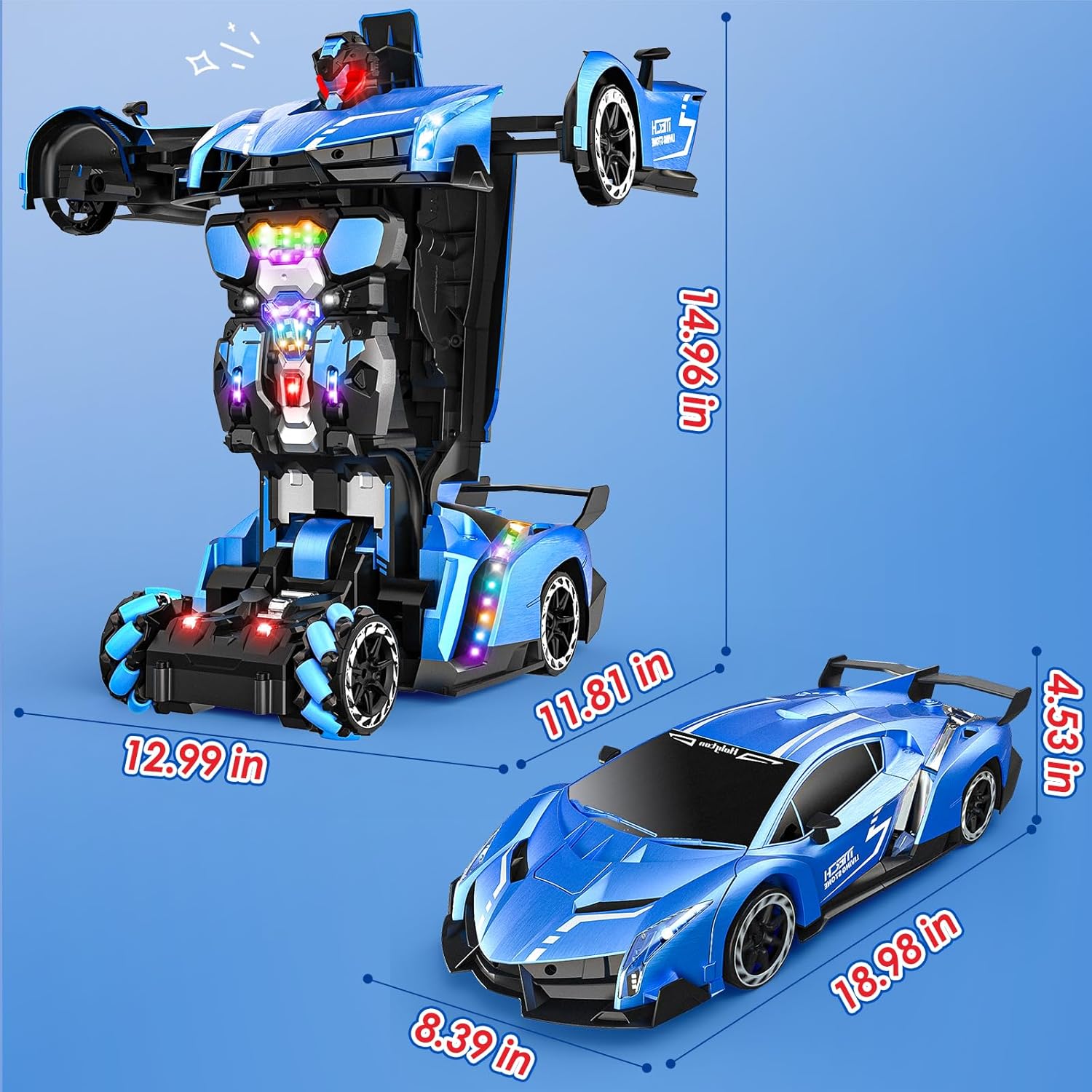
Image: A detailed diagram illustrating the dimensions of the Holyton RC Car in both its car and robot configurations.
Гарантыя і падтрымка
Holyton products come with a standard manufacturer's warranty. For detailed warranty information, product support, or troubleshooting assistance, please contact Holyton customer service:
- Марка: Холітан
- тэлефон: +1 (866) 514-8669
- электронная пошта: holyton@foxmail.com
If you encounter problems, you can contact us directly and we will provide a solution within 24 hours.