
1. Уводзіны
Welcome to the user manual for your Nothing Phone (3a). This guide provides detailed instructions on setting up, operating, maintaining, and troubleshooting your device to ensure optimal performance and user experience.

Figure 1.1: The Nothing Phone (3a) showcasing its unique transparent back design and Glyph Interface.
2. Настройка
2.1. Распакаванне і першапачатковы агляд
Upon receiving your Nothing Phone (3a), carefully open the packaging and inspect the contents. Ensure all items listed in the "What's in the Box" section are present and undamaged.
- Nothing Phone (3a) device
- USB-кабель C
- Выцягвальнік латка для SIM-карты
- Папярэдне нанесеная ахоўная плёнка для экрана
2.2. Устаўка SIM-карты
- Знайдзіце латок для SIM-карты на бакавой панэлі тэлефона.
- Устаўце інструмент для выкідання латка SIM-карты ў невялікую адтуліну побач з ім і моцна націсніце, пакуль латок не выскочыць.
- Устаўце карту (карты) Nano-SIM у латок залатымі кантактамі ўніз.
- Асцярожна ўстаўце латок для SIM-карты назад у тэлефон, пакуль ён не зафіксуецца на месцы.
2.3. Пачатковае ўключэнне і майстар налады
Press and hold the power button on the right side of the phone until the Nothing logo appears. Follow the on-screen instructions to complete the initial setup, including language selection, Wi-Fi connection, Google account sign-in, and data transfer.
3. Operating Your Nothing Phone (3a)
3.1. Nothing OS 3.1 Overview
The Nothing Phone (3a) runs on Nothing OS 3.1, an intuitive and customizable Android-based operating system. It features functional adaptations for an optimized user experience.

Figure 3.1: Visual representation of Nothing OS 3.1's customizable interface.
3.2. Сістэма камер
The Nothing Phone (3a) is equipped with an advanced camera system designed to capture high-quality photos and videos.
- Асноўная камера: 50-MP OIS (Optical Image Stabilization) main camera for detailed and stable shots.
- Тэлеаб'ектыўная камера: 50-MP telephoto lens with up to 30x Ultra Zoom for capturing distant subjects.
- Ультрашырокая камера: 8-MP ultra-wide-angle lens for expansive landscape and group shots.
- Пярэдняя камера: 32-MP front camera for sharp selfies and video calls.

Figure 3.2: Detailed breakdown of the Phone (3a)'s Elite Camera System components.

Figure 3.3: Illustration of the telephoto zoom lens technology and its capability to capture distant scenes.
3.3. Essential Key and Essential Space
The Essential Key is a new physical button on the side of your device. A short press captures screen content, while a long press allows you to record voice notes, ideas, and inspirations. The Essential Space organizes your captures and provides personalized suggestions.

Figure 3.4: The Essential Key and its integration with the Essential Space for content organization.
3.4. Інтэрфейс гліфаў
The Glyph Interface on the back of the phone provides unique LED light and sound notifications for calls, messages, and other alerts, offering a distinct visual and auditory experience.

Figure 3.5: The Glyph Interface on the rear of the Nothing Phone (3a), demonstrating its illuminated patterns.
4. Тэхнічнае абслугоўванне
4.1. Кіраванне батарэяй
The Nothing Phone (3a) features a 5,000 mAh battery with 50W fast charging. To maximize battery lifespan:
- Пазбягайце экстрэмальных тэмператур.
- Выкарыстоўвайце для зарадкі кабель USB-C, які ўваходзіць у камплект.
- Пазбягайце частай поўнай разрадкі акумулятара.

Figure 4.1: Visual representation of the 5,000 mAh battery capacity.
4.2. Ачыстка прылады
Use a soft, lint-free cloth to clean the screen and back of your phone. For stubborn smudges, slightly dampпрамыйце тканіну вадой. Пазбягайце выкарыстання агрэсіўных хімічных рэчываў або абразіўных матэрыялаў.
4.3. Абнаўленне праграмнага забеспячэння
Рэгулярна правярайце наяўнасць абнаўленняў праграмнага забеспячэння і ўсталёўвайце іх, каб пераканацца, што ваша прылада мае найноўшыя функцыі, патчы бяспекі і паляпшэнні прадукцыйнасці. Перайдзіце да Налады > Сістэма > Абнаўленне праграмнага забеспячэння каб праверыць наяўнасць абнаўленняў.
5. Выпраўленне непаладак
5.1. Распаўсюджаныя праблемы і рашэнні
| выпуск | Магчымая прычына | Рашэнне |
|---|---|---|
| Тэлефон не ўключаецца | Нізкі зарад батарэі, праграмны збой | Charge the phone for at least 30 minutes. Perform a forced restart by holding the power button for 10-15 seconds. |
| Збоі або завісанні праграм | App bug, insufficient RAM, outdated software | Clear app cache/data. Close background apps. Update the app or phone software. |
| Дрэнны тэрмін службы батарэі | High screen brightness, background apps, network issues | Adjust screen brightness. Close unused apps. Disable unnecessary features like GPS/Bluetooth. |
5.2. Скід да заводскіх налад
If issues persist, a factory reset may be necessary. This will erase all data on your phone, so ensure you have backed up important information. Navigate to Налады > Сістэма > Параметры скіду > Сцерці ўсе даныя (скід да заводскіх налад).
6. Тэхнічныя характарыстыкі
Key technical specifications for the Nothing Phone (3a) (Model: A059).
| Асаблівасць | Дэталь |
|---|---|
| Назва мадэлі | Нічога, тэлефон (3a) |
| Нумар мадэлі | A059 |
| Аперацыйная сістэма | Android 15, Nothing OS 3.1 |
| Дысплей | 6.77-inch Flexible FHD+ AMOLED, 120 Hz, 1.07 billion colors |
| Працэсар | Snapdragon 7s Gen 3 (2.5 GHz, 8-core) |
| АЗП | 12 GB (up to 20GB RAM Boost) |
| Захоўванне | 256 ГБ |
| Асноўная камера | 50-MP OIS |
| Тэлеаб'ектыў | 50-MP (30x Ultra Zoom) |
| Звышшырокавугольная камера | 8-Мп |
| Пярэдняя камера | 32-Мп |
| акумулятар | 5,000 mAh (50W Fast Charging) |
| Памеры | 7.75 х 0.83 х 16.35 см |
| Вага | 201 грамаў |
| Устойлівасць да вады і пылу | IP64 |
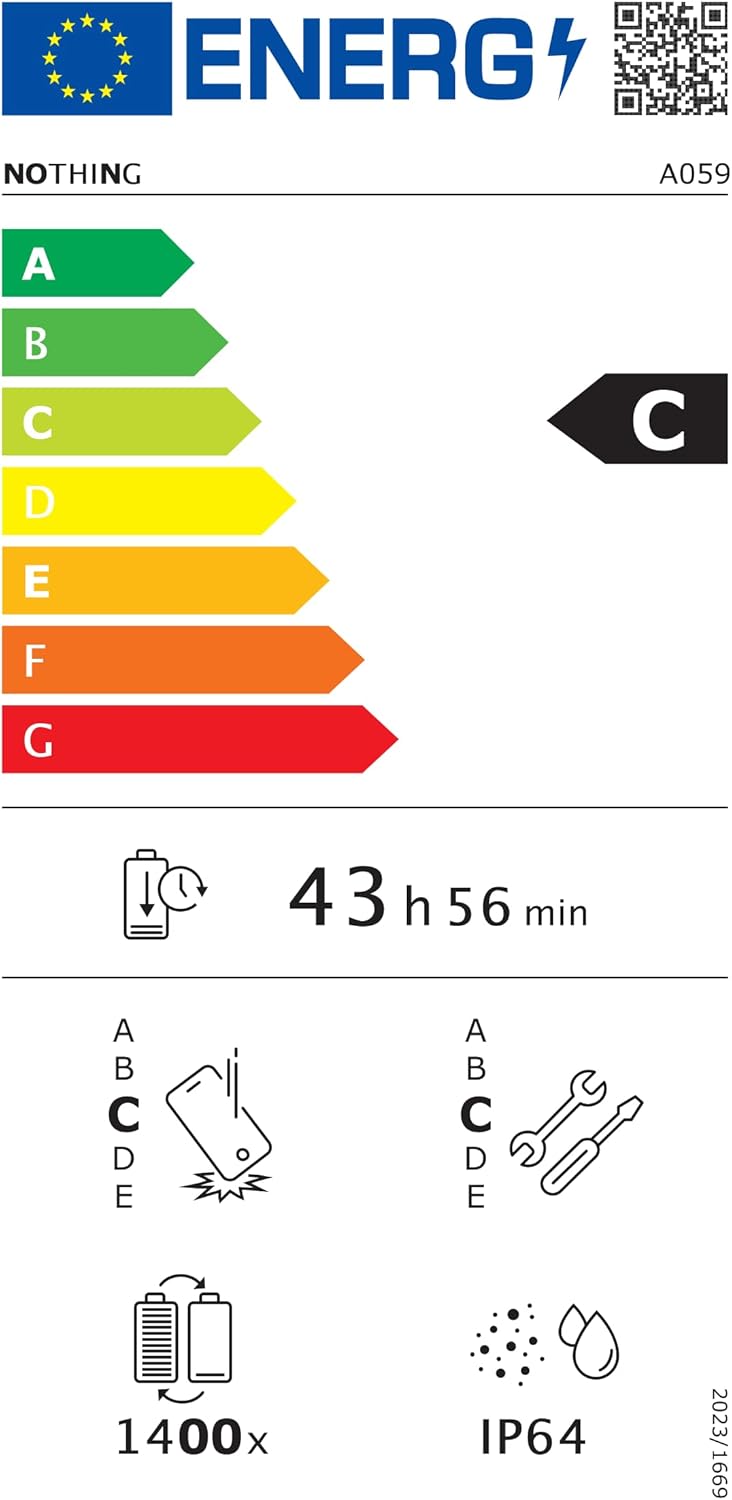
Figure 6.1: EU Energy Label for Nothing Phone (3a), indicating energy efficiency and IP64 rating. More details available at eprel.ec.europa.eu/qr/2179652.
7. Гарантыя і падтрымка
Your Nothing Phone (3a) comes with a manufacturer's warranty. Please refer to the warranty card included in your product packaging for specific terms and conditions.
For further assistance, technical support, or warranty claims, please visit the official Nothing support webна сайце або звярніцеся ў службу падтрымкі кліентаў. Больш падрабязную інфармацыю можна знайсці на Няма нічога ў краме на Amazon.