
1. Уводзіны
This user manual provides detailed instructions for the installation, operation, and maintenance of your BoyKeep D112-10 Light Bulb Security Camera. Please read this manual thoroughly before using the product to ensure proper functionality and safety.

Figure 1.1.1: BoyKeep D112-10 Light Bulb Security Camera (10-pack). This image displays the product as a bundle of ten light bulb-shaped security cameras.
2. Прадукт скончыўсяview
2.1. Змесціва ўпакоўкі
The package for the BoyKeep D112-10 Light Bulb Security Camera (10-pack) includes:
- 10 x BoyKeep D112-10 Light Bulb Security Camera bodies
- Кіраўніцтва карыстальніка (гэты дакумент)
2.2. Асноўныя магчымасці
- 1080P High-Resolution Video: Забяспечвае выразныя і падрабязныя выявы.
- Каляровы начны бачанне: Палепшаная бачнасць ва ўмовах нізкай асветленасці.
- 24/7 Real-time Motion Alerts: Notifies your device upon motion detection.
- Двухбаковая размова: Убудаваны мікрафон і дынамік для сувязі.
- One-Touch Connection: Simplifies pairing with your device.
- Мульты-прылада Viewing & Sharing: Monitor multiple cameras and share access.
- Cloud & Memory Card Storage: Flexible recording options (memory card not included).
- Паварот на 360° і нахіл на 95°: Wide area coverage with remote control.
- Лёгкая ўстаноўка: Designed for standard E27 light sockets.
2.3. Кампаненты камеры

Figure 2.3.1: Camera Component Diagram. This image illustrates the various parts of the BoyKeep D112-10 camera, including the E27 light socket base, enhanced WiFi module, microphone, 4 array LEDs, HD lens, 4 white LEDs, light sensor, memory card slot, and reset button. Dimensions are also shown: 6 cm (2.35 in) width and 15 cm (5.9 in) height.
3. Настройка
3.1. Ўстаноўка
The BoyKeep D112-10 camera is designed for easy installation into a standard E27 light bulb socket.
- Выключэнне: Ensure the power to the light socket is turned off before installation to prevent electrical shock.
- Укруціць: Carefully screw the camera into a standard E27 light socket until it is securely fastened.
- Уключэнне: Restore power to the light socket. The camera will power on and initiate its startup sequence.
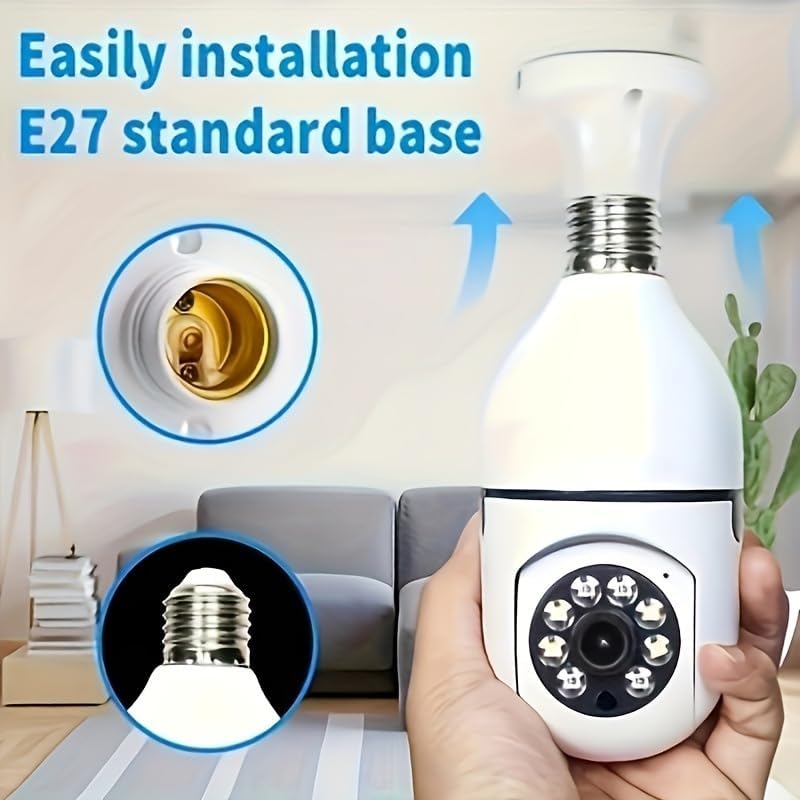
Малюнак 3.1.1: Простая ўстаноўка. This image demonstrates the simple process of screwing the camera into a standard E27 light bulb socket for quick setup.
3.2. Загрузка праграмы і падключэнне
To operate the camera, you need to download the dedicated mobile application.
- Спампаваць прыкладанне: Пошук the "BoyKeep" app (or specified app name in product packaging) on your smartphone's app store (Google Play Store for Android or Apple App Store for iOS).
- Рэгістрацыя/Уваход: Адкрыйце праграму і выконвайце інструкцыі на экране, каб зарэгістраваць новы ўліковы запіс або ўвайсці ў сістэму, калі ў вас ужо ёсць уліковы запіс.
- Дадаць прыладу: In the app, select "Add Device" or the '+' icon. Choose the camera type (e.g., "Smart Camera" or "Light Bulb Camera").
- Падключыцеся да Wi-Fi: Ensure your smartphone is connected to a 2.4GHz Wi-Fi network. The camera only supports 2.4GHz Wi-Fi. Follow the app's instructions to connect the camera to your Wi-Fi network. This usually involves scanning a QR code generated by the app with the camera, or entering Wi-Fi credentials.
- Завяршэнне: Once connected, the camera will appear in your device list within the app.
Заўвага: Ensure your Wi-Fi router supports 2.4GHz and that your phone is connected to the 2.4GHz band during setup. 5GHz networks are not supported by this device.
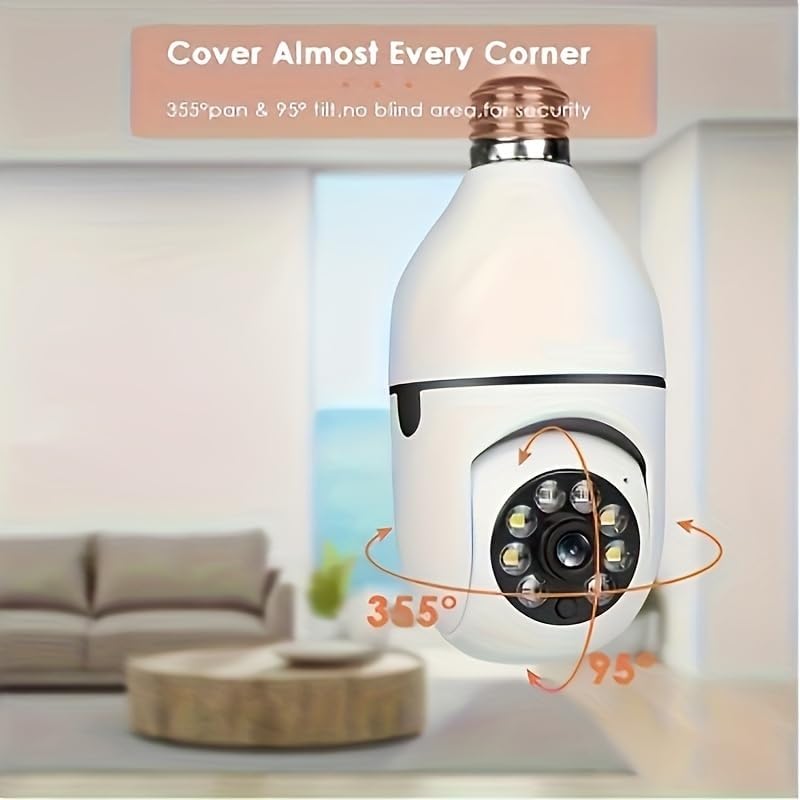
Figure 3.2.1: Wi-Fi Connection and Two-Way Talk. This diagram illustrates how the camera connects to a 2.4GHz Wi-Fi network and enables two-way communication between the camera and a smartphone or computer via the internet, allowing for interactions like speaking to a delivery person.
4. Інструкцыя па эксплуатацыі
4.1. Жыць View і прайграванне
- жыць View: Open the app and select the camera from your device list to view жывы канал.
- Прайграванне: Доступ да запісанага footage by selecting the "Playback" option within the camera's interface in the app. You can navigate through the timeline to view specific events.
4.2. Кіраванне паваротам і нахілам
The camera offers 360° horizontal pan and 95° vertical tilt capabilities.
- кантроль: У прамым эфіры view interface of the app, use the directional controls (usually a joystick or arrow icons) to remotely adjust the camera's viewкут нахілу.
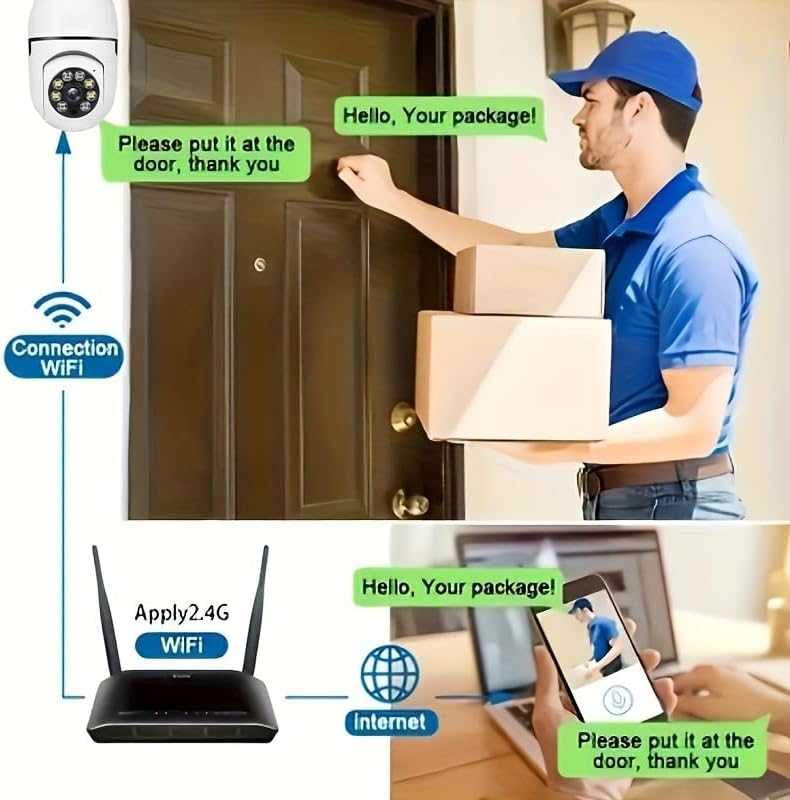
Figure 4.2.1: Pan and Tilt Coverage. This image demonstrates the camera's ability to cover almost every corner with its 355° pan and 95° tilt functions, eliminating blind spots for comprehensive security.
4.3. Выяўленне руху і абвесткі
- Уключыць/Выключыць: Navigate to the camera settings in the app to enable or disable motion detection.
- Адчувальнасць: Adjust the motion detection sensitivity level to minimize false alarms.
- Абвесткі: When motion is detected, the camera will send push notifications to your smartphone. Recorded events will be stored in the cloud (if subscribed) or on the inserted memory card.
4.4. Двухбаковая аўдыёсувязь
- Актываваць: У прамым эфіры view, tap the microphone icon to speak through the camera's speaker. Tap it again to mute.
- Слухай: The camera's microphone is active during live view, allowing you to hear audio from the camera's vicinity.
- Выклік адным дотыкам: If available, press the physical one-touch call button on the camera (if present) to initiate a call to your linked smartphone.
4.5. Рэжымы начнога бачання
The camera supports both infrared and full-color night vision.
- Аўтаматычны рэжым: The camera automatically switches between day and night vision based on ambient light.
- Інфрачырвонае начное бачанне: Забяспечвае выразныя чорна-белыя выявы ў поўнай цемры.
- Поўнакаляровы начны бачанне: Utilizes built-in white LEDs to provide color images in low light, similar to daytime viewing. This mode can be activated manually or set to trigger upon motion detection.

Figure 4.5.1: Smart Dual Light LED Night Vision. This image compares the visual output of infrared night vision (top, black and white) and full-color night vision (bottom, color) provided by the camera's smart dual light LEDs, showcasing improved visibility in low-light conditions.
4.6. Параметры захоўвання
- Memory Card (MicroSD): Insert a compatible MicroSD card (up to 128GB, Class 10 or higher recommended, not included) into the camera's memory card slot for local storage of recordings. The camera supports 24/7 continuous recording to the memory card.
- Воблачнае сховішча: The camera offers cloud storage services (e.g., a 30-day trial may be included). Refer to the app for subscription details and management.
5. Тэхнічнае абслугоўванне
- Уборка: Выкарыстоўвайце мяккую сухую тканіну для чысткі аб'ектыва і корпуса камеры. Не выкарыстоўвайце вадкія ачышчальнікі або абразіўныя матэрыялы.
- Абнаўленні прашыўкі: Regularly check the app for firmware updates. Keeping the firmware updated ensures optimal performance and security.
- Стабільнасць сеткі: Ensure your Wi-Fi network is stable and strong in the camera's location for uninterrupted operation.
- Умовы навакольнага асяроддзя: The camera is designed for indoor use. Avoid exposing it to extreme temperatures, direct sunlight, or high humidity.
6. Выпраўленне непаладак
| праблема | Магчымая прычына | Рашэнне |
|---|---|---|
| Камера не ўключаецца. | No power to the light socket; camera not screwed in properly. | Ensure the light socket has power. Re-screw the camera firmly into the socket. |
| Немагчыма падключыцца да Wi-Fi. | Incorrect Wi-Fi password; connecting to 5GHz network; weak Wi-Fi signal. | Verify Wi-Fi password. Ensure you are connecting to a 2.4GHz network. Move camera closer to router or use a Wi-Fi extender. Reset camera and try again. |
| Папярэджанні аб руху не атрыманы. | Motion detection disabled; app notifications turned off; low sensitivity. | Enable motion detection in app settings. Check phone's notification settings for the app. Increase motion detection sensitivity. |
| Дрэнная якасць відэа. | Weak Wi-Fi signal; dirty lens. | Improve Wi-Fi signal strength. Clean the camera lens with a soft, dry cloth. |
| Двухбаковая аўдыёсувязь не працуе. | Microphone/speaker muted in app; network issues. | Check audio settings in the app. Ensure stable network connection. |
7. Тэхнічныя характарыстыкі
| Асаблівасць | Дэталь |
|---|---|
| Назва мадэлі | Д112-10 |
| Дазвол відэа | 1080P |
| Сувязь | 2.4 ГГц Wi-Fi (IEEE 802.11b/g/n) |
| Крыніца харчавання | Corded Electric (E27 Light Socket) |
| Дыяпазон павароту/нахілу | 355° па гарызанталі, 95° па вертыкалі |
| Начное бачанне | Infrared & Full-Color Night Vision |
| Параметры захоўвання | Карта MicroSD (да 128 ГБ, не ўваходзіць у камплект), воблачнае сховішча |
| Аўдыё | Двухбаковая размова (убудаваны мікрафон і дынамік) |
| Выкарыстанне ў памяшканні/на вуліцы | У памяшканні |
| Памеры (корпус камеры) | Approx. 6 cm (2.35 in) diameter, 15 cm (5.9 in) height |
| Уключаныя кампаненты | Корпус камеры |
8. Інфармацыя аб гарантыі
BoyKeep products are manufactured to the highest quality standards. This product comes with a standard manufacturer's warranty. Please refer to the product packaging or the official BoyKeep webкаб даведацца пра канкрэтныя ўмовы гарантыі, у тым ліку пра тэрмін і пакрыццё.
9. Падтрымка кліентаў
For technical support, troubleshooting assistance, or any inquiries regarding your BoyKeep D112-10 Light Bulb Security Camera, please contact our customer support team:
- Інтэрнэт-падтрымка: Visit the official BoyKeep store on Amazon: BoyKeep Store
- Падтрымка па электроннай пошце: Refer to the contact information provided in your product packaging or on the BoyKeep webсайт.
When contacting support, please have your product model number (D112-10) and purchase details ready.