
1. Уводзіны
This manual provides detailed instructions for the setup, operation, and maintenance of your OFFNOVA TSC-2043PB Bluetooth Thermal Label Printer. Please read this manual thoroughly before using the device to ensure proper functionality and to extend the product's lifespan. This printer is designed for various labeling tasks, including address labels, shipping labels, product tags, and more, compatible with both mobile devices and computers.
2. Змесціва ўпакоўкі
Праверце наяўнасць усіх прадметаў у камплекце:
- 1 x OFFNOVA TSC-2043PB Label Maker
- 1 x Roll of 200 Labels (70mm x 40mm)
- 1 х кабель USB-C
- 1 х Інструкцыя па эксплуатацыі
3. Прадукт скончыўсяview
The OFFNOVA TSC-2043PB is a portable thermal label printer featuring Bluetooth and USB connectivity. It offers high-resolution printing at 203 DPI and supports label widths from 0.78 inches to 3.14 inches (20-80mm). The device is equipped with a 2500mAh rechargeable battery for extended use.
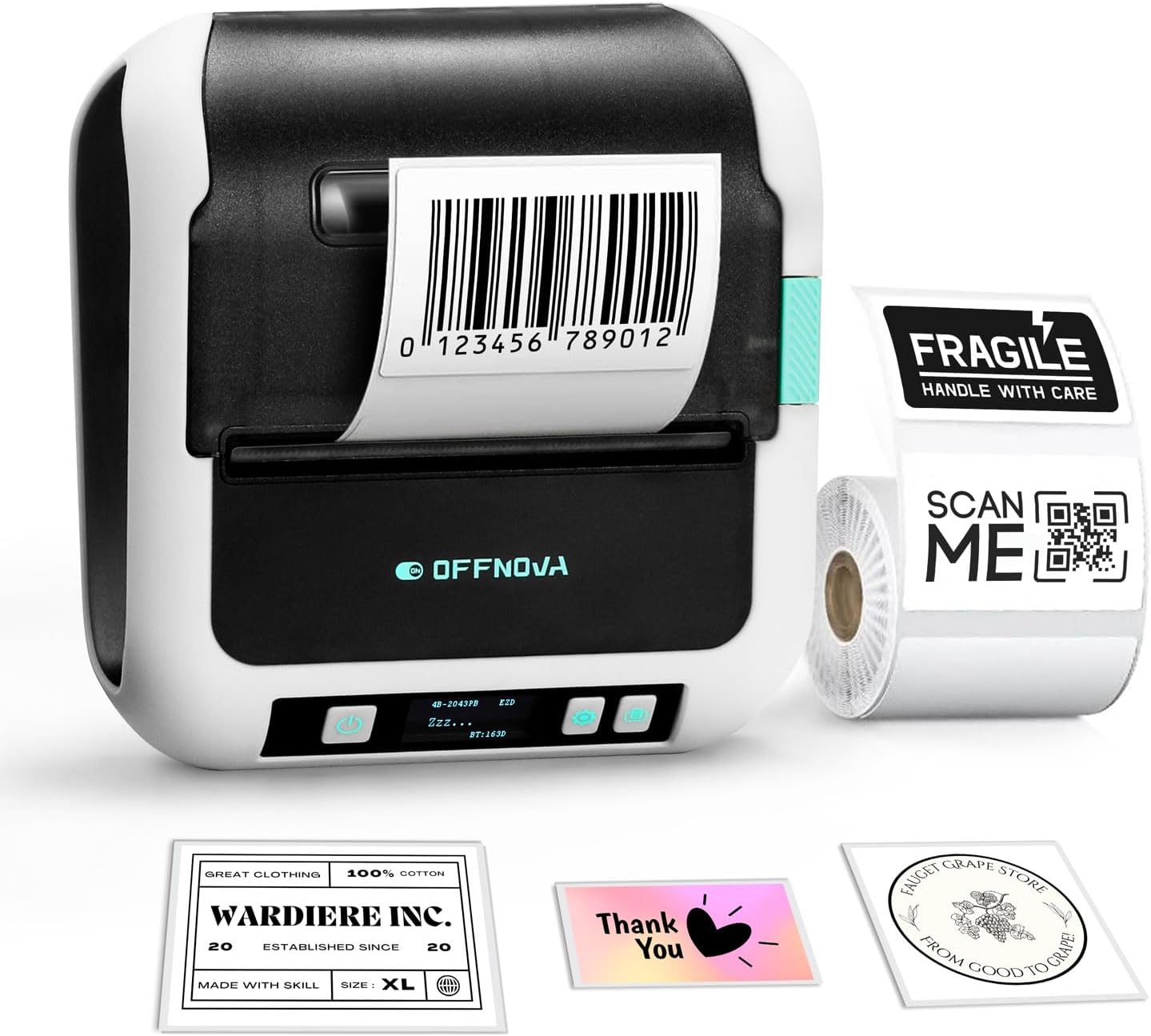
Image 3.1: OFFNOVA TSC-2043PB Label Maker. The printer is shown with a barcode label being printed, alongside various sample labels like 'Fragile', 'Thank You', and 'Wardrobe Inc.'.

Image 3.2: Close-up of the printer's digital display. The display shows '4B-2043PB', 'ZZZ...', 'EZD', and 'BT:163D', indicating model information and Bluetooth status.
Асноўныя характарыстыкі:
- Stable Bluetooth Connectivity: For wireless printing from iOS and Android devices.
- Высакахуткасны друк: Up to 70mm/s.
- Доўгі тэрмін службы батарэі: Акумулятар 2500 мАг.
- Wide Label Support: Compatible with labels from 0.78" to 3.14" (20-80mm) width.
- Высокая раздзяляльнасць: 203 DPI for clear text and barcodes.
- Універсальнае прымяненне: Suitable for home, office, and small business use.
4. Настройка
4.1 Загрузка этыкетак
Follow these steps to properly load label paper into your printer:
- Step 1: Unlock and Adjust Baffle. Unlock and adjust the baffle width to accommodate the label paper's width.
- Step 2: Insert Label Paper. Put the label paper roll into the printer compartment. Ensure the labels face upwards.
- Step 3: Lock Baffle. Lock and secure the baffle to hold the label roll in place.
- Step 4: Close Cover and Power On. Close the printer cover, then turn on the power. The printer will automatically calibrate the label.
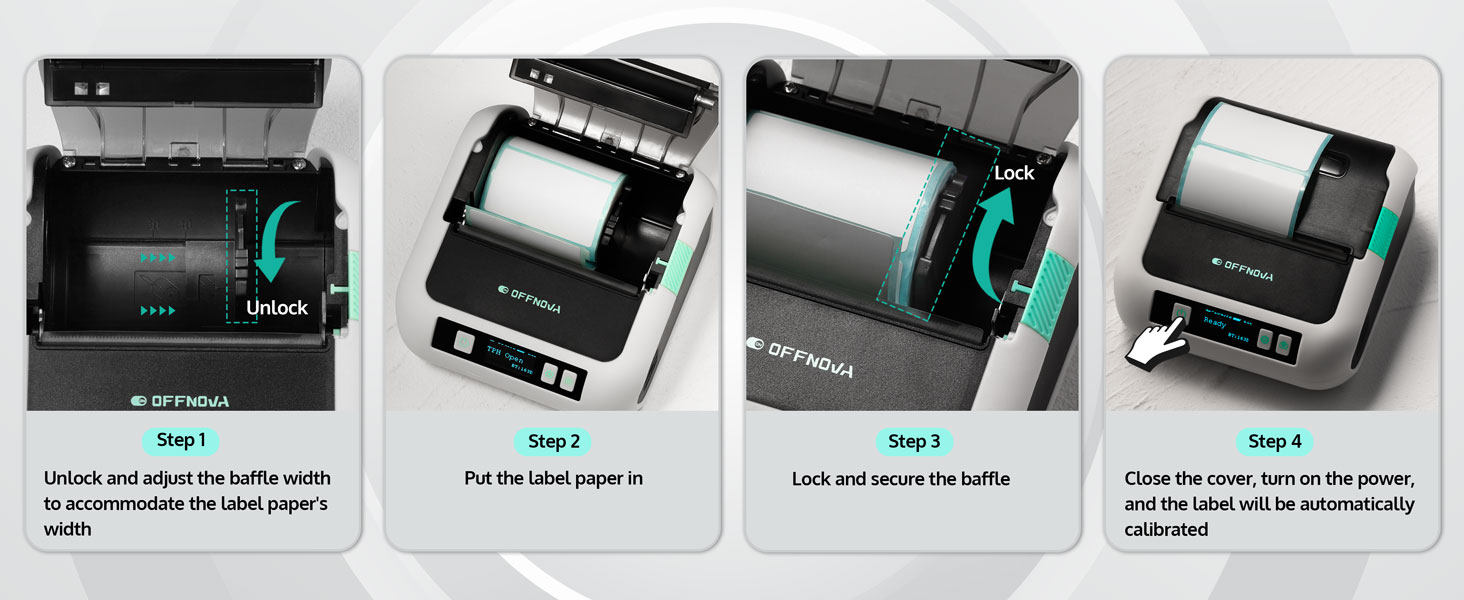
Image 4.1: Visual guide for loading labels. Shows unlocking, inserting, locking, and automatic calibration steps.
4.2 Mobile Device Setup (iOS/Android)
To print from your smartphone or tablet, follow these steps:
- Крок 1: Спампуйце прыкладанне. Download the "4Barcode" app from your device's app store.
- Step 2: Power On and Enable Bluetooth. Turn on the OFFNOVA label maker and ensure Bluetooth is enabled on your mobile device.
- Step 3: Connect and Print. Open the "4Barcode" app, connect to your printer via Bluetooth, customize your label content, and initiate printing.

Image 4.2: The label maker connected to a smartphone via Bluetooth and a laptop via USB-C, illustrating its compatibility.
4.3 PC/Mac Setup
To print from your computer, follow these steps:
- Step 1: Download Driver. Visit the official OFFNOVA website and download the correct driver for your computer's operating system (Windows or macOS).
- Step 2: Connect via USB. Падключыце прынтар да кампутара з дапамогай кабеля USB-C, які ўваходзіць у камплект.
- Step 3: Select and Print. Customize your label content using your preferred software, select the '2043PB' model as your printer, and begin printing.
5. Інструкцыя па эксплуатацыі
5.1 Using the 4Barcode App
The 4Barcode app provides extensive features for label design and printing:
- Ready-to-Use Templates: Access a variety of pre-designed templates for different label types.
- Barcode/QR Code Generators: Easily create and print barcodes and QR codes.
- Icons and Batch Printing: Add various icons to your labels and print multiple labels efficiently.
- Voice Input and OCR Recognition: Utilize advanced input methods for convenience.

Image 5.1: Screenshot of the 4Barcode app interface, showing various design options and templates for creating labels.
5.2 Label Printing Guidelines
The printer supports a range of label sizes to accommodate various needs:
- Шырыня этыкеткі: From 0.78 inches (20mm) to 3.14 inches (80mm).
- прыкладанні: Suitable for barcode labels, file folder labels, logo labels, address labels, price labels, and asset identification.
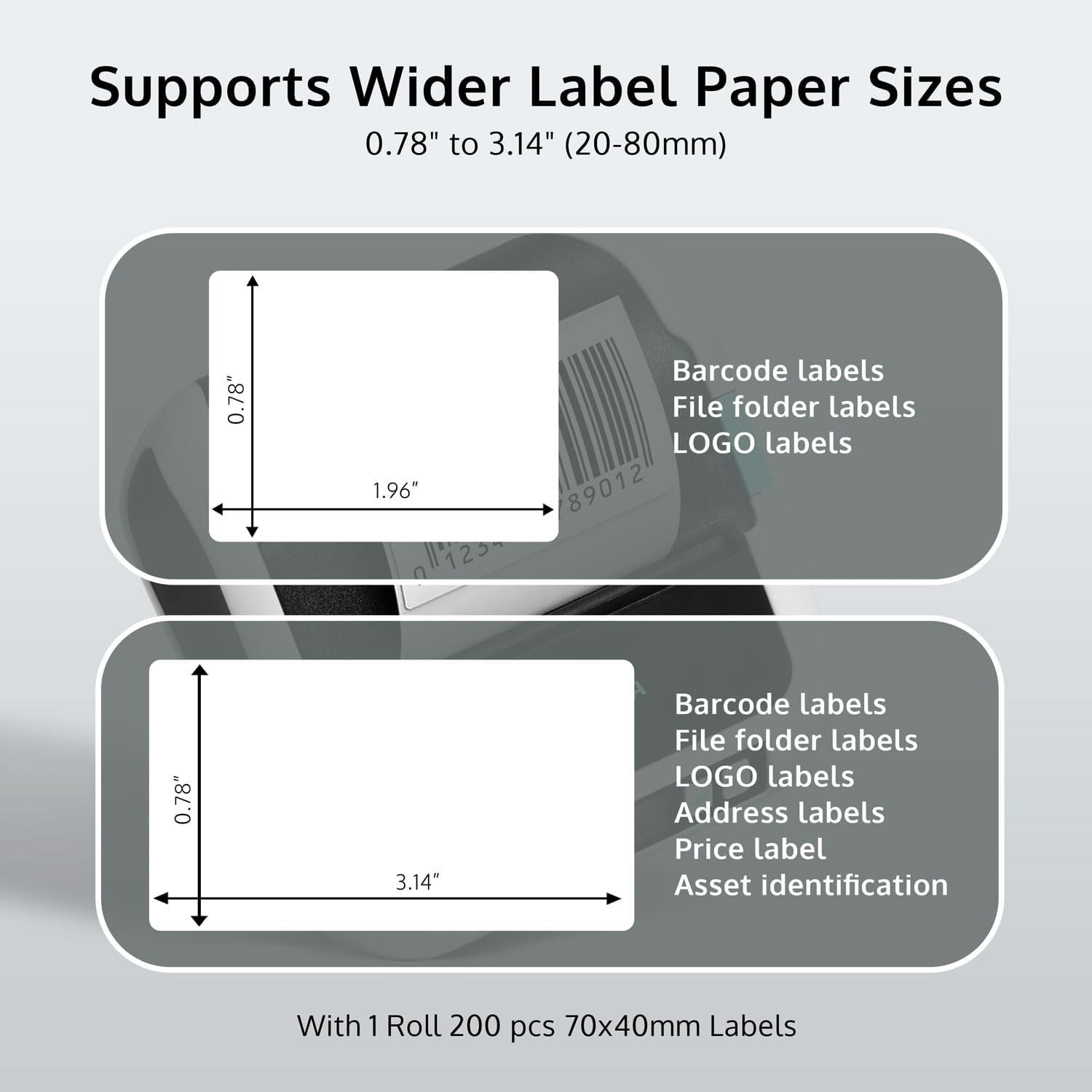
Image 5.2: Diagram illustrating the supported label paper sizes, specifically 0.78" x 1.96" and 0.78" x 3.14", along with exampменшасці іх выкарыстання.
6. Тэхнічнае абслугоўванне
Regular maintenance ensures optimal performance and longevity of your label maker:
- Ачыстка друкавальнай галоўкі: Выкарыстоўвайце мяккую тканіну без ворса. dampАкуратна працярыце друкавальную галоўку ізапрапілавым спіртам. Перад чысткай пераканайцеся, што прынтар выключаны і астыў.
- Ачыстка роліка: Use a similar cloth to clean the rubber roller to prevent paper jams and ensure smooth feeding.
- Выдаленне пылу: Keep the printer free from dust and debris. Use compressed air if necessary.
- захоўванне: Захоўвайце прынтар у прахалодным, сухім месцы, удалечыні ад прамых сонечных прамянёў і экстрэмальных тэмператур.
- Сыход за батарэяй: Для аптымальнага тэрміну службы батарэі пазбягайце частай поўнай разрадкі батарэі. Рэгулярна зараджайце прынтар, асабліва калі ён будзе захоўвацца працяглы час.
7. Выпраўленне непаладак
If you encounter issues with your OFFNOVA TSC-2043PB, refer to the following common problems and solutions:
| праблема | Магчымая прычына | Рашэнне |
|---|---|---|
| Прынтар не ўключаецца | Нізкі зарад батарэі; кнопка харчавання націснута няправільна | Charge the printer using the USB-C cable; Press and hold the power button for a few seconds. |
| Немагчыма падключыцца праз Bluetooth | Bluetooth не ўключаны; прынтар не бачны; праблема з праграмай | Ensure Bluetooth is on for both printer and device; Restart both devices; Reinstall the 4Barcode app. |
| Дрэнная якасць друку | Dirty print head; Low battery; Incorrect label type | Clean the print head (see Maintenance); Charge the printer; Ensure you are using thermal labels. |
| Paper jam / "Paper Out" error | Improper label loading; Debris in paper path; Sensor issue | Re-load labels correctly, ensuring they are aligned; Clean the paper path; Turn the printer off and on again to reset. |
| Printer not recognized by PC/Mac | Driver not installed; USB cable issue | Install the correct driver from the OFFNOVA website; Try a different USB-C cable or port. |
8. Тэхнічныя характарыстыкі
Detailed technical specifications for the OFFNOVA TSC-2043PB Label Maker:
| Асаблівасць | Дэталь |
|---|---|
| Нумар мадэлі | TSC-2043PB |
| Памеры прадукту | 4.5" Г x 4.5" Ш x 2" У |
| Вага прадмета | 1.25 фунта (0.57 кілаграма) |
| Тэхналогія падлучэння | Bluetooth, USB (USB Type C) |
| Тэхналогія друку | Цеплавы |
| Максімальны дазвол друку | 203 DPI (кропак на цалю) |
| Максімальная хуткасць друку | 70mm/s (Monochrome) |
| Максімальны памер носьбіта | 76 мм (3.14 цалі) |
| Sheet Size (Width) | 25.4-76 мм (0.78-3.14 цалі) |
| Максімальная ёмістасць аркуша ўводу | 300 |
| Сумяшчальныя прылады | Ноўтбукі, ПК, смартфоны, планшэты |
| Асаблівасці | Bluetooth, Lightweight, Portable |
| Крыніца харчавання | Акумулятар 2500 мАг |
9. Гарантыя і падтрымка
The OFFNOVA TSC-2043PB Label Maker comes with a Гарантыя 1 год з даты пакупкі. Гэтая гарантыя распаўсюджваецца на вытворчыя дэфекты і няспраўнасці пры нармальным выкарыстанні.
For technical support, warranty claims, or any questions regarding your product, please contact OFFNOVA customer service through their official website or the contact information provided in your product packaging. When contacting support, please have your model number (TSC-2043PB) and purchase details ready.